Bypassing Seagate ATA Security Lock

Here’s a common story when it comes to password retrieval: guy sets up a PC, and being very security-conscious, puts a password on his Seagate hard drive. Fast forward a few months, and the password is, of course, forgotten. Hard drive gets shuffled around between a few ‘computer experts’ in an attempt to solve the problem, and eventually winds up on [blacklotus89]’s workbench. Here’s how he solved this problem.

What followed is a walk down Hackaday posts from years ago. [blacklotus] originally found one of our posts regarding the ATA password lock on a hard drive. After downloading the required tool, he found it only worked on WD hard drives, and not the Seagate sitting lifeless on his desk. Another Hackaday post proved to be more promising. By accessing the hard drive controller’s serial port, [blacklotus] was able to see the first few lines of the memory and the buffer.

Two hours and two Python scripts later, [blacklotus] was able to dump the contents of his drive. He then took another Seagate drive, locked it, dumped it, and analyzed the data coming from this new locked drive. He found his old password and used the same method to look for the password on the old, previously impenetrable drive. It turns out the password for the old drive was set to ‘0000’, an apparently highly secure password.

In going through a few forums, [blacklotus] found a lot of people asking for help with the same problem, and a lot of replies saying. ‘we don’t know if this hard drive is yours so we can’t help you.’ It appears those code junkies didn’t know how to unlock a hard drive ether, so [blacklotus] put all his tools up on GitHub. Great work, and something that didn’t end up as a Hackaday Fail of the Week as [blacklotus] originally expected.

Repairing Dead USB Flash Drives

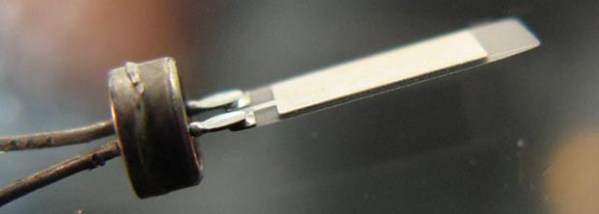
Over the last few years, [Tobias] has repaired a number of USB Flash drives. This strikes us as a little odd, given small capacity Flash drives are effectively free in the form of conference handouts and swag, but we’re guessing [Tobias] has had a few too many friends lose their thesis to a broken Flash drive.

In all his repairs, [Tobias] found one thing in common The crystal responsible for communicating with the USB controller is always broken. In a way, this makes a lot of sense; everything else on a Flash drive is silicon encased in an epoxy package, where the crystal is a somewhat fragile piece of quartz. Breaking even a small part of this crystal will drastically change the frequency it resonates at making the USB controller throw a fit.

[Tobias]’ solution for all his Flash drive repairs is to desolder and change out the crystal, bringing the drive back to life. Some of the USB Flash drives even have multiple pads for different crystal packages, making it easy to kludge together a solution should you need to repair a Flash drive five minutes ago.

Turning A Storefront Into A Video Game

invasion

[Kris]’ house/office has a huge store window, and instead of covering it up with newspapers, decided to do something cool. He’s had projections and other art pieces on display for his neighbors, but his new storefront arcade game very likely beats all of those.

Every video game needs a display, and this one is no slouch. The display is a 16*90 matrix of WS2812 LEDs with inset into a laser cut grid and put behind a layer of plexiglass. With this grid, the display has a great raster effect that’s great for the pixeley aesthetic [Kris] was going for. In front of the window is an MDF and steel arcade box powered by an Arduino Due.

The game is driven by the Adafruit neopixel library, with a few modifications to support alpha blending. There’s no external memory for this game – everything is running on a second Arduino Due inside the window.

It’s a great looking game, and if you’re ever in [Kris]’ area – behind the zoo in Antwerp – you’re free to walk up and give this game a spin.

Video demo below.

Continue reading “Turning A Storefront Into A Video Game”

The Atari Jaguar That Should Have Been

jag

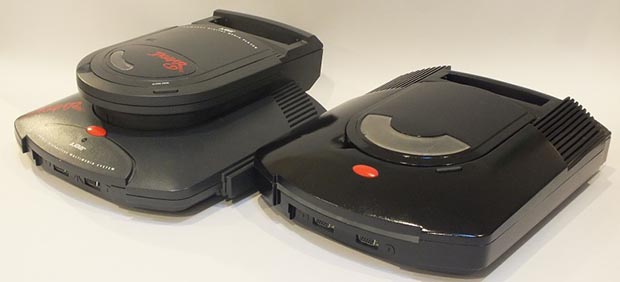
Released in 1993, the Atari Jaguar suffered from a number of problems – it was difficult to program, had hardware idiosyncrasies, and with the CD drive was vastly overpriced compared to the Sega Saturn and Sony Playstation released one year later. Nevertheless, the Jaguar still has a rabid fanbase that counts [10p6] among them, and he’s created what Atari should have released 20 years ago.

In a few forum threads at jaguarsector (login required) and nexgam.de (no login, German), [10p6] goes over his changes to the classic Jaguar + CD combo. He’s stuffed everything inside a new case, cutting down on the amount of plastic from the old enclosure. A proper integrated power supply has been added, replacing the two power supplies used in the original. It’s also overclocked to 32 MHz, compared to the 26 MHz of the stock unit, making this a very powerful system that could have easily competed with the Saturn and Playstation.

[10p6] has an amazing piece of hardware on his hands here, and should he ever want to make a few molds of his new Jaguar, he could put together some sort of kit to replicate this build. He’s still working on finding a model maker and perfecting his case design, but a new, improved version of the Jaguar is something we’d love to see in a limited production.

A Modular Game Boy Synthesizer

Euro

Synth heads and electronic music aficionados the world over love a good rackmount synth. These days, though, synthesis tends more toward small, digital, and ‘retro’ rather than the monstrous hulking behemoths of the 60s and 70s. [gieskes] might be ahead of the curve, here, as he’s built a Game Boy module for his eurorack synthesizer.

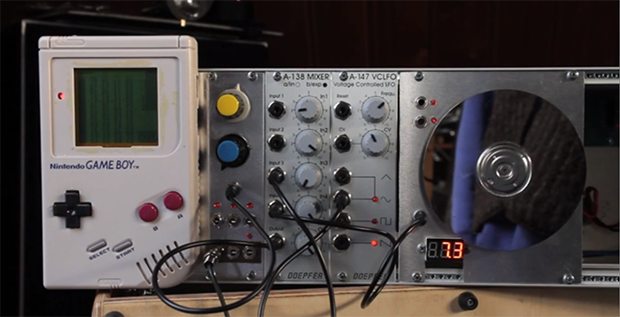
The software running on [gieskes]’s Game Boy is the venerable Little Sound DJ (LSDJ), the last word in creating chiptunes on everyone’s favorite 8-bit handheld. As with any proper Game Boy used in chiptunes, there are a few modifications to the 1980s era hardware. [gieskes] tapped into the cartridge connector with a ‘repeat’ signal that provides slowed down, noisy signals for LSDJ. There’s also pitch control via CV, and the audio output is brought up to 10Vpp

In the video below, you can see [gieskes]’ euroboy in action with a few Doepfer synth modules. There’s also a very cool pulse generator made from an old hard drive in there, so it’s certainly worth the watch.

Continue reading “A Modular Game Boy Synthesizer”

Windows CE On A Raspberry Pi

From all the BSDs and Linuxes to extraordinarily odd operating systems, it seems just about every OS has been ported to the Raspberry Pi. All except Windows, that is, but a few people are working on it.

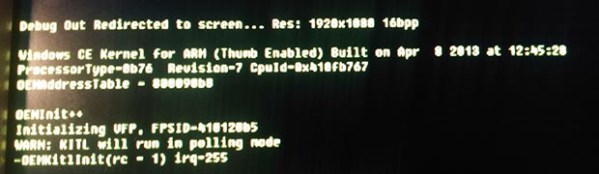
This build comes to us from [ideeman] who wanted to show off his Raspi running Windows Compact Embedded. It technically works, but there are still a few problems. In his own words:

Unfortunately, as it is now, I can’t really control it through anything else than via the kernel transport layer (through serial, directly to visual studio, and I still get lots of checksum errors, must me from the cheapo USB<==>TTL 3.3V adapter I’m using). The original developer (dboling) is still struggling with native USB drivers, but as you can see, he already got a (unaccelerated) running display driver.

If you’re interested, I can send you the compiled kernel image, but I don’t think you’ll do really much without the serial debugging provided through Visual Studio 2008 (+Platform builder 7.0)… I’m not sure it can be legally released to the public though.

While running Windows Compact Embedded isn’t as cool as running Windows RT on a Raspi, the latter will never happen. Windows RT requires 1 GB of RAM and a 1 GHz ARM v7 processor, neither of which the Pi has. Still, it’s a very impressive hack and with a few more devs on board, [dboling] and [ideeman] might end up with a truly functional system.

Below are pics of [ideeman]’s Raspi running WinCE. For [ideeman], feel free to link to a torrent in the comments.

Continue reading “Windows CE On A Raspberry Pi”

Mini Supergun PCB

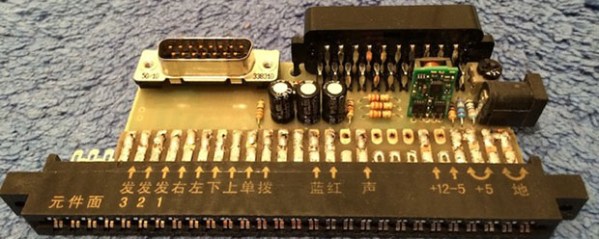
A few decades ago, Japanese manufacturers of arcade games realized they should make a connector for all their boards that provides the power, controller, video, and audio I/O. This became the JAMMA standard and it make arcade owner’s lives awesome. Because you can buy arcade boards off the Internet, arcade enthusiasts figured out they could build their own console with an ATX power supply, AV connectors, and a few controllers. These ‘superguns’ as they’re called are big devices with wires all over the place. [Charlie] wanted to condense the size of his supergun and ended up creating a single PCB solution (link dead, try the Internet Archive version).

The JAMMA compatable boards require a few power connections; +5 V, +12 V, and -5 V. Of all the boards [Charlie] has collected so far, he realized only one used the negative supply. This, along with a big 12V laptop power supply, means the only power connection for this mini supergun is a single barrel connector.

For the controls and A/V, DSub and SCART connectors are commonplace. Laying these parts out in Eagle resulted in a single-sided board that is easily fabbed by etching with a toner transfer at home.

There are a few problems with the build, as [Charlie] admits. Some of the pins on the JAMMA connector aren’t on the board. These are only ground pins on the pinout, and so far everything works okay. It’s still a great project, though, that turns old arcade boards into a playable device with a minimal amount of hardware.