Raspi-controlled RGB LED Strip Display

snake

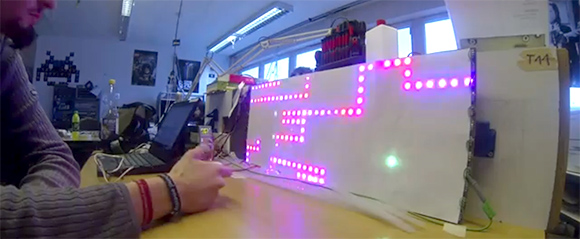
[4RM4] over at the Stuttgart hackerspace Shackspace ran into a guy selling individually addressable RGB LED strips when he attended the 29th Chaos Communication Congress last December. He had a Raspberry Pi with him, and after a little bit of work he rigged up an LED display that wrapped around a trash can. A respectable hack, but not quite ready for prime time.

After getting back to the Shackspace, [4RM4] decided to go in a more classic direction by building an RGB Snake clone. A few neat features were implemented like a high score list, a free play bot, and a clock.

To control his pixel-munching snake, [4RM4] used a Wii Nunchuck controller hooked up to the Raspberry Pi’s GPIO pins. It looks like a whole lot of fun, and given the absurdly high scores shown in the video after the break, it looks like this build is getting a lot of use at the Shackspace.

Continue reading “Raspi-controlled RGB LED Strip Display”

Laser Cut PCBs

19_done

Despite what you may have heard, those 40 Watt laser cutters actually can cut out traces on your next PCB.

Since he got his laser cutter a year and a half ago, [Rich] over at Nothing Labs has been trying to cut PCBs with it. Others have tried, usually by masking off a piece of copper followed by chemical etching. [Rich] wanted a one-step process, though, and his laser cutter really isn’t up to the task of cutting metal.

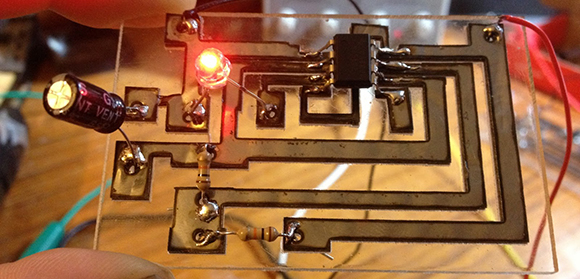
All that changed when he heard of another maker cutting  .001″ thick stainless steel on a similar laser cutter. Stainless steel isn’t solderable, but mild steel is. After finding a very thin piece of mild steel, [Rich] taped it down to a sheet of acrylic, designed a simple 555 blinky LED circuit, and tried out a new technique.

It turns out it is possible to cut very thin steel into circuit traces, and with enough flux to turn them into a functional circuit. As a bonus the resulting circuit looks really cool and a board can be made in mere minutes.

It’s not the thing for very fine work – the minimum trace width [Rich] can get is about 1/16″, but it is a very fast way to prototype a few circuits.

Continue reading “Laser Cut PCBs”

Raspberry Pi Plays MIDI Without An Operating System

[youtube=http://www.youtube.com/watch?v=k6TCysv6AzE&w=580]

For all the interesting DSP functions locked away in the Raspberry Pi, it’s still hard to imagine using the Raspberry Pi as an eminently capable software synthesizer, tracker, or sequencer. Running any of the usual Linux digital audio programs means – surprise – running Linux, and the performance penalty associated with that.

It would be much better if all these audio programs could run directly on the Raspberry Pi without an operating system, and [Joe]’s project is right up that alley. He’s playing MIDI files without an operating system, in effect making the Raspberry Pi a very powerful embedded platform.

[Joe]’s build is the first bare metal audio code for the Raspberry Pi. It’s actually an LV2 plugin host that will load audio plugins, read MIDI files, and shoot the resulting audio out over the 1/8″ jack on the Pi.  This work wouldn’t have been possible without a few Raspberry Pi bare metal tutorials put together by [David Welch].

Hopefully this won’t be the last we’ll see of [Joe] and his code; the Raspberry Pi has more than enough horsepower to be an amazing sampler, synth, beat machine, or the next generation of Akai MPC. All we need are a few brave coders to take up coding bare metal on the Raspberry Pi.

Building A Tool To Bend Small Metal Tubes

tube

[Joel] is setting up a really nice workshop. Included in his list of machinery are the staples of any workshop; a lathe, miter saw, containers full of organized screws, and a manual mill converted to a CNC machine. [Joel] wanted an oiling system for his mill, and like any good maker decided to fabricate his own. This required bending very small diameter brass tubes, something doable by hand (or without sand, at least). He decided to solve this problem with a DIY tube bending tool that allows him to bend tiny brass tubing without the walls collapsing.

[Joel] broke out his lathe and machined two brass rollers with a groove to hold his 3/16″ tubing. One of these brass rollers is attached to a handle, while the other is attached to a block that gets clamped into [Joel]’s bench vise. After threading some tubing through the rollers, [Joel] is able to bend it precisely with only a tiny bit of collapsing on small-radius bends.

Tired Of Playing The MacBook? Play The Raspberry Pi!

pithingy

Hit up any club, party, or get together where musicians are present and you’ll probably find a DJ booth stacked to the gills with faders, various MIDI devices, and a MacBook. However abundant an OS X-based DJ platform is, we haven’t heard hide nor hare of a Raspberry Pi being used as a sequencer, MIDI device, or MaxMSP box.

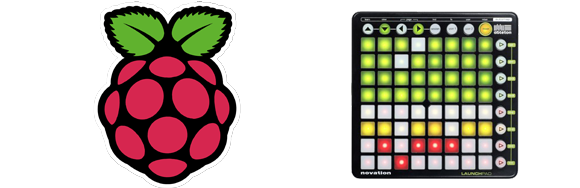
[James] over at Illuminated Sound put together a great tutorial for making all those cool electronic music devices play nice with a Raspberry Pi. He used a Novation Launchpad, an 8×8 MIDI controller that can act as faders, a keyboard, or even a functional equivalent to the pads on an MPC.

Hardware is nothing without software, so [James] used Puredata and libusb to turn the MIDI data into notes and audio effects.

[James] added a download that includes the Launchpad driver and a Puredata sketch to test everything out. You can see how it all fits together in the video after the break.

Continue reading “Tired Of Playing The MacBook? Play The Raspberry Pi!”

Plastic Sword Detects WiFi-enabled Orcs

sword

For a few years now, [Jomegat] has been thinking about Sting, the sword wielded by [Bilbo Baggins] and later [Frodo] in The Hobbit and The Lord of the Rings. Sting glows blue whenever an orc is near. Assuming the Elvish magic created by Tolkien is in reality highly advanced Elvish technology, [Jomegat] figured out a way to make his plastic Sting detect WiFi-enabled orcs.

Since The Hobbit was released, toy stores have been flooded with related merchandise that included a wonderful toy version of everyone’s favorite orc killing weapon. The only problem was how to add orc sensors to this plastic Sting. [Jomegat] assumed all orcs carry a cell phone, and being the low creatures they are, would always have their WiFi turned on. [Jomegat] found a very inexpensive WiFi detector key chain that would sense these phone-carrying orcs and light up to alert our warrior to imminent danger.

After acquiring the materials crafted from Elvish magic technology, [Jomegat] opened up the plastic hilt of Sting and installed the WiFi detector. Now, whenever Sting senses the preferred wireless connection of the orc, the blade glows a bright blue.

[Jomegat] was eaten by a grue shortly after completing this project.

Flatbed Scanner Eliminates The Perils Of Macro Photography

IMG_7728

If you have ever played around with macro photography, you’ll know how hard it is to get a focused image of something that isn’t two-dimensional. For virtually every 3D object, you’ll have to deal with the depth of field – the small region where things are actually in focus. [David] came up with a neat homebrew solution for making sure everything in his macro photos is in focus using a discarded flatbed scanner and a Raspberry Pi.

[David]’s technique relies on focus stacking. Basically, [David] takes dozens of images of the same object, moving the camera closer by a fraction of an inch before snapping each frame. These pictures are stitched together with CombineZ, a piece of software used for extending the depth of field in images.

The hardware part of the build is a Raspberry Pi hooked up to a stepper motor driver and the shutter button of [David]’s camera. By attaching his camera to the carriage of a flatbed scanner, [David] can inch his camera ever closer to his object of study while grabbing the images for CombineZ.

The results are impressive, and would be nearly impossible to replicate any other way without tens of thousands of dollars in camera equipment.