Raspberry Pi Quadcopter

[youtube=http://www.youtube.com/watch?v=TjXvzMdf8Nk&w=470]

It was bound to happen sooner or later, but that doesn’t diminish the awesomeness of [Matthew]’s Raspberry Pi-powered quadcopter.

[Matthew]’s quadcopter is similar to all the other flying drones we’ve seen before with one important difference – all the processing, from reading the gyroscopes to computing exactly how much power to give each motor – is handled by a Raspberry Pi. This task is usually the domain of a microcontroller, as these calculations need to happen in real-time. The Linux distro [Matt] is running on his Pi has a lot more overhead than a simple AVR or ARM microcontroller, so doing everything that needs to be done in real-time isn’t guaranteed. With a bit of clever programming, [Matthew] managed to make sure all the necessary tasks were taken care of in time. It’s still not a real-time operating system, but for this project at least, it’s good enough.

Since the Raspberry Pi in [Matthew]’s quadcopter is much more powerful than a microcontroller, there’s plenty of head room to SSH into the ‘copter while it’s flying. There may even be enough processing power to stream video to a web server; we honestly can’t wait to see what [Matthew] does with his flying Linux computer in the future.

You can check out [Matthew]’s code over on the git or watch a few flight test videos over on his youtube.
 

Getting Rid Of A Tangled Web Of Phone Chargers

USB

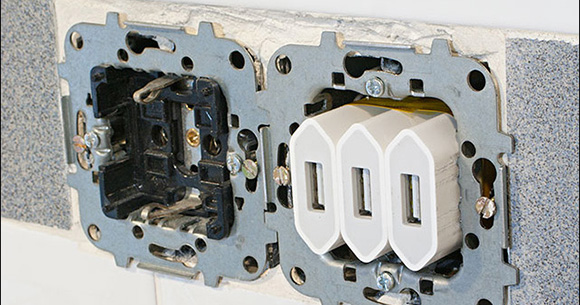
Every night, [Roberto]’s kitchen counter is cluttered with three cell phones, three different cell phone chargers and a mess of wires until morning comes and the chargers are moved to a drawer for the following night. For [Roberto] this is a bit of a pain – a much easier solution would be to have a few USB ports embedded right into his kitchen backsplash. With the right tools, this can be easily done, resulting in a very professional looking installation for charging a trio of phones.

After removing a Euro AC outlet and replacing it with three iPhone chargers, [Roberto] simply soldered the six mains connections on the chargers to his house’s wiring. This resulted in a perfectly functional but rather ugly home project, though.

The next step was to machine a blank AC outlet cover for the three USB ports. [Roberto]’s CNC mill made quick work of this piece of plastic and turned it into a professional-looking installation.

Printing Puzzles With Plastic Parts

A decade or so ago, a line of jigsaw puzzles called Puzz3D brought the joys of fitting pieces of cardboard together into three dimensions. If you’ve ever put one together, you’ll remember being slightly disappointed at these 3D puzzles – they were made of two-dimensional foam board and only lived up to their expectations on the vertices of their 3D objects. Now that just about every hackerspace in the land has a 3D printer, it might just be time to create better 3D puzzles, and [Rich Olson]’s OpenSCAD library is up to the task.

There are a few other tools that cut 3D models up into smaller objects, but none of these had the features [Rich] wanted. He created a library that is able to position the puzzle cuts anywhere on the X and Y axes, adjusts the kerf for a tighter or looser fit, and exports one piece at a time for 3D printers with a smaller build area.

Right now the library is limited to generating up to four interlocking pieces, but [Rich] says the code should be easy to modify for a truly absurd 500-piece puzzle of the Taj Mahal,

Conductive Filament Means Printable Sensors

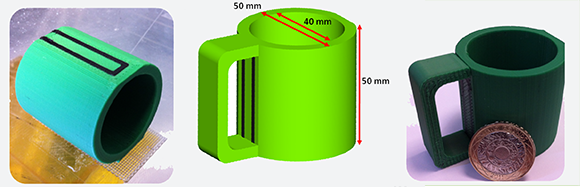
The 3D printer world has the creation of plastic trinkets pretty much down pat. The next step, obviously, is the creation of multi-material models, whether they be made of two different colors of plastic, or completely different materials entirely. A few folks from the University of Warwick and GKN Aerospace in Bristol, UK have come up with a way of putting electronic sensors directly into 3D printed objects.

These new sensors rely on a conductive filament custom-made for this study. So far, the researchers have created flex sensors, capacitive buttons, and a ‘smart’ mug that can sense how much water is contained within.

To produce their ‘carbomorph’ filament, the researchers stirred regular old carbon black to a sample of polycaprolactone dissolved in a solvent. After shaking well, the mixture was laid out on a piece of glass for an hour resulting in a thin film that could then be rolled into a 3mm filament. While this is a great way of producing small quantities of carbomorph filament, we’re sure a few Hackaday readers can come up with an easier way of rolling their own conductive filament. Send us a link if you’ve figured out a better way.

Tip ‘o the hat to [Evan] for this one

Turning Toy Pianos Into MIDI Keyboards

Building a MIDI device is always a great microcontroller project, and nearly everyone has an old toy keyboard lying around in the back of a closet or in the basement. [JenShen] decided to take one of these toy keyboards and build a MIDI keyboard.

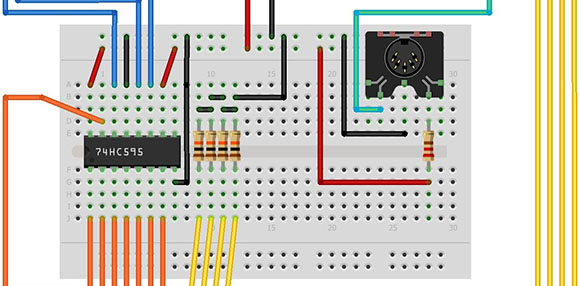
The keyboard [JenShen] used was a simple Casio keyboard with built-in voices. After tearing out the guts of the keyboard, the only thing that remained is the row of push buttons underneath the keys. These buttons were laid out in a row/column matrix, so [JenShen] needed to decode this matrix before sending the result to an Arduino for processing.

A 74HN595 shift register was used to read the 8 rows of buttons underneath the keys, while the rows were tied to different input pins on the ‘duino. This allowed [JenShen] to scan the keyboard matrix with an Arduino and generate MIDI notes and send them to other synths.

In the video after the break, you can check out [JenShen]’s circuit and code that allowed him to turn a toy keyboard into a proper 32-note MIDI keyboard. It’s not velocity sensitive, but he says he’ll show everyone how to accomplish that in a future post.

Continue reading “Turning Toy Pianos Into MIDI Keyboards”

Pulse Oximeter Displays Blood Oxygen Levels On A PC

The last time you were in the emergency room after a horrible accident involving a PVC pressure vessel, a nurse probably clipped a device called a pulse oximeter onto one of your remaining fingers. These small electronic devices detect both your pulse and blood oxygen level with a pair of LEDs and a photosensor. [Anders] sent in a great tutorial for building your own pulse oximeter using a fancy ARM dev board, but the theory behind the operation of this device can be transferred to just about any microcontroller platform.

The theory behind a pulse oximeter relies on the fact that hemoglobin absorbs red and infrared light differently based on its oxygenation levels. By shining a red and IR LED through a finger onto a photoresistor, it’s possible to determine a person’s blood oxygen level with just a tiny bit of math.

Of course a little bit of hardware needs to be thrown into the project; for this, [Anders] used an EMF32 Gecko starter kit, a great looking ARM dev board. After connecting the LEDs to a few transistors and opamps, [Anders] connected his sensor circuit to the ADC on the Gecko board. From here it was very easy to calculate his blood oxygen level and even display his pulse rate to a PC application.

Yes, for just the price of a dev board and a few LEDs, it’s possible to build your own medical device at a price far below what a commercial pulseox meter would cost. FDA approval not included.

Kickstarter Incurs The Wrath Of Arduino Creator

[Massimo], one of the creators of the Arduino, is a little perturbed over what passes for the truth over on Kickstarter.

While [Massimo] does recognize that Kickstarter can be a force of good launching garage-designed projects into the hands of willing consumers, he noticed something was a little fishy with the recent smARtDUINO kickstarter (notice the capital letters, by the way). Right near the top of the smARtDUINO’s kickstarter page is the phrase, “For years we manufactured the ARDUINO in Italy. Now we created a new Open System: modular, scalable, the world’s cheapest and smallest!”

Being at the top of the Arduino organization, you’d think [Massimo] would have heard of these former Arduino manufacturers. The name didn’t ring a bell to him, so he called up the factory. No one at the factory had heard of them, and after a long search it was finally revealed the head of the smARtDUINO project hired two factory workers who worked for a supplier the official Arduino manufacturer uses.

[Massimo] makes the comparison of, “if he hires two factory workers from Ford he can claim he used to manufacture Ford cars.” We’re thinking that’s a little generous. It’s more like hiring two people who used to restock the vending machines in a Foxconn plant and claiming you used to build Apple computers.

With a simple trademark infringement on his hands, [Massimo] contacted Kickstarter to see what could be done. Kickstarter replied:

Thanks for writing in and bringing this to our attention. This is a matter that must be taken up directly with the project creator. You can contact them by clicking “Contact me” on the project page.
Best,
Kickstarter

For [Massimo], and us, that’s just not a sufficient answer. We’re thinking Kickstarter has an obligation to vet their projects and make sure the creators of these projects are who they say they are.

But enough about what we think. What do you, the Hackaday reader, think about this situation?