Simulating LED Cubes In Blender

[youtube=http://www.youtube.com/watch?v=bl-kvfJxYwM&w=470]

The Jyväskylä, Finland hackerspace hacklab-jlk was lucky enough to work on a public arts project for their home town. They had the opportunity to design, build, and install a trio of LED cubes in Jyväskylä’s central Church Park. As such a high-profile project, the hacklab-jlk team decided to take their time and ended up implementing a lot of very cool features for their LED cubes, including simulating the light show in Blender.

The LED cube is similar to all the other LED cube builds we’ve seen before; it’s an 8x8x8 cube controlled by an ATMega328. The Elovalo project, as it is called, is a trio of LED cubes – one using red LEDs, one using green LED, and a blue LED cube each mounted on a pedestal in a Jyväskylä park.

Because the Elovalo is a permanent installation, the team needed a way to verify new firmware for the LED cubes. They came up with a LED cube simulator for Blender that allows them to write a new display function in C and render either single frames or a full animation of the lighting pattern.

A very cool build, and nearly too awesome for a public arts project. We look forward to a video of the complete installation, but until then we’ll make do with the short preview video available after the break.

Continue reading “Simulating LED Cubes In Blender”

Make Cell Phone Calls With Your Arduino

Cellular shields for the Arduino have been around for ages, but this is the first one we’ve seen that turns your Arduino into a proper cell phone.

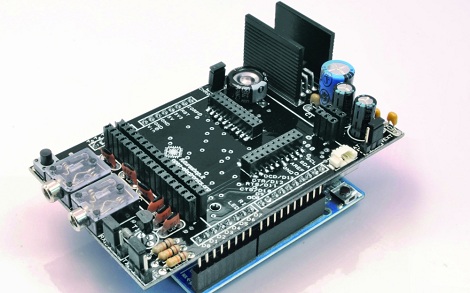
The shield is based around the SIM900 GSM/GPRS radio module, and is compatible with the SIM908 GSM/GPRS module that adds a GPS receiver. Also on board this shield are a pair of 1/8″ audio jacks, perfect for connecting a microphone and headphones. Yes, you can actually make cell phone calls with your Arduino now.

The real star of this build is the new GSM Shield library. This library of code includes the methods necessary for an Arduino to function as a cell phone (answer, hang up, dial a number), but also includes a lot of improvements for TCP/IP communication.

Even though the cost of getting an Arduino communicating through a GSM or GPRS network is fairly high, we’re thinking this would be the perfect starting point for a completely open source, open hardware cell phone. A phone with the same functionality as an old Nokia brick that is also a MiFy would be an amazing piece of hardware, and would surely make for a profitable Kickstarter.

Saving A Bricked Phone With A Pencil Lead

[stompyonos] bricked his Samsung Captivate. Not wanting to be without a phone for a while, he researched a fix online and found shorting a pair of pins on the USB port would put the phone into download mode, saving his phone. The only problem for this plan is [stompy] didn’t have any resistors on hand. Instead, he came up with a wonderful MacGyverism using a piece of paper, a bit of graphite, and a pair of paper clips.

The process of unbricking a Captivate requires a 300 or 330 kΩ resistor across pins 4 and 5 of the mini USB port. This can be done with a few resistors, but [stompy] only had a multimeter lying around. After scribbling a good bit of pencil lead on a piece of paper, he attached two paper clips to make a variable resistor, dialed it in to about 300 kΩ, and cut up an old Nokia charger for its USB plug.

Not bad for a very easy fix that didn’t cost [stompyonos] a dime, and certainly better than a $500 paperweight.

Help Computer Vision Researchers, Get A 3d Model Of Your Living Room

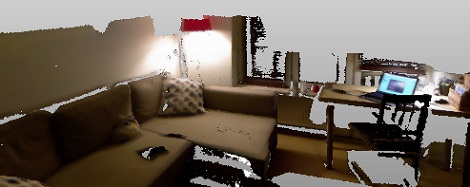
Robots can easily make their way across a factory floor; with painted lines on the floor, a factory makes for an ideal environment for a robot to navigate. A much more difficult test of computer vision lies in your living room. Finding a way around a coffee table and not knocking over a lamp present a huge challenge for any autonomous robot. Researchers at the Royal Institute of Technology in Sweden are working on this problem, but they need your help.

[Alper Aydemir], [Rasmus Göransson] and Prof. [Patric Jensfelt] at the Centre for Autonomous Systems in Stockholm created Kinect@Home. The idea is simple: by modeling hundreds of living rooms in 3D, the computer vision and robotics researchers will have a fantastic library to train their algorithms.

To help out the Kinect@Home team, all that is needed is a Kinect, just like the one lying disused in your cupboard. After signing up on the Kinect@Home site, you’re able to create a 3D model of your living room, den, or office right in your browser. This 3D model is then added to the Kinect@Home library for CV researchers around the world.

Building A PDA From Scratch

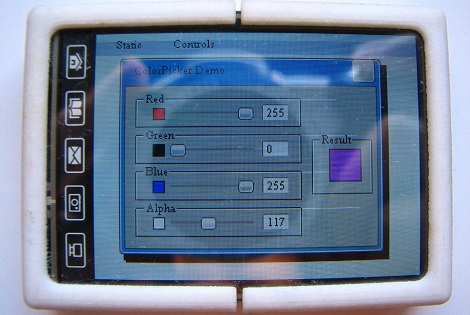
Extremely powerful ARM microcontrollers have been around for ages now, but only recently have they been available for just a few dollars with a good enough toolchain for some serious development work. [Jose] wanted to develop something awesome with an ARM chip he had lying around, so he built a PDA (Spanish, translation) that can be used as a game console, an oscilloscope, a clock, or a wristwatch. Basically, it’s a portable homebrew computer that can do just about anything.

The hardware is built around an ARM Cortex M4 chip clocked at 170MHz. Included on the PCB is an SD card slot, a JTAG interface, a USB port (only used for charging the battery at this point), and a touch screen LCD controller.

After designing the PCB and enclosure, [Jose] looked around the Internet for a decent GUI library without much success. He eventually found Gwen, a lightweight library for programming GUIs that is easily ported to [Jose]’s hardware.

So far, [Jose] has a few GUI demos up and running on his homebrew PDA, but nothing very useful yet. Still, the fact that [Jose] can get a full-featured ARM tablet-like piece of hardware off the ground without a team of developers brings a smile to our face. We can’t wait to see the state of homebrew ARM devices in a few years when everyone has the requisite hardware and software knowledge.

Labor Day Weekend Water Gun Spectacular

In the US, summer is marked by two holidays. In late May, Memorial day traditionally marks the the beginning of summer, the opening of public pools, and the day shopping malls are invaded by scores of petulant teenagers. In early September, Labor day marks the traditional end of summer, a great weekend to fire up the grill, and finally – finally – an end to the neighborhood kids screaming their heads off outside. Being Labor day weekend, we were very happy to see two builds show up in the tip jar concerning the one object that defines summer: water guns.

Homemade Super Soaker

[Michael] had the genius idea of building a water gun out of a diaphragm expansion tank (German, here’s the terrible translation). These tanks – usually connected to a house’s hot water line near the hot water heater – allow for the expansion of hot water and protects pipes from excessive pressure. It does this with a rubber membrane separating the inside the tank into two halves. Half the tank is filled with water while the other half is filled with compressed air from a bicycle pump.

[Michael] connected a hose and made a nice gun out of aluminum pipe to build the ‘gun’ part of his build. With 9 bar of pressure in the expansion tank, [Michael] can shoot a stream of water 20 meters.

Water gun turret with a laser sight

This build comes from [Valentin]. He picked up a automobile water pump for just a few Euros, and attached it to a 1 liter bottle filled with water. A pan/tilt turret was constructed out of CNC milled aluminum and a pair of servos.

After [Valentin] got the water-shooting turret part of the build out of the way, he installed a 2.4 GHz wireless camera on the pan/tilt mount and taped a receiver to the back of his remote control.

The addition of a small LCD screen displaying the turret’s point of view makes for a very cool build, perfect for pestering those annoying neighborhood kids.

Video of [Valentin]’s build after the break.

Continue reading “Labor Day Weekend Water Gun Spectacular”

Raspberry Pi - rpi

Operating Systems Development With The Raspberry Pi

Even though the Raspberry Pi has, from the very beginning, been touted as an educational computer, we’ve seen neither hide nor hare of coursework, lesson plans, or even computer sciencey tutorials using the Raspi. We’re guessing academia works at a much slower pace than the average hardware hacker, but [Alex Chadwick] at Cambridge University has managed to put together an online tutorial on developing an operating system from scratch for the Raspi.

The goal of this tutorial is to throw a budding Raspi tinkerer into the strange and confusing world of registers, hexadecimal, and ARMv6 assembly. After going through the necessary toolchain, [Alex]’s tutorials cover blinking the ‘OK’ LED on the Raspberry Pi using only assembly.

The OS development guide goes on from there to include drawing graphics on the screen and even accepting input from a USB keyboard.

It’s important to point out what [Alex]’s tutorial isn’t; even though this series of tutorials goes through manipulating the bare metal of the Raspberry Pi, don’t expect to be porting UNIX to the Raspi after going through these guides. That being said, after completing these tutorials, you’ll be in a fabulous position for building your own homebrew OS on the Raspberry Pi.