Controlling Robots With A TRS-80

[DJ Sures], mastermind behind the EZ-B Bluetooth Robot controller, sent in a really interesting build where he controls a robot with a 1983 TRS-80 computer.

The robot in question is [DJ Sures]’ adorable WALL-E we’ve seen before. WALL-E is controlled through a Bluetooth connection to a desktop PC with the EZ-Builder hardware and software package.

To get the Trash-80 talking to WALL-E, [Sures] connected a tiny Bluetooth module to the TX pin of the 6402 UART. It’s a very, very simple modification that adds a Bluetooth serial connection to one of the first notebook computers. After syncing the TRS-80 and WALL-E to the computer running EZ-Builder, it’s a piece of cake to make the robot respond to the clanging of a 30-year-old keyboard.

There’s a video of [DJ Sures] going over his build after the break with a wonderful demo of WALL-E freaking out to a little dubstep. Check that out after the break.

Continue reading “Controlling Robots With A TRS-80”

Building A 4-bit TTL Computer

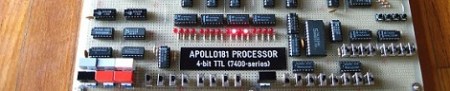
When [GG] was 12 years old, he was introduced to BugBooks, the wonderful ‘introduction to digital design’ books from the early 1970s. It has always been a dream of [GG] to build the TTL computer featured in the BugBooks, and now that he has the necessary time and money available to him, the Apollo181 has become a reality.

[GG]’s computer is built around a 74181 ALU, an exceptionally old-school chip that provides the core of a computer in a neat 24-pin chip. With a 256-byte RAM and a few additional logic chips, [GG]’s computer is an exceptional piece of engineering able to perform 625,000 instructions per second when clocked at 2.5 MHz.

This isn’t [GG]’s first homebrew computer build; last year we saw his incredible Z80 minicomputer. Now we can’t wait to see what’s on tap for next year. After the break, you can check out [GG] loading in operands and operators into his computer and letting the Apollo181 churn away on its program.

Continue reading “Building A 4-bit TTL Computer”

Building A Sound Reactive EL Panel And Learning Something In The Process

We’ve seen a lot of builds using electroluminescent wire, usually in the realm of costumes and props. Unfortunately, most electrical engineers don’t deal with blinking and dimming EL wire and panels and any tinkerer trying to control electroluminescence doesn’t have a lot of resources on how to control EL stuff. [ch00f] wanted to fill this knowledge gap, so he build a sound reactive EL panel driver and learned a lot in the process.

Nobody really knows how electroluminescent wire and panels work on a molecular level, but [ch00f] did know that changing the direction of an electric field will cause the EL material to glow. Changing the frequency of this electric field will change the EL material’s brightness, so all [ch00f] had to do was make a variable-frequency EL driver – something that’s a lot harder than it sounds.

We won’t bore you with the details because we  couldn’t do [ch00f]’s write up any justice. We will skip to the end and tell you [ch00f] was able to make a sound reactive EL panel after a month of work that included making his own transformers and doing a whole bunch of math. You can check out the video of [ch00f]’s [Tony Stark]-esque EL panel after the break.

Continue reading “Building A Sound Reactive EL Panel And Learning Something In The Process”

Mapping The Surface Of A Video Game Moon

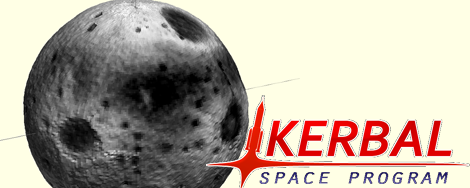
Writing for Hackaday isn’t all fun and games; occasionally I need to actually write posts and reply to emails from builders around the globe. Usually, though, I’m knee-deep in a personal project, or just hanging out playing a few video games. Recently I’ve gone off the deep end with Kerbal Space Program, an awesome little space flight simulator set in an alternate reality where everyone is just slightly incompetent.

As it turns out, there’s actually a lot of fairly technical objectives in this game, from performing orbital rendezvous to mapping the surface of another planet. It didn’t take long for me to go off the deep end and start mapping the Kerbal moon and turning it into a 3D object. Check out how I did this after the break.

Continue reading “Mapping The Surface Of A Video Game Moon”

Designing A Self-replicating Milling Machine

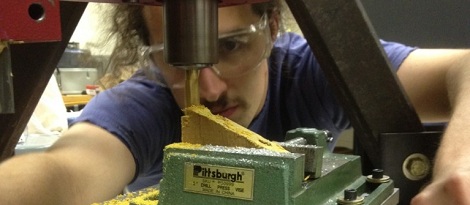
For his senior design project at Swarthmore College, [Julian] decided to build a metalworking equivalent to the RepRap. [Julian]’s final project is a self-replicating milling machine, and hopefully giving some serious metalworking power to all the makers with CNC routers and RepRaps out there.

At first glance, [Julian]’s mill doesn’t look like something you would find in a machine shop. The machine is built around a tetrahedral machine tool frame, giving the machine an amazing amount of stiffness with the added bonus of a degree of self-alignment. The spindle and motor are off-the-shelf units, but the entire bed assembly is made by [Julian] himself.

Right now, [Julian] still considers his project a very early prototype; there’s still a bit of chatter issues he’s working out, and the cost of the finished machine – about $1200, not including many hours of fine tuning – means it isn’t as competitive as other options. Still, [Julian] made a mill from scratch, and that’s nothing to scoff at.

Improving A Software Defined Radio With A Few Bits Of Wire

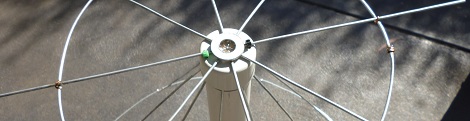
Impressed by the recent advances in the software defined radio scene, [Jason] picked up a $20 USB TV tuner dongle to check out his local airwaves. Unfortunately, the antenna included with the little USB dongle is terrible at receiving any signal other than broadcast TV. [Jason] wanted to improve his reception, so he got some wire and made his own discone antenna.

The discone antenna is ideally suited for [Jason]’s setup – properly constructed, it’s able to receive over the entire 64 to 1700 MHz band the RTL-SDR dongle is able to read. To construct his antenna, [Jason] checked out [VE3SQB]’s list of antenna design programs, got the dimensions of his antenna, and set to work attaching wire to PVC pipe.

The antenna is a massive improvement over the stock antenna included with the TV tuner dongle. After mounting his discone at the far end of his back yard, [Jason] started picking up a few blips from the transponders of passing aircraft.

Getting Started With OpenCV

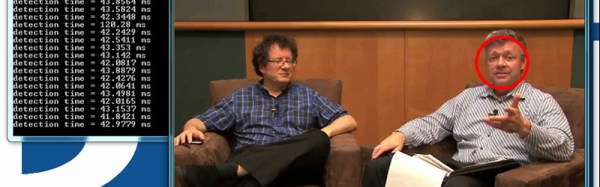
[Eric Gregori] sent in an article he wrote for EETimes to introduce the concepts behind computer vision to the masses. As a nice little bonus, [Eric] included a VMware image containing Ubuntu and all the packages and examples necessary to write your own OpenCV apps.

There’s a ton of awesome stuff you can do with computer vision – from automated sentries to keep squirrels away, a kitchen that will tell you when to do the dishes, and automating blindness by mounting a laser on a face tracker, there’s a lot of unexplored territory in the area of computer vision.

Included in [Eric]’s VM image are a motion and line detection example app, an ‘optical flow’ example, and a face detection example. There’s enough here to make a few very interesting projects, so hopefully, [Eric]’s VM image and examples will get your next CV project up and running quickly.