Six Foot Speaker Shakes Buildings To Their Foundation

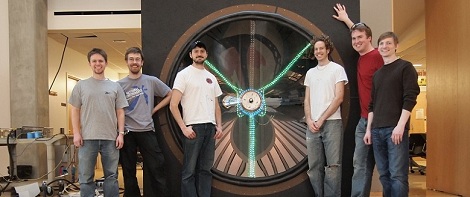
In the first scene of Back to the Future, [Marty McFly] visits the unoccupied laboratory of [Doc Brown]. Seeing an 8-foot-tall speaker connected to a huge array of amplifiers, [Marty] immediately turns on the amps, plugs in an electric guitar, and promptly destroys the amps and speaker while being thrown across the room. This scene must have been a huge inspiration to [Dan] and [Kyle]; they decided to replicate this gigantic speaker for the 2011 UW-Madison  Engineering Expo.

A speaker is a remarkably simple device – they’re usually just a coil of wire, a set of magnets on an iron frame, and a cone. [Dan] and [Kyle] wound hundreds of feet of copper wire around a fiberglass frame for the voice coil, used 8 and 10-inch steel pipe to secure the magnets, and pop riveted two sheets of polycarbonate together to form the cone. The result is a six-foot-diameter speaker in an 8x8x2 foot enclosure.

A speaker this size is only good for one thing: a ton of bass. The speaker can reliably reproduce frequencies from 5 Hz to 50 Hz, frequencies that are better felt than heard. There’s a video of the speaker in action after the break, but we’re pretty sure the best way to experience this insane device is in person.

Continue reading “Six Foot Speaker Shakes Buildings To Their Foundation”
3D Graphics On An Oscilloscope

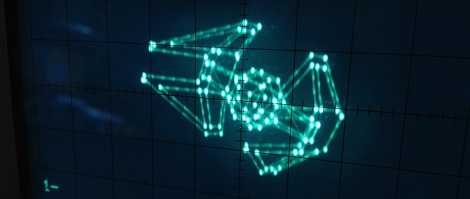
Armed with four wingtip-mounted Sienar Fleet Systems L-s9.3 laser cannons and a SFS P-s5.6 twin ion engine, the TIE Interceptor has become the scourge of the Rebel fleet, nearly capable of out-running and out-maneuvering the beloved A-wings of Nomad Squadron. Because of [Matt]’s tireless work, we can now visualize TIE Interceptors on approach with our targeting computers oscilloscopes.

[Matt]’s oscilloscope visualization of a TIE fighter is a huge improvement on previous scope displays we’ve seen, considering [Matt] used very minimal hardware to display 3D graphics. The build uses an ATMega88 along with a 10-bit DAC to draw lines on the screen. The capacious Mega88 with 8kB of flash and 1kB of SRAM was nearly filled to capacity with [Matt]’s project; to improve the rendering speed of the display, sine & cosine values are pre-computed and stored in flash along with division tables for common values.

The rotation of the TIE fighter is controlled by a serial connection to [Batt]’s desktop. It’s a very impressive piece of work that looks like it would fit into the cinematic aesthetic of The Empire Strikes Back. Check out [Matt]’s video of the TIE rotating in space after the break.

Continue reading “3D Graphics On An Oscilloscope”

SpeechJammer Puts An End To Annoying Speakers

If you’ve ever had to deal with people disturbing your peace and quiet by yammering on with their cell phones, you might be interested in the SpeechJammer.

The idea behind the SpeechJammer is fairly simple: It’s very hard to speak if your words are recorded and played back to you a fraction of a second later. This is a real psychological phenomenon known as delayed audio feedback that also has a beneficial effect on stuttering.

According to the researcher’s writeup (PDF warning), the SpeechJammer works by measuring the distance to the ‘target’ with an ultrasonic distance sensor and records the speaker’s voice with a shotgun mic. The recording of the spearker’s voice is delayed for about a fifth of a second and then played on a speaker on the front of the gun.

The researchers tested two conditions: ‘reading news aloud’ and a ”spontaneous monologue.’ Subjects who were reading news aloud had their speech jammed more often than those with the monologue, but the results look fairly promising. There’s only one video of the SpeechJammer in action (available after the break), so we’d like to see a few Hackaday readers build their own ‘shut up gun’ and send in a demo with an annoying talker to validate the results.

Continue reading “SpeechJammer Puts An End To Annoying Speakers”

Resetting The Page Count On A Laser Printer

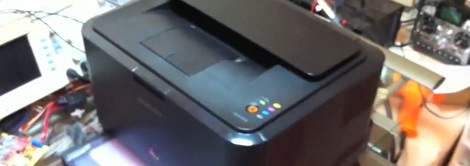
[Brian] really liked his Samsung color laser printer right up until it was time to replace the toner cartridges. A full set of toner cartridges sell for about the same price as the printer itself, so [Brian] figured he could simply refill the toner in the cartridges he already has. The printer sends out the ‘low toner’ warning  based on page count and won’t print if the page count is too high, negating the economy of a toner refill kit. Luckily, [Brian] figured out a dead simple way to reset the page count so he can use those third-party refill kits.

All the configuration settings and page counts for the printer are stored on an I2C EEPROM. After dumping the data held on this EEPROM with an Arduino and sniffing everything going into the EEPROM with a Bus Pirate, [Brian] was nearly at his wit’s end. Thankfully, serendipity intervened. When [Brian] restarted the printer with the Bus Pirate attached, he noticed it took much longer to initialize. Printing a configuration report, he was trilled to see that all page counts have been zeroed.

The final hack that allows [Brian] to reset the page count and used refilled toner cartridges is a simple wire that ties the SDA line of the EEPROM to ground on boot. [Brian] used a momentary switch, but given this is a once-every-few-months operation, a simple wire would suffice. Check out [Brian]’s page reset demo after the break.

Continue reading “Resetting The Page Count On A Laser Printer”

Control Your PC With A Remote

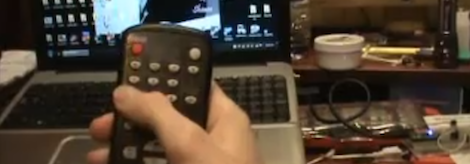
Because his computer is gradually turning into an all-inclusive media display device, [Shawn] figured a remote to control the volume and a video playlist would be a reasonable addition. TV remotes for computers have been around for years, but [Shawn] decided to go the DIY route and build his own computer remote.

For the build, [Shawn] used a Teensy dev board with an IR receiver module and the requisite infrared remote library. To translate infrared signals to keyboard commands,[Shawn] decided to base his project off a previous build that used a small program called AutoHotKey.

Right now the build can cycle through a pre-defined YouTube and Shoutcast playlist and change the volume of the currently playing track. There’s also support for moving the mouse with directional buttons on the remote, but we’re wondering if a better implementation would be using the Windows multimedia keyboard scan codes that should be supported by [Shawn]’s laptop.

Still, [Shawn] managed a very nice build that would fit into our computer battlestations quite nicely. Check out the demo of the remote in action after the break.

Continue reading “Control Your PC With A Remote”

DyIO Is A Huge Robotics Development Board

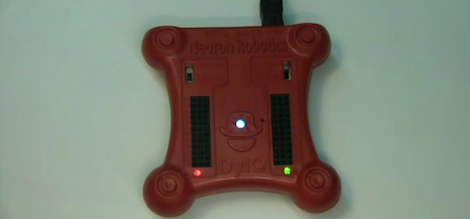
[Kevin] wrote in to tell us about the robotics development platform he’s been working on for the last few years. He calls his device the DyIO, and looks like an extremely easy way to get a robot up and running quickly.

Because the DyIO stands for Dynamic Input & Output, [Kevin] thought it was important to put 24 separate IO pins in his build. These pins can serve as 24 digital inputs or outputs, a few analog inputs and PWM outs, or even DC motor controls.

What’s really interesting is the SDK that [Kevin] and his team chose to build. With this SDK, you can program the DyIO in Java or just about any other language you would want. Already, [Kevin] and his team have built a few interesting projects around the DyIO, like a hexapod robot and animatronic pokemon. While we’re sure something awesome beyond imagination is waiting to be built with the DyIO platform, you can check out these already-completed builds after the break.

Continue reading “DyIO Is A Huge Robotics Development Board”

Very Easy 3D Scanning Software With ReconstructMe

[Maxzillian] sent in a pretty amazing project he’s been beta testing called ReconstructMe. Even though this project is just the result of software developers getting bored at their job, there’s a lot of potential in the 3D scanning abilities of ReconstructMe.

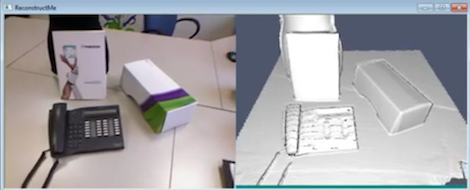
ReconstructMe is a software interface that allows anyone with a Kinect (or other 3D depth camera) in front of a scene and generate a 3D object on a computer in an .STL or .OBJ file. There are countless applications of this technology, such as scanning objects to duplicate with a 3D printer, or importing yourself into a video game.

There are a few downsides to ReconstructMe: The only 3D sensors supported are the xBox 360 Kinect and the ASUS Xtion. The Kinect for Windows isn’t supported yet. Right now, ReconstructMe is limited to scanning objects that fit into a one-meter cube and can only operate from the command line, but it looks like the ReconstructMe team is working on supporting larger scans.

While it’s not quite ready for prime time, ReconstructMe could serve as the basis for a few amazing 3D scanner builds. Check out the video demos after the break.

Continue reading “Very Easy 3D Scanning Software With ReconstructMe”