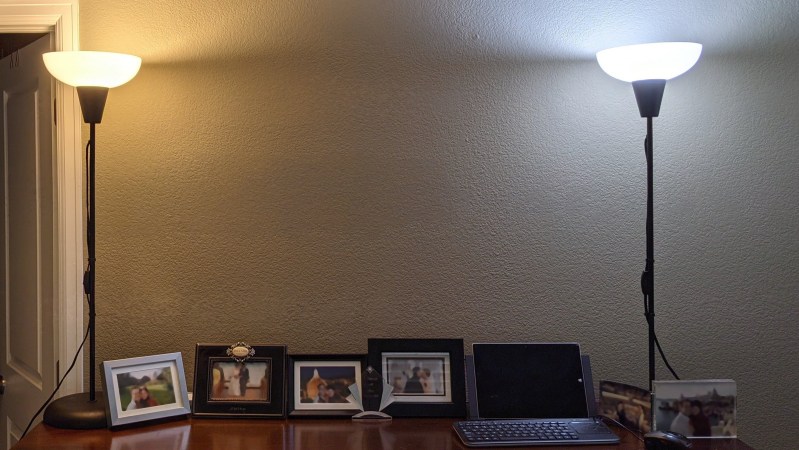
image of two floor lamps, one cool and one hot,

Customized Work-From-Home Lighting

[Jon] wants his home office lighting to mimic the light outside, at least from a color perspective. To that end, he has embarked on a design which monitors both the outdoor light and at his work station, and accordingly drives a pair of LED lamps of different colors. One lamp is rated at above 5000 K and provides “cool” lighting, , and the other is rated at less than 3000 K for “warm” lighting.
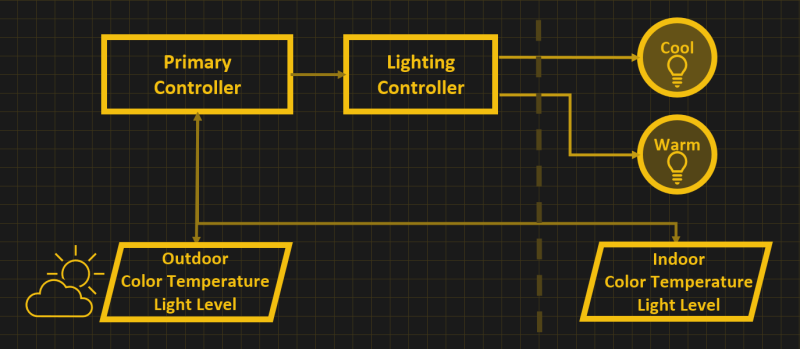
Block diagram of the system, light sensors indoor and outdoors are connected to a primary controller, and the primary controller is connected to a lighting controller driving one cool and one warm light bulb.

Commercial solutions do exist, but they are proprietary and do this within a single bulb and seem difficult to control in an orchestrated manner throughout the house. [Jon] plans for his approach to be scalable, eventually consisting of a variety of lighted areas of the house from a single microcontroller.

One of the design goals for this project is to create something that could disappear into the room, rather than the science fair aesthetic of my prior project.

One commenter on his project’s site asked why [Jon] is doing this, that is, what is the value of controlling the color of your indoor lighting? While [Jon] doesn’t have a specific goal in mind at the moment, he notes that these techniques could potentially be helpful for enhancing productivity, managing circadian rhythms, and as light therapy for seasonal depression.

We covered [Jon]’s science-fair-like project that in this writeup from last year. If the topic interests you, check out the white papers he links on his project page for further reading.


ESP32 Video Input Using I2S

Computer engineering student [sherwin-dc] had a rover project which required streaming video through an ESP32 to be accessed by a web server. He couldn’t find documentation for the standard camera interface of the ESP32, but even if he had it, that approach used too many I/O pins. Instead, [sherwin-dc] decided to shoe-horn a video into an I2S stream. It helped that he had access to an Altera MAX 10 FPGA to process the video signal from the camera. He did succeed, but it took a lot of experimenting to work around the limited resources of the ESP32. Ultimately [sherwin-dc] decided on QVGA resolution of 320×240 pixels, with 8 bits per pixel. This meant each frame uses just 77 KB of precious ESP32 RAM.

His design uses a 2.5 MHz SCK, which equates to about four frames per second. But he notes that with higher SCK rates in the tens of MHz, the frame rate could be significantly higher — in theory. But considering other system processing, the ESP32 can’t even keep up with four FPS. In the end, he was lucky to get 0.5 FPS throughput, but that was adequate for purposes of controlling the rover (see animated GIF below the break). That said, if you had a more powerful processor in your design, this technique might be of interest. [Sherwin-dc] notes that the standard camera drivers for the ESP32 use I2S under the hood, so the concept isn’t crazy.

We’ve covered several articles about generating video over I2S before, including this piece from back in 2019. Have you ever commandeered a protocol for “off-label” use?

Continue reading “ESP32 Video Input Using I2S”

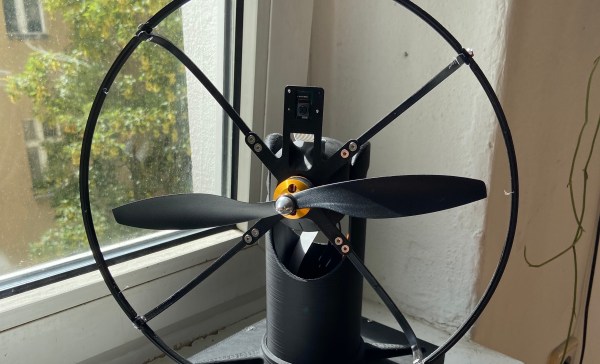
Homemade electric fan showing a small camera peeking up above the central hub.

Keep Cool With This Face-Following Fan

[AchillesVM] decided to build a tabletop electric fan so it would track him as he moves around the room. Pan and tilt control is provided by a pair of servos controlled by a Raspberry Pi 3b+. How does it know where [AchillesVM} is? It captures the scene using a Raspberry Pi v2 Camera and uses OpenCV’s default face-tracking algorithm to find him. Well, strictly speaking, it tracks anyone’s face around the room. If multiple faces are detected, it follows the largest — which is usually the person closest to the fan.

The whole processing loop runs at 60 ms, so the speed of the servo mechanism is probably the limiting factor when it comes to following fast-moving house guests. At first glance it might look like an old fan from the 1920s, in fact [AchillesVM] built the whole thing by himself, 3D-printing case and using a few off-the-shelf parts (like the 25 cm R/C plane propeller).

It’s a work in progress, so follow his GitHub repository (above) for updates. Hopefully, there will be a front-mounted finger guard coming soon. If you like gadgets that interact with you as you move about, we’ve covered the face-tracking confectionery cannon back in 2014, and the head-tracking water blaster last year. In the “don’t try this” file goes the build that started a career — the eye-tracking laser robot.

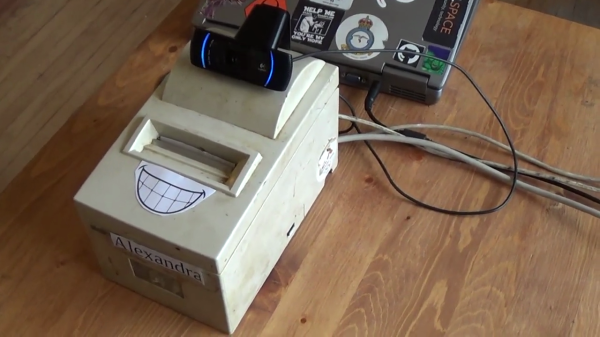
Cobbled together proof-of-concept vaccination verification system, showing a dot-matrix receipt printer, a webcam for QR code scanning, and an old laptop running the software

Manitoban Makes Open Software Demo Of Proprietary Vaccine Verification Systems

[Mark Jenkins] wasn’t impressed with the Covid 19 vaccination verification systems that restaurants in Manitoba are required to use. Patrons must present a QR code, which must be verified by a mobile app available only from Apple or Google. With help from his local hackerspace, he came up with a bash script solution requiring only kilobytes vs the 50 MB of the mobile apps. [Mark] isn’t pleased with the exclusivity of the apps availability and the lack of an open API. His concern isn’t entirely theoretical, either — Google mysteriously pulled their app from the Play Store for over a week.

The interim result, shown in the video below, is a demonstration system called Alexandra. It consists of a receipt printer, a webcam being used as a QR scanner, and a 2005-era laptop running the script. This is merely a proof of concept, as [Mark] clearly notes. There is still some work to be done — for example, the method used to authenticate with the Google server is transient. But eventually [Mark] hopes to have a free software alternative soon, suitable for restaurant owners to use in their establishments.

What kinds of vaccination verifications systems, if any, are used in your part of the world? Is the system open or proprietary? Let us know in the comments below.

Continue reading “Manitoban Makes Open Software Demo Of Proprietary Vaccine Verification Systems”

Solar Fueled Emergency Power Pack

Heavy rainfall in Northern Europe last month caused disastrous flooding in several countries. [Daniel Jedecke] was on assignment in the North Rhine-Westphalia region of Germany during the floods and saw the damage firsthand. He was struck by the lack of emergency power, and set about the task of designing a simple, portable power pack.

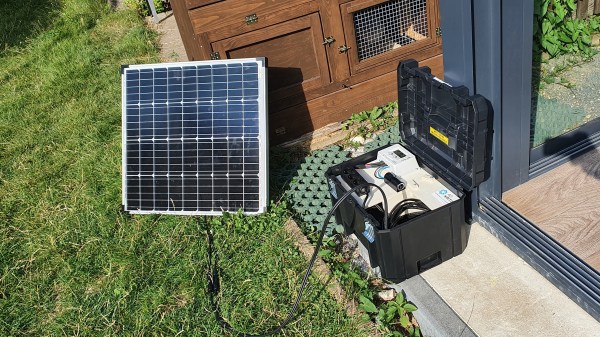
[Daniel] wanted his system to be as simple and maintenance-free as possible, and well as inexpensive. He passed by the traditional solutions such as gasoline fueled generators or advanced chemistry battery packs. Instead, he settled on the ordinary car battery — they’re easy to obtain in a pinch, and he found a used 45 Ah one sitting in his basement. To keep the system portable, he decided on a single 80 W monocrystalline solar panel which comes with a smart battery charge controller. An inverter provides standard (for Germany) 240 VAC in addition to the +12 VDC output.

The whole thing, except the panel, is installed in an off-the-shelf toolbox with the pieces secured to a custom-made wood frame. We think [Daniel]’s goals were met: made from standard materials, long-lasting without excessive maintenance, portable, and providing both DC and AC outputs for everyday use. Way back in 2015 we wrote about an emergency battery pack using rechargeable drill batteries. Do you keep an emergency power pack handy in case of outages or disasters?

Who Needs Pin Headers?

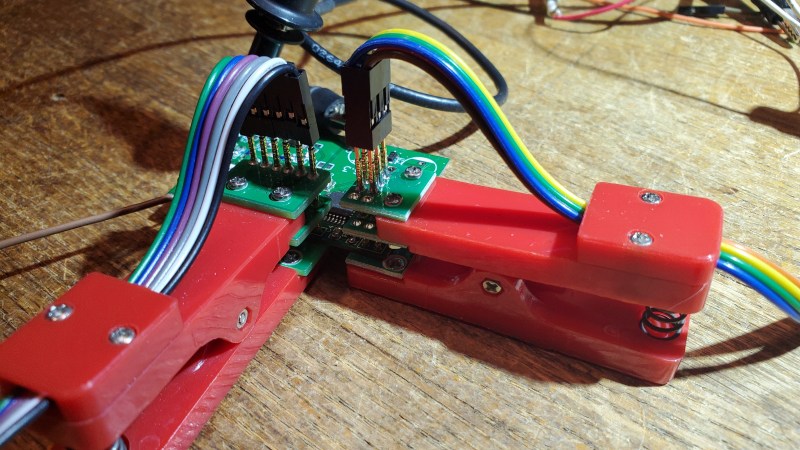
[Martin] sent this query, along with the lead photo, into the tip line, and he makes a good point. Most development and evaluation boards have multiple rows of pin headers, often arriving loose in the package — soldering is left to the user. In an abundance of caution, we usually design our prototype boards with many pin headers for debugging and testing. But as [Martin] reminds us, there are other alternatives to solder.

  • Yours truly once worked with a prolific designer of PIC microprocessor boards. Long before the advent of solutions like the Tag Connect family, [Ralph] would program his boards by just inserting a pin header into the PCB and applying gentle pressure with his thumb until the code finished flashing.
  • You may have seen the staggered offset PCB patterns that hold your pin header securely while you solder. You could tweak this a little bit to put more pressure on the pins, making a solder-less connection that is sufficient for temporary testing.
  • Taking the opposite approach, you can get solderless connectors with press-fit pins, a method we tested a few years ago on a Raspberry Pi Zero. Anyone who has worked on Eurocard-based systems like VME can appreciate the time-savings and improved reliability of 96-pin DIN-41612 press-fit connectors.
  • Or, as [Martin] proposes, you could use one of these inexpensive pogo-pin clamps. These are available for less than $10 from your favorite Asian electronics distributor. They are about the size of a large clothespin, and are available in several different pin configurations.

These techniques won’t help you if you need to plug your board into another card, such as a hat onto a Raspberry Pi. But when you just want to grab a few signals for a serial port or probing some digital I/O signals, having a few of these clips in your tool box can save you the time and headache of soldering down a header. Do you have any tips for making soldering pin headers easier, or even avoiding them altogether? Let us know in the comments below.

Materials For Self Learners

[João Nuno Carvalho] is a passionate learner. Software engineer by day, he studies all different branches of science and engineering in his spare time. He has organized an impressive list of study / reference materials on a wide variety of subjects that interest him, from aeronautical engineering to quantum mechanics and dozens more in between. In fact, his study lists themselves became so numerous that he collected them into a list of lists, which can be found here on his GitHub repository. These include categories on “How to learn…”

  • Modern Electronics
  • Modern Linux
  • Modern Embedded Systems
  • Mathematics from the ground up
  • Physics from the ground up
  • Modern Compressive Sensing
  • Modern [C, C++, Rust, Python]
  • Modern Machine Learning
  • Modern Aeronautics and Astronautics
  • Guitar on a budget

Another interesting thing we found in his repo was a list of common electrical components. If you can’t remember off the top of your head the part number of common 100 V PNP bipolar transistor, [João]’s list will point you towards a BD136.

It’s quite an impressive list of resources, and we can’t help but wonder how large [Joã0]’s personal library is if it contains even half of the materials from these lists. Check these out if you want to brush up on a topic — they include not only text books and reference volumes, but forums, blogs, YouTube links, etc. On the topic of learning, we wrote a piece back in 2017 on how learning differs between hobbyists and students. Do you have a favorite list-of-lists that you turn to when you want to brush up or learn about a new subject? Let us know in the comments below.