Keycap Shine? No, Shiny Keycaps

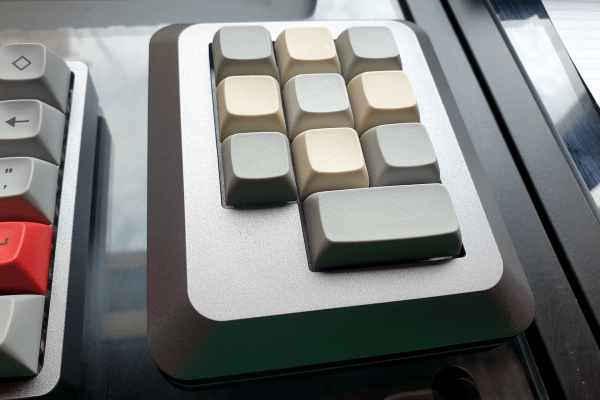
No matter how often you wash your hands, ABS keycaps will eventually exhibit shine wherever you strike them the most. And that’s the problem right there: the shine might be okay if it were somehow uniform across the surface of the keycaps, but instead it just tends to make one feel seen. And since there’s really nothing you can do except to replace your keycaps (or start with PBT), you might as well embrace the shine, right?

Well, that’s how [mmalluck] feels, anyway. He recently experimented with using acetone vapors to refinish a set of keycaps from Drop, making them super-duper shiny in the process. Now, the operative word here is vapors, because straight acetone would acid-wash those ‘caps faster than you can say ‘bad idea jeans’.

So to that end, [mmalluck] poured acetone in a glass cake pan, used a piece of cardboard to separate the keycaps from the acetone, and covered it all with a glass cutting board. It doesn’t take very long to achieve a good result, and [mmalluck] says it’s better to err on the side of too-short instead of risking reaching the point of too-melted.

We wouldn’t have thought we’d react this way, but we think they’re pretty cool looking. That particular set seems just right for this process, which makes them look like new old-stock typewriter keys or something. Looks way better than the ultra-personalized shine of usage. What do you think? Let us know in the comments.

Via KBD #90

The Tools To Fight Against Single-Use Plastic

Imagine for a moment that you design products for a living. But you can’t design all the things, so you have to buy some of your stuff from big-box stores just to go about your everyday life. This is more or less what happened to [Eric Strebel], who recently bought a bathroom faucet from IKEA. This particular flat-pack faucet came with a single-use plastic nut driver to be used in putting the faucet together. Since there is no marking that indicates the plastic type, it can’t be easily recycled. Not even the size of the business end is indicated. So between the shoddy plastic construction and the lack of information, most people are going to just throw this thing away. And that’s terrible.

So what’s to be done? Aside from boycotting IKEA (which [Eric] may do in the future for all we know), there’s not much to do but to offer up solutions on public platform and see what happens. To that end, [Eric] came up with five different ways of making this nut driver that are arguably more sustainable than single-use mystery plastic.

Say what you will about sustainability of using metals, which have to be mined, versus plastic – many of these methods use no tooling, so that’s something. Nut drivers made by [Eric] would instead be laser-cut from flat stock and either folded up and welded, or assembled from a multi-piece cut into a single-piece tool via perpendicular members that slot together. Or as [Eric] points out, the design could stay exactly the same as the plastic original and be die-cast instead.

It’s certainly an interesting exercise in design, and it’s really cool to see a little bit into [Eric]’s thought process when it comes to improving existing things. Be sure to check it out after the break, and let us know how you’d have done it better.

Continue reading “The Tools To Fight Against Single-Use Plastic”

Fytó Is Fido For Phytophiles

On the surface, most plants really aren’t all that exciting, save for maybe the Venus flytrap. Sure, you can watch them grow in the long run, but for the most part, they’re just kind of there, quietly bringing peace and cleaner air. Day by day, they hardly move at all, although if you’re one of those people who likes to get the Sim into the pool and take the ladder away, you could always play the drought game just to watch it droop and come back to life a half hour later.

Fytó the smart planter is a much more cool and far less cruel way of spicing up your plant life. The idea is to turn a plant into a pet by giving it an expressive face. Sure, plants have needs, but they communicate them more subtly than the average Earthing. By assigning animated emoji to various conditions, the plant becomes more familiar and in turn, feels more like a pet. Plus, the whole thing is just so darn cute.

Fytó runs on a Raspberry Pi 2W and has six emotions that are based on a capacitive soil moisture sensor, an LM35 temperature sensor, and an LDR module to detect light levels. If everything is copacetic, Fytó puts on a happy face, and will lick its lips after getting a drink of water. If the light is insufficient, Fytó looks sleepy; if the plant needs water, Fytó appears sweaty, red-faced, and parched. Don’t conflate this with the temperature-taking emoji, which indicates that Fytó is too hot. Finally, if the spot is too drafty and cold, Fytó looks like it’s nearly frozen. Be sure to check out the video after the break and watch Fytó work through their range of emotions.

Would you rather hear your plant complain in English? There’s a build for that.

Continue reading “Fytó Is Fido For Phytophiles”

Hackaday Podcast 181: 3D Printing With Volcano Nuts, The Hackaday Bookshelf, And A Puzzlebot

This week, Editor-in-Chief Elliot Williams and Assignments Editor Kristina Panos convened in a secret location to say what we will about the choicest hacks of the past week. We kick things off by discussing the brand new Cyberdeck contest, which is the first of it’s type, but certainly won’t be the last. In other contest news, we recently announced the winners of the Hack it Back Challenge of the Hackaday Prize, which ran the gamut from bodysnatching builds to rad resto-mods and resto-recreations.

IBM’s Linkway, French edition. Très tubulaire, non?

Taking top honors in wow factor this week is [Stuff Made Here]’s jigsaw puzzle-solving robot. This monster can currently tackle small laser-cut puzzles, but is destined to solve an all-white 5000-piece nightmare once all the engineering pieces have come together.

Then we took a field trip to Zip Tie City, where the plastic’s green ♻ and the wiring’s pretty, admired volcano nuts from afar, and briefly considered the idea of a 3D printer with a heating zone of programmable length.

Finally, we take a look at a creatively destructive robot that’s akin to a useless machine, bloviate about books you should read, and dance around the topic of learning by playing.


Direct download.

Check out the links below if you want to follow along, and as always, tell us what you think about this episode in the comments!

Continue reading “Hackaday Podcast 181: 3D Printing With Volcano Nuts, The Hackaday Bookshelf, And A Puzzlebot”

Hackaday Podcast 180: Tiny CRTs, Springy PCBs, And Measuring Trees

The demogorgon just wants to be friends. See? He’s waving hello.

This week, Editor-in-Chief Elliot Williams and Assignments Editor Kristina Panos traded sweat for silence, recording from their respective attic-level offices in the August heat unaided by fans (too noisy). We decided there’s no real news this week that lacks a political bent, except maybe that Winamp is back with a new version that’s four years in the making. (Is Winamp divisive?) Does it still whip the llama’s ass? You be the judge.

After Elliot gives Kristina a brief math lesson in increasing area with regard to 3D printer nozzle sizes, we talk a bit about 3D pens, drool over a truly customizable macropad that uses a microcontroller for each keyswitch, and  discuss dendrometers and tree health. Then it’s back to keyboards for one incredible modular build with an e-ink display and haptic feedback knob which is soon to go open source.

Finally, we talk tiny CRTs, a USB drive that must have the ultimate in security through obscurity, discuss the merits of retrograde clocks, and wonder aloud about the utility of jumping PCBs. Don’t bounce on us just yet — not until you hear about our first electronics wins and learn the one thing Kristina doesn’t do when she’s spending all day in the heat.

Direct download. And listen with Winamp!

Check out the links below if you want to follow along, and as always, tell us what you think about this episode in the comments!

Continue reading “Hackaday Podcast 180: Tiny CRTs, Springy PCBs, And Measuring Trees”

Foam Cutter Moves Like A Hot Knife Through Butter

Make enough attempts to cut foam using whatever you’ve got — utility knife, hacksaw, serrated plastic knife — and you’ll wish hard for something that cuts cleaner, faster, and better. While there are all sorts of ways to build a hot wire foam cutter, this design from [jasonwinfieldnz] is both interesting and imitable.

If you don’t already know it, nichrome wire is nifty stuff that’s readily available in thrift store hair dryers and toasters. It stretches as it heats up, and shrinks as it cools back down.

The interesting part of this build is that instead of using a spring to keep tension on the nichrome wire, [jasonwinfieldnz] designed and 3D-printed a bow out of PLA that does the job elegantly. While [jason] was initially concerned that the bow might possibly melt, he found in practice that although the bow does get warm to the touch, it’s nowhere near hot enough to even warp.

One nice touch is the simple fence that rides along two slots and secures with wingnuts. We also like that [jason] made this foam cutter largely from scrap material, and rather than buy a spool of nichrome, he opted for a skinny heating element and pillaging the wire.

If you’re a nichrome noob, know that it doesn’t take much juice to do the job. Even though a computer power supply is what [jason] had lying around, it’s complete overkill, so you would definitely want to limit the current. Check out the build video after the break.

Still not portable enough for you? All you really need is a 18650, some nichrome, and a few bits and bobs to hold it all together.

Continue reading “Foam Cutter Moves Like A Hot Knife Through Butter”

A Customizable Macropad To Make Anyone’s Tail Wag

[Gili Yankovitch] has always wanted some kind of macro keypad for all those boss-slaying combos he keeps up the sleeve of his wizard robe while playing WoW. Seventeen years later, he finally threw down the gauntlet and built one. But really, this is an understatement, because Paws is kind of the customizable macropad to end all customizable macropads.

This thing is completely bespoke, and yet cookie cutter at the same time — but we mean that in the best possible way. Paws can be made in any shape or form, and quite easily. How is this even possible, you ask? Well, every single key has its own microcontroller.

Yep, each key has an ATtiny85 and a cute little ribbon cable, and these form a token ring network that talks to an Arduino, which provides the keyboard interface to the computer. To make things even easier, [Gili] built a simple programming UI that automatically recognizes the configuration and number of keys, and lets the user choose the most important bit of all — the color of the LED.

[Gili] wanted to combine all the skills he’s learned since the worst timeline started in early 2020 — embedded software, CAD, electronics, and PCB design. We’d like to add networking to that list, especially since he figured out a nice workaround for the slowness of I²C and the limitations of communication between the ‘tiny85s and the Arduino. Though [Gili] may have started out with a tall order, he definitely filled it. Want to get your paws on the design files? Just claw your way over to GitHub.

If your customization interests lie more toward what program is in focus, be sure to check out Keybon, which was one of the many awesome winners of our Odd Inputs and Peculiar Peripherals contest.