The Statial-b Open Source Adjustable Mouse

Many of us are very heavy computer users, and two items that can affect our comfort and, by extension, our health are the keyboard and the mouse. We’ve covered many ergonomic and customisable keyboards over the years, but we are not sure we’ve covered a fully adjustable mouse until now. Here’s [Charlie Pyott] with their second take on an adjustable mouse, the open source, statial-b.

[Charlie] goes into an extensive discussion of the design process in the video after the break, which is a fascinating glimpse into the methods used by a professional industrial designer. The statial concept breaks the contact surfaces of the mouse into fixed and moveable sections. The moveable sections are attached to the mouse core via a pair of ball joints connected with extendible arms, allowing the surfaces to be adjusted for both position and orientation. The design process starts with 3D scanning their ‘workhorse mouse,’ a Razer Deathadder Elite. This creates a reference volume within which the statial body should fit in its minimal configuration.

So which mouse grip style are you into?

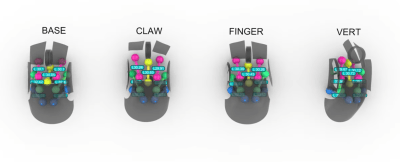
The design has a fixed central core, with each button (including the central scroller) separately adjustable. The side panel with a pair of thumb buttons is also moveable. Creating a model in Rhino 3D working with the grasshopper visual programming environment [Charlies] explored the surface constraints for the base, claw, finger and vertical grip styles common among mouse users. This model was then fed into Fusion 360 for the detailed design. After completing the design, it was passed back into Rhino 3D to add lattice effects to the panel. This helps reduce weight and lets the internal LEDs shine through. The design is intended for resin printing, so you could go wild with the visuals by missing custom resins if you were so inclined.

Continue reading “The Statial-b Open Source Adjustable Mouse”

A DaVinci Screw-Cutting Machine

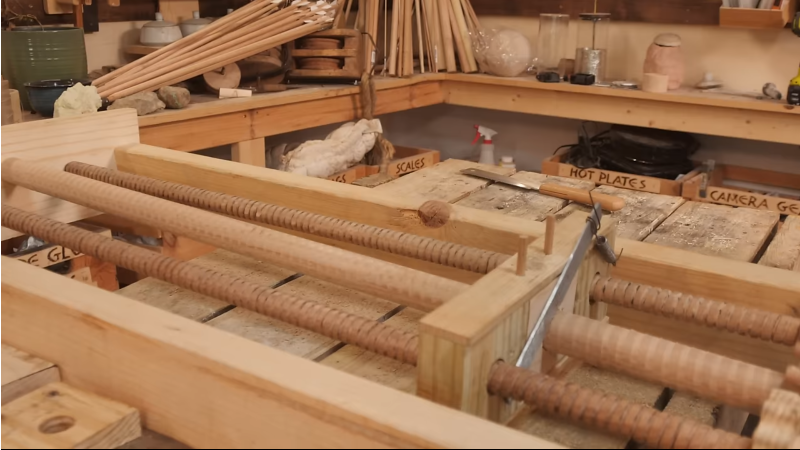
It’s not news that Leonardo DaVinci was somewhat ahead of his time, and over the centuries many of the creations in his sketchbooks have been created and proved quite functional. The guys from the YouTube channel How To Make Everything have been looking at one such sketch, a screw thread-cutting machine. At first glance, it seems a little flawed. Threads are hard to make by hand, and you can see that this thread-cutting machine needs two identical threads operating as a reference to make it work. However, as the guys demonstrate, you can create threads by hand using simple methods.

Starting with an offset blade mounted on a block with a hole through it, a dowel can be scribed with a starter thread. This can then be worked by hand to cut enough of a groove for the application. They demonstrated that the machine was viable using nothing but wood for construction. A metal blade was mounted, and some preload force was applied to it with a spring. The dowel to be cut was loaded, and the machine ran back and forth enough times to create a very nice-looking screw thread. And once you’ve made two identical threaded dowels, you can use them to upgrade the machine or even build a second. Once you have a repeatable way to make such threads, all kinds of applications become more accessible. Need a bench vice? No problem now!

Whilst the demonstration doesn’t precisely follow the plans laid out by the master inventor, they aren’t all that clear on the cutting tool after all, it’s nice to see people still wanting to build his ideas, and we’ll certainly be following along.

If you like these “from scratch” builds, you’ll like this other one. Leonardo’s work wasn’t just about machines; he was also very interested in science. Here’s a recreation of his demonstration of gravity as a form of acceleration.

Continue reading “A DaVinci Screw-Cutting Machine”

Learn GPU Programming With Simple Puzzles

Have you wanted to get into GPU programming with CUDA but found the usual textbooks and guides a bit too intense? Well, help is at hand in the form of a series of increasingly difficult programming ‘puzzles’ created by [Sasha Rush]. The first part of the simplification is to utilise the excellent NUMBA python JIT compiler to allow easy-to-understand code to be deployed as GPU machine code. Working on these puzzles is even easier if you use this linked Google Colab as your programming environment, launching you straight into a Jupyter notebook with the puzzles laid out. You can use your own GPU if you have one, but that’s not detailed.

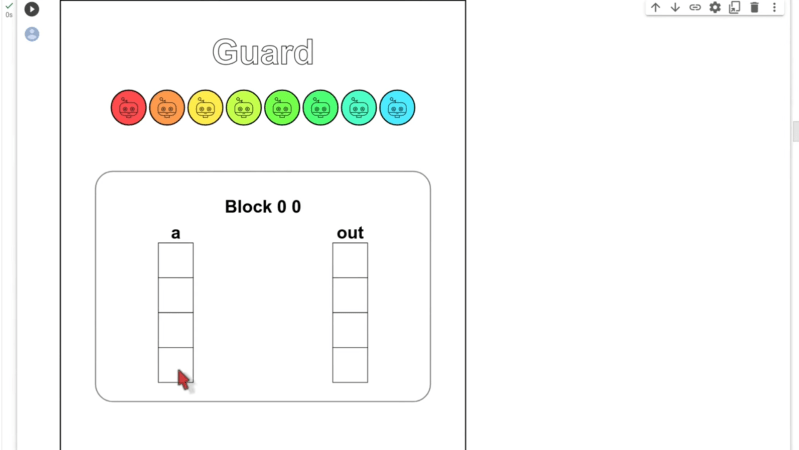
The puzzles start, assuming you know nothing at all about GPU programming, which is totally the case for some of us! What’s really nice is the way the result of the program operation is displayed, showing graphically how data are read and written to the input and output arrays you’re working with. Each essential concept for CUDA programming is identified one at a time with a real programming example, making it a breeze to follow along. Just make sure you don’t watch the video below all the way through the first time, as in it [Sasha] explains all the solutions!

Confused about why you’d want to do this? Then perhaps check out our guide to CUDA first. We know what you’re thinking: how do we use non-nVIDIA hardware? Well, there’s SCALE for that! Finally, once you understand CUDA, why not have a play with WebGPU?

Continue reading “Learn GPU Programming With Simple Puzzles”

3D Printing On Top Of Laser Cut Acrylic

[Julius Curt] needed to mark acrylic panels with a bit more clarity than the usual way of rastering the surface, so they attempted to 3D print directly to an acrylic sheet, which worked perfectly. The obvious way to do this was to bond the acrylic sheet to the bed with glue temporarily, but another way was tried, and it’s much less messy and precarious.

The bond between a 3D print and acrylic is very strong

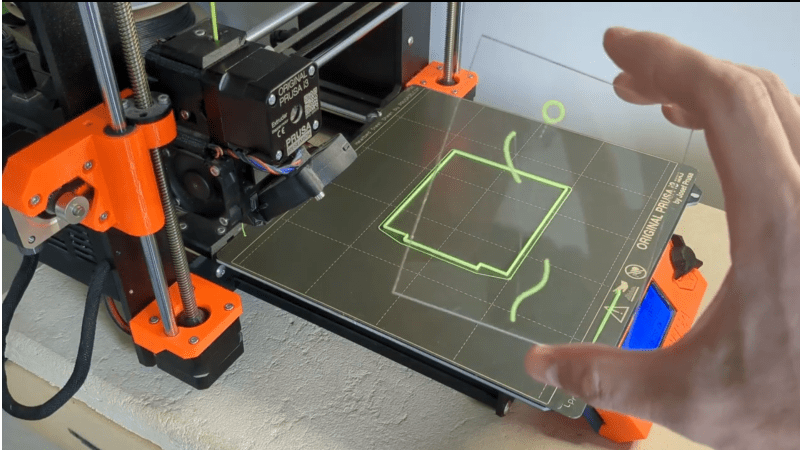
The first step was to create a 3D model which combined a constraining ‘fence’ to contain the acrylic panel with the required artwork floating above. It was easy enough to run the print long enough to build the fence, then pause the print mid-way to add the pristine panel and restart after a quick re-prime and wipe.

There were a few simple takeaways from the video below. First, to ensure sufficient tolerance between the fence and the panel, consider the layer width (plus associated tolerance when printed) and the laser kerf of your machines to ensure a not-too-sloppy fit. Secondly, that hot nozzle won’t do the acrylic surface any favours during travel moves, so enabling Z-hopping is essential!

Another use for this simple technique is to fully incorporate an acrylic sheet within a print by pausing at an appropriate height again, dropping the panel in, and continuing the print. A degree of overlap will lock the panel tight, with the plastic bonding very firmly to the acrylic, as [Julius] demonstrates in the video.

It’s always a delight to see how techniques can combine to create the desired effects. Here’s how to use a color laser printer and toner transfer paper to apply designs to a 3D printing front panel. Whilst we’re thinking about the multitude of uses for hacking with acrylic, what about not doing that and using corrugated plastic instead?

Continue reading “3D Printing On Top Of Laser Cut Acrylic”

Revisiting 1990’s Mac Games That Never Were

[John Calhoun] was digging around their old MAC hard drives, revisiting some abandoned shareware games they wrote over three decades ago, and has uploaded the recovered disk images to GitHub for everyone to take apart and play with. This repository has a few of the games complete with their development files and the compiler environment, a mixture of Think Pascal and C.

Back then, [John] had a solid mantra when creating projects, specifically prototyping fast and abandoning things quickly if they were not working out. The blog shows a list of twenty-eight projects, of which only five ever made it to release, with all the rest left to rot. This is reminiscent of the attitude around Silicon Valley of moving fast and breaking things. Anyway, reasons for ditching a project ranged from ‘too much sprite work’ for a D’n’D style game to simply ‘not fun’ for some with clunky control mechanisms. [John] even abandoned a neat-looking steampunk flight simulator due to the sheer amount of work needed. Of course, it’s not all lost effort. Much of the code written was reused across multiple projects; after all, there’s no point in re-writing a cosine lookup table if you’ve already got one kicking around in another project.

Still, it’s a fun trip down memory lane, looking deep into projects that never were and the development journey to becoming a successful programmer.

While it isn’t hard to find old Macintosh hardware, some are not in great shape. Here’s a fun Hackintosh project that uses retro parts. [John] was featured a while back, with his homage to his first mac, a sleek Rpi-powered eInk desk ornament. Finally, we can’t talk about recovering retro software without looking in detail at the floppy disk themselves.

Get Your Lisp On With The Dune Shell

Lisp is one of those programming languages that seems to keep taunting us for not learning it properly. It is still used for teaching functional languages today. [Adam McDaniel] has an obvious fondness for this fifty-year-old language and has used it in several projects, including their own shell, Dune.

Dune is a shell designed for powerful scripting. Think of it as an unholy combination of bash and Lisp.

Dune is designed to be highly customisable, allowing you to create a super-optimised workstation for your admin and programming tasks. [Adam] describes the front end for Dune as having turned up the cosiness dial to eleven, and we can see that. A cosy home is personalised, and Dune lets you customise everything.

Dune is a useable functional programming environment with a reasonably complete standard library to back it up, which should simplify some of the more complicated sysadmin tasks. [Adam] says the language also supports a few metaprogramming concepts, such as a quote operator, operator overloading, and macro programming. It’s difficult to describe much more about what you can do with Dune, as it’s a general-purpose programming language wrapped in a shell. The possibilities are endless, and [Adam] is looking forward to seeing what you lot out there do with his project!

The shell can be personalised by editing the prelude file, which allows you to overload functions for the prompt text, the incomplete prompt text (so you can implement intelligent completion options), and a function that deals with the formatting of the command response text. [Adam] gives us his personal prelude file, which defines many helper functions displaying useful things such as the current weather, a calendar, and an ASCII art cat. You never know when that might come in handy. This file is written in Lisp, so we reckon that’s where many people will start as they come up the Lisp (re)learning curve before embarking on more involved automation. Dune was written in Rust, so you need that infrastructure to install it with Cargo.

As we said earlier, Lisp is not a new language. We found a hack for porting a Lisp interpreter to any old language and also running Lisp bare metal on a Lisp machine. Finally, [Al] takes a look at some alternative shells.

Reverse Engineering A Keyboard Driver Uncovers A Self-Destruct Code

Should you be able to brick a keyboard just by writing a driver to flash the lights on it? We don’t think so either. [TheNotary] got quite the shock when embarking on a seemingly straightforward project to learn C++ on the x86-64 architecture with Windows and sent it straight to Silicon Heaven with only a few seemingly innocent USB packets.

The project was a custom driver for the XVX S-K80 mechanical keyboard, aiming to flash LED patterns across the key LEDs and perhaps send custom images to the integrated LCD. When doing this sort of work, the first thing you need is the documentation of the communications protocols. Obviously, this was not an option with a closed-source project, so the next best thing is to spy on the existing Windows drivers and see how they worked. Using Wireshark to monitor the USB traffic whilst twiddling with the colour settings, it was clear that communications were purely over HID messages, simplifying subsequent analysis. Next, they used x32dbg (now x64dbg, but whatever) to attach to the existing driver process and trap a few interesting Windows system calls. After reading around the Windows API, a few candidate functions were identified and trapped. This gave them enough information to begin writing code to reproduce this behaviour. Then things got a bit odd.

Continue reading “Reverse Engineering A Keyboard Driver Uncovers A Self-Destruct Code”