Harmonic Analyzer Mechanical Fourier Computer

If you’re into mechanical devices or Fourier series (or both!), you’ve got some serious YouTubing to do.

[The Engineer Guy] has posted up a series of four videos (Introduction, Synthesis, Analysis, and Operation) that demonstrate the operation and theory behind a 100-year-old machine that does Fourier analysis and synthesis with gears, cams, rocker-arms, and springs.

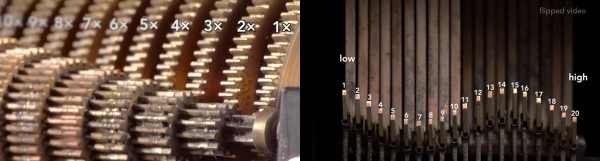
In Synthesis, [The Engineer Guy] explains how the machine creates an arbitrary waveform from its twenty Fourier components. In retrospect, if you’re up on your Fourier synthesis, it’s pretty obvious. Gears turn at precise ratios to each other to create the relative frequencies, and circles turning trace out sine or cosine waves easily enough. But the mechanical spring-weighted summation mechanism blew our mind, and watching the machine do its thing is mesmerizing.

In Analysis everything runs in reverse. [The Engineer Guy] sets some sample points — a square wave — into the machine and it spits out the Fourier coefficients. If you don’t have a good intuitive feel for the duality implied by Fourier analysis and synthesis, go through the video from 1:50 to 2:20 again. For good measure, [The Engineer Guy] then puts the resulting coefficient estimates back into the machine, and you get to watch a bunch of gears and springs churn out a pretty good square wave. Truly amazing.

The fact that the machine was designed by [Albert Michelson], of Michelson-Morley experiment fame, adds some star power. [The Engineer Guy] is selling a book documenting the machine, and his video about the book is probably worth your time as well. And if you still haven’t gotten enough sine-wavey goodness, watch the bonus track where he runs the machine in slow-mo: pure mechano-mathematical hotness!

Continue reading “Harmonic Analyzer Mechanical Fourier Computer”
$2 FM Transmitter For Raspberry Pi

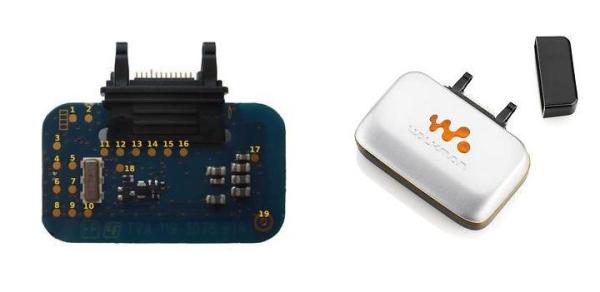
We love re-purposed consumer gear. This project uses a cheap, discontinued cellphone gadget to create a Raspberry Pi controlled FM radio transmitter.

The Sony-Ericsson MMR-70 radio transmitter apparently used to connect to a cell phone and broadcast music. But the Walkman cellphones in question are a little bit old in the tooth, so one can buy the transmitter units for cheap on the resale market. What makes the transmitters even more interesting is that you can activate and deactivate the radio, change frequency or output power, and even send RDS station and song information.

It turns out (link in German) that the radios have an AVR ATMega32 microcontroller and a NS73 radio transmitter module, which can be entirely controlled over I2C. (Schematic here as PDF.) The units also have handy test points strewn all around. Once the test points were mapped out, one could completely ignore the on-board AVR microcontroller and control the FM transmitter module directly using the Raspberry Pi’s I2C outputs.

And that’s where [Manawyrm] stepped in. She wrote an I2C daemon for the Raspberry Pi that lets you control the FM transmitter via simple commands. All you have to do is solder up a bunch of test points, install [Manawyrm]’s software, write a batch script, and you’re on the air. For instance, this makes building a FM radio retransmitter for online streamed audio a one-day project. You can see his working example on youtube. Of course, you’ll want a web-based remote control interface to go with that.

If you’re interested in hacking along, and don’t have a Raspberry Pi application in mind, Sparkfun used to sell the NS73 radio transmitter so you can find lots of good information about the chip. We’d love to see a stand-alone broadcasting gizmo that actually utilizes the onboard AVR chip, but our hats are off to [Manawyrm] for making the Raspberry Pi version so accessible.

Protocol Snooping Digital Audio

More and more clubs are going digital. When you go out to hear a band, they’re plugging into an ADC (analog-to-digital converter) box on stage, and the digitized audio data is transmitted to the mixing console over Ethernet. This saves the venue having to run many audio cables over long distances, but it’s a lot harder to hack on. So [Michael] trained popular network analysis tools on his ProCo Momentum gear to see just what the data looks like.

[Michael]’s writeup of the process is a little sparse, but he name-drops all the components you’d need to get the job done. First, he simply looks at the raw data using Wireshark. Once he figured out how the eight channels were split up, he used the command-line version (tshark) and a standard Unix command-line tool (cut) to pull the data apart. Now he’s got a text representation for eight channels of audio data.

Using xxd to convert the data from text to binary, he then played it using sox to see what it sounded like. No dice, yet. After a bit more trial and error, he realized that the data was unsigned, big-endian integers.  He tried again, and everything sounded good. Success!

While this is not a complete reverse-engineering tutorial like this one, we think that it hits the high points: using a bunch of the right tools and some good hunches to figure out an obscure protocol.

Hybrid 50cc Ultracapacitor Scooter

We’re all familiar with hybrid gas-electric cars these days, but how about a hybrid scooter that uses supercapacitors instead of batteries? Our hats are off to [Alex] from Labs Bell for the almost entirely-DIY conversion.

The hybrid idea is to drive the vehicle’s wheels with electric motors, but generate the electricity with a normal gasoline engine. This allows the hybrid to control the engine speed almost independently of the wheel motors’ demand for power, allowing the gas engine to run at its most efficient speed and charge up batteries with the extra energy. As an extra bonus, many hybrids also use regenerative braking to recoup some of the energy normally wasted as heat in your brake pads.

[Alex]’s hybrid scooter does all of the above and more. Since the stock vehicle is a 50cc scooter, any increase in acceleration is doubtless welcome. We’d love to see the scooter starting from stop with a full charge. Using supercapacitors as storage instead of batteries is a win for charging efficiency. In urban stop-and-go traffic, the natural habitat of the 50cc scooter, the regenerative braking should help further with gas consumption.

What’s most impressive to us is the completely DIY hybrid control unit that takes some simple inputs (wheel speed and throttle position) and controls regenerative braking, the gas engine’s throttle, etc. Since the hybrid control system is currently under development, there’s even a button to switch between different trial algorithms on the fly. Very cool!

Oh yeah, and [Alex] points out the fire extinguisher on-board. He had occasion to use it for his hybrid motorcycle V1. Safety first!

Use A Cheap PIN Diode As A Geiger Counter

After the Fukushima nuclear power plant disaster, radiation measurement became newly relevant for a lot of people. Geiger-Müller tubes, previously a curiosity, became simultaneously important and scarce.

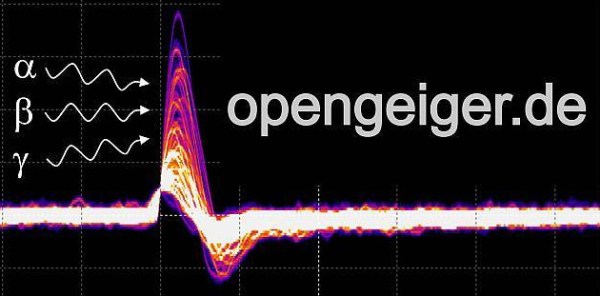
Opengeiger.de (English-language version here) has complete instructions for making a Geiger counter without a Geiger-Müller tube. Instead, this counter uses a PIN photodiode and some carefully chosen operational amplifiers. The total cost of such a device is significantly cheaper than the alternative: under $1 for the diode and around $5 for the rest. And since the PIN photodiode in question is used in many other devices, it’s not a niche component like a Geiger tube is.

The secret sauce is in component selection and tuning. Opengeiger uses the BPW34 diode because it is relatively common and has a large surface area, but also because it has a very low capacitance when reverse-biased. The first-stage opamp choice is also fairly critical. Considering that an average gamma radiation event produces only around 10 nanoamps for about 50 microseconds, a lot of amplification (100,000x), low noise, and high bandwidth are a must.

If you want to get started with this project, you could first browse through the explanation (PDF) to get an overview of the project’s goals, read up on all the technical considerations (PDF) or just head straight for the DIY instructions for the “Stuttgarter Geigerle” (PDF, schematic is on the last page). All of the documentation is chock-full of relevant references and totally worth the read.

Dottie The Flip Dot Clock

What is it that we like so much about inefficient, noisy clocks made with inappropriate technology? Answer the question for yourself by watching the video (below) that [David Henshaw] sent us of Dottie, the flip-dot clock.

But besides the piece itself, we really like the progression in the build log, from “how am I going to do this?” to a boxed-up, finished project.

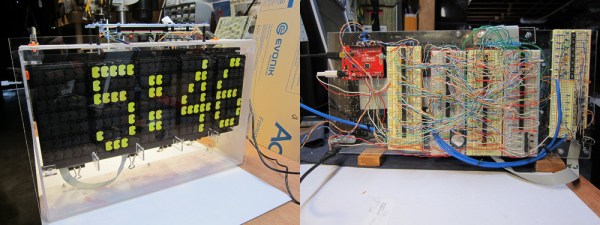
Another stunning aspect of this build is just how nice an acrylic case and a raft of cleverly written software can make a project look. You’d never guess from the front that the back-side was an (incredible) rat’s nest of breadboards and Ethernet wires. Those random switching patterns make you forget all the wiring.

And the servo-steered, solenoid-driven chimes are simply sweet. We’re sure that we’d love to hear them in real life.

Continue reading “Dottie The Flip Dot Clock”

HuddleLamp Turns Multiple Tablets Into Single Desktop

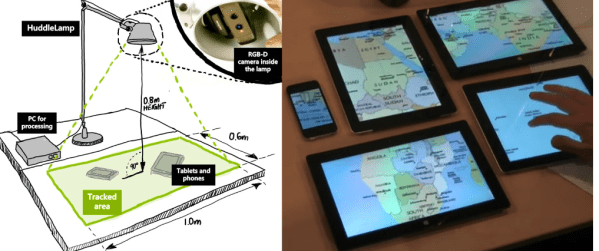
Imagine you’ve got a bunch of people sitting around a table with their various mobile display devices, and you want these devices to act together. Maybe you’d like them to be peepholes into a single larger display, revealing different sections of the display as you move them around the table. Or maybe you want to be able to drag and drop across these devices with finger gestures. HuddleLamp lets you do all this.

How does it work? Basically, a 3D camera sits above the tabletop, and watches for your mobile displays and your hands. Through the magic of machine vision, a server sends the right images to each screen in the group. (The “lamp” in HuddleLamp is a table lamp arranged above the space with a 3D camera built into it.)

A really nice touch is that the authors also provide JavaScript objects that you can embed into web apps to enable devices to join the group without downloading special software. A new device will flash an identifying pattern that the computer vision routine will recognize. Once that’s done, the server starts sending the correct parts of the overall display to the new device.

The video, below the break, demonstrates the possible interactions.

Continue reading “HuddleLamp Turns Multiple Tablets Into Single Desktop”