An Old Typewriter Speaks To The World

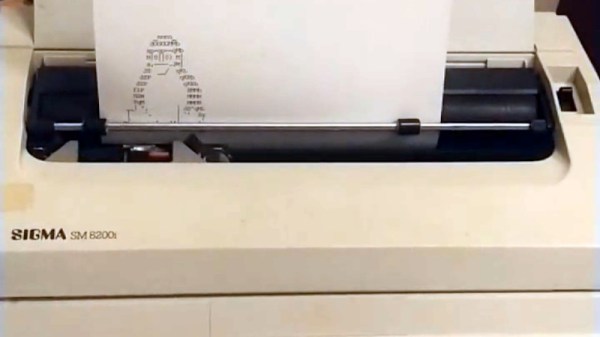
Typewriters are something which was once ubiquitous, yet which abruptly faded away and are now a rare sight. There was a period of a few years in which electric typewriters and computers existed side-by-side though, and it’s one of these which [Jonah Brüchert] has experimented with connecting to a computer for use as a printer or terminal.

The machine in question is a SIGMA SM 8200i typewriter, which is a rebadged version of the East German Erika S3004. It has an intriguing 26-pin connector on its side which provides access to a 1200 baud serial port. It uses its own character encoding dubbed “gdrascii”, for which there is a Python library that he could port to Rust. The result is a terminal in the old style, from the days when access to a computer was through a teletype  rather than a screen. All that’s missing is a punched tape reader at its side!

We’ve featured a lot of typewriters here over the ears, but this isn’t the first that has received a terminal conversion.

Eight RS232 Ports, One Ethernet Port

When it comes to impromptu enclosures, [Paul Wallace] is a man after our own hearts, for his serial-to-Ethernet converters allowing him to control older test equipment were housed in takeaway curry containers. Once the test equipment pile had grown it became obvious that a pile of curry containers was a bit unwieldy, even if the curry had been enjoyable, so he set about creating an all-in-one multiway serial to Ethernet box.

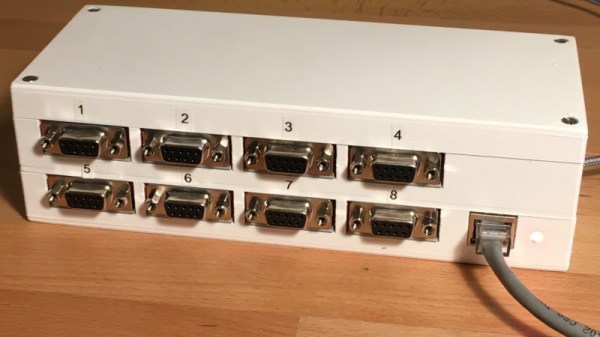
Reminiscent of the serial terminal access controllers that were found in dumb terminal sites back in the day, it’s a box with eight DB-9 connectors for serial ports and a single RJ45 Ethernet port. Inside is a Teensy 4.1 which packs a PHY and eight hardware serial ports, and a pile of MAX232 level converter modules. These have a small modification to wire in the CTS and RTS lines, and the whole is clothed in a custom 3D printed case.

The result is a very neat, almost commercial standard box that should save him quite a bit of space. Not everyone has eight devices to drive, so if you have just one how about using an ESP8266?

The Nine Dollar Laser Bed

A laser cutter bed has to be robust, fireproof, and capable of adequately supporting whatever piece of work is being done on the machine. For that reason they are typically a metal honeycomb, and can be surprisingly expensive. [David Tucker] has built a MultiBot CNC machine and is using it with a laser head, and his solution to the problem of a laser bed is to turn towards the kitchen ware store.

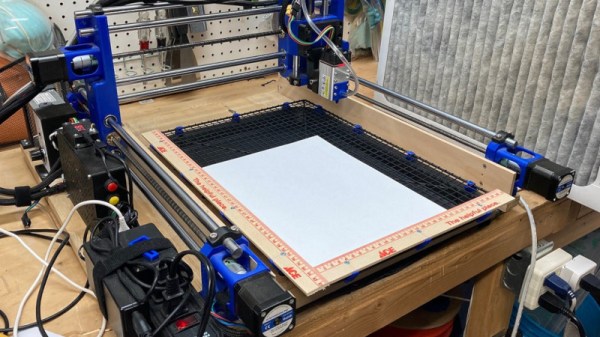
The answer lay in an Expert Grill Jerky Rack, a wire grille with a baking tray underneath it. Perfect lasering support but for its shininess, so it was painted matte back to reduce reflections and a handy set of clips were 3D printed to secure the grille to the tray.

We like this solution as it’s both effective and cheap, though we can’t help a little worry at the prospect of any laser cutter without adequate enclosure for safety. Having been involved in the unenviable task of cleaning an encrusted hackerspace laser cutter bed, we also like the idea that it could be disposed of and replaced without guilt. Do you have any tales of laser cutter bed cleaning, or have you found a cheap substitute of your own? Let us know in the comments!

A Sinclair ZX81 Clone Still Has The Power To Fascinate

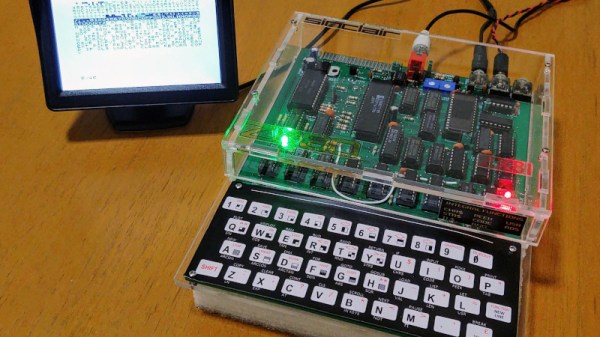
The golden age of 8-bit computing brought us pixelated graphics in bright colours, accompanied of course by chiptune music. This aesthetic is strong enough to define a collective image of a generation’s youth, even if the 1980s reality had much more of the tired 1970s leftovers about it.  The truth was that not all popular 8-bit machines had colour, sound, or good graphics, and among these limited-capability machines was Sir Clive Sinclair’s ZX81. With a Z80, 1k of RAM, a membrane keyboard, and not much else, it helped set the stage for the hugely popular ZX Spectrum which followed it. The fun’s not over though, as [Augusto Baffa] demonstrates with his modern recreation of a machine that can switch between the ’81 and its less-popular ZX80 predecessor.

Rather than a Eurocard-sized mainboard and membrane keypad, this clone copies the ZX80 with a full-sized mainboard the front of which carries the keyboard contacts. It also eschews the ULA found in the ’81 for discrete TTL. It’s based upon the venerable Grant Searle design for a homebuilt Sinclair computer, and all of the files for this version can be found in a GitHub repository.

There is a lot to be said for the ZX81 as a model for retrocomputer experimentation, because of its extreme simplicity. It may have been no great shakes in the computing department compared to many of its competitors, but it remains possibly one of the easiest of the bunch whose operation to completely understand. Also we like it for that paltry 1k of memory, teaching kids about memory constraints is a good thing in our book.

We’ve featured the diminutive ZX more than once, including a couple of years ago in our April Fools coverage.

The Noble Effort To Put OpenSCAD In The Browser

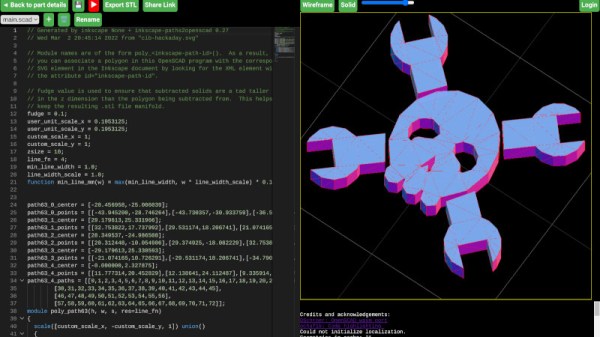
In a world of CAD packages with arcane or unfriendly interfaces there’s a stand-out player that’s remarkable because it has no interface. OpenSCAD is a CAD package for coders, in which all design elements are created in a scripting language rather than graphically. It’s maybe not for everyone but it has a significant following, and its reach has been extended further as you can now run it from within a modern web browser.

The origins of this project can be tracked back to August of 2021, when when Autodrop3D’s [mmiscool] offered a sizable bounty for anyone willing to port the parametric CAD modeler to web assembly. Developer [Dominick Schroer] ultimately answered the call with openscad-wasm, which implements the core of OpenSCAD as a JavaScript ES6 module. From there, it just needed to get paired with a user interface, and off to the cloud we go.

Opening it up and giving it a go, we found it to be a very usable OpenSCAD version, albeit a little slower to render than the desktop equivalent on a mediocre laptop. We didn’t try exporting and printing an STL, but so far it has given us no reason to believe it wouldn’t be every bit as useful as the version you’re used to.

But wait, there’s more! Parallel to this effort, [Olivier Chafik] has also been working on his own idea of what OpenSCAD in the web should be. He’s using the same core developed by [Dominick], but has combined it with the Monaco editor from Microsoft and a Javascript STL viewer. Despite being very similar, we’re happy to report there’s no rivalry here; in fact, according to the video after the break, it sounds like two the projects have already swapped a bit of code.

The move among desktop applications to move into the browser and often into a pay-to-play cloud has seemed relentless over recent years, so it’s pleasing to see a rare example of a browser migration that’s open-source. It has the handy effect of bringing the CAD package to platforms such as tablets or Chromebooks which wouldn’t normally be an OpenSCAD platform, and this we like, a lot.

Continue reading “The Noble Effort To Put OpenSCAD In The Browser”

5-Axis 3D Printing For The Rest Of Us

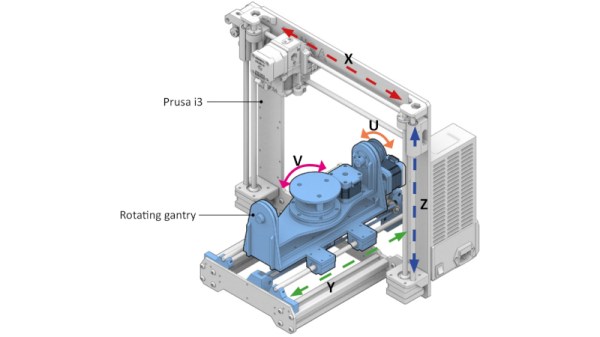
By now we’re all used to the idea of three dimensional printing, as over the last fifteen years or so it’s become an indispensable tool for anyone with an interest in making things without an industrial scale budget. There are still a few limitations to the techniques used in a common 3D printer though, in particular being tied to layers in a single orientation. It’s something that can be addressed by adding tilt and rotational axes to the printer to deliver a five-axis device, but this has not been available in an affordable form. [Freddie Hong] and colleagues have tackled the production of an affordable printer, and his solution fits neatly on the bed of a Prusa i3 to convert it to five-axis machine without breaking the bank.

The quantity and quality of the work is certainly impressive, with suitable slicing software being developed alongside the 3D printed parts to fit the two extra axes. For now all we can do is look at the pictures and the video below the break, but once the work has been presented the promise that all the necessary files will be made public. We can see versions of the hardware finding their way onto printers other  than the Prusa, and we can see this becoming yet another piece of the regular armory available to those of us who make things.

Continue reading “5-Axis 3D Printing For The Rest Of Us”

A Wireless Headphone Charger Without The Wireless

We’re all used to the idea of wireless charging, usually in the form of an induction coil on which a mobile phone or other appliance can be placed for a top-up. Not every battery-powered appliance has a built-in wireless charging coil though, meaning that despite the tech being available we all still have a jumble of wires.

[Sergio Costas] has a simple solution to conjuring wireless charging from thin air in his headphone stand, which conceals a set of charging contacts. It’s by no means a new idea and it might seem like an obvious hack, but it undeniably does away with the wires and we like it. After all, if it were that obvious, none of us would have that mess of chargers.

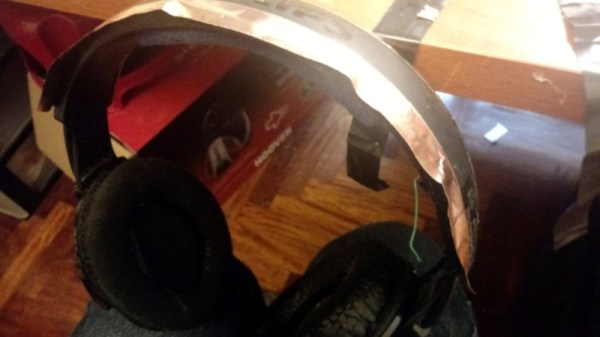
The headphones in question are a Bluetooth wireless pair, and the charging contacts have been brought out via a voltage regulator and a bridge rectifier to a pair of copper tapes along the sides of the headband. These mate with matching contacts in a 3D printed holder to which 12 VDC has been applied. Perhaps he’s just reinvented the springy contacts you’ll find on any cordless home phone, but it’s unquestionably a charger without wires.

Meanwhile if you have a conventional wireless charger, how do you know it’s working?