This Tube Preamp Has A Nixie Volume Display

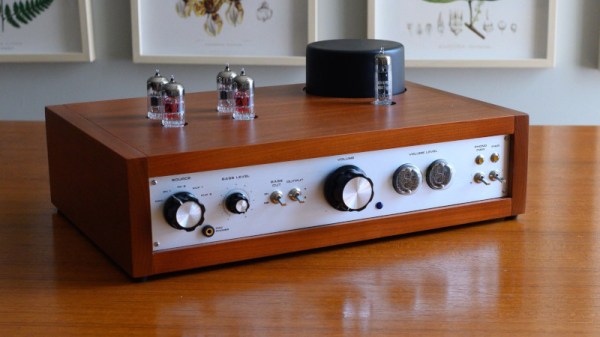
The pursuit of audiophile hi-fi is one upon which many superlatives and perhaps a little too much money are lavished. But it’s also a field in which the self-builder can produce their own equipment that is as good or often better than that which can be bought, so it provides plenty of interesting projects along the way. [Justin Scott]’s tube preamplifier is a great example, with its novel use of a pair of Nixie tubes to indicate the volume to which it has been set.

The audio side of the preamp comes courtesy of a four-tube kit from tubes 4 hi-fi, in which we notice another tube as power supply rectifier. The case is a beautifully made wooden affair with a professional front panel, but it’s the Nixies which make it a bit special. A high quality motorised potentiometer is used as a volume control, one of its multiple outputs is used as a simple potential divider to provide a voltage. This is read by an Arduino, which in turn drives the Nixies via a BCD-to-decimal decoder. The attention to detail in the whole project is at a very high level, and though he’s not shred any of its audio measurements with us, we’d expect it to sound as good as it looks.

If tube amplifiers interest you, we’ve delved into their design in the past, and it’s worth directing you to Justin’s matching amplifier, as well.
USB-C Where It Was Never Intended To Be

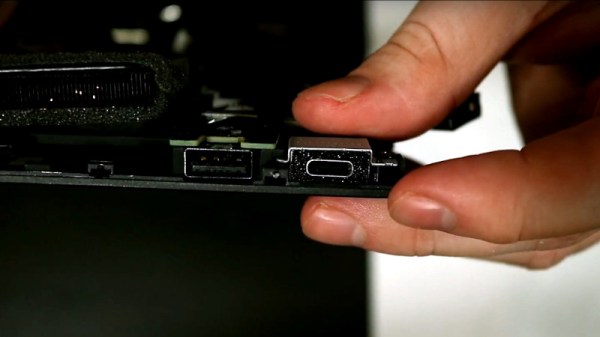
The USB-C revolution is well under way, as first your new phone, then your single-board computer, and now your laptop are likely so sport the familiar reversible round-cornered connector. We’re still in the crossover period of requiring to keep micro USB, proprietary laptop, and USB-C power supplies at hand, but the promise of a USB-C-only world is tantalisingly close. For [Purkkaviritys] that’s a little bit closer now, as he’s modified his Thinkpad T440s to take a USB charger instead of its proprietary Lenovo square-plug part. (Video, embedded below.)

At its heart is a USB-PD emulator module that does all the hard work of negotiation with the power supply, giving the laptop the DC voltage it needs. It’s not quite that simple though, because a resistor is required to reassure the laptop that it’s got a genuine power supply. The module is encased in a carefully-designed surround that neatly takes the space vacated by the original connector, and since this laptop has its internal power connector on a short cable it is made very straightforward to fit into the case. If you didn’t know it was a home-made upgrade, you could be forgiven for thinking that this laptop left the factory with a USB-C power socket.

The USB-C module used here is a versatile part. We’ve previously seen it in a soldering iron conversion.

Continue reading “USB-C Where It Was Never Intended To Be”

A Stylish Raspberry Pi Camera

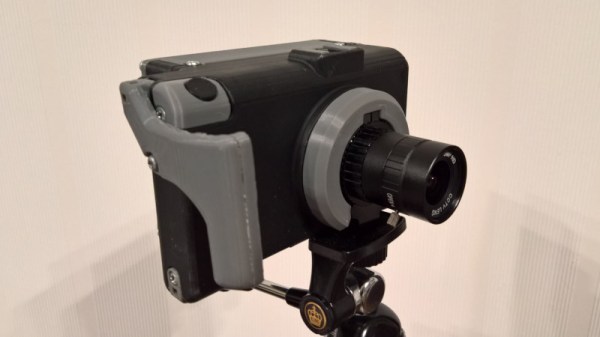
The Raspberry Pi HQ camera module is an exciting product that for the first time puts something close to a decent quality interchangeable lens camera into the hands of hardware hackers. It’s already attracted the attention of those who have a wish to explore the boundaries of camera form factors. Our latest entrant in this field comes courtesy of [BBまどーし], who has opted for a very good 3D-printed analog of a conventional compact camera.

On the front as you might expect is the module, concealed behind a smart plastic ring. Behind that is a battery compartment, concealing not the brace of 18650s or the bare LiPo pouch that you might expect, but a 10,400 mAH USB power bank. Behind that is something approaching a conventional Raspberry Pi case, designed to take a Hyperpixel screen. The battery might seem an unadventurous choice, but it serves to highlight just how much bang for your buck can now be found in compact power banks. It may not have a hacker aesthetic, but you can’t argue with its cost and simplicity.

The details are the interesting part of this design, for instance it has a standard accessory shoe printed into its top. There is also a shutter button, but they admit to not being a software wizard enough to get it working. Perhaps a quick look at this Pi Camera in a 1970s Merlin game would be in order.

There’s An Engineer In Germany I’d Like A Word With; Tale Of A Crumbling Volkswagen Lock

In common with quite a few in the hardware hacking community, I have a fondness for older vehicles. My “modern” ride is an older vehicle by today’s standards, a Volkswagen Polo 6N made in the late 1990s. It’s by my estimation a Good Car, having transported me reliably back and forth across the UK and Europe for several years.

Last week though, it let me down. Outside the church in a neighbouring village the driver’s door lock failed, leaving me with my igniton key stuck in the door, and a mildly embarrassing phone call to my dad to bring the Torx driver required to remove the assembly and release it. I am evidently not 1337 enough, I don’t carry a full set of Torx bits with me everywhere I go. The passenger side lock has never worked properly while I’ve had the car, and this is evidently my cue to sort it all out.

Continue reading “There’s An Engineer In Germany I’d Like A Word With; Tale Of A Crumbling Volkswagen Lock”

Grok The Z80 With This Simulator

Many of us will have at some point encountered a Z80 microprocessor, whether we’ve bare-metal programmed for it, or simply had a go at blasting some invaders on a game system using one. Like all the processors of its era, it’s got a relatively simple and accessible internal block diagram, so there’s a good chance that readers well even know how it works, too. But do any of know how it really works, down to the gate, transistor, and net level? [Goran] does, because he’s written a Z80 netlist simulator that allows the running of code alongside the examination of the chip and its signals. It’s not particularly fast, achieving a modest 2.3kHz clock speed when run of a fairly high-end PC, but we’re guessing readers needing to run Z80 code for anything other than learning would use the real thing anyway.

There’s a video of the software in operation which we’ve placed below the break, and we can see it will be a fascinating tool even to people who aren’t dedicated reverse engineers. To be able to bring up a logic analyzer view of the internals of a processor while it is in operation is truly astounding if you are used to it as a black box, and to have logic diagrams at your fingertips rather than puzzling out individual transistors really gives a window into what is going on.

This isn’t the only such simulator out there, in the past we’ve mentioned Visual6502, when we covered the Monster 6502.

Continue reading “Grok The Z80 With This Simulator”

3D Printer Revives Large Format Camera

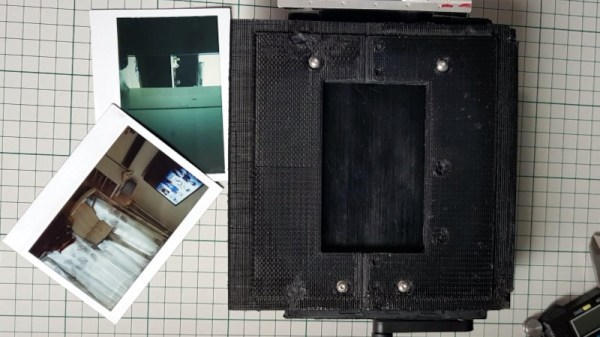
With a quarter-century of more of consumer digital cameras behind us, it’s easy to forget that there was once another way to see your photos without waiting for them to be developed. Polaroid Land cameras and their special film could give the impatient photographer a print in about a minute, but sadly outside a single specialist producer, it is no longer a product that is generally available.  [The Amateur Engineer] sought an alternative for a large format camera, by adapting a back designed for Fuji Instax film instead.

Lomography, the retailer of fun plastic cameras, had produced an Instax back for one of their cameras, and to adapt it for a Tachihara large format camera required a custom 3D-printed frame. Being quite a large item it had to be printed in three pieces and stuck together with epoxy. Then a series of light leaks had to be chased down and closed up. The result is a working Instax back for the camera, which appears to deliver the photographic goods.

We’ve seen a few digital backs for larger cameras produced with scanners, but we rather like this linear CCD one.

This 68k Board Is About As Simple As It Gets

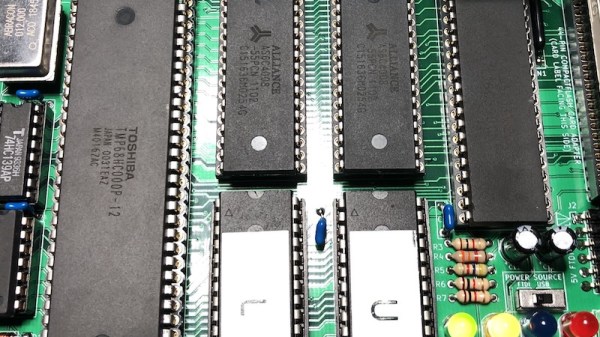
For those of us who remember the Motorola 68000 microprocessor, it’s likely that a sizeable quantity of those memories will come in the form of a cream or grey box with a Commodore, Atari, or Apple logo on it These machines were the affordable creative workstations of their day, and under the hood were a tour de force of custom silicon and clever hardware design. We might, therefore, be excused for an association between 68000 based computers and complexity, but in reality, they are as straightforward to interface as the rest of the crop of late-1970s silicon. We can see it in [Matt Sarnoff]’s 68k-nano, about as simple a 68000-based single-board computer as it’s possible to get.

But for all its simplicity, this board is no slouch. It packs a megabyte of RAM, 64k of ROM, a 16550 UART, and an IDE interface for a CompactFlash card. There is also provision for a real-time clock module, through an interesting bit-banged SPI interface from the 16550’s control lines. There appears also to be a 50-pin expansion header.

Software-wise there is a ROM monitor that provides test and housekeeping functions, and which loads an executable from the card plugged into the IDE interface if there is one. This feature makes the board especially interesting, as it opens up the possibility of running a μClinux or similar kernel for a more fully-featured operating system.

The 68k doesn’t receive the attention here that some of its 8-bit contemporaries do, but it still appears from time to time. We’ve certainly featured at least one other 68000-based SBC in the past.

Thanks [Anton] for the tip.