Arduino Nano Powers Reverse Polish Notation Calculator

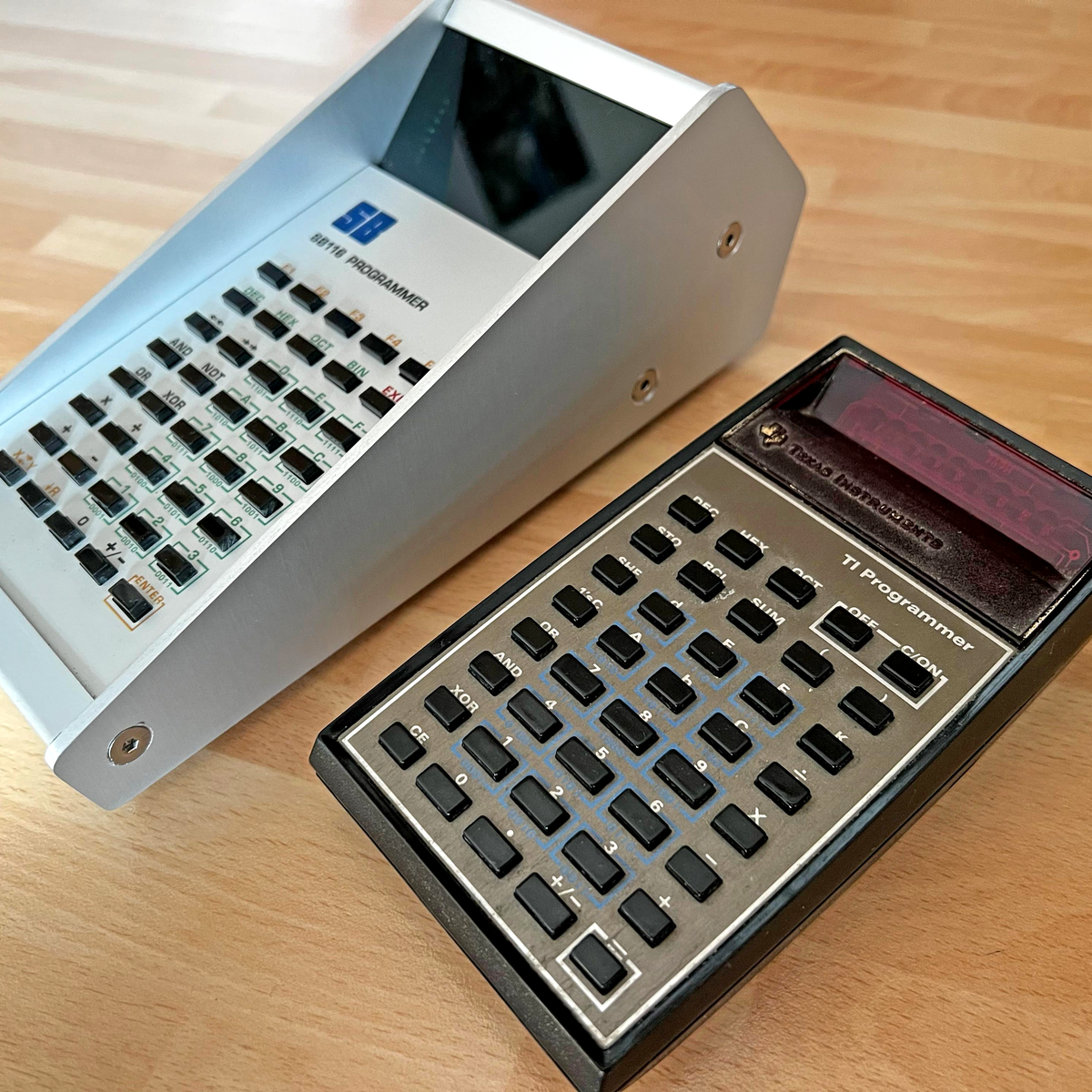
There’s something about Reverse Polish Notation (RPN) and the calculators that use it. It calls to mind a time when a calculator was a serious tool, and not just a throwaway toy. Created in the legacy of such calculators by HP and Texas Instruments, [Simon Boak] shows off his SB116, sporting an Arduino Nano under the hood. It’s a fully custom design, with a hand-built metal case, a custom PCB for the keyboard, and a tiny OLED display for maximum retro green goodness.

The impetus for this build was to replace a particular calculator, a well-used TI Programmer, that’s useful for working with 6502 assembly. The SB116 supports binary, octal, decimal, and hex; and boasts some downright useful functions — AND, NOT, OR, XOR, and bitshifts. The source code is available, but you’re on your own for the case and keyboard. And for maximized retro faux-nostalgia, [Simon] designed a box that would have looked right at home on an 80s store shelf.

Stick around for more retro-modern takes on calculators, or tales of repairing a genuine vintage model.

Bootstrapping The Old Fashioned Way

The PDP-11, the Altair 8800, and the IMSAI 8080 were some of the heroes of the computer revolution, and they have something in common — front panel switches, and a lot of them. You probably have a fuzzy idea about those switches, maybe from reading Levy’s Hackers, where the painful process of toggling in programs is briefly described. But how exactly does it work? Well thanks to [Dave Plummer] of Dave’s Garage, now we have a handy tutorial. The exact computer in question is a reproduction of the IMSAI 8080, the computer made famous by a young Matthew Broderick in Wargames. [Dave] managed to score the reproduction and a viewer saved him the time of assembly.

The example program is a Larson Scanner, AKA making an strip of lights push a pulse of light across the strip. [Dave] starts with the Assembly code, a scant 11 lines, and runs it through an assembler available online. That gives us machine code, but there’s no hex keypad for input, so we need those in 8-bit binary bytes. To actually program the machine, you set the address switches to your start-of-program location, and the data switches to your first byte. The “deposit” switch sets that byte, while the “deposit next” switch increments the address and then stores the value. It means you don’t have to key in an address for each instruction, just the data. Get to the end of the program, confirm the address is set to the start, and flick run. Hope you toggled everything in correctly. If so, you’re rewarded with a friendly scanner so reminiscent of 80s TV shows. Stick around after the break to see the demonstration!
Continue reading “Bootstrapping The Old Fashioned Way”

This Week In Security: One-click, UPnP, Mainframes, And Exploring The Fog

A couple weeks ago we talked about in-app browsers, and the potential privacy issues when opening content in them. This week Microsoft reveals the other side of that security coin — JavaScript on a visited website may be able to interact with the JS embedded in the app browser. The vulnerability chain starts with a link handler published to Android, where any https://m.tiktok[.]com/redirect links automatically open in the TikTok app. The problem here is that this does trigger a redirect, and app-internal deeplinks aren’t filtered out. One of these internal schemes has the effect of loading an arbitrary page in the app webview, and while there is a filter that should prevent loading untrusted hosts, it can be bypassed with a pair of arguments included in the URI call.

Once an arbitrary page is loaded, the biggest problem shows up. The JavaScript that runs in the app browser exposes 70+ methods to JS running on the page. If this is untrusted code, it gives away the figurative keys to the kingdom, as an auth token can be accessed for the current user. Account modification, private video access, and video upload are all accessible. Thankfully the problem was fixed back in March, less than a month after private disclosure. Still, a one-click account hijack is nothing to sneeze at. Thankfully this one didn’t escape from the lab before it was fixed.

UPnP Strikes Again

It’s not an exaggeration to say that Universal Plug and Play (UPnP) may have been the most dangerous feature to be included in routers with the possible exception of open-by-default WiFi. QNAP has issued yet another advisory of ransomware targeting their devices, and once again UPnP is the culprit. Photo Station is the vulnerable app, and it has to be exposed to the internet to get pwned. And what does UPnP do? Exposes apps to the internet without user interaction. And QNAP, in their efforts to make their NAS products more usable, included UPnP support, maybe by default on some models. If you have a QNAP device (or even if you don’t), make sure UPnP is disabled on your router, turn off all port forwarding unless you’re absolutely sure you know what you’re doing, and use Wireguard for remote access. Continue reading “This Week In Security: One-click, UPnP, Mainframes, And Exploring The Fog”

How To Be A Stinkin’ Chess Cheat — Sockfish

[James Stanley] enjoys chess, isn’t terribly good at it, and has some dubious scruples. At least, that’s the setup for building Sockfish, a shoe-to-Pi interface to let you cheat at chess. We’re pretty sure only the first point is true, but the build is impressive all the same. It’s a pair of 3D printed shoe inserts, with two pressure-sensitive inputs on each insert, coupled with a vibration motor in each. Tap out your opponent’s moves during the game, and the Stockfish software will buzz instructions back to you. Just follow the instructions, and you too can be a chess master.

In practice things went a bit awry, as poking in encoded move data with one’s feet isn’t the easiest task, and discerning the subtle tickles on the toes is error-prone at best. [James] arranged a match against an unsuspecting friend (in the name of science), and managed to fat-finger (fat-toe?) the inputs on both games, leading to Sockfish instructing him to make illegal moves.

This seemed like too much cheating, even for [James], so he played the rest of each game on his own abilities, winning one of the two. Once the deed was done, our anti-hero gladly doffed his shoes to show off his gadgetry. After some debate, they concluded the device might “bring the game into disrepute” if used for greater evil. Naturally [James] is already working on an improved version.

Thanks to [Abe Tusk] for the tip!

Magnetic Maniac Manages Mangled Memory

Ahh, floppy disks. Few things carry nostalgia quite like a floppy — either 3 1⁄2 or 5 1⁄4, depending on which generation of hacker you happen to be. (And yes, we hear you grey-beards, 8-inch floppies were definitely a thing.) The real goodies aren’t the floppies themselves, but what they carried, like Wolfenstein 3d, Commander Keen, DOS, or any number of other classics from the past. Unfortunately a bunch of floppy disks these aren’t carrying anything anymore, as bit rot eventually catches up with them. Even worse, on some trashed floppies, a format operation fails, too. Surely, these floppies are destined for the trash, right?
Continue reading “Magnetic Maniac Manages Mangled Memory”

Fail Of The Week: Bronze-Brazed Wrought Iron

[Will Stelter], a promising young blacksmith working out of Montana, had a terrific idea for a unique composite material for finishing off a knife build. This build is a collaboration between multiple blacksmiths, and as the youngster of the group, [Will] really wanted to pull out the stops and finally make a material he’d been contemplating for years to impress the elders. He knows that if you try to forge wrought iron at too low a temperature, it develops cracks and splits. Could you do this on purpose, and then fill these cracks with bronze? It would be quite the stunning material, with the bright bronze veins running through the dark iron. He had to try.

Unfortunately, our young experimenter ran into some problems that didn’t have enough time to overcome. First, getting the bronze to flow and fill the voids of the iron was a challenge, particularly when heating with a torch. Throwing the whole experiment into a forge resulted in the bronze leaking through the enclosure. The most promising attempt was a beefed-up box, set in an oven for about 20 minutes, with the temperature high enough to liquefy the bronze. It was looking great, until he cut into it and found too many air pockets for a workable billet.

The attempt was a failure, but we’re delighted that [Will] went ahead and put the video out there anyway. And if you know how to make this work, go drop a comment on his channel, and we’ll all look forward to a part two, where he finally nails the technique.
Continue reading “Fail Of The Week: Bronze-Brazed Wrought Iron”

This Week In Security: Malicious Clipboards, Snakes On A Domain, And Binary Golf

There’s a bit of a panic regarding Chromium, Google Chrome, the system clipboard, and of all things, Google Doodles on the New Tab Page. It’s all about Chromium issue 1334203, “NewTabPageDoodleShareDialogFocusTest.All test fails when user gesture is enforced”. You see, Chromium has quite a large regression test suite, and Google engineers want to ensure that the Google Doodles always work. A security feature added to the clipboard handling API happened to break a Doodles test, so to fix the Doodle, the security feature was partially reverted. The now-missing feature? Requiring user interaction before a page can read or write to the clipboard.

Now you understand why there’s been a bit of a panic — yes, that sounds really bad. Pages arbitrarily reading from your clipboard is downright malicious and dangerous. And if no interaction is required, then any page can do so, right? No, not quite. So, Chrome has a set of protections, that there are certain things that a page cannot do if the user has not interacted with the page. You might see this at play in Discord when trying to refresh a page containing a video call. “Click anywhere on this page to enable video.” It’s intended to prevent annoying auto-play videos and other irritating page behavior. And most importantly, it’s *not* the only protection against a page reading your clipboard contents. See for yourself. Reading the clipboard is a site permission, just like accessing your camera or mic.

Now it’s true that a site could potentially *write* to the clipboard, and use this to try to be malicious. For example, writing rm -rf / on a site that claims to be showing off Linux command line tips. But that’s always been the case. It’s why you should always paste into a simple text editor, and not straight into the console from a site. So, really, no panic is necessary. The Chromium devs tried to roll out a slightly more aggressive security measure, and found it broke something unrelated, so partially rolled it back. The sky is not falling.
Continue reading “This Week In Security: Malicious Clipboards, Snakes On A Domain, And Binary Golf”