Hackerspace Intros: EgMakerSpace In East Gippsland Australia

[Scott Lambshed] took some time to shoot a video tour of egMakerSpace’s new digs. This hackerspace is located in East Gippsland Australia, which is to the East from Melbourne. We know the banner image we chose isn’t all that descriptive, but just look at all of that space! They’ve got a bounty of rooms to use for everything from crafts, to machine/wood shop, to retro computing. There’s even a nice outdoor patio area which was a bit overgrown to start with but cleanup has already begun.

The group is just getting moved into what must have been an old hospital or school. Aside from some network infrastructure, a room full of couches, and a few tools, there’s not a lot in place yet. But one thing that is already looking quite good is their horde of electronics components. The latter half of the video shows boxes, bins, trays, and tackle boxes full of goodies just waiting to make it onto the next protoboard project.

[Scott] is hoping to get the word out in the area about egMakerSpace, and that’s exactly what these introductions are for. So grab you favorite video capture device and send us your own local hackerspace tour.

Continue reading “Hackerspace Intros: EgMakerSpace In East Gippsland Australia”
One Wire Reads The Keypad From The APRS Radio Mic

[Shane Burrell] decided to spend some time learning how the keypad on the his Kenwood TM-710A APRS radio mic works. It uses a different technique than you might think. Normally a grid of buttons is scanned as a matrix to detect keypresses, but this hardware actually counts pulses on a serial wire to take each reading.

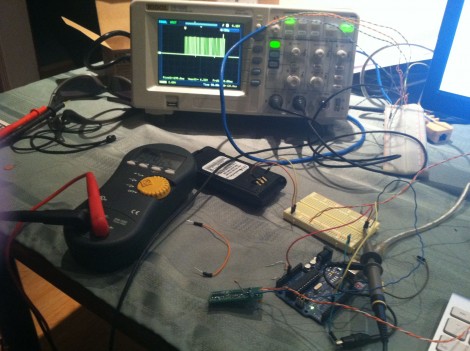
The stock radio sends a steady digital pulse to the handset and with each pulse the mic pulls the line low. It then uses a 4017 decade counter to see what comes back. If the edge count matches it means nothing is pressed, but a change in the number of pulses returning to the base unit can be used to extrapolate which button has been pressed.

[Shane] went on to implement this control technique using an AVR chip in place of the  radio base unit. He used the data gained from measuring the pulse behavior using an oscilloscope to write the firmware for the project. He filmed a bit of a demo after the break which shows his findings.

We’re not quite sure how this would translate into your own home-brew projects, but the thought of scanning a keypad with two pins of a uC is quite desirable. Sure there is the 555-timer frequency technique, but we’re always down with new ideas.

Continue reading “One Wire Reads The Keypad From The APRS Radio Mic”

Flying Microscope Build Seems Way Too Nice For A Home Lab

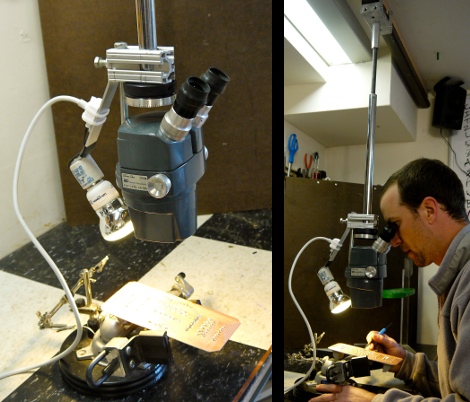
This flying microscope is a tool which [Darrell Taylor] can be very proud of. He wanted to have an inspection microscope for working with surface mount projects. He got his hands on a binocular version for a song and dance because it came without a stand. Initially he built a simple rig but if it wasn’t in the right place it was hard on the body, and the upright section was getting in the way of larger projects.

This time around he used a hanging track system instead of a stand. He had some aluminum track on hand which was originally meant for use with a sliding glass door. He fabricated a trolley to interface with the track, and added a vertical rod to support the microscope. This makes it easy to slide the unit to the side when not in use, and provides for some height adjustment as well. To add to the functionality he included a light on the opposite side of the scope. This keeps the project illuminated without shadows being cast by his hands or the scope itself.

Level Conversion With Plenty Of Options

[Andy Brown] wanted one level converter to rule them all, so he set out to build his own which included plenty of options.

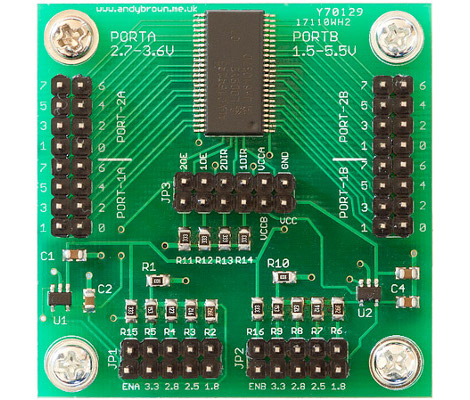
The chip at the top and center is a pretty neat little device. It’s an NXP 74ALVC164245DL. In addition to having an incredibly long and seemingly meaningless part number, it contains a pair of bi-directional octal ports. It runs very fast (about 333 MHz) and supports voltages up to 5V on one side, and up to 3.3V on the other. As long as you stay below those maximums you can choose your own target voltages. To do so, he included a couple of adjustable voltage LDOs which are set using jumpers.

But wait, [Andy’s] not finished quite yet. If the jumpers don’t offer the target voltage you’re looking for he also included breakout pins so that you may inject the voltage using an external source. He even included the option to use the LDOs on their own, without the level converter. How do you keep all of these configurations straight? He build a little web form that lets you set your desired parameters and it tells you which jumper should be connected.

Directly Interfacing A Joystick With An Xbee

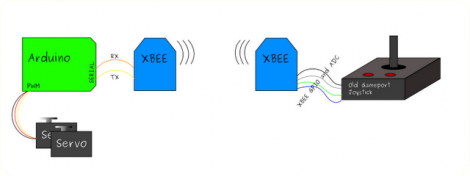
We see a pretty steady stream of projects that use Xbee modules. They’re one of the more reliable and popular ways to add a wireless aspect to your project. But we don’t often see them used to their full potential. Since there’s a microcontroller onboard, many simple tasks can be accomplished without the need for an addition microcontroller. [Stephen’s] showing how this can be done, by reading the stick and button data from a game controller using only an Xbee module.

His test setup uses an Arduino to drive servo motors on the receiving end of the hardware. You can’t do everything with Xbee, but the sender is where this concept comes into play. [Stephen] grabbed an older gamepad which is meant for use with a PC game port. The joystick uses potentiometers to measure position data, and the buttons simply complete a circuit. He altered the joystick by adding voltage dividers to the pots, and pull-up resistors to the buttons. From there he just wired it up to the Xbee and set up the module’s firmware to package and transmit the data. It’s a nice way to do more with less.

We had a little discussion here at Hackaday about Xbee modules which seem to be in short supply. Some of us think it’s due to the flooding in Thailand. If you’ve got some info on the situation, or just want to share your own conspiracy theory, let us know in the comments.

Metal Detection Using An Inductor Instead Of A Clock Crystal.

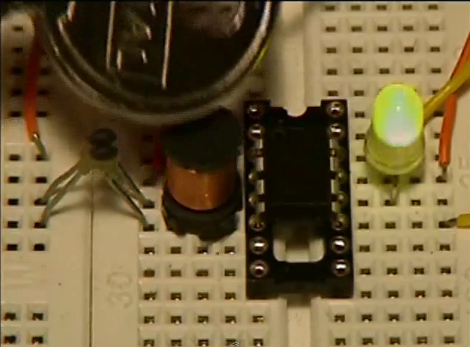
This project from a few years back is an interesting take on a metal detector. Instead of building a detection circuit, [Bruno Gavand] replaced the external clock crystal with an inductor. Here you can see the inductor coil next to the PIC 12F683. You can see two components jumping from one breadboard to the other. These are smoothing capacitors on the inductor lines.

The watchdog timer for the chip is run by the internal RC oscillator. When the external crystal receives a pulse due to metal inducing a current in the coil, the value of the watchdog timer is compared to it. This data is filtered and if the proper parameters are present the green LED blinks. This is bicolor LED. If the inductor circuit is functioning properly it will blink red at power up. [Bruno] says that results will vary based on that inductor so you may need to try a few to get the calibration light to blink.

We’re thinking this would make a simple stud finder (by detecting where the nails/screws are in the wall). Check out the demo after the break, then let us know what you would use this for by leaving a comment.

Continue reading “Metal Detection Using An Inductor Instead Of A Clock Crystal.”

Light Programming For A Clock

+

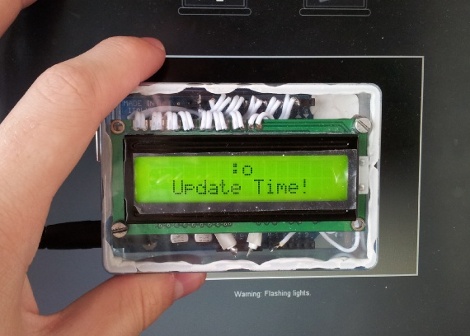
So at first glance we were thinking there wasn’t much special about this clock. It’s based on an Arduino and displays the time using a character LCD screen. But then we realized that there’s no battery-backed RTC and no buttons. How the heck do you set the time on this thing? [Mossblaser] is using a light programmer to set the time using a computer screen.

We’ve tried nearly the same data transfer technique before, using a white and black flashing computer screen to push Manchester encoding to a light dependent resistor. We were met with limited success, but you can see that [Mossblaser’s] rig is much more reliable and we think there’s a few reasons behind this. First, he’s only sending five bits per seconds, a very slow speed when it comes to digital transmissions. This helps to make up for slow LCD screen refresh. Also, the LDR is surrounded by material on the back of the case that will help to block out ambient light. And finally, he’s using a smaller part of the screen instead of flashing the whole thing. This may result in more accurate timing. You’ve got to admit, this is pretty slick!

Continue reading “Light Programming For A Clock”