Sensor Array Tries To Outdo The Other Guys

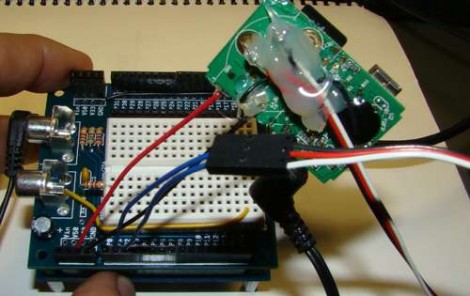
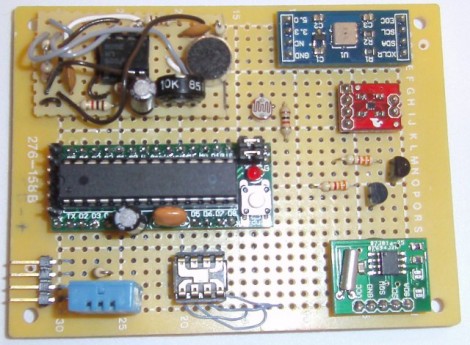
The team over at the Louisville Hackerspace LVL1 is not going to be outdone when it comes to collecting environmental data. They put together this Frankenstein of sensor boards that lets you collect a heap of data showing what is going on around it.

At the center-left a small Arduino clone is responsible for collecting the data. Data storage is not talked about on their write-up, but if that’s an ATmega328 chip you should be able to work out an easy way to store data on the 1k of internal EEPROM. If that’s not enough, there is an I2C bus included on the board making it easy to add a compatible EEPROM.

The sensor on the bottom left should look familiar. It’s a DHT11 temperature and humidity sensor we’ve seen popping up in projects lately. But wait, there’s also a TMP102 temperature sensor; but that’s not the end of it. A BMP085 pressure sensor also includes a third temperature sensing option. Want to see when the lights go on in the room? There’s a CdS sensor and a TSL230R Lux sensor for that. An op-amp circuit can measure the sound level in the room via one of the Arduino’s ADC pins. And finally, an RTC board is used for time stamping the data.

Obviously this is overkill, and we’re sure it’s meant as a test platform for various sensors. All of them have been mounted on the protoboard and wired up using the point-to-point soldering method.
Adding Sound To Children’s Museum Exhibits

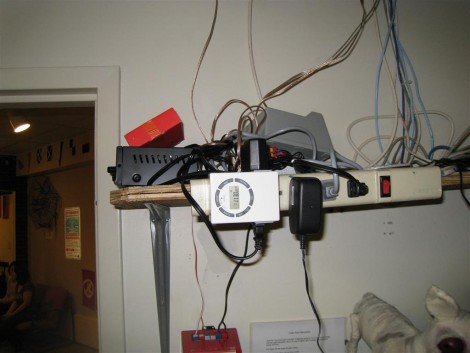
Believe it or not, the local Children’s Museum staff was happy that [Bill Porter] left this mess of wires and equipment in one of their offices. It makes up an ambient sound system for a couple of their exhibits. A movie without sound just doesn’t fully entertain, and the same can be said for these exhibits. The ambient sound that goes with a boat room, and a hospital room in the Museum really helps to snag your attention. And [Bill’s] material cost came in at just over $200 for both rooms.

He started off by purchasing a speaker, amp, and MP3 breakout board (SparkFun). The speaker mounts in one of the ceiling tiles, with the wire running to a different room where the audio equipment is housed. There were a couple of problems with this; the museum staff forgot to turn on the system, and for all of its expense this only provided one room with audio. Bill figured that since only one speaker was being used he could make an audio file with a different clip on the left and right channel, then feed them to different rooms. He also added that programmable timer so the sounds will turn themselves on and off.

This isn’t the first time we’ve seen hacks end up as museum pieces. Check out this other project that rigs up some interactive telephones.

Intelligent Flashlight Will Literally Show You The Way

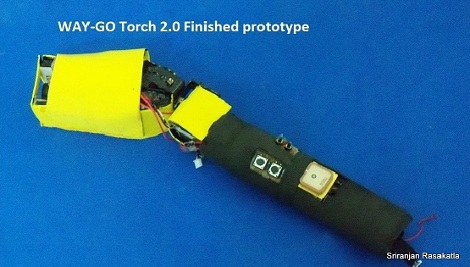
Flashlights are so 20th Century. Be it the incandescent type that popped up very early on, or LED models with came around in the 90’s, there’s not much excitement to the devices. But [Sriranjan Rasakatla] is doing his best to change that. This is his WAY-GO Torch, an intelligent flashlight (a Smart Light?) that will not just light your path, but overlay useful data on it.

At the front of the unit a pico projector is housed on a jointed assembly. This allows the device to project data on the ground in front of you. Using a digital compass and GPS module, it can show the polar coordinates, guide you on your way, or provide information about the buildings around you. The motorized mount provides image stabilization based on IMU data. Check out the demonstration video after the break. It shows general functionality in the first part of the clip, with some footage of the stabilization system at about 4:30.

This really does seem like it came right out of a Sci-Fi novel. It’s useful, but the complexity makes it surprising that [Sriranjan] was able to pull it off. We wonder how the battery life is on the device, but it can’t be any worse that one of those really huge flashlight builds.

Continue reading “Intelligent Flashlight Will Literally Show You The Way”

$3 Adds Sweet Tunes To Your Project

It’s a fun time to design your own MP3 player, lovingly adding in features to a meticulously crafted user interface. But sometimes you just want a quick and cheap way to add music to a project. [Jeff Ledger] will show you how to do just that using some knock-off hardware from overseas. Instead of a proper breakout board — which can cost a bundle — he used a generic MP3 player acquired for $3 from an eBay seller.

Cracking open the case you’ll see that you actually get a lot for your triad of Washingtons. We know, it may be of questionable quality (see this feature about cheap PSU problems) but we’re not building mission critical hardware now are we? Inside is a rechargeable Lithium battery for use with another project, and a chip-on-board device with attached SD card slot, audio jack, and USB port. The battery inputs are used to solder the MP3 pcb to the power rails on your project. To control the playback, just make connections to the button pads as [Jeff] describes in his post. It sounds like this will work with any MP3 player which runs at either 3.3V or 5V.

Just In Case You Didn’t Know How Awesome Laser Cutters Really Are

[Alex] got his hands on an Epiloge laser cutter the easy way — the company he works for bought one. We’re sure he’s not trying to rub it in, but he really does make the tool look and sound cool in the post he wrote purely to show off the new toy hardware.

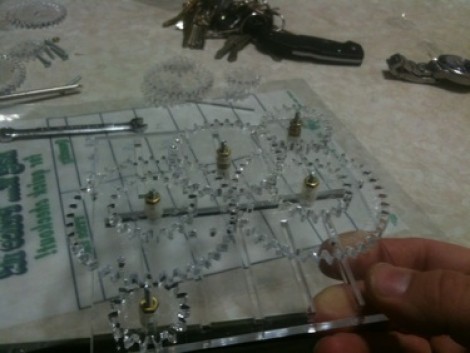
This model is a CO2 laser and it’s capable of etching and cutting a variety of materials. It does so with a 1200 DPI resolution at 0.005 pitch. The samples of engraved text and images show the clean lines and shapes this type of accuracy can achieve. The most stunning example is a piece of anodized aluminum which ends up showing some fantastic contrast that would make perfect face plates for project enclosures. Then there’s the cutting feature which is responsible for the gear demo seen above. We were surprised to hear that it will cut through acrylic but not polycarbonate.

After the break we’ve embedded [Alex’s] video. The camera is focused on the cutter as it engraves some lettering, then cuts out a gear. During the process he discusses what he’s learned about the device, sharing some interesting tidbits along the way.

We’re hoping to see some cool stuff like this from [Grenadier] who recently won a similar 40 Watt CO2 laser from Full Spectrum.

Continue reading “Just In Case You Didn’t Know How Awesome Laser Cutters Really Are”

Electronics That Tell You To Wash The Dishes

Nothing stinks up the house like a sink full of dirty dish. Well, a full trash can will do it to a greater extent, but that’s a project for another day. In what must be an overreaction to a perpetually full sink of dishes at his London Hackerspace, [Tom] built a web-connected dirty dish detector.

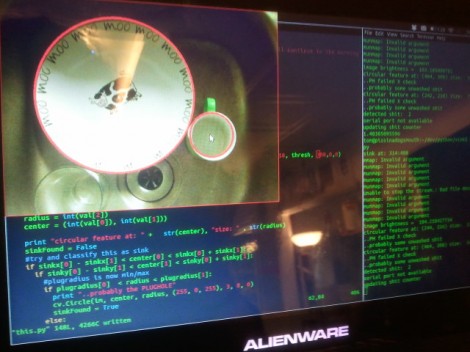
He calls it the Great OpenCV Wash-Up Detector. The system features a series of different signals to ‘remind’ forgetful geeks about cleaning up after themselves. The initial implementation uses a traffic signal to alert the room that there are dirty dished to be cleaned; illuminating the different colors to show how long the sink has been full. [Tom] also plans to add message bursts to the IRC room, and air horns when the situation gets dire.

As the name implies, this uses OpenCV to detect circles in the sink. A webcam has been mounted above it pointing straight down, providing a clear input image to detect plates, mugs, and the like. [Tom] even wrote some code that disables the system when the lights are turned off.

Of course, this may train offenders to leave the dishes on the counter where the detector can’t see them.

Python Maps Mouse Movements On An LED Matrix

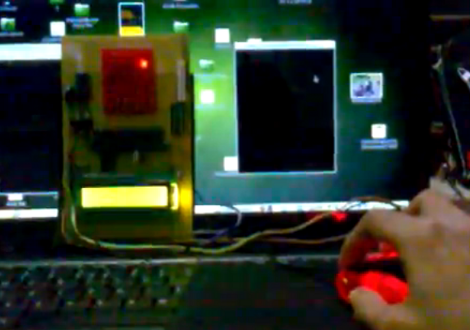
[Vinod Stanur] is working with a mouse input and a microcontroller driven LED matrix. The mouse cursor is tracked inside of a window by Python and the resulting coordinates on the LED grid are illuminated. He calls it an LED matrix “Paint Toy” because one of the features he’s included lets the user create pixel art like in MS Paint.

The 10×8 grid of lights is controlled by a PIC 16F877A. This display orientation is perfect for the 8-bit controller, which uses an array of ten bytes to keep track of the pixel data. A computer running his Python application (which uses the Pygame module to track the mouse movements) communicates with the display board via an RF connection. Five bytes plus a stop character make up the communication packet. The first two bytes contain the coordinates of the cursor, the other three bytes contain mouse button status.

As you can see in the demo after the break, the system is very responsive. The mouse can be moved quickly without latency issues, and if the cursor leaves the tracking window it gets picked up right away when it re-enters.

Continue reading “Python Maps Mouse Movements On An LED Matrix”