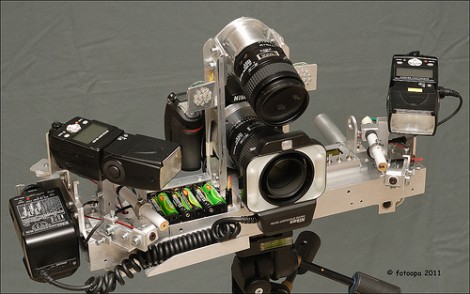
Laser-triggered Camera Rig Update: 2011 Version

[Fotoopa] keeps churning out new iterations of his laser-triggered camera rig. This is his latest, which he calls the 2011 setup. Regular readers will remember that we just covered a different version back in November; that one was the 2010 rendition. It had two DSLR cameras offset by 90 degrees with mirrors to face forward. This time around he has gone back to the single camera setup which was what he used on the first and second versions seen way back in 2008.

Whew, that’s a lot of links to specialty DSLR hardware. Let’s bring it back to this newest model (the link at the top). The biggest improvement is the shutter delay between when the laser beam is tripped and the image is take. [Fotoopa] reports that he’s managed to reduce that time down to 3.3 milliseconds. This is thanks to an external shutter replacement which improves on the stock shutter’s 52 millisecond delay.

For those that are seeing this for the first time. [Fotoopa] uses this rig to photograph insects in motion. A laser trip wire is responsible for triggering the shutter, and it does so with stunning results!
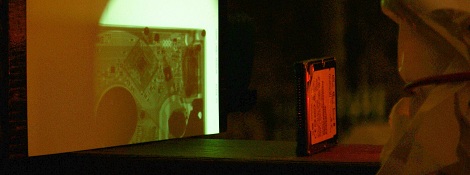
[Grenadier] Wins The Laser Cutter For His Portable X-ray Project

The results of the Full Spectrum Laser contest over at Build Lounge have been announce. The top prize of a 40 watt deluxe laser cutter goes to [Grenadier] for the portable x-ray machine we saw at the beginning of the month. We think this is an excellent choice for top prize because, come on, this is pretty hard-core.

Taking second place was a Christmas light show choreographed to music. The open spaces of the University of Minnesota hosted the installation. We’ve embedded a video of the performance after the break.

Third prize went to the QC Co-lab Hackerspace for their light wall. It uses the ever popular GE Color Effects lights, with each bulb housed in a vacuum formed pyramid which acts as a diffuser.

There were also several honorable mentions. There’s a special place in our heart for [Jack Buffington’s] solar clock which was included in this group. We think the use of fiber optics to pipe the sunlight into a machined index ring is ingenious. And you’ve got to give him credit for developing a project that uses no electricity and almost no moving parts (there is a slider to adjust for daylight savings time).

Continue reading “[Grenadier] Wins The Laser Cutter For His Portable X-ray Project”

Replacing An Overheating Tablet Power Supply

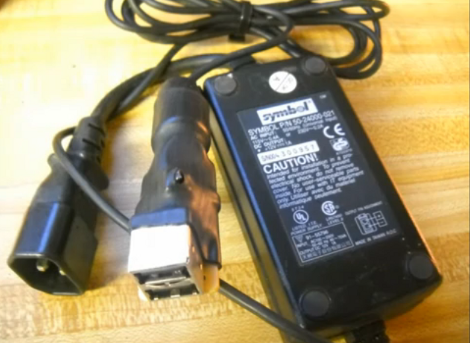
[Dave] has an ASUS tablet PC with a little problem. The device is charged via the docking connector’s USB cable when plugged into a special wall transformer. The problem is that the wall unit tends to overheat, and is shut down by a thermister inside to avoid permanent damage. The word on the Internet is to drop it in a zipper bag and chill it in the freezer for a bit. Although this works, it’s not the permanent solution that he was looking for. Instead, he hit the parts bin and built his own power supply replacement without buying anything.

The device is simply looking for 12V on the power pin (pin 1) of the USB cable. [Dave] dug through his mountain of unused AC adapters and found one that fit the voltage and current specs of the stock unit. He also grabbed a dusty old motherboard and plucked the USB ports off of the back. A bit of protoboard makes for a good base to connect the AC adapter wires to the ports, which was then covered with one big shrink tube. The result is seen above, and demonstrated in the clip after the break.

Continue reading “Replacing An Overheating Tablet Power Supply”

Cheap WiFi Bridge For Pen Testing Or Otherwise

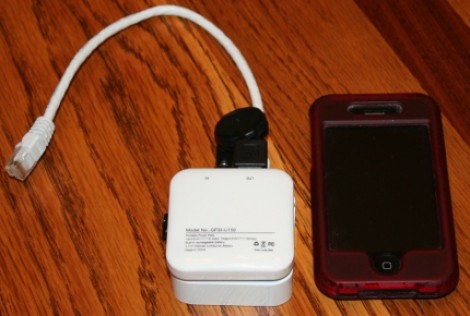
Twenty three dollars. That’s all this tiny pen-testing device will set you back. And there really isn’t much to it. [Kevin Bong] came up with the idea to use a Wifi router as a bridge to test a wired network’s security remotely. He grabbed a TP-Link TL-WR703N router, a low-profile thumb drive, and a cellphone backup battery; all cheaply available products.

No hardware hacking is necessary to connect the three components. The only other preparation needed is to reflash the router firmware with OpenWRT and load it up with common pen-testing software packages like Netcrack and Airhack.

[Kevin] calls this a drop box, because you find an Ethernet jack, plug it in, and drop it there. You can then connect to the router via Wifi and begin testing the wired network security measures. We’re sure images of espionage pop into your head from that description, but we’re certain this can be useful in other ways as well. If you ever find yourself with an Ethernet connection but no access to Wifi this is a quick way to setup an AP.

Oscilloscope Clock Made Possible By Dumpster Diving

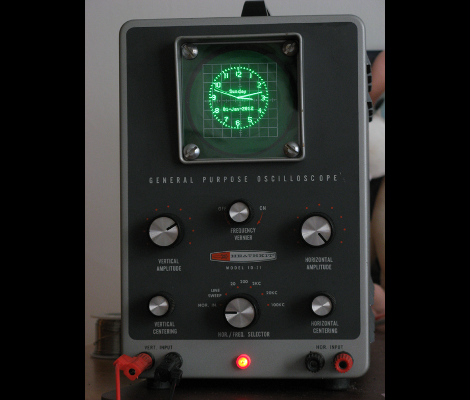
We see people driving around the night before trash collection and reclaiming items doomed to the land fill (or on their way to recycling… who knows). We’re beginning to think we need to join those ranks. Case in point is this vintage oscilloscope which [Bob Alexander] plucked from the curb in the nick of time. Here’s the kicker, when he got it home he found it still worked! He couldn’t let this opportunity go to waste, so he figured out how to turn it into a clock without losing the ability to use it as a scope.

You probably already know that it’s possible to display your own graphics on an oscilloscope. In fact, you can buy a board from Sparkfun which will turn the scope into an analog clock, and that’s exactly what [Bob] did. But he was met with two problems, the X-axis was flipped and he didn’t have an easy way to power the board.

He struggled with the voltage supply, frying his first attempt at boosting the internal 6.3V supply to use with a linear 5V regulator. His second attempt worked though, soldering a 12V regulator to the transformer. He was then on to the X-axis correction, using a rail-to-rail op-amp to invert the signal. The project finishes by adding toggle controls and buttons on the back of the case to switch between scope and clock modes, and to set the time.

Hellduino: Hellschreiber Radio Transmissions From An Arduino Board

[Mark VandeWettering] was experimenting with a simple transmitting circuit and an Arduino. The circuit in the project was designed by [Steve Weber] to broadcast temperature and telemetry data using Morse Code. But [Mark] wanted to step beyond that protocol and set out to write a sketch that broadcasts using the Hellschreiber protocol.

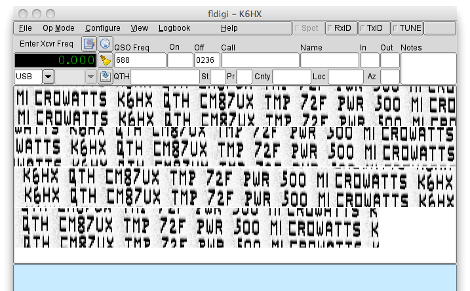
This protocol transmits glyph images, which are decoded as you see above. For some reason we can’t help but think this is like Captcha for radio enthusiasts. We have seen Hellschreiber used with AVR microcontrollers before, but this is the first Arduino implementation that we’ve come across. [Mark] does a great job of demonstrating his project in the video after the break. He mentions that the transmitter has no antenna, but is still being picked up by his receiving antenna mounted behind his house.

Since [Mark] doesn’t really cover the hardware he used, you will need to look back at [Steve’s] original design schematics for more information.

Continue reading “Hellduino: Hellschreiber Radio Transmissions From An Arduino Board”

Fully Loaded Electronics Lab Makes Your Projects A Breeze

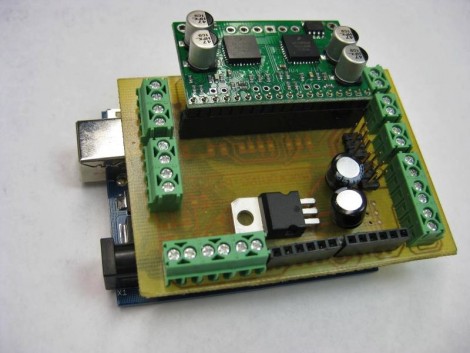
There’s really nothing special about this hack. [Craig Hollabaugh] needed an Arduino shield for hosting a Pololu motor driver and making connections to external hardware. What really caused us to spend way too much time reviewing his posts is that [Craig’s] narrative style of documenting the project is delightful, and we’re envious of his electronics lab. That link points to the first of four project pages. The next page is linked at the bottom of each page, or you can find the collection after the break.

[Craig] starts by designing a single-sided shield in Eagle. It’s been years since he made his own PCB, and it takes him about four tries to get the toner transfer right (we’ve also been victim to the wrong mirroring of the resist!). When it comes time to drill for the pin headers [Craig] uses his 3D printer to make a bracket allowing the Dremel to mount to the drill press. There’s a good tip here about buying carbide bits from Harbor Freight; we thought eBay was the only place to get these. Many of us would need to put in a parts order, but this workshop has a well-organized stock of everything he needs. He also has the solder paste and PID outfitted toaster oven to reflow the board. Oh, and when he forgets to add a resistor it’s off the rework station to add one.

See what we mean… one can never have too many tools.

Continue reading “Fully Loaded Electronics Lab Makes Your Projects A Breeze”