NES Controller Cannibalized For MP3 Player Enclosure

We know some folks are very upset by the scrapping on vintage hardware, so let’s all observe a moment of silence for this NES controller.

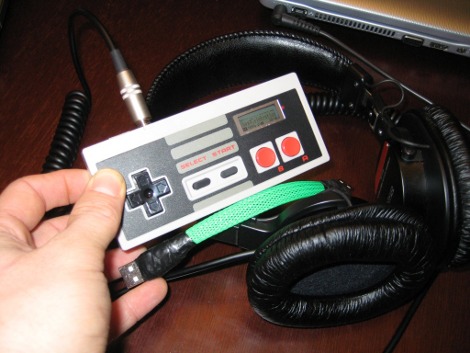
Now that that’s behind us we can live vicariously through [Burger King Diamond’s] project. He polished up the NES controller and repurposed it as an enclosure for a portable MP3 player.

His first step was to remove some of the yellowing of the plastic using Retr0brite. He admits it wasn’t bad to start with but now it’s sparkling like new. Next, he started planning how everything would fit in the case. Luckily the MP3 player operates with one AAA battery which leaves plenty of room.

Just above the A and B buttons you can make out an opening that he cut in the case for the MP3 player’s LCD screen. The bezel from the original case works well for cleaning the rough cut opening. The buttons on the controller have been patched into the controls on the MP3 board, and the opening for the controller’s cable now holds the headphone jack. There’s also a USB port mounted next to it for easy file transfers.

The one thing we would like to see is a rechargeable battery so you don’t need to open the case to top off the power. But all in all this is a fantastic build!
Fix Broken Buttons On Your ASUS Computer Monitors

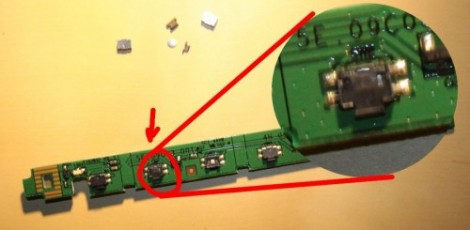
One of the perks of writing for Hackaday is that we often find hacks that we’ve been meaning to do ourselves. Here’s one that will let us fix our borked ASUS computer monitor buttons. [Silviu] has the same monitor we do, an ASUS VW202, and had the same problem of stuck buttons. We already cracked ours open and realized that the buttons are not easily replaced (you’ve got to source the right one). We just unstuck the offender and vowed not to press that button again, but [Silviu] actually figured out how to disassemble and repair the PCB mount switches.

As with most consumer electronics these days the worst part of the process is getting the monitor’s case apart. The plastic bezel has little spring tabs all around it that must be gently pried apart. Once the PCB which hosts the buttons was removed, he took the metal housing off of the broken switch. Inside he found that a bit of metal particulate (leftovers from manufacturing?) were causing the problem. A quick cleaning with a cotton swab removed the debris and got the tactile switch working again.

Reverse Geocache Box Looks Great And Packed With Features

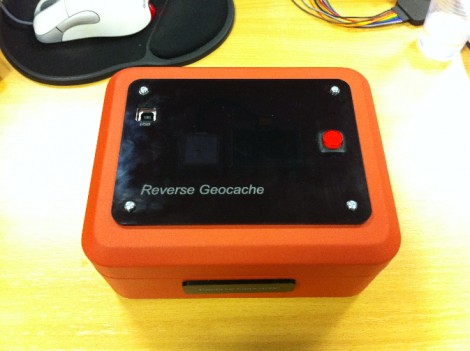
[Ranger Bob] crafted this great looking Reverse Geocache box. Our favorite feature is the black piece of acrylic on top. It’s laser cut (not sure if the letters are engraved or not) and gives a great finished look while hiding a couple of things at the same time.

The orange box is a metal cash box, and there’s a smooth indentation in the lid where the handle resides when not being carried. [Bob] removed the handle and mounted the GPS module in that void. But there’s also an OLED display mounted next to it. As you can see in the demo video after the break, the screen is bright enough to be seen clearly through the smoky acrylic covering that depression.

This project gave [Bob] the chance to order his first professionally made circuit board. He did the design in Eagle, managing to keep within the 5cmx5cm limits of Seeed Studio’s least expensive Fusion PCB option. The board hosts the PIC 18F87J50 responsible for handing the screen, GPS module, input button, and USB port. Power comes from an internal Lithium battery.

We’ve featured a lot of Reverse Geocache boxes and they’re still one of our favorite projects because so much love goes into the design and build process. Here’s another one that we chose randomly for your amusement.

Continue reading “Reverse Geocache Box Looks Great And Packed With Features”

Doom For Your Calculator Gets A Color Upgrade

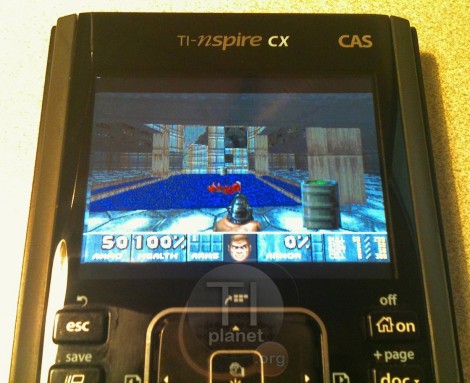
You’re not still playing nDoom in black and white, are you? What decade do live in? Thankfully, the Doom port for TI-nspire calculators has been upgraded to support color. That is if you’ve got the hardware to run it.

The video after the break (and the image above) shows a TI-nspire CX running the popular first-person-shooter. It’s seen several upgrades since the beta version which we saw piggy-backed with a different TI-83 hack a year ago. The control scheme has been tweaked, and a menu system was added. It’s not the same on-screen menu that you would see with the DOS version of the game, but it accomplishes that same thing. This port is packaged with the Ndless program that unlocks the hardware so that you can perform your own hacks.

Unfortunately there is still no sound available for the game but that is a project for a different time. We know it must be possible because we’ve seen a TI-84+ used to play music stored on a thumb drive. Continue reading “Doom For Your Calculator Gets A Color Upgrade”

Building A Variable Frequency Drive For A Three-phase Motor

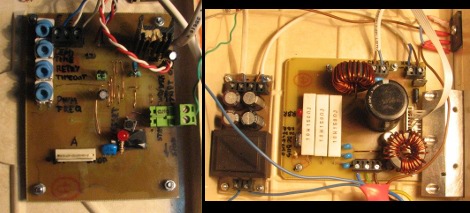
Here are the power and driver boards that [Miceuz] designed to control a three-phase induction motor. This is his first time building such a setup and he learned a lot along the way. He admits it’s not an industrial quality driver, but it will work for motors that need 200 watts or less of power.

The motor control board uses an MC3PHAC driver IC and an IRAMS06UP60A handles the power side of things. The majority of the board design came from studying the recommended application schematics for these two parts. But that’s far from all that goes into the setup. Motor drivers always include levels of protection (the whole reason to have a driver in the first place) and that comes in several different forms. [Miceuz] made sure to add EMI, over voltage, and over current protection. He discusses all of these, sharing links that explain the concepts of each.

Forget Siri – Make Wolfram Alpha Your Personal Assistant

So you can spend a bundle on a new phone and it comes with a voice-activated digital assistant. But let’s be honest, it’s much more satisfying if you coded up this feature yourself. Here’s a guide on doing just that by combining an Asterisk server with the Wolfram Alpha API.

Asterisk is a package we are already familiar with. It’s an open source Private Branch Exchange suite that lets you build your own telephone network. Chances are, you’re not going to build one just for this project, but if you do make sure to document the process and let us know about it. With the Asterisk server in place you just need to give the assistant script an extension (in this case it’s 4747).

But then there’s the problem of translating your speech into text which can be submitted as a Wolfram query. There’s an API for that too which uses Google to do that translation. From there you can tweak abbreviations and other parameters, but all-in-all your new assistant is ready to go. Call it up and ask what to do when you have a flat tire (yeah, that commercial drives us crazy too).

[Thanks M]

Commandeer X10-based Home Automation With Your Favorite Microcontroller

X10 has been around for a long time. It’s the brand name for a set of wireless modules used to switch electrical devices in the home. There’s all kinds of different units (bulb sockets, electrical outlets and plug pass-throughs, etc.) and they’re mass-produced which makes them really inexpensive. Whether you already have some X10 controlled devices or just plan to add them later, we think you’ll find [Jeff Ledger’s] post on controlling the system with a Propeller chip interesting. The technique is not Propeller specific and will be simple to port to your microcontroller of choice.

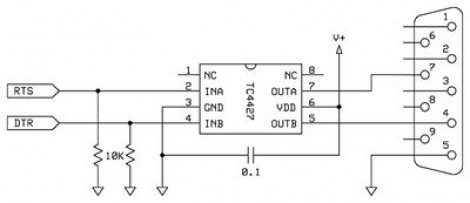
[Jeff] got his hands on an X10 Firecracker. This provides a DB-9 serial connection meant to be used for computer control. But the interface is so simple all you need is two I/O pins feeding the level converter circuit seen above. You can get the TC4427 for less than a dollar, and the Firecrcker module for as little as $6. Since [Jeff] has already covered adding Ethernet via a ENC28J60 he goes on to detail a web-server that lets him switch his devices, all served from the Propeller chip.

Here’s a different ENC28J60 Ethernet tutorial for those interested in webpages from microcontrollers. And then there’s also a ZigBee home automation project if you’re not warming up to the idea of using X10 modules.