Lighted Acrylic Christmas Ornaments

If you’ve gone to the trouble of building your own CNC mill we know you’re always on the lookout for things to use it for. [Boris Landoni] wrote in with just the thing for the holiday season; a set of lighted acrylic Christmas ornaments.

One of the interesting properties of acrylic is how it reacts when edge-lit. The material pipes the light, until it bounces off of a disturbance in the surface. The first step is to design the outline of the ornament as all cut edges will glow. Next, [Boris] uses artCAM to design the internal parts to be cut. This application translates the relief cuts necessary to really make your design shine (sorry, we couldn’t resist). The best examples of this are the angel and candle seen above.

Each of these acrylic pieces has a slot cut on the bottom to hug an LED. [Boris] used small project boxes with a PCB for that diode, as well as a button battery for power.

Ultrasonic Combo Lock

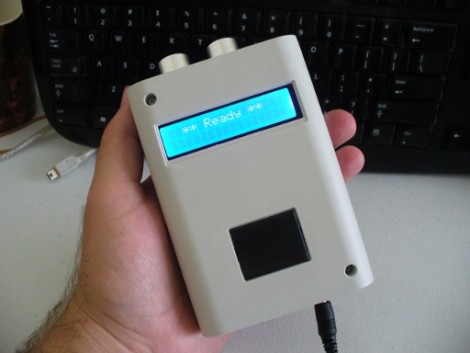
[John Boxall] took a different route for a single-input combination lock. This unit uses a Ping ultrasonic range finder to input a four digit code. It’s a hardware upgrade, but uses the same basic concept as his button-based combo lock. That design used an Arduino to measure how long you hold down a single button, with a one second pause between inputs, to enter the code. This one also uses timing to establish when each digit is read, but that digit is grabbed as the distance between your hand and the sensor.

There are things we like and dislike about the redesign. This is obviously much more expensive than other button-based locks like this garage door opener we built. If we were to run with [John’s] design, we might spring for the Ping sensor (because it’s a pretty cool input) and replace he character LCD with an LED or two. The other drawback that we see here is that it may be easy for someone to steal your code by watching from afar. Still, we love the project and think you will too after seeing the demo clip below.

Continue reading “Ultrasonic Combo Lock”

How The Kindle Touch Jailbreak Was Discovered

The Kindle Touch has been rooted! There’s a proof video embedded after the break, but the best part about this discovery is that [Yifan Lu] wrote in-depth about how he discovered and exploited a security hole in the device.

The process begins by getting a dump of the firmware. If you remove the case it’s not hard to find the serial port on the board, which he did. But by that time someone else had already dumped the image and uploaded it. We guess you could say that [Yifan] was shocked by what he found in the disassembly. This a ground-up rewrite compared to past Kindle devices and it seems there’s a lot to be hacked. The bootloader is not locked, but messing around with that is a good way to brick the device. The Javascript, which is the language used for the UI, is not obfuscated and Amazon included many hooks for later plugins. Long story short, hacks for previous Kindles won’t work here, but it should be easy to reverse engineer the software and write new ones.

Gaining access to the device is as easy as injecting some HTML code into the UI. It is then run by the device as root (no kidding!). [Yifan] grabbed an MP3 file, changed its tag information to the HTML attack code, then played the file on the device to exploit the flaw. How long before malicious data from illegally downloaded MP3 files ends up blanking the root file system on one of these?

Continue reading “How The Kindle Touch Jailbreak Was Discovered”

Pee-light Gives Guidance For Nocturnal Tinkles

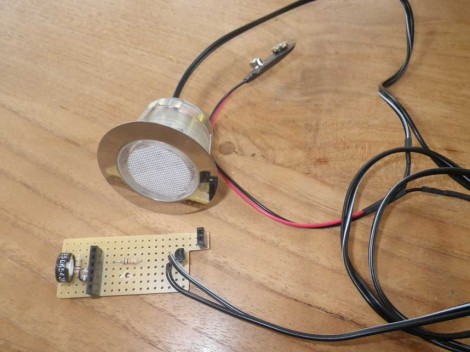
This light is a rather dim LED module whose purpose is to give you a very small bit of illumination when using the restroom at night. If you rely on it instead of using the overhead lighting in the bathroom, you’ll be able to find your way back to bed with your night-vision undisturbed.

[Fred] built the project as a way to learn more about using MSP430 microcontrollers. The protoboard seen above has a pair of female pin headers designed to accept an MSP430-PIR board, which uses the low-power microcontroller to monitor a PIR motion sensor. The chip can be reprogrammed and [Fred] did just that, using the USB dongle side of the eZ430-F2013 dev stick. Now when the sensor detects motion the chip first checks the light-dependent resistor on the protoboard to see if it’s dark in the bathroom. If so, it switches on the LED and sets a timer to shut if off again.

The system runs on a 9V battery, which is a bit under-powered for the 12V-spec’ed LED module. But [Fred] says the light it produces is just the right intensity.

[Thanks Jeremy]

Naughty Duck Will Be The End Of Secret Santa At Your Place Of Work

Aw, isn’t he cute? Looks are deceiving, because if you get him started, this duck says some vulgar things. [Gigavolt] found the little guy abandoned at the Goodwill store and decided it might have some hacking potential. Boy was he right. The stock toy can already sing a tune while flapping its beak and wings. After spending some time in [Gigavolt’s] lair, this duck is going to be on the naughty list. The best part is that this is going to end up in the hands of someone else thanks to a Secret Santa exchange.

The build article linked above is safe for you to read at work, but the video embedded after the break most certainly is not. [Gigavolt] got to work replacing the integrated circuit inside with his own PIC 16F628 microcontroller. He uses a new audio track, which is played back by a SOMO-14D audio player board. The two use different input voltage levels which is something of a bother, but it’s a standby power drain that has been vexing [Gigavolt] he rolled his own board using the DorkbotPDX order and can’t figure out why the current consumption is so high. Take a look at the cursing duck, then see if you can’t troubleshoot his electrical issues.

Continue reading “Naughty Duck Will Be The End Of Secret Santa At Your Place Of Work”

Dilemmabox Brings Tactile Upvoting

Here’s a fun art installation which you might run into downtown. It’s called the Dilemmabox and lets you pull a rope to up or down vote a question. [Christoffer Lorang Dahl] realized that touchscreens are wiping out a lot of really fun user interfaces of yore. He incorporated the two hanging rope inputs as an homage to doorbell ropes.

The built process works much like a laptop-to-digital photo frame conversion. The first step is to liberate the LCD screen from the laptop body. Both are housed in a wooden box, with a window cut out to show the screen. The mechanically clever part is the rope pulls. They’re both just pressing a key on the keyboard in a roundabout sort of way. [Christoffer] attached a smooth hemispherical piece to two keys. The ropes are connected to wooden levers which are held in place by springs. They rub on the hemispheres just enough when passing by to register a keypress.

The photo above was taken during the Dilemmabox’s brief appearance at a shopping plaza in Oslo.

Android Legs Stability Testing

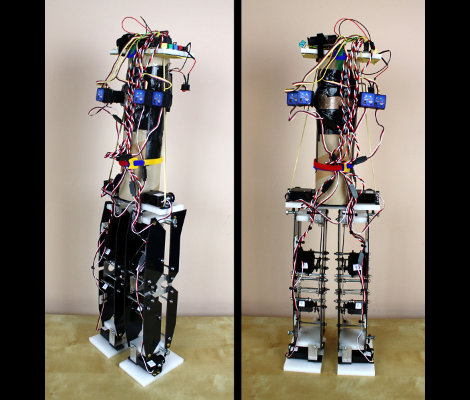
This is [James’] latest android build, a set of legs that use gyroscopes for balance.

He started off by planning the build with some LEGO pieces to get an idea of how each foot and leg joint would fit together. This let him achieve one of his goals. From the start he wanted to create a robot that would remain stable, and not build up enough momentum to tip itself over if there is a problem. With the dimensions established he cut out parts from 2mm sheets of HIP plastic using a hobby knife. They work in conjunction with a frame made from aluminum and HDPE. The whole thing houses eight servos responsible for movement, but he found an interesting way to use them for balance as well.

[James] came across some gyroscopic sensors which are made for use with RC helicopters. They connect in-line with a servo motor and offset it based on the gyro data. He’s using four of them with this bot, playing the hip and ankle servos against each other for balance. What results is a set of legs that look like their jonesin’ for a fix. See for yourself in the clip after the break.

Continue reading “Android Legs Stability Testing”