Dynamic DNS Updating – No PC Required

arduino_ddns

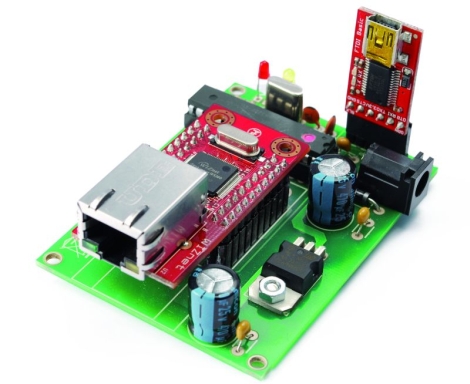
[Boris] from Open Electronics recently wrote us to share their latest creation. Like many of us, he uses DynDNS to keep his home network a FQDN’s reach away. While DynDNS is quite a convenient service, many people don’t like the idea of leaving their computer on all the time to keep the IP updated. That’s where the Arduino DDNS module comes into play.

Built using a standard ATMega328 with the Arduino bootloader installed, the module periodically checks to see if the user’s IP has changed, updating the DynDNS entry as needed. The Arduino talks to the network via a WIZnet Ethernet breakout board, contacting DynDNS’ servers to check and update the user’s IP over a series of standard HTTP requests.

We are aware that several router firmware packages such as DD-WRT have this functionality built-in, but this project makes for a nice alternative when those resources are not available.

As always, a bill of materials, PCB layouts, and Arduino Sketch code are all available for download over at the Open Electronics site.


Temperature Sensing Mug Means Never Burning Your Mouth Again

temp_sensing_mug

Some people tend to get awfully attached to their favorite mug. Like an old friend, the mug holds a special place in their hearts, and there’s a weird sadness when it finally gives up the ghost. Through the winter months [Ben’s] girlfriend is never without hers, and when it broke, he decided to give her a new one with some added functionality.

He built her a temperature sensing mug that uses a rather novel way of determining how hot or cold the contents are. Instead of using a thermistor to determine the drink’s temperature, he opted to use a simple diode since it is well known that a diode’s forward voltage varies with temperature. After determining the diode’s voltage range using hot and cold beverages, he hooked it up to the ADC of a PIC12F615 micro controller. The temperature is displayed via 10 LEDs, which are driven through a pair of 8-bit shift registers and buffers since his PIC did not have enough pins to control them on its own.

He had some PCBs made, and after a handful of setbacks got everything put together. He says the mug works pretty well, though the display changes a bit more slowly than he would like. He also mentions that if he builds a second version, he will be sure to select a different PIC that has enough I/O pins to do the job, as well as use a thermistor instead of a simple diode for sensing the temperature.

Continue reading to see a brief demo video [Ben] put together.

Continue reading “Temperature Sensing Mug Means Never Burning Your Mouth Again”

Controlling Weapons With Kinect

kinect_rocket_launcher

It was only a matter of time before someone would figure out how to weaponize their Kinect. Hacker [Jonas Wagner] was fiddling with his Kinect one day and thought that it would be cool to launch missiles simply by gesturing. Not having any real missiles on hand, he settled for controlling a USB-powered foam missile launcher instead.

He mounted a webcam to the top of his rocket launcher to record video of his victims, and with a bit of Python along with the libfreenect ilbrary he was well on his way to world cubicle dominance.  The Kinect waits for him to pull his hand out of its holster in dramatic fashion, monitoring his movements for tracking purposes. Once the launcher has been armed, the Kinect watches for [Jonas] to pull his hands out of frame before firing the rocket.

We doubt you’ll see this thing controlling weapons for DARPA any time soon, but it’s cool nonetheless. The launcher seems to move a touch slowly, but we’re guessing that with an uprated servo, things could be a bit snappier.

Continue reading for a quick video of the Kinect-powered rocket launcher in action.

[via KinectHacks]

Continue reading “Controlling Weapons With Kinect”

Ball Bot Constructed From Power Tools And Pet Toys

ballbot

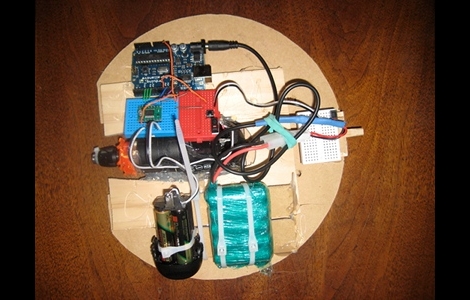
Hackaday forum member [machinelou] says he’s been fascinated with remote controlled hamster balls for quite some time. Inspired by a ball bot he saw on a BBC show, he finally picked up a 12″ plastic ball and got to work.

He used a small drill to provide the power required to roll the ball, and an Arduino is used as the brains of the device. This is his first major project outside of simple I/O and servo control, so he’s taking things slowly. While all this is a bit new to him, he already has things up and running to a degree as you can see in the video below. In its current state, the ball is programmed to roll forward and backwards for a few seconds before going back to sleep.

His future plans include adding a servo-controlled weight to allow him to steer the ball as well as using a pair of Zigbee modules in order to control the ball remotely.

It’s a neat little project, and definitely one that would be a fan favorite among kids. Stick around to see a quick video of his bot’s progress thus far.

Continue reading “Ball Bot Constructed From Power Tools And Pet Toys”

DIY MP3 Player Shows That No Hack Is Ever Obsolete

wacken_death_box

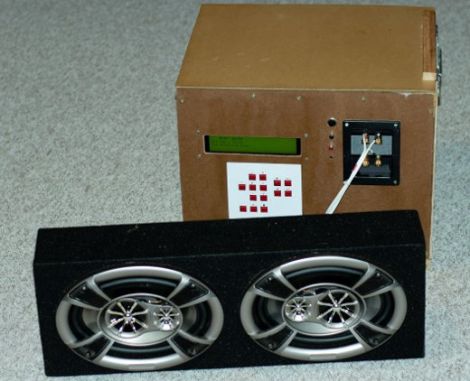
[Ole Wolf] wrote in to tell us about a project he has been working on for several years now. The Wacken Death Box serves as a reminder that once you start a DIY project, it’s probably a good idea to finish it in a reasonable amount of time, lest it risk becoming obsolete.

His Death Box is an MP3 player that he takes along on his annual trip to the Wacken Open Air Festival. His goal was to construct a portable amplified music player that could be powered from either a car battery or charger. A Via EPIA Mini-ITX computer serves as the brains of the device, blaring his tunes from a set of car loudspeakers via a two-channel 100W amp.

[Ole Wolf] used the music player for a few years, improving it as he went along. He does admit however, that with the continually dropping prices of MP3 players, he decided to bring a small portable unit along with him to the 2010 festival, leaving his box at home.

Given the fact that far smaller and more portable devices make his music box seem clunky and obsolete in comparison, you might ask why he even keeps it around. We think that every hack has its place, and while you won’t be strapping the Death Box on your back for your morning jog, it fits quite well in a variety of situations. This rugged music box would be an appropriate choice to use in your workshop, at the beach, or even on a construction job site – places where you might not want to use your comparatively fragile iDevice.

flipflop_clock

FlipFlop Clock Uses Mains Frequency To Keep Time

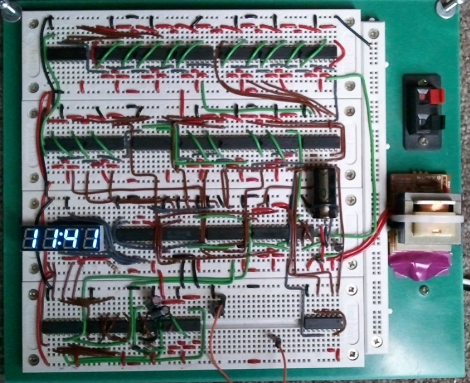
One afternoon, [Sam] was a bit bored and decided he would build a clock. Not wanting to spend any money on the project, he set off to construct his clock using only the components he had on hand – this meant no micro controllers would be used whatsoever.

Built on a set of four breadboards, his clock sports a pretty short parts list. It uses just over a dozen flipflops, a few NAND chips, a 555 timer, and a small handful of other components. What you won’t find on the bill of materials however, is any sort of crystal or real-time clock. Instead of using a separate chip for keeping time, he opted to use the 60hz mains frequency as the basis for his time keeping.

The mains sine wave is passed through a series of frequency dividers to reach a 1/60hz signal, which is used to trigger the clock counters he constructed. The time is displayed on a 4-digit seven segment display, using a pair of multiplexers clocked by a 555 timer.

The clock seems to work nicely, though you have to be pretty well-versed in how the clock was built to set the time. The only means of doing so is to probe into the clock of the digit you are setting while pressing the lone pushbutton mounted on the breadboard.

While we are pretty sure no one will ever mess with his clock’s time, we have to wonder if it blinks on and off like our old VCR when the power goes out.

PIC-based Temperature Logger With Onboard Storage

pic_temp_logger

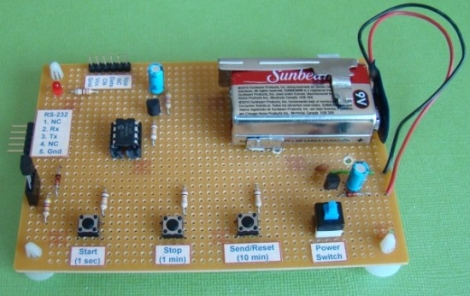
Last summer, [Rajendra Bhatt] built himself a simple PIC-based temperature monitor with data logging abilities and recently got around to sharing it on his site. The sensor is based on a PIC12F683 micro controller and measures the ambient temperature on a set interval, storing the values on the MCU’s internal EEPROM.

He used a Maxim DS18B20 temperature sensor, which communicates with the PIC over a 1-wire bus. The sensor is read based upon the interval chosen by the user, and can be configured to measure the temperature every second, every minute, or every 10 minutes. The data is stored on the aforementioned EEPROM and can be uploaded to a computer via a serial connection. The PIC has the ability to store 254 readings before the data must be cleared from the device.

It’s a great beginner project, and has plenty of room for improvement. As [Rajendra] points out, an external EEPROM could be added to expand the recording capacity, and it would be nice to have a real-time clock on hand for accurate time stamping. If we were to build one ourselves, a means of wireless data transfer would be first on our list of potential enhancements.