Kinect Hack Makes April Fools’ Prank A Reality

gmail_motion

Unless you have been hiding out in a cave for the last week or so, you have heard about this year’s April Fools’ joke from Google. Gmail Motion was purported to be an action-driven interface for Gmail, complete with goofy poses and gestures for completing everyday email tasks. Unfortunately it was all an elaborate joke and no gesture-based Gmail interface is forthcoming…at least not from Google.

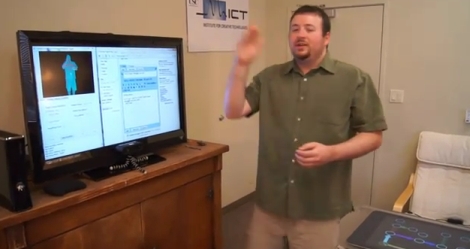
The team over at the USC Institute for Creative Technologies have stepped up and made Google’s hoax a reality.  You might remember these guys from their Kinect-based World of Warcraft interface which used body motions to emulate in-game keyboard actions. Using their Flexible Action and Articulated Skeleton Toolkit (FAAST), they developed a Kinect interface for Gmail which they have dubbed the Software Library Optimizing Obligatory Waving (SLOOW).

Their skeleton tracking software allows them to use all of the faux gestures Google dreamed up for controlling your inbox, however impractical they might be. We love a good April Fools’ joke, but we really enjoy when they become reality via some clever thinking.

Stick around for a video demo of the SLOOW interface in action.

[via Adafruit]

Continue reading “Kinect Hack Makes April Fools’ Prank A Reality”
RFID Drink System Eliminates The Need For Change

popcard_vending_machine

[Avatar-X] snagged a drink vending machine online a few years back, and has been selling drinks to his neighbors ever since. People are always asking him for change, and just the other day he was thirsty and out of change himself.  He considered adding an override key so that he could snag free drinks whenever he pleased, but decided to go all out and built a cash card system instead.

He didn’t know how to interface with the machine’s logic board, so after poring over the service manual he consulted with a support rep from the company that manufactured it. Luckily, he was able to get enough information from them to start making some headway. With his friend’s assistance, he was able to figure out which pins on the Bill Validator Interface needed to be shorted in order to simulate the addition of funds.

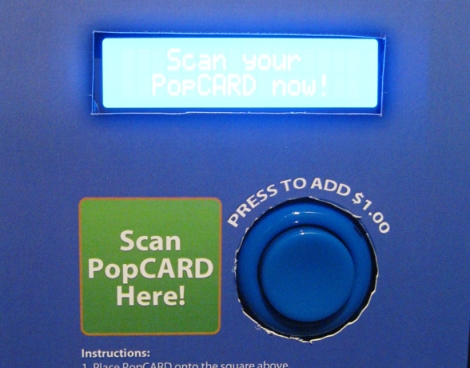
Using an Arduino with an Ethernet shield, LCD display, and an RFID reader, he had his PopCARD system up and running in no time. Now all his neighbors have to do when they want a drink is swipe their card in front of the machine and hit a button to add funds from their account.

As you can see in the video below it works great, and we’re sure his neighbors are pleased with the improvements he has made.

Continue reading “RFID Drink System Eliminates The Need For Change”

Power-sipping MSP430 Mini Alarm Clock

msp430_alarmclock

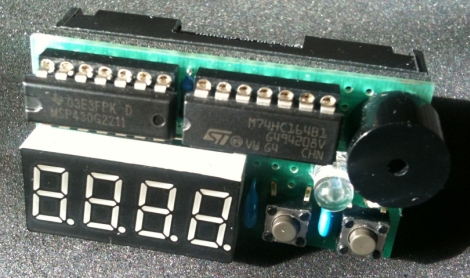
[Markus] had a TI MSP430 sitting around from the LaunchPad kit he bought a while back. He didn’t know what to do with it, but eventually decided that it would make a great miniature alarm clock.

He added a shift register to the mix in order to drive his 7-segment LCD display, using two of the MSP430’s output pins in the process. Four more pins were tied to the display’s cathodes, while the remaining two pins are connected to push buttons which register user input.

He crammed the clock’s logic as well as an alarm tune into the chip’s scant 2KB of memory space, literally occupying everything up to the last available byte. The clock is quite a power-miser, using just 2 µA in standby mode. According to [Markus’] calculations, that should enable the clock to use one set of batteries for 10+ years.

While this isn’t the first MSP430 clock we have seen, it certainly is the smallest and most simple.  Stick around to see a quick video of his clock in action.

Continue reading “Power-sipping MSP430 Mini Alarm Clock”

Solar-powered GameBoy Color Never Runs Out Of Juice

solar_gbc

Instructables user [Andrew] was given a free, but damaged GameBoy color by a friend. The friend’s dog had done quite a number on the outside of the handheld, but it was definitely usable.  After replacing some of the outer shell, [Andrew] decided that he would try tweaking the GameBoy to utilize a solar cell in order to keep the batteries topped off.

He bought a solar garden light for $5 and disassembled it, being careful not to damage the heavily-glued solar panel in the process. The GameBoy was pulled apart next, and the solar panel was soldered to the handheld’s battery leads. Once the wires were properly routed through the case, he reassembled the handheld and picked up a pair of rechargeable AA batteries to test things out.

[Andrew] tells us that the solar panel works nicely, and that simply setting it out face-down keeps his batteries charged and ready to go.

Stick around for a quick video demo of his solar-powered GameBoy.

Continue reading “Solar-powered GameBoy Color Never Runs Out Of Juice”

Aftermarket Visor-mounted GPS Better Than OEM

mini_gps

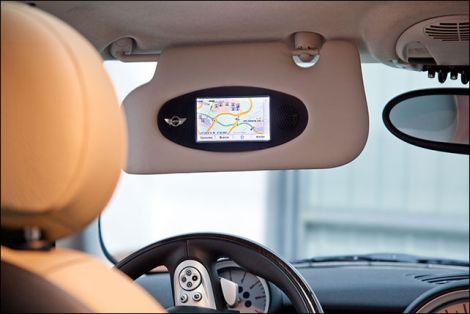
When [Roberto] bought his Mini Cooper, he opted to forgo the factory GPS system as it was over priced and didn’t have the best of reputations. He decided that he still needed GPS in his car, so he committed himself to install a TomTom unit in a way that would not detract from the car’s interior.

He dismantled the driver’s side sun visor, taking measurements of the original plastic housing that contained the mirror and lighting. He then drew up a 3D model of a replacement housing that would allow him to fit both the GPS unit and the speaker in the same amount of space formerly occupied by the mirror.

He gutted his TomTom unit, removing any extraneous parts he could find. A smaller speaker was sourced due to size constraints, then everything was mounted in his new housing once it arrived.

The end result is amazing. The GPS unit looks like it was installed at the factory – there is no sign that this was any sort of aftermarket modification. We are sure people will be quick to say that would be difficult to keep your eyes on the road while looking at the navigation screen, but as [Roberto] points out, you should be following the spoken directions once the car is in motion anyhow.

Adjustable Prank Box Growls And Screams

growling_altoids_tin

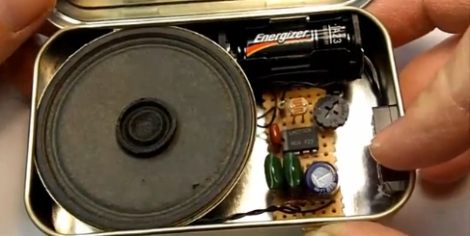
[Brett] over at FightCube was tossing around ideas to build a screaming prank circuit that fits inside an Altoids tin. Sound familiar? We featured a story just a few days back about the construction of a very similar item by [Dino Segovis]. It seems that great minds think alike after all!

[Brett’s] version is a bit more robust than the one we featured the other day. It’s similar to [Dino’s] in that it uses a 555 timer in astable mode, triggered by a normally-closed microswitch when the tin is opened. However, this version also includes a photoresistor which is used to increase the pitch and speed of the output as more light enters the box. This creates a growling effect that builds up into a scream as the box is opened. [Brett] has also included an adjustable pot which allows the sound range to be tweaked to his liking.

Stick around for a video walkthrough of the screamer circuit as well as a demo of the Altoids tin in action.

Continue reading “Adjustable Prank Box Growls And Screams”

Using Your PC As A Simple Signal Generator

dc_offset_circuit

[Debraj] needed a simple signal generator for a project he was working on, but didn’t have one handy. He found that the easiest and cheapest way to get clean, reliable signaling was by using something that was already sitting on his desk – his PC.

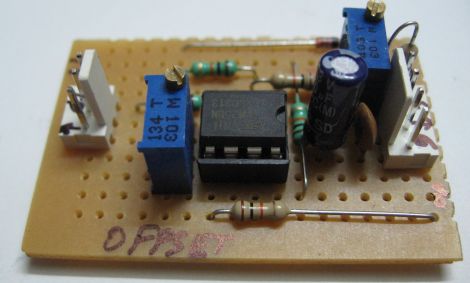
He found that the tone generator built into Audacity was quite useful, at least for generating waveforms at less than 20 KHz or so. Upon plugging his scope into his sound card’s audio jack, he observed that the PC had good frequency fidelity, though it required an additional DC offset as most cards are built to remove that offset from the waveform.

Using a LM358 as a non-inverting summing amplifier, he was able to apply a steady DC offset and generate usable signals for his micro controller projects. A schematic for his offset circuit is available on his site, should you wish to build one of your own.

[Debraj] also notes that though Audacity is a cheap free way to generate simple signals, any number of complex signals can be generated using MATLAB if you happen to own a copy.