Steampipe: All SQL All The Time

Although modern Linux has slightly shifted, the old Unix mantra was: everything’s a file. With Steampipe, a better saying might be: everything’s a SQL table. The official tagline is “select * from cloud” which also works. The open-source program relies on plugins, and there are currently 140 sources ranging from GitHub to Google Sheets and more.

There are command line interfaces for the major platforms. You can also add the system to PostgresSQL or SQLite for even more SQL goodness. Continue reading “Steampipe: All SQL All The Time”

Linux Fu: Forward To The Past!

Ok, so the title isn’t as catchy as “Back to the Future,” but my guess is a lot of people who are advanced Linux users have — at least — a slight interest in retrocomputing. You’d like an Altair, but not for $10,000. You can build replicas of varying fidelities, of course. You can also just emulate the machine or a similar CP/M machine in software. There are many 8080 or Z80 emulators out there, ranging from SIMH to MAME. Most of these will run on Linux or — at the least — WINE. However, depending on your goals, you should consider RunCPM. Why? It runs on many platforms, including, of course, Linux and other desktop systems. But it also will work with the Arduino, Teensy, ESP32, or STM32 processors. There is also experimental support for SAM4S and Cyclone II FPGAs.

It’s pretty interesting to have one system that will work across PCs and embedded hardware. What’s more is that, at least on Linux, the file system is directly translated (sort of), so you don’t have to use tricks or special software to transfer files to and from CP/M. It is almost like giving Linux the ability to run CP/M software. You still have to have virtual disks, but they are nothing more than directories with normal files in them.

Goals

Of course, if your goal is to simulate a system and you want to have 180 kB floppies or whatever, then the direct file system isn’t a benefit. But if you want to use CP/M software for education, nostalgia, or cross-development, this is the way to go, in my opinion.

It isn’t just the file system, either. If you need a quick utility inside your bogus CP/M environment, you can write it in Lua, at least on desktop systems. On the Arduino, you can access digital and analog I/O. Theoretically, you could deploy an embedded Altair for some real purpose fairly cheaply. Continue reading “Linux Fu: Forward To The Past!”

Not A FrogPad But Close

While you might think one-handed keyboards are a niche item, if you have reduced function in one hand or you only have one hand, they are pretty important. [Kian] was getting ready for surgery that would put his left arm out of commission for a while, which spurred the construction of a one-handed keyboard inspired by FrogPad.

There was a time when creating a new keyboard would have been a significant task. These days, it is reasonably easy and [Kian] simply repurposed an existing kit for a split keyboard. Using just half the board was easy since it is made in two parts already.

There have been many attempts at building effective one-handed input devices over the years, and the circa 2002 FrogPad is one of the better devices. Like most one-handed keyboards, it uses layers. The top layer has the most common keystrokes to minimize the number of layer changes required to type common text.

Continue reading “Not A FrogPad But Close”

Extreme Waterproof 3D Prints

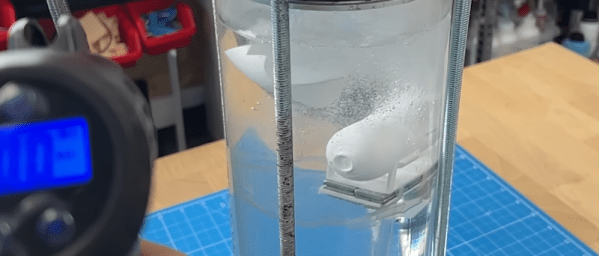
Since the crew at [CPSdrone] likes to build underwater drones — submarines, in other words — they need to 3D print waterproof hulls. At first, they thought there were several reasons for water entering the hulls, but the real reason was that water tends to soak through the print surface. They’ve worked it all out in the video below.

Since the printer is an FDM printer, it isn’t surprising that the surface has tiny pores; even the tiniest pores will let water in at high pressure. They tried using epoxy to seal the prints, which worked to some degree. They did tests using an example submersible hull that you can try yourself if you like.

Continue reading “Extreme Waterproof 3D Prints”

Linux Fu: Curling C

Sometimes, it pays to read the man pages of commands you use often. There might be a gem hidden in there that you don’t know about. Case in point: I’ve used curl (technically, cURL, but I’m going to stick with curl) many times to grab data from some website or otherwise make a web request. But what happens if you want to do the same thing from a C program? Well, you could be lazy and just spawn a copy of curl. But it turns out curl has a trick up its sleeve that can help you. If only I’d read the man page sooner!

First Things

The simplest use of curl is to just name a URL on the command line. For example, consider this session:

$ curl http://www.hackaday.com 
<html>
<head><title>301 Moved Permanently</title></head>
<body>
<center><h1>301 Moved Permanently</h1></center>
<hr><center>nginx</center>
</body>
</html>

This isn’t so useful because it is a 301 response (to send you to the https server, in this case). The -L option will make curl go get the page instead of the redirect. Try:

$ curl -L http://www.hackaday.com

Continue reading “Linux Fu: Curling C”

Make Your Bookshelf Clickable

We’ll confess that we have a fondness for real books and plenty of them. So does [James], and he decided he needed a way to take a picture of his bookshelves and make each book clickable to find more information. This is one of those things that sounds fairly simple until you decide to do it. You can try an example of the results and then go back and read about the journey it took to get there.

There are several subtasks involved. First, you want to identify each book’s envelope. It wouldn’t do to click on the Joy of Cooking and get information about Remembrance of Things Past.

The next challenge is reading the title of the book. This can be tricky. Fonts differ. The book could be upside down. Some titles go cross the spine, but most go vertically. The remainder of the task is fairly easy. If you know the region and the title, you can easily find a link (for Google Books, in this case) and build an SVG overlay that maps the areas for each book to the right link.

Continue reading “Make Your Bookshelf Clickable”

Ring Around The Inverter

[Dr. Shane] asks the question: what happens if you connect the output of an inverter logic gate back to the input? In theory, it doesn’t make sense, but depending on the gate’s physical construction, you’ll get into a strange state. The transistors within the gate will behave differently than they normally would, and you’ll wind up with an amplifier or an oscillator. You can see the results in the video below. In the second video, you can see what the odd connection does to the thermal properties of the inverter, too.

The CMOS inverter becomes biased in the active region, so it makes sense that it settles at the halfway point. The TTL inverter is slightly different, but the delay through the gate isn’t enough to produce a good oscillation. However, an odd number of inverters connected in a ring like this is one way to create a simple oscillator.

Continue reading “Ring Around The Inverter”