3D Universe Theater

If you are an astronomy buff, there are plenty of star maps you can find in print or online (or even on your Smartphone). But if you are a science fiction fan (or writer), you probably find those maps frustrating because they are flat. Two stars next to each other on the map might be light years apart in the axis coming out of the page. A star 3.2 light years from Sol (our sun) looks the same on the map as a star 100 light years away.

The Gaia satellite (an ESA project) orbits beyond the moon and is carefully mapping the 3D position of every point of light it sees. [Charlie Hoey] took the data for about 2 million stars and used WebGL to give you a 3D view of the data in your web browser.
Continue reading “3D Universe Theater”

Supercapacitor Uses No Carbon

Supercapacitors have found a myriad of uses due to their ability to rapidly charge and then deliver the power efficiently. Currently, production of supercapacitors requires materials made out of carbon which requires high temperatures and poses other manufacturing difficulties.

Researchers announced a new type of supercapacitor that uses no carbon and could have advantages over conventional technologies. The new research focuses on metal-organic frameworks, or MOFs. This material is extremely porous with a sponge-like structure. Since supercapacitors require large surface areas, that makes MOFs an interesting material for that application. However, MOFs are not very electrically conductive, which is a disadvantage.

Continue reading “Supercapacitor Uses No Carbon”

A Slice Of Ubuntu

The de facto standard for Raspberry Pi operating systems is Raspbian–a Debian based distribution specifically for the diminutive computer. Of course, you have multiple choices and there might not be one best choice for every situation. It did catch our eye, however, that the RaspEX project released a workable Ubunutu 16.10 release for the Raspberry Pi 2 and 3.

RaspEX is a full Linux Desktop system with LXDE (a lightweight desktop environment) and many other useful programs. Firefox, Samba, and VNC4Server are present. You can use the Ubuntu repositories to install anything else you want. The system uses kernel 4.4.21. You can see a review of a much older version of RaspEX  in the video below.

Continue reading “A Slice Of Ubuntu”

A DIY, Visual Alexa

Talking to computers is all the rage right now. We are accustomed to using voice to communicate with each other, so that makes sense. However, there’s a distinct difference between talking to a human over a phone line and conversing face-to-face. You get a lot of visual cues in person compared to talking over a phone or radio.

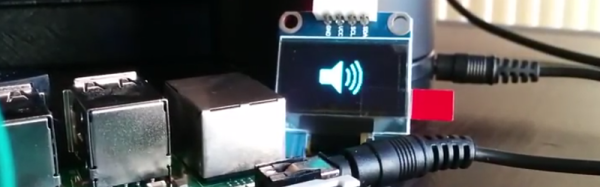
Today, most voice-enabled systems are like taking to a computer over the phone. It gets the job done, but you don’t always get the most benefit. To that end, [Youness] decided to marry an OLED display to his Alexa to give visual feedback about the current state of Alexa. It is a work in progress, but you can see two incarnations of the idea in the videos below.

A Raspberry Pi provides the horsepower and the display. A Python program connects to the Alexa Voice Service (AVS) to understand what to do. AVS provides several interfaces for building voice-enabled applications:

  • Speech Recognition/Synthesis – Understand and generate speech.
  • Alerts – Deal with events such as timers or a user utterance.
  • AudioPlayer – Manages audio playback.
  • PlaybackController – Manages playback queue.
  • Speaker – Controls volume control.
  • System – Provides client information to AVS.

We’ve seen AVS used to create an Echo clone (in a retro case, though). We also recently looked at the Google speech API on the Raspberry Pi.

Continue reading “A DIY, Visual Alexa”

A Cheap, 555-Based Geiger Counter

Every mad scientist’s lair needs a Geiger counter. After all, if that UFO crashes on the back patio, you might need to know if it is hot. [Tanner_Tech] shows you how to build a cheap one that will get the job done.

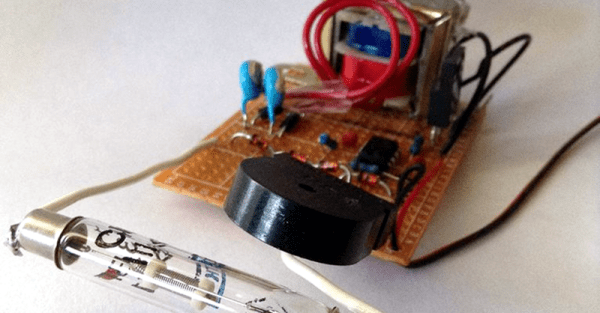
You do need a Geiger tube, but a quick search of a popular auction site shows plenty of Russian surplus for a few bucks. The other thing you need is a source of high voltage (about 400V), which is the heart of the circuit using a 555-based DC to DC converter. You can see a video of the device working, below.

The DC to DC converter needs a transformer that [Tanner] swiped out of an alarm clock. A piezo transducer (stolen from a junk microwave) gives you the characteristic click. If you prefer solid state over hollow state, there’s an open source project that uses a PIN diode as a sensor. Or you could add an Arduino and some LEDs.

Continue reading “A Cheap, 555-Based Geiger Counter”

Upcycle An Isolation Transformer

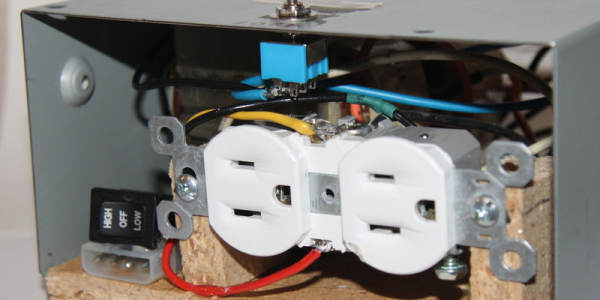
There are several reasons you should have an isolation transformer. They can prevent ground loops and also prevent a device under test from having a DC path to ground (or isolate an oscilloscope from DC ground, which can be dangerous in its own right, but that’s another discussion). [Tanner_tech] noticed that finding ballast transformers for sodium vapor street lights is getting easier as more street lights move to LED technology. What to do with these transformers? Build an isolation transformer, of course.

Of course, your dumpster transformer might be a little different than the one shown in the post (and the video, below). [Tanner] shows how to work out the leads you need. A little wood work and a PC power supply case finished the project.

Judging from the comments, some people take [Tanner’s] talk about safety as an implication that a transformer makes working on mains safe. It doesn’t. It makes it safer if you know what you are doing. Working with high voltage isn’t a place to learn by doing.

If you want some practical advice, [Jenny List] has a good read for you. You probably also ought to invest an hour in watching this video that has a lot of practical advice.

Continue reading “Upcycle An Isolation Transformer”

Raspberry Pi Want A Cracker?

If you watch the old original Star Trek, you’ll notice that the computers on board the Enterprise don’t look much like our computers (unless you count the little 3.5 inch floppies that looked pretty close to the real thing). Then again, the Enterprise didn’t need keyboards and screens since the computers did a pretty good job of listening and speaking to humans.

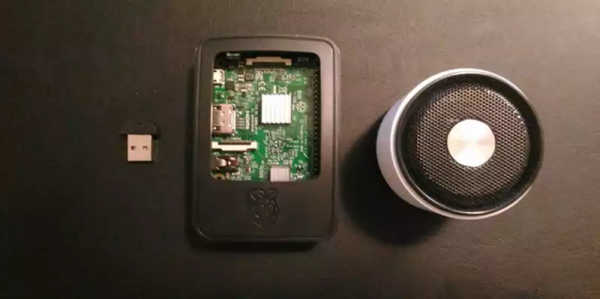
We aren’t quite to the point where you can just ask the computer some fuzzy open-ended question like Captain Kirk did, but we do have things like Echo, Siri, and Google Now that do a fair job of listening to you and replying. In fact, Google provides an API that can do speech recognition and generation. [Giulio] used some common Python libraries to add speech I/O to a Raspberry Pi.

Continue reading “Raspberry Pi Want A Cracker?”