Custom PCB Is A Poor Man’s Pick And Place

Surface mount devices have gotten really small, so small that a poorly timed sneeze can send your 0603 and 0402 parts off to live with the dust motes lurking at the edge of your bench. While soldering such parts is a challenge, it’s not always size that matters. Some parts with larger footprints can be a challenge because of the pin pitch, and getting them to land just right on the PCB pads can be a real pain.

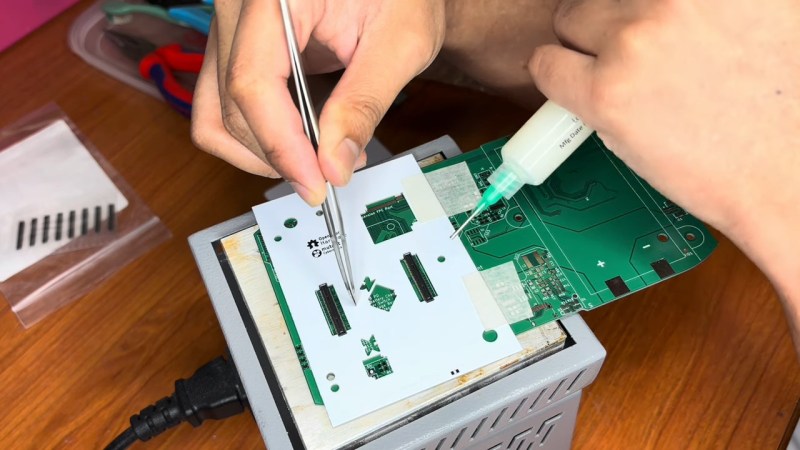
To fight this problem, [rahmanshaber] came up with this clever custom PCB fixture. The trick is to create a jig to hold the fine-pitch parts securely while still leaving room to work. In his case, the parts are a couple of SMD ribbon cable connectors and some chips in what appear to be TQFP packages. [rahmanshaber] used FreeCAD to get the outline of each part from the 3D model of his PCB, and KiCad to design the cutouts; skip to 7:30 or so in the video below if you don’t need the design lesson. The important bit is to leave enough room around the traces so that the part’s leads can rest of the PCB while still having room to access them.

Using the fixture is pretty intuitive. The fixture is aligned over the footprint of the part and fixed in place with some tape. Solder paste is applied to the pads, the part is registered into the hole, and you’re ready for soldering. [rahmanshaber] chose to use a hot plate to do the soldering, but it looks like there’s enough room for a soldering iron, if that’s your thing.

It’s a simple idea, but sometimes the simplest tools are the best. We’ve seen lots of other simple SMD tools, from assembly jigs to solder paste stencil fixtures. Continue reading “Custom PCB Is A Poor Man’s Pick And Place”

OpenMV Promises “Flyby” Imaging Of Components For Pick And Place Project

[iforce2d] has an interesting video exploring whether the OpenMV H7 board is viable as a flyby camera for pick and place, able to quickly snap a shot of a moving part instead of requiring the part to be held still in front of the camera. The answer seems to be yes!

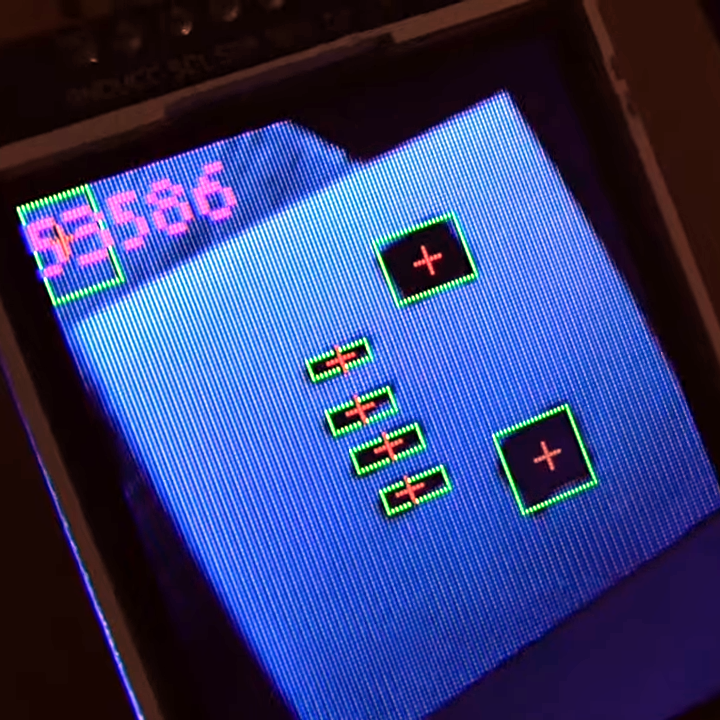
The OpenMV camera module does capture, blob detection, LCD output, and more.

The H7 is OpenMV‘s most recent device, and it supports a variety of useful add-ons such as a global shutter camera sensor, which [iforce2d] is using here. OpenMV has some absolutely fantastic hardware, and is able to snap the image, do blob detection (and other image processing), display on a small LCD, and send all the relevant data over the UART as well as accept commands on what to look for, all in one neat package.

It used to be that global shutter cameras were pretty specialized pieces of equipment, but they’re much more common now. There’s even a Raspberry Pi global shutter camera module, and it’s just so much nicer for machine vision applications.

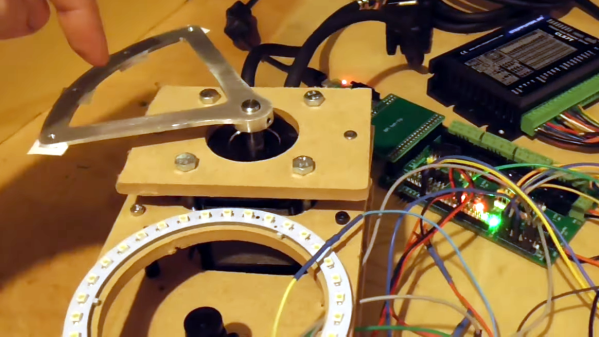
Watch the test setup as [iforce2d] demonstrates and explains an early proof of concept. The metal fixture on the motor swings over the camera’s lens with a ring light for even illumination, and despite the moving object, the H7 gets an awfully nice image. Check it out in the video, embedded below.

Continue reading “OpenMV Promises “Flyby” Imaging Of Components For Pick And Place Project”

An RP2040 Powered Pick And Place

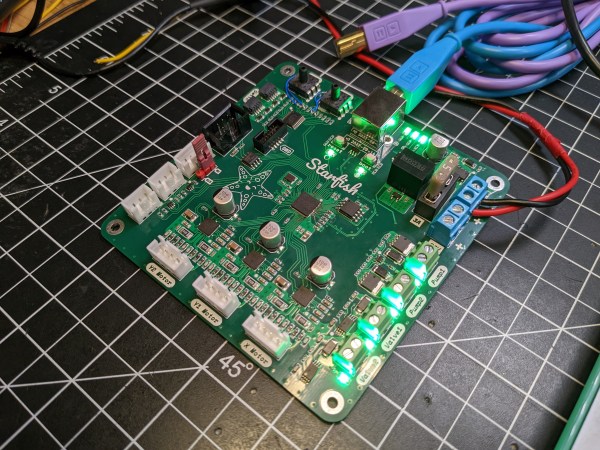
Pick and place machines are a wonder to behold, as they delicately and accurately place part after part. Unfortunately, they have to have a similarly wondrous price tag. Luckily, they aren’t too difficult to make yourself as they share many properties of a 3D printer with some extra constraints. [Stargirl Flowers] released Starfish, an open-source pick-and-place control board based around an RP2040 to help people make their own.

She purchased a LumenPnP, and the itch to tinker became too much to ignore. The STM32 on the stock controller also happened to get fried, leaving an obvious opening to create a custom board. [Stargirl] chose Trinamic TMC2209 motor controllers to drive the three stepper motors. The power circuit is impressively overbuilt with a 3A fuse, a TVS diode for shunting voltage spikes, a P-channel MOSFET for reverse polarity protection, a low-pass filter for AC ripple, and a large 100μF capacitor.

The RP2040 is a good choice since it’s easy to get and has plenty of digital I/O. USB connects the board to the outside work and includes ESD TVS diodes to protect the board when connecting and disconnecting the USB port. Motors for vacuums are controlled by a 74HC2G34 buffer that drives enable lines to two MOSFETs. Solenoids are similar but with a high current peak and a much smaller current to keep them open. The DRV120 fits the bill as it is a single-channel relay with current regulation. I2C vacuum sensors are the same ones on the Lumen motherboard; they just required an I2C multiplexer.

It’s an extremely well-documented project explaining why each part was chosen and why. If you want to create an RP2040 project that needs to last, we consider this a guiding star. It’s all up on GitHub for you to take a look at.

This isn’t the first time we’ve seen RP2040 as part of a motor controller, and we suspect we’ll see more.

Pick and place reels

Pick And Place Hack Chat Reveals Assembly Secrets

These days we’ve got powerful free tools to do CAD and circuit design, cheap desktop 3D printers that can knock out bespoke enclosures, and convenient services that will spin up a stack of your PCBs and send them hurtling towards your front door for far less than anyone could have imagined. In short, if you want to build your own professional-looking gadgets, the only limit is your time and ambition. Well, assuming you only want to build a few of them, anyway.

Once you start adding some zeros to the number of units you’re looking to produce, hand assembling PCBs quickly becomes a non-starter. Enter the pick and place machine. This wonder of modern technology can drop all those microscopic components on your board in a fraction of the time it would take a human, and never needs to take a bathroom break. This week Chris Denney stopped by the Hack Chat to talk about these incredible machines and all the minutiae of turning your circuit board design into a finished product.

Chris is the Chief Technology Officer (CTO) of Worthington Assembly, a quick turn electronics manufacturer in South Deerfield, Massachusetts that has been building and shipping custom circuit boards since 1974. He knows a thing or two about PCB production, and looking to help junior and mid-level engineers create easier to manufacture designs, he started the “Pick, Place, Podcast” when COVID hit and in-person tours of the facility were no longer possible. Now he says he can tell when a board comes from a regular listener by how many of his tips make it into the design.

So what should you be doing to make sure your board assembly goes as smoothly as possible? Chris says a lot of it is pretty common sense stuff, like including clear polarity indicators, having a legible silkscreen, and the use of fiducial markers. But some of the tips might come as something of a surprise, such as his advice to stick with the classic green solder mask. While modern board houses might let you select from a rainbow of colors, the fact is that green is what most equipment has been historically designed to work with.

That black PCB might look slick, but can confuse older pick and place machines or conveyors which were designed with the reflectivity of the classic green PCB in mind. It also makes automated optical inspection (AOI) much more difficult, especially with smaller component packages. That said, other colors such as white and red are less of a problem and often just require some fine tuning of the equipment.

He also pulled back the curtain a bit on how the contract manufacturing (CM) world works. While many might have the impression that the PCB game has moved overseas, Chris says orders of less than 10,000 units are still largely handheld by domestic CMs to minimize turnaround time. He also notes that many assembly houses are supported almost entirely by a few key accounts, so while they may be juggling 50 customers, there’s usually just two or three “big fish” that provide 80% of their business. With such a tight-knit group, he cautions CMs can be a bit selective; so if a customer is difficult to work with they can easily find themselves on the short end of the stick.

While the Hack Chat is officially only scheduled for an hour, Chris hung out for closer to three, chatting with community members about everything and anything to do with electronic design and production. His knowledge and passion for the subject was readily apparent, and we’re glad he was able to make time in his schedule to join us.


The Hack Chat is a weekly online chat session hosted by leading experts from all corners of the hardware hacking universe. It’s a great way for hackers connect in a fun and informal way, but if you can’t make it live, these overview posts as well as the transcripts posted to Hackaday.io make sure you don’t miss out.

Pick and place reels

Pick And Place Hack Chat

Join us on Wednesday, February 9 at noon Pacific for the Pick and Place Hack Chat with Chris Denney!

We in the hacker trade are pretty used to miracles — we make them all the time. But even the most jaded among us has to admit that modern PCB assembly, where components that could easily hide under a grain of sand are handled by robots, borders on witchcraft. The pick and place machines that work these wonders not only have to hit their marks accurately and precisely, but they also do it at blinding speeds and for days on end.

join-hack-chatLuckily, even those of us who design circuits for a living and depend on PCB assembly services to realize those designs can, at least to some degree, abstract the details of the pick and place phase of the process away. But making it “just work” isn’t a trivial task, and learning a little bit about what it takes to do so can make us better designers. Plus, it’s just plain cool to watch a pick and place do its thing. And to dive a little deeper into pick and place, Chris Denney, CTO of Worthington Assembly and co-host of “Pick, Place, Podcast” will stop by the Hack Chat. If you’ve ever wondered about the inner workings of PCB assembly and the role pick and place plays in it, or if you’re looking for tips on how to optimize your layouts for pick and place, this is one you won’t want to miss!

Our Hack Chats are live community events in the Hackaday.io Hack Chat group messaging. This week we’ll be sitting down on Wednesday, February 9 at 12:00 PM Pacific time. If time zones have you tied up, we have a handy time zone converter.

Continue reading “Pick And Place Hack Chat”

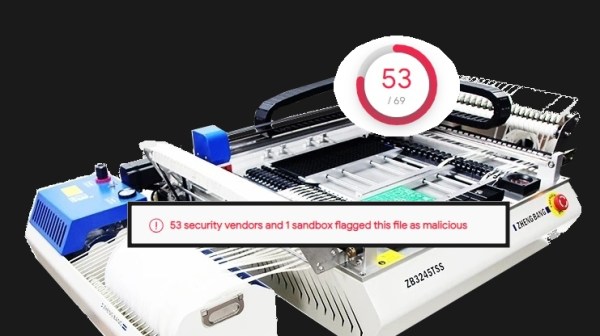
A Zhengbang Pick&Place machine, with a Virustotal 53/69 result and "53 security vendors and 1 sandbox flagged this file as mailcious" crudely overlaid on top of the image

Zhengbang Pick & Places Your Confidential Data In The Bag, Slowly

Isn’t it convenient when your pick-and-place machine arrives with a fully-set-up computer inside of it? Plug in a keyboard, mouse and a monitor, and you have a production line ready to go. Turns out, you can have third parties partake in your convenience by sharing your private information with them – as long as you plug in an Ethernet cable! [Richard] from [RM Cybernetics] has purchased a ZhengBang ZB3245TSS machine, and in the process of setting it up, dutifully backed up its software onto a USB stick – as we all ought to.

This bit of extra care, often missed by fellow hackers, triggered an antivirus scanner alert, and subsequently netted some interesting results on VirusTotal – with 53/69 result for a particular file. That wasn’t conclusive enough – they’ve sent the suspicious file for an analysis, and the test came back positive. After static and dynamic analysis done by a third party, the malware was confirmed to collect metadata accessible to the machine and send it all to a third-party server. Having contacted ZhengBang about this mishap, they received a letter with assurances that the files were harmless, and a .zip attachment with replacement “clean” files which didn’t fail the antivirus checks.

It didn’t end here! After installing the “clean” files, they also ran a few anti-malware tools, and all seemed fine. Then, they plugged the flash drive into another computer again… to encounter even more alerts than before. The malware was equipped with a mechanism to grace every accessible .exe with a copy of itself on sight, infecting even .exe‘s of the anti-malware tools they put on that USB drive. The article implies that the malware could’ve been placed on the machines to collect your company’s proprietary design information – we haven’t found a whole lot of data to support that assertion, however; as much as it is a plausible intention, it could have been a case of an unrelated virus spread in the factory. Surprisingly, all of these discoveries don’t count as violations of Aliexpress Terms and Conditions – so if you’d like to distribute a bunch of IoT malware on, say, wireless routers you bought in bulk, now you know of a platform that will help you!

This goes in our bin of Pretty Bad News for makers and small companies. If you happen to have a ZhengBang pick-and-place machine with a built-in computer, we recommend that you familiarize yourself with the article and do an investigation. The article also goes into details on how to reinstall Windows while keeping all the drivers and software libraries working, but we highly recommend you worry about the impact of this machine’s infection spread mechanisms, first.

Supply chain attacks, eh? We’ve seen plenty of these lately, what’s with communities and software repositories being targeted every now and then. Malware embedded into devices from the factory isn’t a stranger to us, either – at least, this time we have way more information than we did when Supermicro was under fire.

Editor’s Note: As pointed out by our commenters, there’s currently not enough evidence to assert that Zhengbang’s intentions were malicious. The article has been edited to reflect the situation more accurately, and will be updated if more information becomes available.

Editor’s Note Again: A rep from Zhengbang showed up in the comments and claims that this was indeed a virus that they picked up and unintentionally passed on to the end clients.

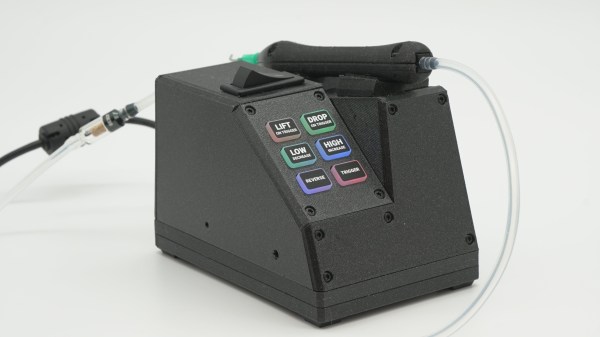
Photo of Pixel Pump Pick & Place Machine

Pixel Pump Pick & Place Positions Parts Precisely

You’ve finally decided to take the plunge and build a board with surface-mount parts. After carefully dispensing the solder paste with a syringe, it’s time to place the parts. You take up your trusty tweezers and reach to grab a SOIC-14 logic IC—only there’s not a great way to grab it. The IC is too long to grab one way and has leads obstructing the other. You work around the leads, drop the IC into place, and then pick up an 0402 resistor. You gently set the resistor into your perfectly dispensed solder paste, pull the tweezers away, and the resistor has stuck to your slightly magnetic tweezers. [Robin Reiter] realized that hobbyists and small manufacturers needed a better way to assemble their surface-mount designs, so he’s building the Pixel Pump Pick & Place, an open-source vacuum assembly tool.

Vacuum assembly tools use a blunt-tipped needle and suction to pick up surface-mount parts. Pressing an attached foot pedal disables the vacuum, allowing the part to be gently released. [Robin] thought to include a few thoughtful features to make the Pixel Pump even more useful. It has adjustable suction presets and a self-cleaning feature to blow out any solder paste you accidentally suck up. Most of the non-electronic parts are 3D printed, and [Robin] intends to make the entire design open-source.

[Robin] has a long history of designing tools to make surface-mount assembly easier—you may remember his 3D-printed magazines for dispensing surface-mount parts. If you want to take your PCB assembly setup to the next level, check out the PnPAssist, which shines a laser crosshair right where you should put each part.