BladeRF, Your Next Software Defined Radio

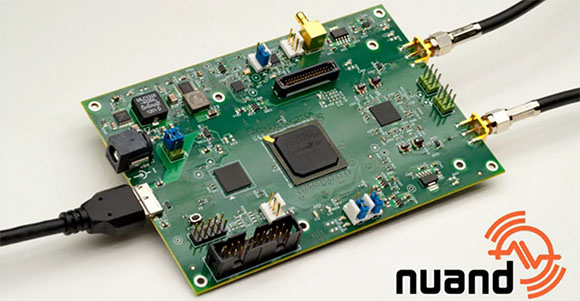
By now you might have a bit weary of your small and inexpensive TV tuner dongle software defined radio. Yes, using a USB TV dongle is a great introduction to SDR, but it has limited bandwidth, limited frequency range, and can’t transmit. Enter the bladeRF, the SDR that makes up for all the shortcomings of a USB dongle, and also serves as a great wireless development platform.

The bladeRF is able to receive and transmit on any frequency between 300 MHz and 3.8 GHz. This, along with a powerful FPGA, ARM CPU, and very good ADCs and DACs makes it possible to build your own software defined WiFi adapter, Bluetooth module, ZigBee radio, GPS receiver, or GSM and 4G LTE modem.

It’s an impressive bit of kit, but it doesn’t exactly come cheap; the bladeRF is available on the Kickstarter for $400. The folks behind the bladeRF seem to be doing things right, though, and are using their Kickstarter windfall for all the right things like a USB vendor ID.

There’s a video of two bladeRFs being used as a full duplex modem. You can check that out after the break.

Continue reading “BladeRF, Your Next Software Defined Radio”

Giving Siri Control Of Some Smart Bulbs

After getting his hands on the Philips Hue smart lightbulb [Brandon Evans] cracked open some of the hardware to see what is inside. He also spent time working out the software tricks necessary to use Siri to control light bulbs from iOS.

If you haven’t heard of the Hue product before it’s an LED bulb that fits in a standard medium base whose color and intensity can be controlled wirelessly. Included in each unit is Zigbee compatible hardware that lets the bulbs form their own mesh network. [Brandon] didn’t crack open the bulb since these things cost a pretty penny and disassembly requires cutting. But he did point us to this post where [Michael Herf] shows what the bulb’s case is hiding. We do get to see the other piece of the puzzle as [Brandon] exposes the internals on the base unit that bridges the mesh network to your home network via Ethernet. An STM32 chip is responsible for controlling the base unit.

Aside from a look at the guts [Brandon] hacked Siri (Apple’s voice activated virtual assistant) to control the system. You can see a demonstration of that in the clip after the break. The details are found in the second half of his post which is linked at the top. The code is found in his siriproxy-hue repository.

Continue reading “Giving Siri Control Of Some Smart Bulbs”

Very Inexpensive RF Module Tutorial

Let’s say you need a way to make a project wireless, but don’t have the scratch for a ZigBee or its ilk. You could use IR, but that has a limited range and can only work within a line of sight of the receiver. [Camilo] sent in a project (Spanish, translation) to connect two devices via a wireless serial connection. As a small bonus, his wireless setup is cheap enough to create a wireless network of dozens of sensors.

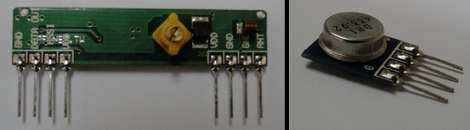
[Camilo] used the TLP434A transmitter/receiver combination to get his wireless project off the ground. These small devices only cost about $5, but being so inexpensive means the hardware designer needs to whip up their own communications protocol.

For a microcontroller, [Camilo] chose a Freescale MC9S08QC, a pleasant refrain from the AVR or PIC we normally see. After making a small board for his transmitter, [Camilo] had a very small remote control, able to send button presses or other data to a remote receiver.

After the break, you can see a short demo video [Camilo] posted of his wireless transmitter turning on an LED attached to his receiver. Unfortunately, this video was filmed with a potato, but all the schematics and code is on his web site for your perusal.

Continue reading “Very Inexpensive RF Module Tutorial”

Nah, You Don’t Need An Ethernet Module For Your Arduino

[Andy] needed a cheap Internet connection between a data-gathering Arduino and his home server. An Ethernet shield would suffice, but he couldn’t run CAT5 to the Arduino’s location. Wireless shields are hideously expensive, and after looking over the popular Zigbee modules, [Andy] had a few concerns about range and build complexity.

The obvious solution to this problem was getting a cheap WiFi router, flashing OpenWRT firmware on the device, and piping sensor data through the Arduino’s USB port, through the router, and over a WiFi connection to the server.

[Andy] used a TP-Link TL-WR703N wireless ‘travel router’ available on eBay £15 (~$30 USD when we checked). After flashing the router with OpenWRT, [Andy] had a wireless connection from a remote data-collecting Arduino directly to his server.

Attentive Hack a Day readers will note this is the third ‘wireless router + OpenWRT as a dev board’ build this week (first one, second one) . No, we don’t know what’s going on, or why the collective unconscious of makers around the globe decided to latch onto this type of build so suddenly. OpenWRT is available for hundreds of different routers, and anything that keeps disused routers out of the landfill (with the bonus of doing something useful) is alright in our book, so if you have another similar build, send it in and we’ll get around to it sometime.

Tubular POV Display

[Ryan]’s cylinder POV display is an amazing piece of work. Right now it’s impressive sitting on his workbench, but we’re sure it would be astonishing hanging above the middle of a dance floor. There are 64 RGB LEDs on this display and they’re certainly bright enough to liven up any space.

Power is provided through a slip ring. The ground is connected to the shaft of the motor [Ryan] picked up at an auto parts store. It’s an efficient way to do things, but the display can only be controlled by whatever image is stored in the ATMega1284’s flash memory. [Ryan] admits this isn’t an ideal setup so he’s working on a ZigBee or Bluetooth connection.

We’ve seen some amazing spinny POV cylinders, but [Ryan]’s build looks amazingly professional. All the board files, schematics and code are uploaded, as well as an image converter for BMPs and PNGs. Check out the demo after the break.
Continue reading “Tubular POV Display”

Commandeer X10-based Home Automation With Your Favorite Microcontroller

X10 has been around for a long time. It’s the brand name for a set of wireless modules used to switch electrical devices in the home. There’s all kinds of different units (bulb sockets, electrical outlets and plug pass-throughs, etc.) and they’re mass-produced which makes them really inexpensive. Whether you already have some X10 controlled devices or just plan to add them later, we think you’ll find [Jeff Ledger’s] post on controlling the system with a Propeller chip interesting. The technique is not Propeller specific and will be simple to port to your microcontroller of choice.

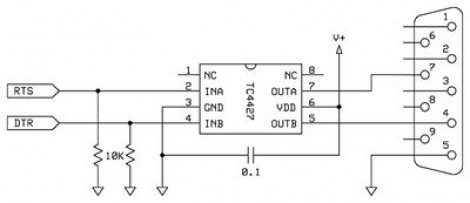
[Jeff] got his hands on an X10 Firecracker. This provides a DB-9 serial connection meant to be used for computer control. But the interface is so simple all you need is two I/O pins feeding the level converter circuit seen above. You can get the TC4427 for less than a dollar, and the Firecrcker module for as little as $6. Since [Jeff] has already covered adding Ethernet via a ENC28J60 he goes on to detail a web-server that lets him switch his devices, all served from the Propeller chip.

Here’s a different ENC28J60 Ethernet tutorial for those interested in webpages from microcontrollers. And then there’s also a ZigBee home automation project if you’re not warming up to the idea of using X10 modules.

The Zigroller Balance Bot

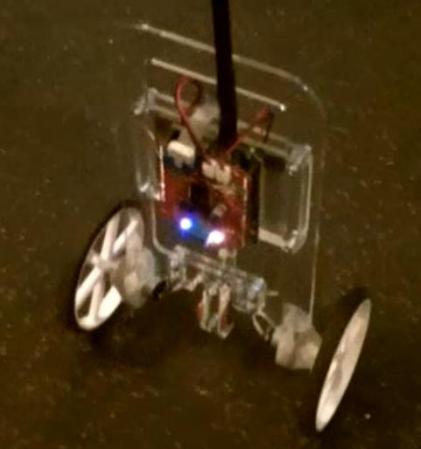
The Zigroller is a Zigbee remote-controlled balance bot.  Although balance bots have been featured on [HAD] before, the Zigroller appears to be well-built and the project is well documented.  Besides a section on hardware, the software for this build is documented here.  The theory behind a balancing bot like this is given in this [MIT] paper if you’d like some more background.

The roller itself was conceived as a project for a UW class this summer.  The class was about control theory, so the electronics and mechanical setup was copied off of the [ArduRoller] project.  In order to keep this project from influencing the control code of this ‘bot, it’s claimed that the code was not looked at while writing the new software. The process for building the remote control assembly is nicely documented and is an original creation for this project. Check out a video of it in action after the break! Continue reading “The Zigroller Balance Bot”