The chiptune music scene is largely rooted in the sounds of the original Nintendo Game Boy and the Commodore 64, while still welcoming a wide range of other hardware under its general umbrella. Still, few chip musicians show up to a gig hauling a PDP-1. That’s perhaps a shame, given that the 1950s era machine can produce beautiful music—as demonstrated by [Peter Samson] and [Joe Lynch].
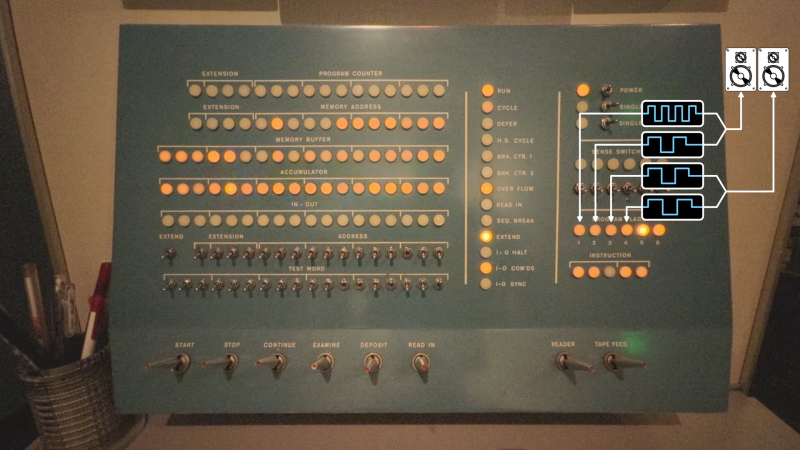
The video demonstration was recorded at the Computer History Museum in Mountain View, California. [Peter Samson] is operating the PDP-1, which is running the Harmony Compiler—which allows the machine to play four individual voices. This is achieved by taking advantage of the PDP-1’s program flags, which are visible as six light bulbs on the control panel. Instructions can be used to turn these bulbs on and off. The Harmony Compiler works by switching the bulbs on and off fast enough to create audible square waves when the light bulb outputs are wired to a simple audio amplifier.
Using Harmony Compiler, [Joe] and [Peter] worked together to transcribe the song Olson by Boards of Canada to play on the PDP-1. The song is encoded on paper tape, and fed into the machine—which dutifully plays back the hauntingly beautiful melody.
If you’re interested in the code that achieved this, it’s blessedly available via Github. If you love stories about old computers playing music, we’ve got those too. Video after the break.
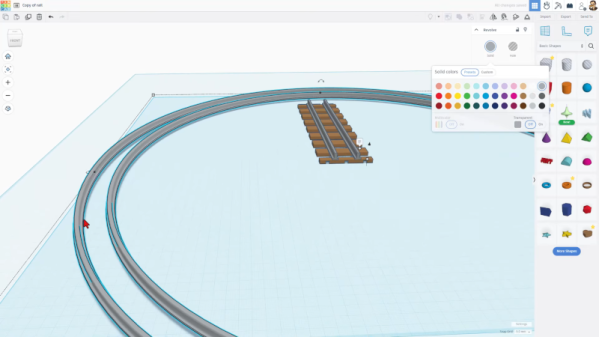
It is easy to write off Tinkercad as a kid’s toy. It is easy enough for kids to learn and it uses bright colors looking more like a video game than a CAD tool. We use a variety of CAD tools, but for something quick, sometimes Tinkercad is just the ticket. Earlier this year, Tinkercad got a sketch feature, something many other CAD programs have and, now, you can even revolve the sketch to form complex objects. Tinkercad guru [HL ModTech] shows you how in the video below.
It wasn’t long ago that we needed to cut an irregular shape out of an STL and we found the sketch feature which was perfect for that purpose. If you’ve used other CAD tools, you’ll know that sketches are typically 2D shapes that get changed into a 3D shape. The traditional thing is to simply extrude it, so if you draw a circle in 2D, you get a cylinder.
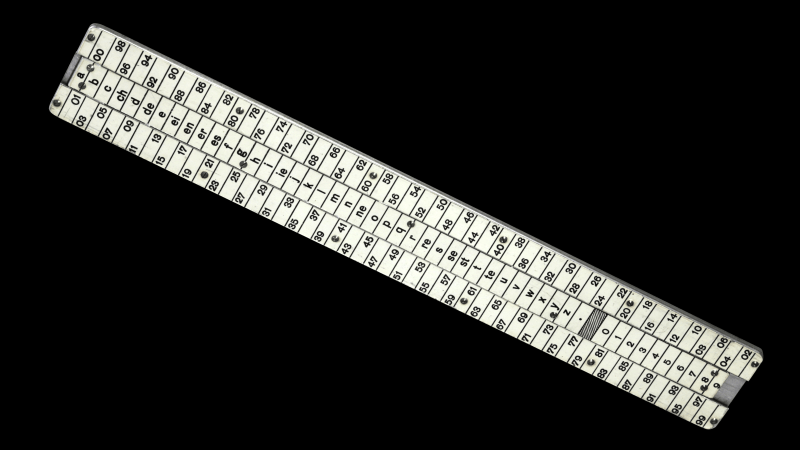
Over on YouTube, [The Modern Rogue] created an interesting video showing a slide-rule-like encryption device called the Réglette. This was a hardware implementation of a Vigenère-like Cipher, technically referred to as a manual polyalphabetic substitution cipher. The device requires no batteries, is fully waterproof, daylight readable and easy to pack, making it really useful if you find yourself in a muddy trench in the middle of winter during a world war. Obviously, because it’s a slide rule.
Anyway, so how does this cipher work? Well, the ‘polyalphabetic’ bit infers the need for a key phrase, which is indeed the first thing all parties need to agree upon. Secondly, a number is required as a reference point. As you can see from the video, the sliding part of the device has letters of the alphabet, as well as numbers and a special symbol. The body has two series of numbers, with the same spacing as the central, sliding part. A second copy of the sliding part is also needed to slide in behind the first unit. This second copy is neatly stowed below the body during storage.
With each message letter, you lookup the corresponding cipher text number, then shift the slider to the next key phrase letter.
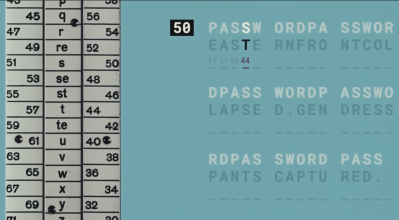
The cipher works by first aligning the starting letter of the (variable-length) key phrase with the reference number. Next, encode the first symbol from the cleartext message (the thing you want to encrypt). You simply look up the letter on the slide and read off either of the numbers next to it. Randomly selecting the left or right set adds an extra bit of strength to the code due to increased entropy. The number is the first symbol for your ciphertext (the thing you want to transmit to the receiver). Next, you move on to the next symbol in the cleartext message. Align the following letter of the key phrase with the reference number, look up the corresponding letter in the message, and transmit the following number onwards. When you run out of key phrase letters, you loop back to the start, and the cycle repeats.
The special symbol we mentioned earlier is not really a ‘blank’; it is a control symbol used to retransmit a new reference number with the existing setup. To change the reference number, the blank character is encoded and sent, followed by the latest reference number. When the blank symbol is received at the other end, the following code is used as the reference number, and the key phrase position is reset to point back to the first letter, restarting the cycle anew. Simple, yes. Effective? Well, not really by modern standards, but at the time of limited computing power (i.e. pen and paper, perhaps a mechanical calculator at best), it would have been sufficient for some uses for a couple of decades.
Why is this Vigenère-like? Well, an actual Vigenère cipher maps letters to other letters, but the Réglette uses numbers, randomly selected, adding entropy, as well as the control code to allow changing the cypher parameter mid-message. This makes it harder to attack; the original Vigenère was considered first-rate cryptography for centuries.
If you’d like to play along at home and learn some other simple ciphers, check this out. Kings and Queens of old frequently used cryptography, including the famous Queen Mary of Scots. Of course, we simply can’t close out an article on cryptography without mentioning the Enigma machine. Here’s one built out of Meccano!
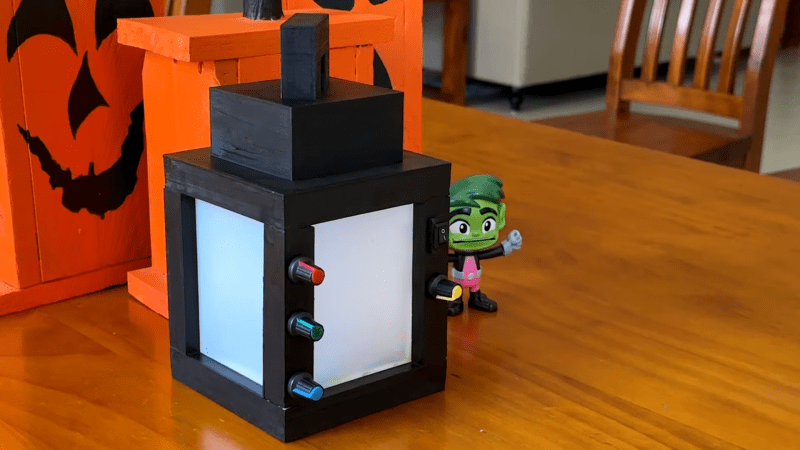
Key to the build is the 3D printed enclosure, which faithfully mimics the look of the in-game item. By virtue of Minecraft’s simplistic visual style, it’s a relatively straightforward print, without a lot of quirky geometry or difficult overhangs that might otherwise trip up your printer. It’s printed in six parts and assembled with acrylic lenses which act to diffuse the light coming from inside.
Electronically, an Arduino Nano runs the show. It’s hooked up to a pair of NeoPixel addressable LED rings, which provide rich RGB colors on demand. Rotary pots are installed on the enclosure to enable the color to be tuned to the user’s desire. Power is courtesy of an 18650 lithium-ion cell and a TP4056 module ensures the battery is kept happy when charging.
It’s a fun prop build, and one that would be the perfect addition to any Minecraft costume. Except for maybe a chicken jockey, because they don’t use lanterns. In any case, we’ve seen similar work before, too.
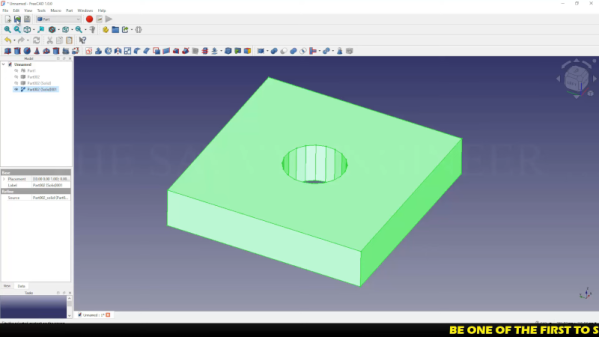
If you think about it, STL files are like PDF files. You usually create them using some other program, export them, and then expect them to print. But you rarely do serious editing on a PDF or an STL. But what if you don’t have anything but the STL? [The Savvy Engineer] has a method to help you if you need to reverse engineer an STL file in FreeCAD. Check it out in the video below.
The problem is, of course, that STLs are made up of numerous little triangles. The trick is to switch workbenches and create a shape from mesh. That gets you part of the way.
Once you have a shape, you can convert it to a solid. At that point, you can create a refined copy. This gives you a proper CAD file that you can export to a STEP file. From there, you can use it in FreeCAD or nearly any other CAD package you like to use.
Once you have a proper object, you can easily use it like any other solid body in your CAD program. This is one of those things you won’t need every day, but when you do need it, it’ll come in handy.
Want to up your FreeCAD game? We can help. There are other ways to hack up STL files. You can even import them into TinkerCAD to do simple things, but they still aren’t proper objects.
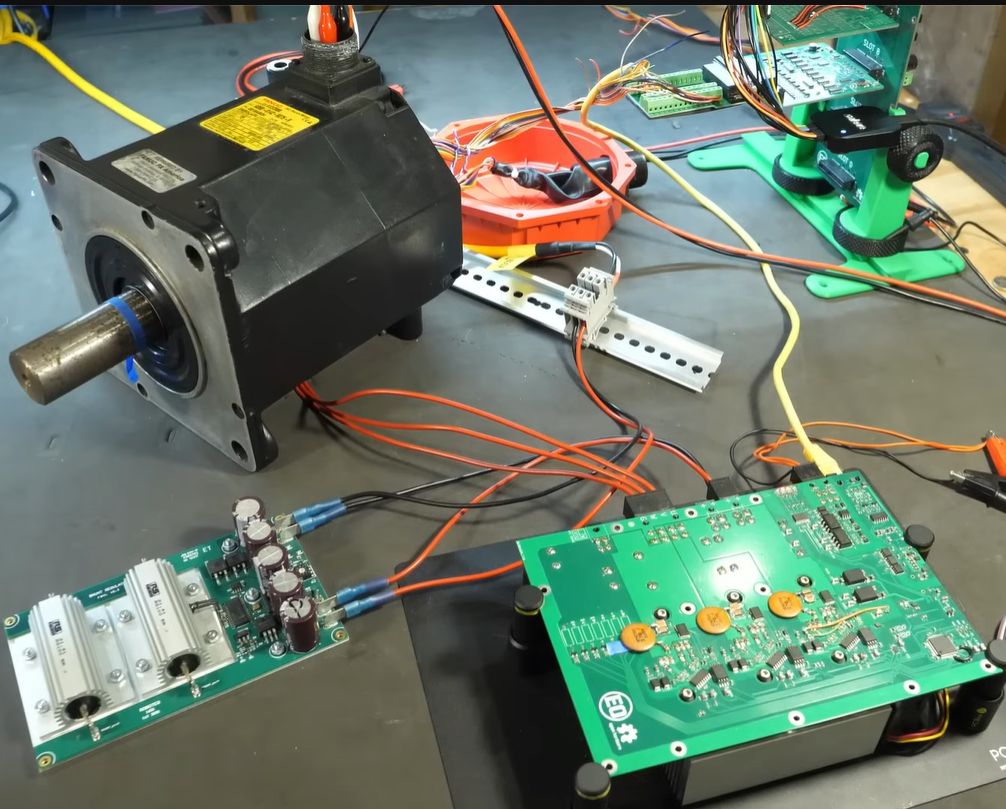
Testing the FOC-based motor controller. (Credit: Excessive Overkill, YouTube)
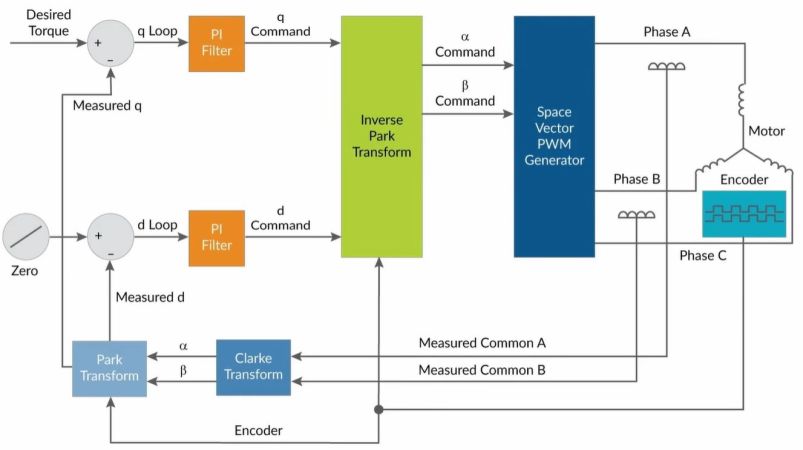
Vector Control, also known as Field Oriented Control or FOC is an AC motor control scheme that enables fine-grained control over a connected motor, through the precise control of its phases. In a recent video [Excessive Overkill] goes through the basics and then the finer details of how FOC works, as well as how to implement it. These controllers generally uses a proportional integral (PI) loop, capable of measuring and integrating the position of the connected motor, thus allowing for precise adjustments of the applied vector.
If this controller looks familiar, it is because we featured it previously in the context of reviving old industrial robotic arms. Whether you are driving the big motors on an industrial robot, or a much smaller permanent magnet AC (PMAC) motor, FOV is very likely the control mechanism that you want to use for the best results. Of note is that most BLDC motors are actually also PMACs with ESC to provide a DC interface.
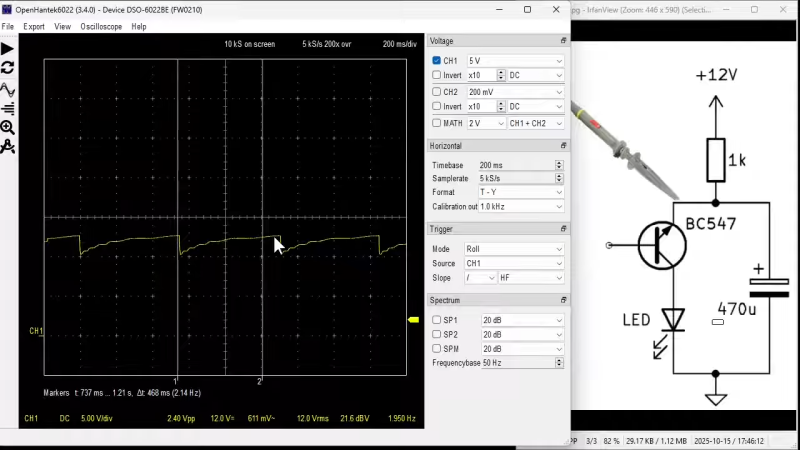
Let’s say you want to blink an LED. You might grab an Arduino and run the Blink sketch, or you might lace up a few components to a 555. But you needn’t go so fancy! [The Design Graveyard] explains how this same effect can be achieved with a single transistor.
The circuit in question is rather odd at first blush. The BC547 NPN transistor is hooked up between an LED and a resistor leading to a 12V DC line, with a capacitor across the emitter and collector. Meanwhile, the base is connected to… nothing! It’s just free-floating in the universe of its own accord. You might expect this circuit to do nothing at all, but if you power it up, the LED will actually start to flash.
The mechanism at play is relatively simple. The capacitor charges to 12 volts via the resistor. At this point, the transistor, which is effectively just acting as a poor diode in this case, undergoes avalanche breakdown at about 8.5 to 9 volts, and starts conducting. This causes the capacitor to discharge via the LED, until the voltage gets low enough that the transistor stops conducting once again. Then, the capacitor begins to charge back up, and the cycle begins again.
It’s a weird way to flash an LED, and it’s not really the normal way to use a transistor—you’re very much running it out of spec. Regardless, it does work for a time! We’ve looked at similar circuits before too. Video after the break.