Hackaday Podcast Episode 308: The Worst 1 Ever, Google’s Find My Opened, And SAR On A Drone

It’s Valentine’s Day today, and what better way to capture your beloved’s heart than by settling down together and listening to the Hackaday Podcast! Elliot Williams is joined by Jenny List for this week’s roundup of what’s cool in the world of hardware. We start by reminding listeners that Hackaday Europe is but a month away, and that a weekend immersed in both hardware hacking and the unique culture offered by the city of Berlin can be yours.

The stand-out hack of the week is introduced by Elliot, Henrik Forstén’s synthetic aperture radar system mounted on a cheap quadcopter, pushing the limits of construction, design, and computation to create landscape imagery of astounding detail. Most of us will never create our own SAR system, but we can all learn a lot about this field from his work. Meanwhile Jenny brings us Sylvain Munaut’s software defined radio made using different projects that are part of Tiny Tapeout ASICs. The SDR isn’t the best one ever, but for us it represents a major milestone in which Tiny Tapeout makes the jump from proof of concept to component. We look forward to more of this at more reasonable prices in the future. Beyond that we looked at the porting of Google Find My to the ESP32, how to repair broken zippers, and tuning in to ultrasonic sounds. Have fun listening, and come back next week for episode 309! Continue reading “Hackaday Podcast Episode 308: The Worst 1 Ever, Google’s Find My Opened, And SAR On A Drone”
USB Hub-A-Dub-Dub: Weird Edge Cases Are My Ruin

The Universal Serial Bus. The one bus to rule them all.  It brought peace and stability to the world of computer peripherals. No more would Apple and PC users have to buy their own special keyboards, mice, and printers. No more would computers sprout different ports for different types of hardware. USB was fast enough and good enough for just about everything you’d ever want to plug in to a computer.

We mostly think of USB devices as being plug-and-play; that you can just hook them up and they’ll work as intended. Fiddle around around with some edge cases, though, and you might quickly learn that’s not the case. That’s just what I found when I started running complicated livestreams from a laptop…

Continue reading “USB Hub-A-Dub-Dub: Weird Edge Cases Are My Ruin”

Cool Kinetic Sculpture Has Tooling Secrets To Share

Occasionally, we get a tip for a project that is so compelling that we just have to write it up despite lacking details on how and why it was built. Alternatively, there are other projects where the finished product is cool, but the tooling or methods used to get there are the real treat. “Homeokinesis,” a kinetic art installation by [Ricardo Weissenberg], ticks off both those boxes in a big way.

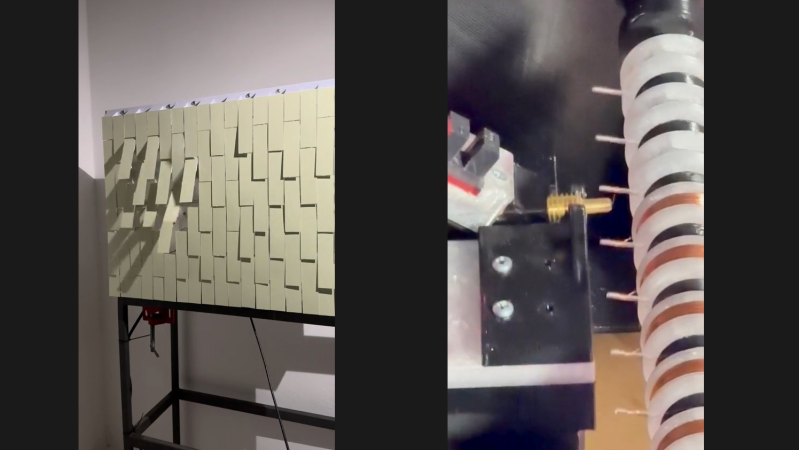
First, the project itself. Judging by the brief video clip in the reddit post below, Homeokinesis is a wall-mounted array of electromagnetically actuated cards. The cards are hinged so that solenoids behind them flip the card out a bit, making interesting patterns of shadow and light, along with a subtle and pleasing clicking sound. The mechanism appears to be largely custom-made, with ample use of 3D printed parts to make the frame and the armatures for each unit of the panel.

Now for the fun part. Rather than relying on commercial solenoids, [Ricardo] decided to roll his own, and built a really cool CNC machine to do it. The machine has a spindle that can hold at least eleven coil forms, which appear to be 3D printed. Blank coil forms have a pair of DuPont-style terminal pins pressed into them before mounting on the spindle, a job facilitated by another custom tool that we’d love more details on. Once the spindle is loaded up with forms, magnet wire feeds through a small mandrel mounted on a motorized carriage and wraps around one terminal pin by a combination of carriage and spindle movements. The spindle then neatly wraps the wire on the form before making the connection to the other terminal and moving on to the next form.

The coil winder is brilliant to watch in action — however briefly — in the video below. We’ve reached out to [Ricardo] for more information, which we’ll be sure to pass along. For now, there are a lot of great ideas here, both on the fabrication side and with the art piece itself, and we tip our hats to [Ricardo] for sharing this.

Continue reading “Cool Kinetic Sculpture Has Tooling Secrets To Share”

Atari 65XE In Laptop Form

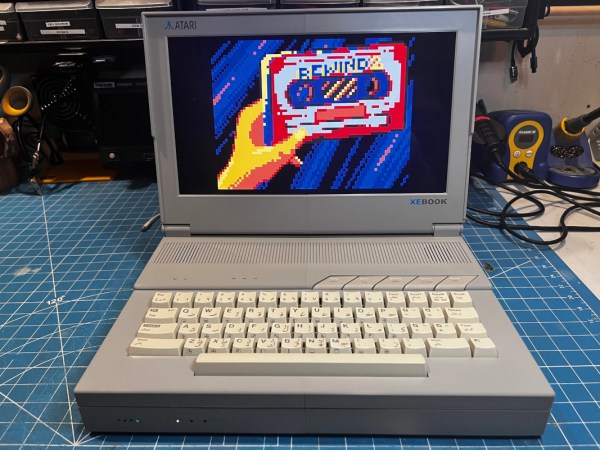
For better or worse, Atari is no longer a household name in computing, but for a time in the 1980s, it was a huge mover in the industry. They not only produced PCs but also a huge number of video game consoles. Although they were a major contributor to the video game crash of the 1980s, they managed to limp along a few more years afterward and produce some interesting machines in the following years, even though they weren’t ultimately able to compete with Nintendo or Sega. One of those computers from that era was a PC-console hybrid of sorts called the Atari XE, and [Sideburn] was able to turn one into a laptop.

The retro laptop began life as an Arabic PAL version of the 65XE, the PC version of the ubiquitous 65-series computer. A large portion of the computer was reworked, including the removal of the power supply in favor of a rechargeable battery with a 6-hour life. Also among the list of scrapped components was the video and sound connectors as well as the RF modulator, which would have been common for displays at the time, but this laptop is getting a 1920×1080 LCD panel to replace all of that old hardware. A 1MB memory upgrade, new speakers and amp, a WiFi card, and an SD floppy card emulator round out the build.

The final part of the build is assembling it all into a custom 3D printed case, and the resulting laptop that [Sideburn] calls the XE Book is a faithful adaptation of this niche computer into what could have been a laptop we would have seen in the late 80s or early 90s similar to the Toshiba T3200SXC. It matches the original’s footprint and still uses all of the core components, so it’s not too difficult to imagine something like this having existed in the past.

Continue reading “Atari 65XE In Laptop Form”

Hackaday Podcast Episode 301: Hacking NVMe Into Raspberry Pi, Lighting LEDs With Microwaves, And How To Keep Your Fingers

Twas the week before Christmas when Elliot and Dan sat down to unwrap a pre-holiday bundle of hacks. We kicked things off in a seasonally appropriate way with a PCB Christmas card that harvests power from your microwave or WiFi router, plus has the potential to be a spy tool. We learned how to grow big, beautiful crystals quickly, just in case you need some baubles for the tree or a nice pair of earrings. Speaking of last-minute gifts, perhaps you could build a packable dipole antenna, a very durable PCB motor, or a ridiculously bright Fibonacci simple add-on for your latest conference badge. We also looked into taking a shortcut to homebrew semiconductors via scanning electron microscopes, solved the mystery of early CD caddies, and discussed the sad state of table saw safety and the lamentable loss of fingers, or fractions thereof.


Download the zero-calorie MP3.

Continue reading “Hackaday Podcast Episode 301: Hacking NVMe Into Raspberry Pi, Lighting LEDs With Microwaves, And How To Keep Your Fingers”

This Week In Security: Recall, BadRAM, And OpenWRT

Microsoft’s Recall feature is back. You may remember our coverage of the new AI feature back in June, but for the uninitiated, it was a creepy security trainwreck. The idea is that Windows will take screenshots of whatever is on the screen every few seconds, and use AI to index the screenshots for easier searching. The only real security win at the time was that Microsoft managed to do all the processing on the local machine, instead of uploading them to the cloud. All the images and index data was available unencrypted on the hard drive, and there weren’t any protections for sensitive data.

Things are admittedly better now, but not perfect. The recall screenshots and database is no longer trivially opened by any user on the machine, and Windows prompts the user to set up and authenticate with Windows Hello before using Recall. [Avram] from Tom’s Hardware did some interesting testing on the sensitive information filter, and found that it worked… sometimes.

So, with the public preview of Recall, is it still creepy? Yes. Is it still a security trainwreck? It appears that the security issues are much improved. Time will tell if a researcher discovers a way to decrypt the Recall data outside of the Recall app.

Patch Tuesday

Since we’re talking about Microsoft, this week was Patch Tuesday, and we had seventy-one separate vulnerabilities fixed, with one of those being a zero-day that was used in real-world attacks. CVE-2024-49138 doesn’t seem to have a lot of information published yet. We know it’s a Heap-based Buffer Overflow in the Common Log File driver, and allows an escalation of privilege to SYSTEM on Windows machines. Continue reading “This Week In Security: Recall, BadRAM, And OpenWRT”

Hack On Self: Headphone Friend

In the last two articles, I talked about two systems relying on audio notifications. The first one is the Alt-Tab annihilator system – a system making use of my window monitoring code to angrily beep at me when I’m getting distracted. The other is the crash prevention system – a small script that helps me avoid an annoying failure mode where I run out of energy before getting myself comfortable for it.

I’ve been appreciating these two systems quite a bit – not only are they at my fingertips, they’re also pretty effective. To this day, I currently use these two systems to help me stay focused as I hack on my own projects or write articles, and they are definitely a mainstay in my self-hacking arsenal.

There is a particular thing I’ve noticed – audio notifications help a fair bit in a way that phone or desktop notifications never would, and, now I have a framework to produce them – in a way that calls for a purpose-tailored device. It’s just wireless headphones, Pi-powered, connected through WiFi, and a library to produce sounds on my computer, but it turns out I can squeeze out a lot out of this simple combination.

Here’s a pocketable device I’ve developed, using off-the-shelf hardware – an audio receiver/transmitter with extra IO, paired to my laptop. And, here’s how I make use of this device’s capabilities to the fullest.

Audio Output

In the “producing sound out of a Pi” article, I’ve mentioned USB-C 3.5mm soundcards. You can use them with a USB-C host port, and you don’t even need any sort of resistors for that – the soundcard doesn’t try and detect state of the CC pin, and why would it, anyway? Get VBUS, GND, D+, and D-, and you got yourself an audio card with high quality output.

Continue reading “Hack On Self: Headphone Friend”