The Perils Of Cheap MIDI Adapters

MIDI

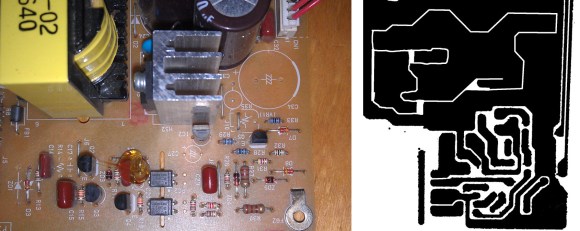
[Arvydas] recently bought a Rock Band 3 Wii keyboard thinking it would be an excellent and very inexpensive (£9.99) MIDI controller. The keyboard has a proper DIN-5 MIDI out port, so theoretically the only thing needed to plug this into a computer is a USB to MIDI adapter. Unlike the keyboard, the MIDI adapter was a cheap piece of Chinese cruft, but given some ingenuity and a handful of components, he was able to get everything working.

The 30-year-old MIDI specification includes a few schematics on how to properly connect MIDI devices together. The most important part of these schematics is an optoisolater on the MIDI in, a valuable addition considering early MIDI keyboards cost thousands of dollars. It seems [Arvydas]’ MIDI to USB adapter didn’t include this vital component, instead replacing it with a simple resistor. Anything to keep costs down, right?

To get the MIDI adapter working, [Arvydas] headed over to Maplin and bought an optioisolator, With everything wired up on a breadboard, he got it to work and eventually transplanted the circuit to the adapter’s PCB.

It’s a great piece of work to get this MIDI adapter functioning, especially since it’s doubtful the cheap adapter would have worked with any MIDI device.

The Tiniest Arcade Cabinets You’ve Ever Seen

After perusing Amazon one day, [Dave] found a very interesting piece of kit: a small, 1.5″ digital picture frame. They’re not very complex, just an LCD, a few buttons to cycle the picture, and a battery to keep everything portable. He decided the best use of this tech would be a tiny arcade cabinet, featuring screen shots of the best games a darkly neon lit arcade of the late 80s had to offer.

After sourcing a few of these digital picture frames on eBay, [Dave] set to work disassembling the frames and designing a custom enclosure. He wanted a few specific features: controls in the right place, replaceable sides, and the glowing red eyes of a coin acceptor slot. [Dave] whipped a model up in OpenSCAD and sent the parts over to his printer.

The controls for the digital picture frame were connected to a quartet of tact switches on the control panel, and a red LED provides the glow from the coin acceptor. With a USB plug and the frame’s memory loaded up with screen shots, [Dave] has a fabulous desk toy.

All the relevant files are up on Thingiverse if you’d like to build your own.

Text Editor Running On Your ARM Project

bare-metal-elua-text-editor

Tired of flashing your embedded project over and over just to tweak a few values? So was [Karl], so he wrote a text editor that runs on his ARM dev board.

Having trouble wrapping your mind around the need for this kind of thing? He’s actually playing around with eLua, the embedded version of the Lua programming language. In this case the program files are being stored on an SD card. But still, moving that back and forth between computer and embedded project gets old quickly. So he invested the time to write a rudimentary text editor that he interfaces through this terminal window. Above you can see the help screen which lays out all of the applications features. Right now it sounds like the only gotcha for this is the amount of RAM it needs to run. As it stands, the editor will now work an mbed board, but it works just fine on an STM Discovery.

Animating A Lamp With The Leap Motion

leap

The Leap Motion is a very cool device, but so far we haven’t seen many applications of interacting with physical devices. [Xavier] wanted to control a cute servo animated desk lamp with his hands, and with the help of a Leap and an Arduino he was able to do just that.

The Leap Motion API has a handy feature that will output all its data over a websocket. It’s a very easy way to transfer hand positions with a minimum amount of overhead, and with just a little bit of Node.js, it’s only two lines of code to connect the Leap to a websocket server.

With the Leap data on a web server, the only thing left to do is pulling it down to an Arduino. Again, [Xavier] used Node.js, this time in the form of johnny five, a Javascript-based Arduino framework. After that, it was a simple matter of mapping the data from the Leap to servo movements in [Xavier]’s Pixar-inspired lamp.

Video of the build below.

Continue reading “Animating A Lamp With The Leap Motion”

3D Printed Dispenser Flings Treats At Your Pets

internet-connected-dog-treat-dispenser

If you’re stuck in the virtual world like [Kevin Flynn] you can still make sure your pup is rewarded for good behavior. Just follow [Jwarp’s] design for this Internet connect dog treat dispenser.

We were actually a bit surprised by the demo video. It shows that the compact unit is more than capable of reliably dispensing one treat at a time. It started as a wood prototype which allowed him to tweak how the servo motors worked before laying out all of the 3D parts in Sketch Up. Two motors cooperate to get the job done. The first allows one treat to exit that shoot coming from the center of the hopper. The other stirs the remaining inventory to both position the next treat and loosen any jams.

Continue reading “3D Printed Dispenser Flings Treats At Your Pets”

Teardrop Camper Combines Simplicity, Style, And Function

teardrop-camper

They needed a place to stay on road trips and at music festivals. This teardrop camper certainly fits the bill. And it’s got a look that will make you proud to unfold yourself into the parking lot every morning.

Starting from a flat frame the camper skeleton was built up using plywood sides and cross pieces to help support the sweeping roof. It was then covered with 1/4″ Birch plywood which has enough flexibility to follow the contour. Inside you won’t find much in the way of frills, but the entire floor is a 4″ thick foam mattress which is a lot better that camping out. There’s a dome on top which can opens for ventilation and a hatch on the rear to carry some extras along on your adventure.

[via Reddit]


Build A Bare Bones Arduino Clone Which Maximizes Its Use Of Real Estate

barebones-arduino-clone-at-home

Check out all the stuff crammed into a small swath of strip board. It’s got that characteristic look of a roll-your-own Arduino board, which is exactly what it is. [S. Erisman] shows you how to build your own copy of his YABBS; Yet Another Bare Bones Arduino (on Stripboard).

The strips of copper on the bottom of the substrate run perpendicular to the DIP chip and have been sliced in the middle. This greatly reduces the amount of jumpering that would have been necessary if using protoboard. A few wires make the necessary connections between the two tooled SIL headers that make up the chip socket. On the right hand side there a voltage regulator with smoothing caps. The left side hosts the obligatory pin 13 LED, and the crystal oscillator can be glimpsed on the far side of the ATmega328.

Pin headers along either side of the board have been altered to allow for soldering from the wrong side of the plastic frames. Note that there’s a three-pin hunk that breaks out the voltage regulator, and an ISP programming header sticking out the top to which those female jumper wires are connected.

Ringing in at as little as $2-$4.75 a piece you’ll have no problem leaving this in a project for the long hall. We can’t say the same for a $30+ brand name unit.