This Bear Can Pass A Turing Test

bear

Some thought the first artificial intelligence would come about as an accident, others as a war machine that decides the only way to protect humans is to kill them all. It turns out both these ideas were wrong. The first AI is apparently a teddy bear, available on Kickstarter for $60.

The Supertoy Kickstarter is selling a mechatronic teddy bear with motors, speakers, and enough electronics to connect to a cell phone. After plugging your cell phone and stuffing it in Teddy’s thorax, the bear comes alive with an intelligence all his own and a voice seemingly lifted from [Peter Griffin].

Needless to say, we’re just a bit skeptical that Teddy here can perform as demonstrated in the Kickstarter video. While the team behind Teddy has developed a successful talking chatbot before, the video makes this tech seem too good. Even the voice sounds like a real person with a microphone, and not like a clunky GPS personality.

Feel free to speculate in the comments on how good this tech can possibly be.
Drive Bay Form Factor Dual Dekatron Readouts For RAM And CPU Usage

optical-drive-dual-dekatron

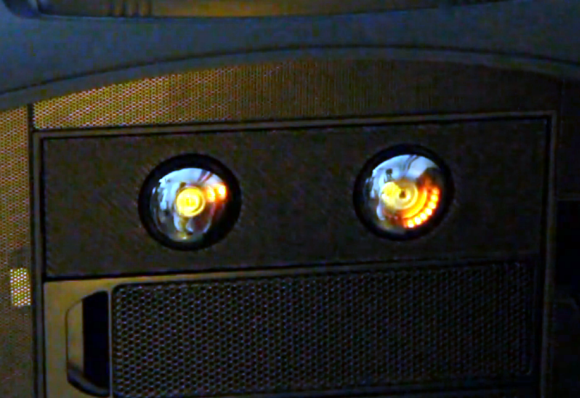
The two circular displays seen above are Dekatrons built into an optical drive enclosure. [Matt Sylvester] picked up a couple of different types of these tubes on eBay. He etched his own driver, and was able to control them with an Arduino. After a few months went by he decided to revisit the project to see if it would work as a CPU and RAM usage meter.

These tubes need high voltage to get the neon display glowing brightly. This raised some concerns about having those voltage levels inside of his PC, as well as the noise which may be introduced by the supply. To deal with those issues [Matt] gutted an old optical drive, using its case to physically isolate the circuitry, and some optoisolators to protect the logic connections. His driver board uses an ATmega328 running the Arduino bootloader. It connects to the PC using an FTDI USB to Serial cable. This makes it a snap to push the performance data to the display. It also has the side benefit of allowing  him to reprogram the chip without opening the case.

If you can’t find one of these tubes for your own project consider faking it.

Continue reading “Drive Bay Form Factor Dual Dekatron Readouts For RAM And CPU Usage”

Making A Dropbox With A Chumby And Bittorrent

chumby

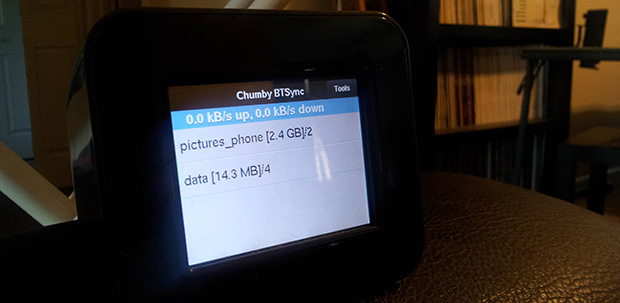
Since the Chumby servers went offline earlier this year, [Huan] found himself with a few of these tiny, extremely hackable internet devices lying around. He’s also getting tired of his NAS and wanted a way to sync folders between all his computers. Combine the two desires, and you can make a personal cloud with a Chumby, thanks to some help from the people at BitTorrent Labs.

[Huan] is using BitTorrent Sync for his Dropbox-like server. After creating a webkit interface for BitTorrent Sync, [Huan] loaded up his Chumby with new firmware, set up a few folders to be synced, and let the Chumby do all the work.

It’s not exactly fast, given the Chumby’s wireless connection and USB 1.1 for an external disk drive, but it’s more than enough to keep your personal project folders synced across multiple computers. As a bonus, it’s also very, very secure, getting around most of the security problems cloud solutions entail.

Hello From SupplyFrame – Your New Evil Overlords !

A couple of weeks ago one of our engineers woke up and read that HackADay was going up for sale. His first reaction was much the same as most regular readers of HackADay, he was worried and concerned that a site that he has read daily for years was going to be sold to someone who would promptly carve it up and ruin it. So he bumped it up the chain here at SupplyFrame and we decided that HaD would be a good fit for us and so we made an offer and here we are!

Continue reading “Hello From SupplyFrame – Your New Evil Overlords !”

Electric Imp As An Internet To RF Gateway

a-little-automation-with-the-electric-imp

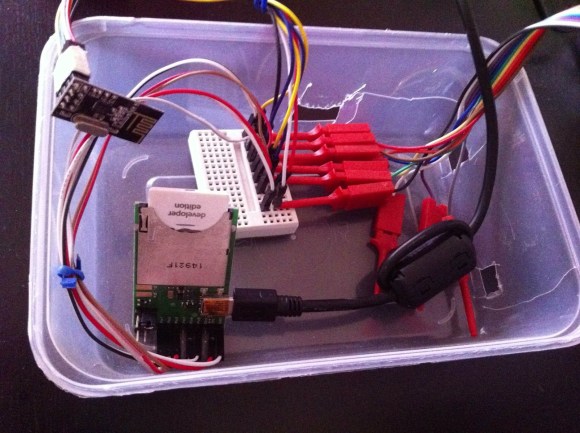
This project is a study in connecting several different families of hobby electronic hardware. The image above shows the Electric Imp side of things. It bridges its Internet connection with the RF connections of the rest of the project.

The Imp is a peculiar (intriguing?) piece of hardware. Take a look at [Brian Benchoff’s] hand’s on experience with the SD form factor hardware which is not an SD card at all. It’s an embedded system which uses light programming and a cloud-based software setup to bring wireless Internet to your projects.

In this case [Stanley Seow] started wondering if he needed multiple Imps to connect different parts of his setup. A bit of head scratching led him to the use of nRF24L01 modules which are cheap and easy to use Radio Frequency transceiver boards. He took a partially finished driver project and brought it home to play nicely with the Imp. Now he can use the system to communicate with other components which will eventually be used for home automation. Right now his proof of concept issues wireless commands to an Arduino driving a strip of LEDs.

Hackit: Researchers Wait 69-years To See Tar Move

69-year-science-experiement

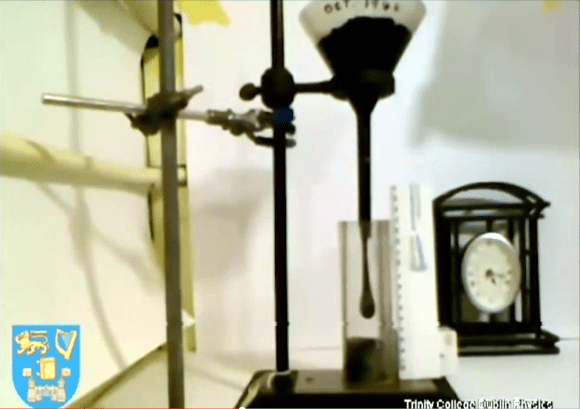
This experiment was started at Trinity College Dublin way back in 1944. Its purpose is to prove that tar flows, and indeed it does let go of a drop about every ten years. The thing is that nobody has ever seen that happen, bringing up the “if a tree falls in the forest” scenario. The Nature article on this event even mentions another experiment whose last drop was missed because the camera monitoring it was offline. This time around they did get some footage of the (un)momentous event which you can see below.

So here’s the challenge for clever hackers: What’s the easiest rig you can think of that won’t just continuously film the experiment but can also ensure that you get the goods on tape when a drop does fall? We see all kinds of high-speed shutter triggers — here’s one of the latest. But we don’t remember seeing an extremely slow version of the same. Let us know your idea by leaving a comment.

Continue reading “Hackit: Researchers Wait 69-years To See Tar Move”

Build Your Own Metal Detector

[Dzl] and his rather serious looking son are metal detector enthusiasts. But when they couldn’t find their store-bought metal detector earlier this summer they just went ahead and built their own. [Dzl] starts his write up with an explanation of how most oscillator based metal detectors work. This one differs by using an Arduino to read from the metal detecting coil.

The circuit starts with an oscillator that produces a signal of about 160 kHz which is constantly measured by the Arduino. When metal enters the coil it alters the frequency, which is immediately picked up the Arduino. Instead of that characteristic rising tone this rig uses a Piezo buzzer, issuing the type of clicks you’d normally associate with a Geiger counter.

The last part of the build was to find the best coil orientation. They settled on thirty turns around a metal bucket. An old Ikea lamp is the perfect form factor to host their hardware which seems to work like a charm.