Programming Without A Toolchain; Crafting PIC Op Code By Hand

We’ve been living a life of luxury, writing our microcontroller code in a text editor and using — of all things — a compiler to turn it into something the chip can use. [Dan Amlund Thomsen] shows us a different way of doing things. He’s actually crafting the operation codes for a PIC microcontroller by hand. We’re glad he’s explained this in-depth because right now we feel way over our heads.

His program is pretty simple, it blinks a single LED and he’s chosen t work with a PIC 12F1840. The first order of business is to issues the words that configure the chip using 14-bit binary values from the datasheet. From there he goes on to write the program in assembly code. At this point he could pretty much just run this through the assembler, but he’s really just getting started now. He walks through the format necessary to package the configuration words, then goes on to illustrate the translation of assembly commands to binary op codes. We’re not sure we’ll ever get around to trying this ourselves, but it was certainly fun to read about it.

Self Monitoring A Home Alarm System

[Lior] wanted to cancel the monitoring system for his home’s alarm, but he didn’t want to stop using the alarm all together. The trick is to rig up some way to monitor it himself. It would have been simple to have it just call him instead of the alarm company since the system just uses a telephone connection. But this would require that he have a land line for it to connect to, and when it calls him he would have no idea what part of the system had been set off. He developed a way to have the system text message him with all of the available details.

An Arduino controls the system, with a SIM900 GSM shield to hand the cell side of things. The board to the left emulates the standard telephone line, with an M8870 DTMF touch tone decoder to figure out what the alarm system is telling him. He also needed to implement touch tone generation to talk back to the system. His write-up includes links to other articles he posted about hardware, software, and protocol specifics.

Center Pivot Pen Plotter

This center pivot pen plotter is an interesting take on the idea, and manages to somewhat simplify the fabrication when compared to a gantry-style built.

Normally we’d see a gantry that travels on two rails, with a print head that moves along its length. Here the gantry is anchored on just one side, with a chain driven system to rotate it along the plotting surface. The print head uses a fine-point felt-tipped marker. It still travels along the arm as you would expect, and can be tilted away from the paper for repositioning.

What was made easier in hardware ends up adding to software complexity. The benefit of a traditional system is that it uses X and Y coordinates to plot a design. The pivot of this mechanism means that as the print head moves further from the center of the machine, the distance between each pixel is magnified. But the clip after the break proves that this issue has been solved.

Continue reading “Center Pivot Pen Plotter”

Giving The IPod Nano A Home On A Honda Dashboard

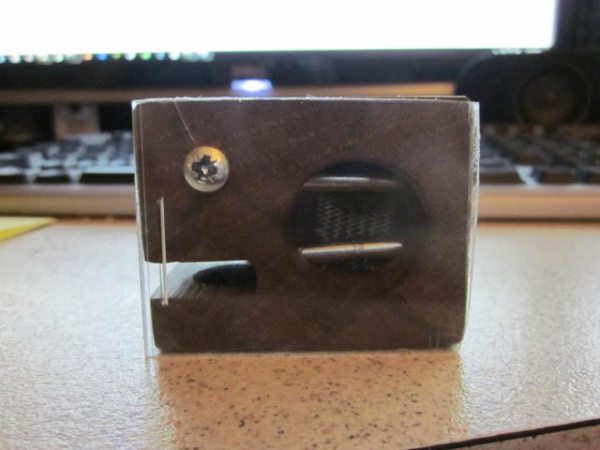
[Hyeinkali’s] iPod Nano looks right at home on the dashboard of his 2001 Honda Accord. He got rid of the simple LCD clock and the buttons that were used to set it. The hack holds the iPod securely in place, but it remains easy to remove and take with you.

He started by popping out the bezel that holds the clock module and hazard light button in place. The original display was about the same width as the Nano, but he wasn’t interested in mounting the mp3 player under the dash. Since he needed to be able to take it with him to sync his music library he made a space near the bottom of the bezel to accept the connector end of the USB cable while keeping the device accessible. After connecting the other end to power he covered the hole in the bezel with mesh and put everything back together. We’re not sure if audio is piped into the car stereo via a cable or through Bluetooth, but it does feed to the head unit.

[via Reddit]

Retrotectacular: Time Sharing

It’s easy to forget the layer upon layer of technological advances that led to the computers we use today. But this look at the state of the art half a century ago does a good job of reminding us. Here [Fernando J. Corbató] explains the concept of Time-Sharing. He is one of the pioneers of the topic which is now used in every computer system in the world.

Since processors (read: a single core) can only work on one operation at a time, it inherently creates a bottle-neck. This is a huge issue when you consider the cost of the computers used at the time. In the video he mentions $300-$600 an hour. That was in the 1960’s and would roughly equate to about $2300-$4600 in 2012. In other words, there’s big money in using the machine as efficiently as possible.

Early on in the discussion he mentions how programs were loaded and solutions were returned by computers of the day. It started with punch cards, then moved to magnetic tape. At the time this was filmed they had just started using teletype and were hoping to add a graphical interface in the near future. We’ve come a long way but the core principles he’s explaining are still quite important. See both parts of the film after the break.

Continue reading “Retrotectacular: Time Sharing”

Some Technical Improvements On [Alton Brown’s] Hacked Smoker

Bringing that smoky goodness to your cooking is neither hard, nor is it expensive. [Alton Brown], who we consider to be the MacGyver of cooking, always seems to be able to build cooking contraptions from common items. The smoker he built from a flower pot was the inspiration for [Tom’s] own project. But [Tom] added in PID hardware to smoke at just the right temperature.

The enclosure hides a single electric burner at the bottom. A metal tray full of wood chips sits on top of it, smoldering as the burner gets hot. You could just set it and forget it, but it will take a lot of trial and error to figure out which setting achieves the best results. [Tom’s] additional hardware, housed in the grey electrical box, switches the burner with a solid state relay. The PID controller takes measurements from a temperature sensor inserted in the lid of the smoker, ensuring perfectly prepared food every time.

If you’re interested in making your own you could try building a heating element from toaster oven parts.

QR Code Opens Doors To You

[Jeremy Blum] wrote in to share his LibeTech QR Code Door Lock project. He developed it during his Senior year at Cornell University along with three of his classmates. It seeks to move away from magnetic card locks in favor of optical locks that authenticate based on a QR code.

The hardware he’s using here is definitely cost prohibitive, but we’re sure the concept could be greatly simplified. In this case a BeagleBone running embedded Linux monitors a feed from a webcam. When it detects a QR code it compares it with a database of approved keys and will unlock the door for you.

There are problems with this technique, one being that an attacker might be able to get a usable photograph of your key without you knowing. But the majority of hotel locks in use right now are even less secure than that. On the upside, the key to your room can be emailed to you for use on just about any device with a screen, or printed out on a piece of paper.

You can find [Jeremy’s] presentation video embedded after the break.

Continue reading “QR Code Opens Doors To You”