Hackaday Links: January 10, 2012

They can put a man on the moon, but they can’t put a man in LEO

Yeah, we’re enraged by that headline. Anyway, NASA put up a whole bunch of projects and made them open source. From the looks of it, there’s plenty of cool stuff: genetic algorithm libs, toolkits for astrodynamics simulations (on the Goddard site), and this cool thing.

Nyan all the disks!

[brainsmoke], a hacker over at revspace, made an assembler version of nyan cat that can be placed on the bootloader of any disk. Just a reminder that you shouldn’t mount everything out there. We learned that lesson the week we discovered a penicillin allergy.

It’ll replace the Buffy poster.

[Anthony Clay] has been working on a set of EE posters that he’s putting up as a Kickstarter. They’re Ohm’s Law, resistor calculator, capacitance, and inductance posters that would look great above any workbench. He’s looking for ideas for other posters, so drop him a line and vote for the 7400 logic poster. All of them.

Ooooohhhh MIDI sampler

A while ago, we saw this neat MIDI Arduino shield. The Kickstarter reached its funding goal (there’s still time left!), but now [Keith] writes in to tell us that the AvecSynth library is platform independent. You could use this to record and play back MIDI messages. MIDI tape delay, anyone?

Open mind, not mouth.

With the success of the Stanford AI class last year, it looks like MIT is really getting their head into the game. Think of it this way: it’s MIT opencourseware that can lead to credentials. Now the only question is, ‘how do you prank a virtual campus?’

Crank Out The Jams With [Dino]’s Fuzz Face

Weekly Hack a Day feature [Dino] is back again, this time with his very own guitar pedal. It’s modeled on a three-transistor Fuzz Face clone and sounds very good in our humble opinion.

Fuzz pedals were some of the first guitar pedals on the market, and for good reason. Their easy construction and simple theory of operation (just amplify sound until the transistor saturates) made them an economical and available pedal for the legends of rock in the 60s. [Dino]’s build follows this tradition of simplicity with a common 2N3904 transistor and a pair of BC547 Silicon transistors. We’re guessing [Dino] couldn’t find any cred-worthy and mojo-giving Germanium transistors, but the result sounds just as good as we could imagine.

To test out his pedal, [Dino] hooked up a [Jack White] style single string lap steel and turned everything up to 12*. The result is rock. Check out the build vid after the break.

Continue reading “Crank Out The Jams With [Dino]’s Fuzz Face”

Help [Chris] Boot His Cray-1 Supercomputer

[Chris Fenton] needs your help. After constructing a 1/10th scale, cycle accurate Cray-1 supercomputer and finding a disk with Cray software on it, he’s ready to start loading the OS. There’s a small problem, though: no one knows how to boot the thing.

[Chris] posted a disk image for a Cray-1/X-MP with the help of the people at archive.org. Now he needs your help – if you think you can reverse engineer the file system, [Chris] will pay handsomely with a miniature model of a Cray printed on his MakerBot. In any case, it seems like a fun challenge.

From our quick glance at the disk image with a HEX editor, it looks like [Chris] has something special on his hands. We see a few references to “Cray memory and registers,” as well as “IOP-0 Kernel, Version 4.2.2” in the header along with a few dates referencing July of 1989.  This is consistent with the history of the source disk pack. If you think you’ve got what it takes to reverse engineer the file system of a Cray-1, this is your chance.

Print Huge Stuff With The Makerbot Replicator

The folks at MakerBot Industries are introducing their new 3D printer at CES this week. It’s called the MakerBot Replicator and features dual heads for 2-color prints and a huge build envelope for huge objects

From [Bre Pettis]’ introduction video (available after the break), the build area is about 9x6x6 inches, compared to the about four-inch cube-sized volume for the MakerBot Cupcake and Thing-O-Matic. The Replicator also features optional dual Makerbot Mk. 8 extruders for two-colored printing. We’ve seen valiant attempts at printing multicolored objects with one extruder, and if you’d ever want to print with two filaments dual extruders are the way to go.

The replicator also features a nice control panel (which includes a Snake game), something that’s relatively rare on the 3D printers we’ve seen. The single extruder model will set you back $1750, while the dual extruder adds another $250 to the price. We really want one of these, but don’t take our word – check out [Bre]’s intro.

Continue reading “Print Huge Stuff With The Makerbot Replicator”

Build An Intervalometer With These Simple Fabrication Techniques

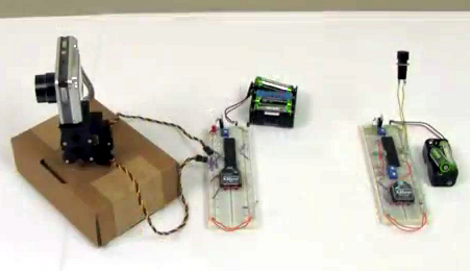
[L] just finished building this intervalometer and his verbose documentation of the project has a little bit of everything. The fabrication uses common prototyping materials, and simple skills that are easy to master even for the beginner.

The hardware is based around an ATmega8 microcontroller. After snooping around the Internet [L] wanted to see if the voltage divider based focus and shutter commands that are present in some camera remote shutter controls would work for his model. Investigation with a commercial shutter release showed him how it was done, so he incorporated that into his design. When it comes to firmware for the device we really like his explanation of the menu system. There’s a lot of settings and he did a great job of planning the user interface to make them all work on the finished product.

The schematic and board layout were done with Eagle. During the layout process he made choices for easy assembly using strip board, and even walks us through the steps when cutting the traces and adding jumper wires. It’s nicely finished in this clear plastic case and demonstrated in the video after the break.

Continue reading “Build An Intervalometer With These Simple Fabrication Techniques”

Rainbow Machine Livens Up Any Photograph

rainbow-machine

[Shameel Arafin, Sean McIntyre, and Reid Bingham] really dig rainbows. Going by the moniker the “RainBroz”, the trio built a portable display that can be used to add cool light painting effects to pictures.

The group brings their Rainbow Machine all over the place, including parties, gatherings, and random spots on the street. Anyone is welcome to have their picture taken with the Rainbow machine, and each subject is given a card with a URL on it, so that they can check out their picture whenever they please.

The display consists of addressable RGB LED strips and an Arduino from Adafruit, along with the associated support mechanisms for moving the LEDs. The real magic is carried out by the LPD8806 light painting library, also from Adafruit, which enables the RainBroz to create all sorts of images with little fuss.

As you can see in the video below, the Rainbow Machine seems to get a pretty warm reception from just about everyone, even people grabbed right off the street. It looks simple enough to build, so why not put one together for your next gathering?

Continue reading “Rainbow Machine Livens Up Any Photograph”

Using A Mac And XCode As A Linux Development Platform

[Ricard Dias] wrote in to tell us about his guide for developing Linux applications on a Mac. He really enjoys the development environment provided by XCode, and it doesn’t take much to make it work as an all-in-one solution for Linux development.

The real trick here is the use of SSH to access a Linux environment. In this example he uses Ubuntu running as a virtual machine, but also mentions that the same thing can be done just as easily with a separate box as long as it is on the same network as the Mac. SSHFS (the SSH Filesystem) lets him mount the development directory on the Linux box locally. This is where the XCode project and files will be stored, but building the program will be done by the Linux machine via a script calling the make comand via SSH. To test out the newly built program, [L] tunnels in using X11 forwarding for ssh, and the application will be shown as a window in OSX, even though it is running on the Ubuntu machine.

We love SSH and use it all the time. It’s amazing how hand it can be.