The Best USB To VGA Converter For The Job

There are many adapters, dongles, and cables designed for interfacing display standards, and no doubt some of you have them in the glue of your entertainment system or work space. They’re great for standards, but what about something that’s not quite standard? [Stephen] has an arcade cabinet with a CRT that runs at an unusual 336 by 262 pixel resolution. It can be driven as 320 by 240 but doesn’t look great, and even that “standard” resolution isn’t supported by many dongles. He’s shared the story of his path to a unique USB to VGA converter which may have application far beyond this arcade machine.

We follow him on a path of discovery, through RP2040 PIOs, simple resistor ladder DACs, and home-made kernel modules, before he arrives at GUD, a USB display protocol with its own upstreamed Linux kernel driver. It’s designed to be used with a Raspberry PI deriving an LCD or HDMI display, but for his task he implemented the protocol on one of the more expensive STM32 series microcontrollers. The result after several false starts and some fiendish PCB routing is a standalone GUD-based USB-to-VGA converter that delivers perfect 34-bit colour at this unusual resolution, and also presumably others if required. It’s a worthwhile read for the many hints it gives on the subject of driving displays, even if you’re not driving an odd cabinet monitor.

Illustrated Kristina with an IBM Model M keyboard floating between her hands.

Keebin’ With Kristina: The One With The Height-Adjustable Key Caps

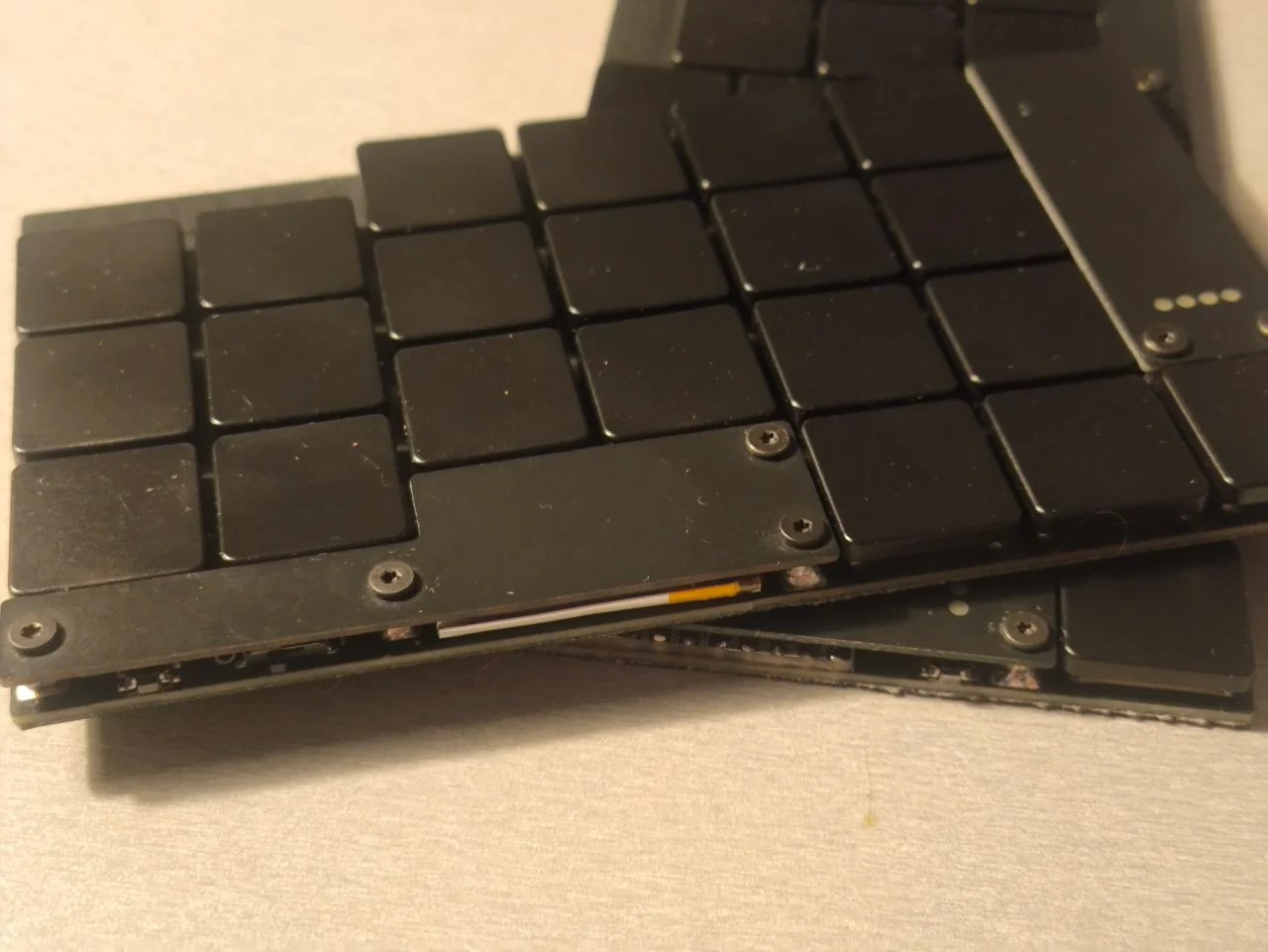
Now, we can’t call these LEGO key caps for obvious reasons, but also because they don’t actually work with standard LEGO. But that’s just fine and dandy, because they’re height-adjustable key caps that use the building block principle.

Height-adjustable keycaps in white, with tops removed to show the LEGO-like middles.
Image by [paper5963] via reddit
Now you could just as easily build wells as the dome shape pictured here, and I’d really like to see that one of these days.

In the caption of the gallery, [paper5963] mentions foam. As far as I’ve studied the pictures, it seems to be all 3D-printed material. If they were foam, they would likely be porous and would attract and hold all kinds of nastiness. Right?

[paper5963] says that there are various parts that add on to these, not just flat tops. There are slopes and curves, too. They are also designing these for narrow pitch, and say they are planning to release the files. Exciting!

Continue reading “Keebin’ With Kristina: The One With The Height-Adjustable Key Caps”

When Clever Hardware Hacks Bite Back: A Password Keeper Device Autopsy

Sometimes you have this project idea in your mind that seems so simple and straightforward, and which feels just so right that you have to roll with it. Then, years later you stumble across the sad remnants of the tearful saga and the dismal failure that it portrays. Do you put it away again, like an unpleasant memory, or write it up in an article, as a tearful confession of past sins? After some coaxing by a friend, [Alessandro] worked up the courage to detail how he set about making a hardware-only password keeper, and why it failed.

The idea was so simple: the device would pretend to be a keyboard and type the passwords for you. This is not that unusual, as hardware devices like the Mooltipass do something similar. Even better, it’d be constructed only out of parts lying around, including an ATtiny85 and an HD44780 display, with bit-banged USB connectivity.

Prototyping the hardware on a breadboard.

Overcoming the challenge of driving the LC display with one pin on the MCU required adding a 74HC595 demultiplexer and careful timing, which sort of worked when the stars aligned just right. Good enough, but what about adding new passwords?

This is where things quickly skidded off the tracks in the most slapstick way possible, as [Alessandro] solved the problem of USB keyboard HID devices being technically ‘output-only’, by abusing the indicator statuses for Caps Lock, Num Lock, and Scroll Lock. By driving these from the host PC in just the right way you can use them as a sort of serial protocol. This incidentally turned out to be the most reliable part of the project.

Where the project finally tripped and fell down the proverbial flight of stairs was when it came to making the bit-banged USB work reliably. As it turns out, USB is very unforgiving with its timing unlike PS/2, making for an infuriating user experience. After tossing the prototype hardware into a box, this is where the project gathered dust for the past years.

If you want to give it a try yourself, maybe using an MCU that has more GPIO and perhaps even a USB hardware peripheral like the STM32F103, ESP32-S3 or something fruit-flavored, you can take a gander at the project files in the GitHub repository.

We’re always happy to see projects that (ab)use the Lock status indicators, it’s always been one of our favorite keyboard hacks.

Illustrated Kristina with an IBM Model M keyboard floating between her hands.

Keebin’ With Kristina: The One With The RollerMouse Keyboard

I just love it when y’all send in your projects, so thanks, [Kai]! But were do I even begin with this one? Okay, so, first of all, you need to know that [Kai Ruhl] built an amazing split keyboard with plenty of keys for even someone like me. Be sure to check it out, because the build log is great reading.

A lovely split keyboard on a pair of rails that doubles as a mouse.
Image by [Kai Ruhl] via Land of Kain
But that wasn’t enough — a mousing solution was in order that didn’t require taking [Kai]’s hands off of the keyboard. And so, over the course of several months, the RollerMouse Keyboard came into being. That’s the creation you see here.

Essentially, this is an ortholinear split with a built-in roller bar mouse, which basically acts like a cylindrical trackball. There’s an outer pipe that slides left/right and rolls up and down, and this sits on a stationary inner rod. The actual mouse bit is from a Logitech M-BJ69 optical number, and [Kai] operates the roller bar using thumbs.

[Kai] found it unpleasant to work the roller bar using thumbs, so mousing is done via the palm rests. You may find it somewhat unpolished with all that exposed wiring in the middle. But I don’t. I just worry about dust is all. And like, wires getting ripped out accidentally.

Continue reading “Keebin’ With Kristina: The One With The RollerMouse Keyboard”

A Keyboard For Anything, Without A Keyboard

There are many solutions for remote control keyboards, be they Bluetooth, infrared, or whatever else. Often they leave much to be desired, and come with distinctly underwhelming physical buttons. [konkop] has a solution to these woes we’ve not seen before, turning an ESP32-S3 into a USB HID keyboard with a web interface for typing and some physical keyboard macro buttons. Instead of typing on the thing, you connect to it via WiFi using your phone, tablet, or computer, and type into a web browser. Your typing is then relayed to the USB HID interface.

The full hardware and software for the design is in the GitHub repository. The macro buttons use Cherry MX keys, and are mapped by default to the common control sequences that most of us would find useful. The software uses Visual Studio Code, and PlatformIO.

We like this project, because it solves something we’ve all encountered at one time or another, and it does so in a novel way. Yes, typing on a smartphone screen can be just as annoying as doing so with a fiddly rubber keyboard, but at least many of us already have our smartphones to hand. Previous plug-in keyboard dongles haven’t reached this ease of use.

Motorized Faders Make An Awesome Volume Mixer For Your PC

These days, Windows has a moderately robust method for managing the volume across several applications. The only problem is that the controls for this are usually buried away. [CHWTT] found a way to make life easier by creating a physical mixer to handle volume levels instead.

The build relies on a piece of software called MIDI Mixer. It’s designed to control the volume levels of any application or audio device on a Windows system, and responds to MIDI commands. To suit this setup, [CHWTT] built a physical device to send the requisite MIDI commands to vary volume levels as desired. The build runs on an Arduino Micro. It’s set up to work with five motorized faders which are sold as replacements for the Behringer X32 mixer, which makes them very cheap to source. The motorized faders are driven by L293D motor controllers. There are also six additional push-buttons hooked up as well. The Micro reads the faders and sends the requisite MIDI commands to the attached PC over USB, and also moves the faders to different presets when commanded by the buttons.

If you’re a streamer, or just someone that often has multiple audio sources open at once, you might find a build like this remarkably useful. The use of motorized faders is a nice touch, too, easily allowing various presets to be recalled for different use cases.

We love seeing a build that goes to the effort to include motorized faders, there’s just something elegant and responsive about them. Continue reading “Motorized Faders Make An Awesome Volume Mixer For Your PC”