64-bit OS Written Entirely In Assembly

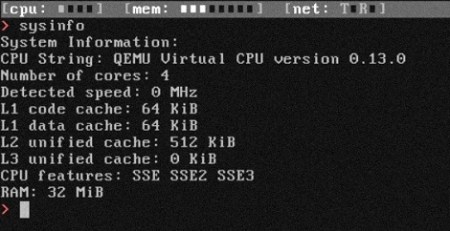
The folks at Return Infinity just released a new version of their BareMetal OS, a 64-bit operating system written entirely in assembly.

The goal of the BareMetal project, which includes a stripped-down bootloader and a cluster computing platform is to get away from the inefficient obfuscated machine code generated by higher level languages like C/C++ and Java. By writing the OS in assembly, runtime speeds are increased, and there’s very little overhead for when every clock cycle counts.

Return Infinity says the ideal application is for high performance and embedded computing. We can see why this would be great for really fast embedded computing – there are system calls for networking, sound, disk access, and everything else a project might need. There’s also ridiculously small system requirements – the entire OS is only 16384 bytes – lend itself to very small, very powerful computers.

With projects that are computationally intensive, we think this could be a great bridge between an insufficient AVR, PIC or Propeller and a full-blown linux distro. There’s just some questions about the implementation – we feel like we’ve just been given a tool we don’t even know when to use. Any hackaday readers have an idea on how to use an OS stripped down to the ‘bare metal?’ What, exactly, would need 64 bits, and what hardware would it run on?

Check out the Return Infinity team calculating prime numbers on their BareMetal Node OS after the jump.

Continue reading “64-bit OS Written Entirely In Assembly”

Apple II Weather Display (part 3)

In parts 1 and 2, I discussed the important parts of what is going on the PC side with lua. While not 110% detailed I hope it gave you an idea on how the data is processed so the Apple II computer could quickly digest it. Now its time to see what happens at the other end of the serial cable. I am using basic, but its not 100% off the rom Applesoft basic, that would be even slower, so I am using a compiler and a fast graphics driver. Both are from “The Beagle Compiler” which was produced by the ever awesome Beagle Bro’s software company, and though still under copyright, the publishers have given permission for use of their software (within reason I don’t think you will get very far selling it).

Continue reading “Apple II Weather Display (part 3)”

Apple II Weather Display (part 2)

In part one of the Apple II weather display I quickly went over how data is fetched and phrased. Now its time to do something with it in part 2. In the order of functions I do the text parts first, and though its very similar to the process that the radar image goes through, its in monochrome and a bit simpler to explain. Before I go into how it works I should explain how I am dividing the Apple II’s screen.

Continue reading “Apple II Weather Display (part 2)”

Apple II Weather Display (part 1)

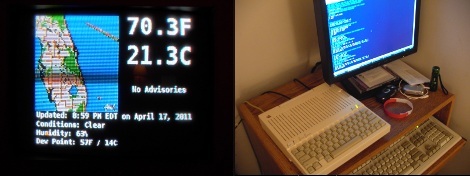
Due to computer issues I had to rob some parts from my “electronics” computer, which wasn’t bad, since I was not working on anything at the time and I felt a software project itch. I also wanted to do something with my Apple //c, which resides on my computer desk, so this ghetto brute force “solution” to use the 25 year old computer as a weather display came about.

In a nutshell there is the Apple II, a serial cable, and a PC running linux mint 10 and a handful of command line utilities. My specific Apple is the fist revision of the //c which means its got a buggy rom and the serial port(s) can be troublesome, the best speed I was able to get was 600 baud with just basic, though every other model could probably go a little faster.

On the linux side, wget downloads html and the radar image from Weather Underground’s mobile site, which is not a perfect source, but its easy. A lua script phrases text and graphics into string patterns that the Apple II can handle as keyboard input, and its sent down a serial cable where it is drawn on screen in basic.

Yea its pretty darn slow … it typically takes about eight to twelve minutes to redraw the screen, which is not all that horrid (imo) considering what is going on, but anyone with a more serious take on this could find numerous ways to optimize it, I just wanted to see what it would look like.

Join us after the break for a short video and to read all the details about how this all works!

Continue reading “Apple II Weather Display (part 1)”

Abusing HTTP Status Codes

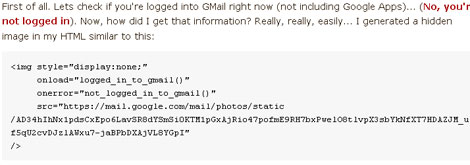
Concerns over privacy online are an ever growing theme. Every day we see people complaining about the policies of facebook and the like. [Mike Cardwell] points out another method of gleaning a bit of personal data from you that you may not have seen yet. By embedding a hidden image or using some really simple javascript, he can tell if you are currently logged into Gmail, Twitter, Facebook, or Digg. While this could possibly be used for more nefarious things, he points out that you could also use it for customizing your website to better suit the experience of the browser. For example, if the “reader” is already logged into Gmail, you could have any email links automatically open a gmail instance instead of the local mail client.

Speed Up Web Browsing In Linux

In modern computer systems, the biggest bottleneck of information tends to be in communicating with the hard disks. High seek times and relatively slow transmission rates when compared to RAM speeds can add up quickly. This was a necessary evil back when RAM space and costs were at a premium, but now it is not uncommon to see 4GB of RAM on laptops, and even 12GB on desktops. For  users whose primary computer use is browsing the internet (either for work, writing articles, or lolcats) and have some extra RAM, moving the browser cache to the RAM from the hard disk is a definite option for increasing speed.

In Linux systems (specifically Fedora and Ubuntu systems), this can be achieved for Chrome and Firefox by creating a larger ramdisk, mounting the ramdisk after boot, and then setting the browser of choice to use that ramdisk as a cache. The necessary commands to do this are readily available (internet archive) on the internet, which makes life easy. Using ramdisks for performance boosts are not exclusive to browsers, and can be used for other software such as Nagios for example.

We have previously covered a tool called Espérance DV for moving cache to RAM in Mac OSX, and for any Windows users feeling left out, there are ways of making Firefox bend to your will. Obviously you will see an increase in RAM use (duh), but this shouldn’t be a problem unless you are running out of free RAM on your system. Remember, free RAM is wasted RAM.

C# Portable Settings Provider

We live in a world where everything must be portable, ranging from mobile applications to making an application able to run on Linux, Windows and OS X.  Making a C# application to be completely portable across all windows computers is a problem that Microsoft knows about and willingly admits they will not fix. [Mike] from Geek Republic has taken it upon himself to show us how to hack up some code to make your programs portable.  This code is a good push forward for people loving the portability of modern applications. He will admit that bugs may exist so be on the lookout and he would probably appreciate the feedback.  Looking forward to a fully working provider so that .NET applications can be carried wherever people go!