Video Player Built From Stellaris Launchpad

stellaris-launchpad-playing-video

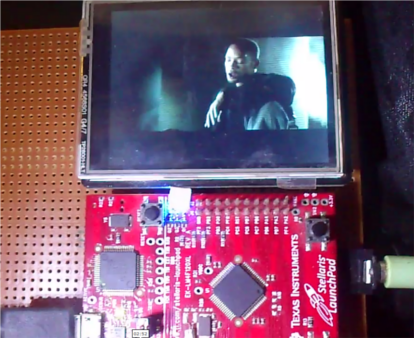
We think it’s pretty impressive to see a Stellaris Launchpad playing back Video and Audio at the same time with a respectable frame rate. It must be a popular time of year for these projects because we just saw another video playback hack yesterday. But for this project [Vinod] had a lot less horsepower to work with.

He’s using a 320×240 display which we ourselves have tried out with this board. It’s plenty fast enough to push image data in parallel, but if you’re looking for full motion video and audio we would have told you tough luck. [Vinod’s] math shows that it is possible with a bit of file hacking. First off, since the source file is widescreen he gets away with only writing to a 320×140 set of pixels at 25 fps. The audio is pushed at 22,400 bytes per second. This leaves him very few cycles to actually do anything between frames. So he encoded the clip as a raw file, interlacing the video and audio information so that the file can be read as a single stream. From the demo after the break it looks and sounds fantastic!

Continue reading “Video Player Built From Stellaris Launchpad” →
VFD Tube Clock Built Using Protoboard And Free-formed PSU

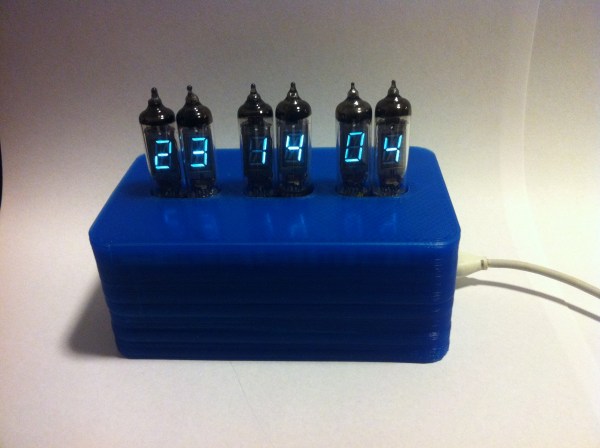
[James Glanville] wrote in to show of his latest tube project. It’s a clock using six IV-3 VFD tubes. In addition to the tube displays the project prominently features a blue 3D printed case which hides away all the guts of the build including the Stellaris Launchpad which drives the clock.

Speaking of guts, you’ll want to look through a few of [James’] other posts on the project. His first write-up on this clock shows off the protoboard and point-to-point soldering that makes the tubes work. To help simplify things he went with a MAX6921 VFD driver chip. He mounted it dead-bug style on its own piece of protoboard and then soldered all of the necessary connections to the larger hunk hosting the tubes. There’s also an interesting post that details the switch mode power supply which ramps the USB 5V power all the way up to the 50V used to drive the displays.

If you like this you should check out the first VFD clock he built. We featured it a while back in a links post.

Ubuntu With A GUI On A Beagleboard

beagle

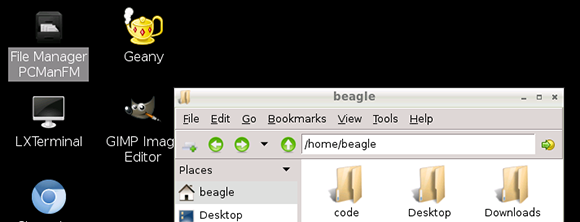
The Raspberry Pi is great if you’re looking for a cheap yet powerful computer running Linux, but let’s not forget all the other ARM dev boards out there. [Adam] spent some time this weekend putting together an Ubuntu distro for his Beagleboard XM to give it the convenience of a GUI and a whole bunch of drivers to get a lot of stuff done.

The Beagleboard XM is another high power ARM dev board that is a little more capable than the Raspberry Pi. With an integrated USB hub, LVDS LCD displays, and a camera board, the Beagleboard already has a lot of peripherals that are now only promised for the Raspberry Pi. The only problem with the Beagleboard XM is the state of drivers and software; a problem [Adam] resolved by bringing Ubuntu to the Beagleboard.

[Adam]’s distro comes with all the goodies a relatively high-powered ARM dev board should have: Python, scipy, numpy, and a few cool extras such as GIMP and Chromium. He says it’s a bit faster than the stock Raspbian distro on the Raspberry Pi, so if you’re looking for the best ARM/Linux dev board for your next project, you may want to give [Adam]’s distro a try.

A Bitcoin Mining Example For The BeagleBone With An FPGA Shield

beaglebone-fpga-bitcoin-mining

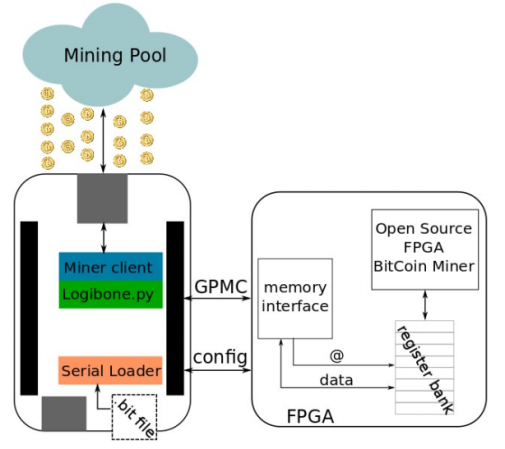
If you’ve got a BeagleBone and an FPGA board you should give this Bitcoin mining rig a try. The hardware uses brute-force to solve hashes, looking for the rare sets that can be used as digital currency. This particular example is designed for the LOGi-bone which is an FPGA shield for the BeagleBone. But we don’t see anything that would make this difficult to use with other FPGA hardware.

We’ve seen FPGA hardware bitcoin mining in the past. It doesn’t offer as much horsepower as an array of GPUs would, but the ARM/FPGA combo can be used in a cluster in order to speed up the process. This sounds like a fun group project to take on at the local Hackerspace.

Impressive Dev Boards For Your STM32 Dev Boards

stm32-discovery-breakout-boards

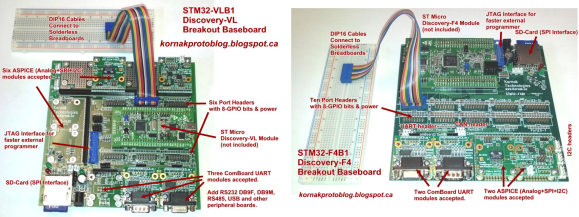
It seems there are a lot of people who have the same complaint about the STM32 Discovery boards; it can be difficult to add external hardware to them. Don’t get us wrong, we appreciate all of the pins being broken out (as opposed to the Stellaris Launchpad which we think has too few available). Here’s [Scot Kornak’s] solution to the problem. He created three different baseboards which the STM32 Discovery plugs into. Each is for a different model of dev board: the VL, F3, and F4. But he also thinks the baseboard we saw in this other project is a good choice for an F4 solution.

These large PCB add-ons bring functionality in two different ways. The first is by using expandable ports for drop in modules like serial communications connectors or Analog/SPI/I2C modules. For us, the second method is the most desirable. He routes each GPIO port to a 2×8 header and uses IDC cables (rainbow cable in these images) to connect them to a breadboard. Seeing this makes us wish STM had used discreet clusters of 16 pins instead of those super long dual pin headers.

Valentine’s Puzzle Box Makes You Work For What’s Inside

valentines-puzzle-box

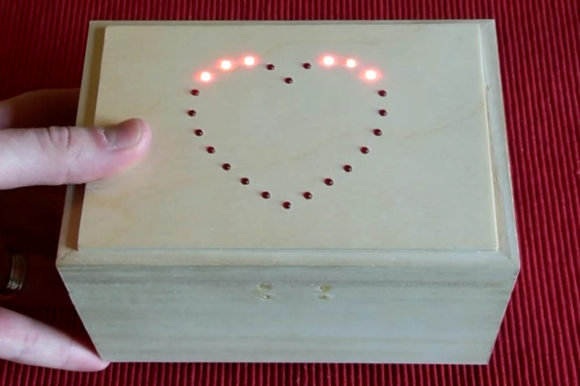
Here’s a new take on a gift box which has been locked from the inside. I doesn’t rely on GPS coordinates or a real-time clock to unfasten the latch. Instead, the box itself acts as a puzzle. You follow the visual and audio clues, turning the box along three axes in order to input the unlock code.

There are three different difficulty settings. The easiest uses the LED heart to indicate which direction to turn the box next. This is accompanied by a beep for correct or a longer tone for incorrect movements. On the medium setting you can only go by the tones, but once you screw up the lights will aid you in getting back to where you where when making the mistake. The impossible setting doesn’t use the lights at all.

[Matt] took inspiration from some reverse geocache projects featured here on Hackaday. He already had an STM32F3 Discovery board on hand which he received as a sample. It’s driving all of the electronics inside, with the on-board gyroscope as the input device. Don’t miss the video after the break to see how well the thing works.

Continue reading “Valentine’s Puzzle Box Makes You Work For What’s Inside” →

Running X86 Apps On Windows RT Devices

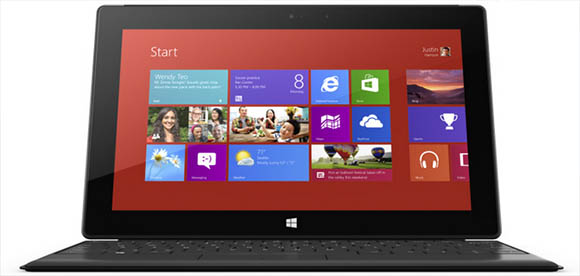
Windows RT, the version of Windows being loaded onto ARM-powered tablets and netbooks such as the new Microsoft Surface, has one drawback: there are tens of thousands of apps written for x86 hardware that simply won’t run on this new ARM-powered architecture. While this may present a problem for hospitals, banks, and other institutions needing a proper Wintel platform, we’re wondering how to get classic games such as Civ III and Age of Empires running on these new tablets.

It seems with a lot of black magic, [mamaich] over at the XDA Developers forum has a solution for us. He’s created a tool for running x86 Win32 apps on Windows RT. Basically, he’s created an x86 emulator for ARM devices that also passes Windows API calls to Windows RT.

So far, [mamaich] has been playing some classic Windows games on his Windows RT box, including Heroes of Might and Magic 3 and Space Cadet Pinball from Windows 95. A few utility apps such as 7Zip and WinRAR also work.

[mamaich]’s plans for his build are to make x86 emulation more automatic without the need for a separate launcher tool. Then, finally, we’ll have the perfect portable platform for RTS games.