Review: IchigoJam Single Board Computer

It won’t replace your beloved Rasbperry Pi, but it’s worth saying hello to this “Strawberry Jam”, straight out of Japan. It’s an equally delicious way to get people interested in the basics of coding.

My hackerspace friend Jim is a lucky bloke, for last year he was able to take an extended holiday through a succession of East Asian countries. We were treated to online pictures of beautiful scenery and beaches, city lights, and of course exciting tech destinations such as hardware markets and hackerspaces. On his return he tossed a package on the table in front of me and said “Jenny, you might like to take a look at that, these are big in Japan!” Inside was an electronic kit and a few pieces of documentation, with Japanese text.

A Different Way To Get Kids Coding

The contents of the IchigoJam kit.

What he’d given me was an IchigoJam (Best translation I’ve been given is “Strawberry Jam”), a small single-board computer aimed at young people. In the style of the 8-bit machines of the 1980s, it runs a comprehensive BASIC interpreter and plugs into a TV set, though it brings itself up-to-date with a USB-A socket for a keyboard. At its heart is an NXP LPC1114F102 ARM Cortex-M0 microcontroller with 32KB of Flash and 4KB of SRAM, and though the board Jim passed to me has a surface-mount example it’s clear that it was also designed for the now-obsolete DIP variant of the chip. If you were to think of this as an odd hybrid of a BASIC Stamp, a Raspberry Pi, and one of the smaller MBED boards, you probably wouldn’t be too far from the mark. What follows is my impression of it based on the information at hand. Sadly the IchigoJam website and forum seems only available to Japanese viewers and returns an error code from my European perspective.

Continue reading “Review: IchigoJam Single Board Computer”

Unlocking God Mode On X86 Processors

We missed this Blackhat talk back in August, but it’s so good we’re glad to find out about it now. [Christopher Domas] details his obsession with hidden processor instructions, and how he discovered an intentional backdoor in certain x86 processors. These processors have a secondary RISC core, and an undocumented procedure to run code on that core, bypassing the normal user/kernel separation mechanisms.

The result is that these specific processors have an intentional mechanism that allows any unprivileged user to jump directly to root level access. The most fascinating part of the talk is the methodical approach [Domas] took to discover the details of this undocumented feature. Once he had an idea of what he was looking for, he automated the process of checking every possible x86 instruction, looking for the one instruction that allowed running code on that extra core. The whole talk is entertaining and instructional, check it out after the break!

There’s a ton of research poking at the instruction level of complication processors. One of our favorites, also by [Domas], is sandsifter which searches for undocumented instructions.

Continue reading “Unlocking God Mode On X86 Processors”

Cool Tools: A Little Filesystem That Keeps Your Bits On Lock

Filesystems for computers are not the best bet for embedded systems. Even those who know this fragment of truth still fall into the trap and pay for it later on while surrounded by the rubble that once was a functioning project. Here’s how it happens.

The project starts small, with modest storage needs. It’s just a temperature logger and you want to store that data, so you stick on a little EEPROM. That works pretty well! But you need to store a little more data so the EEPROM gets paired with a small blob of NOR flash which is much larger but still pretty easy to work with. Device settings go to EEPROM, data logs go to NOR. That works for a time but then you remember that people on the Internet are all about the Internet of Things so it’s time to add WiFi. You start serving a few static pages with that surprisingly capable processor and bump into storage problems again so the NOR flash gets replaced with an SD card and now the logs go there too. Suddenly you’re dealing with multiple files and want access on a computer so a real filesystem is in order. FAT is easy, so the card grows a FAT filesystem. Everything is great, but you start to notice patches missing from the logs. Then the SD card gets totally corrupted. What’s going on? Let’s take a look at the problem, and how to reach embedded file nirvana.

Continue reading “Cool Tools: A Little Filesystem That Keeps Your Bits On Lock”

The Mac That Helped Build The Xbox Rides Again

The original Xbox, released in 2001 by Microsoft, was notable for being built out of largely off-the-shelf PC components. With a custom Pentium III CPU and IDE peripherals, the console was much closer to a contemporary desktop computer than any of the dedicated game consoles which had come before it. Which of course makes perfect sense if you think about it. Microsoft would want to use technology they were intimately acquainted with on their first foray into gaming market, and if there’s anything Microsoft knows better than forced system updates, it’s x86 computers.

But for their follow-up system, the Xbox 360, Microsoft decided to go with a PowerPC processor they co-developed with IBM. Naturally this meant they needed PowerPC development systems to give to developers, which is how Microsoft ended up briefly distributing PowerMac G5’s. [Pierre Dandumont] came into possession of one of these oddball Microsoft-branded Macs, though unfortunately the hard drive had been wiped. But with the help of a leaked drive image and some hardware sleuthing, he’s now got the machine up and running just like it was when Microsoft was sending them to developers between 2003 and 2005.

Since you’re reading this on Hackaday, you might have guessed there was a little more to the story then just downloading an ISO and writing it to the hard drive of a PowerMac G5. There’s apparently some debate in the community about whether or not it’s some form of rudimentary DRM on Microsoft’s part, but in any event, the development kit operating system will only run on a G5 with very specific hardware. So the challenge is not only figuring out what hardware the software is looking for, but finding it and getting it installed over a decade after its prime.

Most of the required hardware, like the Intel 741462-010 network card or 160 GB Seagate ST3160023AS hard drive were easy enough to track down on eBay. But the tricky one was finding a Mac version of the ATi Radeon X800 XT. [Pierre] ended up getting a much more common ATi FireGL X3 and flashing it with the Mac X800 firmware. This is a little easier said than done as depending on which manufacturer made the memory on your specific video card you have to fiddle with the clock speeds to get a usable image, but in the end he found the winning combination and the development kit OS booted up with his hacked graphics card.

So what does all this get you in 2019? [Pierre] admits nothing terribly useful, but it’s still pretty cool. The system lets you run Xbox and Xbox 360 binaries, and even features the old Xbox 360 “blade” style dashboard. He says that he’s only had limited success getting retail games to actually run on the thing, but if your goal was running Xbox 360 games in 2019 there’s certainly better ways to do that anyway. Like, buying an Xbox 360.

We’ve previously talked about the Xbox 360’s rather unusual processor, but around these parts we more often see projects which involve tearing Microsoft’s sophomore console apart than digging into how it actually worked.

Continue reading “The Mac That Helped Build The Xbox Rides Again”

A Compiler In Plain Text Also Plays Music

As a layperson reading about some branches of mathematics, it often seems like mathematicians are just people who really like to create and solve puzzles. And, knowing that computer science shares a lot of its fundamentals with mathematics, we can assume that most computer scientists are also puzzle-solvers as well. This latest project from [tom7] shows off his puzzle creating and solving skills with a readable file which is also a paper, which is also a compiler for C programs, which can also play music.

[tom7] started off with the instruction set for the Intel 8086 processor. Of the instructions available, he wanted to use only instructions which are also readable in a text file. This limits him dramatically in what this file will be able to execute, but also sets up the puzzle. He walks through each of the hurdles he found by only using instructions that also code to text, including limited memory space, no obvious way of exiting the program once it was complete, not being able to jump backward in the program (i.e. looping), and a flurry of other issues that come up once the instruction set is limited in this way.

The result is a sort of C compiler which might not be the most efficient way of executing programs, but it sure is the most effective way of showing off [tom7]’s PhD in computer science. As a bonus, the file can also play an antiquated type of sound file due to one of the available instructions being a call for the processor to interact with I/O. If you want to learn a little bit more about compilers, you can check out a primer we have for investigating some of their features.

Thanks to [Greg] for the tip!

Continue reading “A Compiler In Plain Text Also Plays Music”

No Keyboard Needed, This Laptop Is All Screens

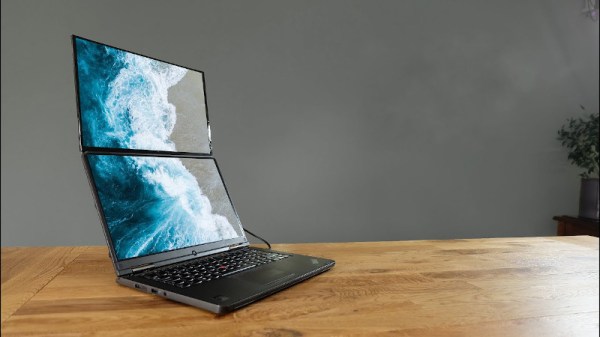
If you have an eye for obscure Microsoft products, you may be aware of the Microsoft PixelSense, a table-sized horizontal touchscreen designed as a collaborative workspace. It’s a multi-user computer with no traditional keyboard or mouse, instead multiple users work with documents and other files as though they were real documents on a table. It’s an impressive piece of technology, and it was the first thing that came to mind when we saw [Anitomicals C]’s dual screen portable computer. It has a form factor similar to a large laptop, in which the touchscreen folds upwards to reveal not a conventional keyboard and trackpad, but another identical touchscreen. The entire surface of the computer is a touch display with a desktop propagated across it, and in a similar way to the Microsoft product the user can work exclusively in the touch environment without some of the limitations of a tablet.

He freely admits that it is a prototype and proof of concept, and that is obvious from its large size and extensive use of desktop components. But he has brought it together in a very tidy Perspex case serving as an interesting class in creating a portable computer with well-chosen desktop components, even though with no battery it does not pretend to fit the same niche as a laptop. We’d be interested to see the same interface produced as a less bulky desktop-only version with solely the two monitors, because the horizontal touch screen is what sets this machine apart from other home-made ones.

Home made laptops are a regular sight on these pages, but some of them are a little more rough-and-ready.

Continue reading “No Keyboard Needed, This Laptop Is All Screens”

Listening To Mains Power, Part 2

The electricity on the power grid wherever you live in the world will now universally come to you as AC. That is to say that it will oscillate between positive and negative polarity many times every second. The frequency of 50 or 60Hz just happens to be within the frequency range for human hearing. There’s a lot more than this fundamental frequency in the spectrum on the power lines though, and to hear those additional frequencies better you’ll have to do a little bit of signal processing.

We first featured this build back when it was still in its prototyping phase, but since then it’s been completed and used successfully to find a number of anomalies on the local power grid. It takes inputs from the line, isolates them, and feeds them into MATLAB via a sound card where they can be analyzed for frequency content. It’s been completed, including a case, and there are now waterfall diagrams of “mystery” switching harmonics found with the device, plus plots of waveform variation over time. There’s also a video below that has these harmonics converted to audio so you can hear the electricity.

Since we featured it last, [David] also took some feedback from the comments on the first article and improved isolation distances on his PCB, as well as making further PCB enhancements before making the final version. If you’ve ever been curious as to what you might find on the power lines, be sure to take a look at the updates on the project’s page.

Continue reading “Listening To Mains Power, Part 2”