STM32 Driving A PCIe Video Card

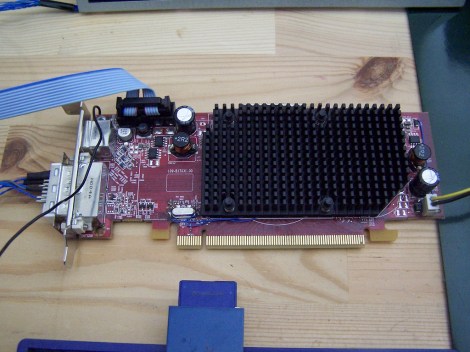
[Gpuhackr] chose his username to explain exactly how he spends his time. For instance, here he’s using an STM32 Discovery board to drive an AMD Radeon HD 2400 graphics card. The ARM microcontroller isn’t actually using the PCIe interface on the card. Instead, [Gpuhackr] has patched into the debugging interface built into the card itself. This isn’t quite as straight forward as it sounds, but if you do the wiring carefully it’s a pretty intersting way to connect an ARM to an LCD monitor.

This project would be almost impossible if it weren’t for the open source code which AMD has released. This lets him implement the card’s 3D rendering features. The demo directly programs the UVD Xtensa CPU which is on the video card. It draws a cube with color gradients on each side. The cube spins while the debug information is overlaid on the screen. In this case the ARM chip/board is really being used as a programmer to upload some custom firmware. But we think a real code-ninja could implement a communications protocol to open up a simple way to drive the card in real-time.

[Thanks uMinded]
USB To RS-232 Adapter Hacked To Use RS485 Instead

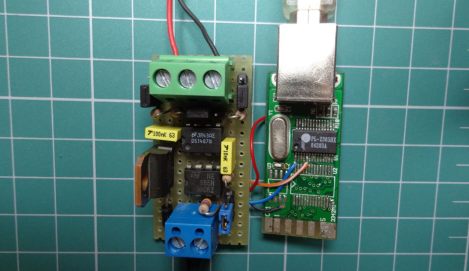
[André Sarmento] needed to connect a computer to an RS-485 bus. A simple converter can be sourced online, but the only thing he could find locally that was even close was a USB to RS-232 converter. He used that component to craft his own USB to RS-485 bridge.

RS-485 is often used for remote sensors as it provides a method of connecting electronics over long distances. The converter which he started with seems to be encased in a hot-glue-like substance. A bit of time with a torch and he was able to get to the components on the board. There are two stages, one which converts RS-232 to TTL, and the other converts TTL to USB. [André] removed the RS-232 chip and patched his own board (shown on the left) into its TTL lines. He was also able to add a few more configuration options, like using an external power source, and having a few jumper-selected resistor options.

Giving The MSP430 A GUI

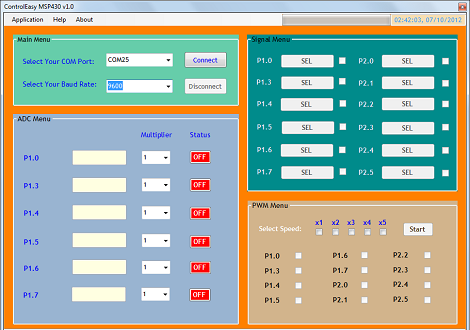
Sometimes you need to toggle or read a few pins on a microcontroller for a project so simple (or so temporary) that coding some firmware is a rather large investment of time. [Jaspreet] had the same problem – wanting to read values and toggle pins without writing any code – so he came up with a rather clever solution to control an MSP430 through a serial connection.

[Jaspreet] calls his project ControlEasy, and it does exactly as advertised: it provides a software interface to control ADC inputs, PWM outputs, and the state of output pins via a desktop computer. ControlEasy does this with a matching piece of code running on any MSP430 with a hardware UART (like the TI Launchpad) sending and receiving data to the computer.

Right now ControlEasy can read analog values, generate PWM output, and set individual pins high and low. [Jaspreet] plans on expanding his software to allow control of LCDs and I2C and SPI devices.

In the video after the break you can see [Jaspreet] fiddling around with some pins on his LaunchPad via the GUI. The software is also available for download if you’d like to try it out, but unfortunately it’s a Windows-only build at this point.

Continue reading “Giving The MSP430 A GUI”

FreeSoC, For When You Need 68 I/O Pins

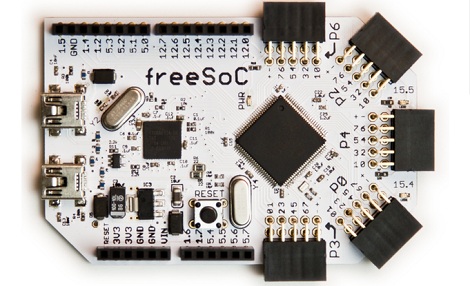
Like many of us, [Jon] began his journey through the magical world of microcontrollers with an Arduino. For a beginner, the Arduino is a wonderful tool, but [Jon] quickly found himself limited by the platform. There are too few pins on the Arduino, and and the platform doesn’t really lend itself to extremely complex projects. To this end, [Jon] designed freeSoC, an Arduino-compatible platform based on the Cypress Semiconductor PSoC 5.

The Cypress PSoC 5 is an extremely capable microcontroller with 60 general purpose I/O pins and 8 special purpose, high current outputs. Every pin on [Jon]’s freeSoC is completely configurable; if you want 24 SPI ports and a dozen 20-bit ADCs, just launch Cypress’ design software and configure the chip graphically. With this many I/O ports, the PSoC 5 is as useful as an FPGA, without all the hassle of actually being and FPGA.

A really neat feature of the freeSoC is its ability to be programmed graphically. Using Cypress’ PSoC Creator IDE, the multitude of I/O pins can be configured to just about anything very easily. Because the PSoC 5 is based on an ARM Cortex-M3, programming the freeSoC is as easy as any one of many ARM dev boards that were recently released.

[Jon] came up with a very, very neat project here, and it’s something we can definitely see the utility of.

Thanks [Dale] for sending this one in.

Stcdude Is Linux Friendly ISP Programming Software For STC 8051 Chips

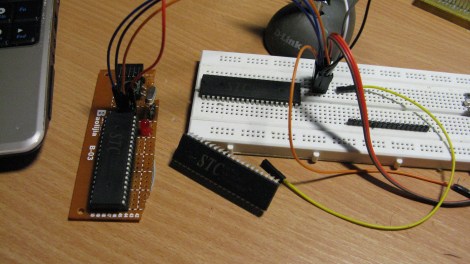
[Andrew] picked up a handful of these big STC 8051 chips for a song and dance. The problem he has with them is the clunky VB6 programming software that only wants to run on a Windows box. He buckled down and wrote his own programming software called stcdude. As you have probably guessed, it’s meant to perform the same open-source functions that avrdude does for AVR chips. It can be used in conjunction with the Small Device C Compiler (SDCC).

It uses an API which is based on Lua script. We think this is to make it easy to interface your own hardware programmer with the software. The package is still quite early in development but it is working and even implements the ability to poll and identify the type of chip based on its stored hardware database. It sounds like he could use a hand. The stock software must still be used for setting the MCU options. We’re not really familiar with the 8051 family but we’d bet that is akin to setting the fuses on the AVR chips. Please let us know in the comments if we’re wrong about that.

[Limpkin’s] New Business Card

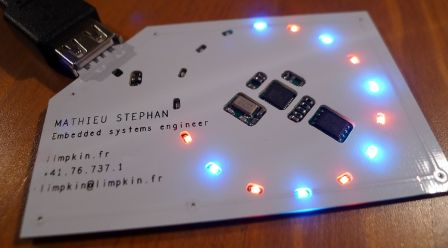
[Limpkin] decided to give the whole embedded business card thing a try. Here is his finished project, a low-profile mass storage business card that doesn’t cost an arm and a leg. Sure, the $6 price tag could score him a hundred paper cards, but those don’t light up like this one does!

The main components on the card include an AVR microcontroller, a flash memory chip, and an ESD protection chip. The latter is to make sure a static shock on the USB connector doesn’t zap the MCU. Speaking of, he went with an AT90USB162 which runs from an external 8 Mhz oscillator. Sure, it’s not the fastest thing out there, but since there’s only 16 Mb of flash on this card we don’t think you’ll notice any data transfer delay. The processor is running the LUFA stack and has two flavors of firmware. One that enumerates as an HID keyboard to automatically use keyboard shortcuts to launch a browser and load up his website. The other implements a mass storage device.

If you don’t like the electronic route, you could always go with some laser cut metal. We’ve heard that [Kevin Mitnick’s] business card has snap-out lock picking tools kind of like these.

LVDS On An FPGA Could Make It Possible To Reuse Laptops LCDs And The Like

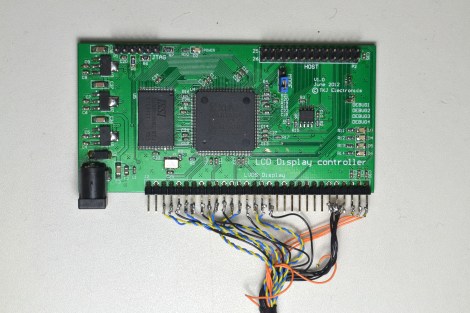
Search around the Internet and you’ll find a landfill of forum threads asking how to drive the LCD screen from a dead laptop. The answer is always that there is just no way to do it. That’s because most of them use a Low-Voltage Differential Signalling protocol that just isn’t available through the hardware used in hobby projects. But the appearance of this board could signal that things are about to change. We don’t want to get your hopes up too much. This isn’t an open source project, but it is a piece of hardware that can make LVDS available for the 8, 16, and 32-bit microcontrollers you’re used to working with.

It’s a derivative of a project [Thomas Jespersen] worked on for a customer. It uses an FPGA to implement the LVDS standard used by high-pixel-count LCD displays. It contains enough memory for a full frame-buffer, and includes a Motorola-8080 communication standard. [Thomas] gives a full description of how the setup works in the video after the break. Demonstrations start about 7:30 into the video with an STM32 F4 Discovery board driving the display.

Continue reading “LVDS On An FPGA Could Make It Possible To Reuse Laptops LCDs And The Like”