AVR Fuse Bits Explained

Every AVR microcontroller, from the ATtiny in your thermostat to the ATMega in your Arduino, stores its configuration in a series of fuse bits. These fuse bits control settings such as the multiplier of the internal oscillator (and thus the speed of the chip), or if the reset pin can be used as a GPIO pin. [YS] just put up an awesome tutorial for understanding these fuse/lock bits, and it’s just the reference guide you’ll need when you find your AVR is running 8 times slower than you would like.

As an example, [YS] uses the ATMega48 default settings. From the factory, the ‘Mega48 ships with it’s fuse bits set to use an 8MHz internal RC oscillator with the CKDIV8 bit set. This results in the chip operating at 1MHz, a bit slow for [YS]’ liking.

By looking at the datasheet for the ATMega48, [YS] found the CKDIV8 fuse was the 7th bit in the low fuse byte. From the factory, the default value for this byte is 0b01100010. To remove the ‘divide clock by 8’ bit, [YS] needed to change the low byte to 0b11100010, or 0xE2. This is done via AVRdude by appending lfuse:w:0xE2:m to the commands entered when programming.

Fuse bits don’t need to be scary. As long as you can convert between binary and hex, can remember there are 7 bits in a byte (remember to start counting from 0), and have access to an easy to use fuse calculator, it’s possible to change all the settings on any AVR you have on hand.
            

USB Business Card Packs An ARM Processor

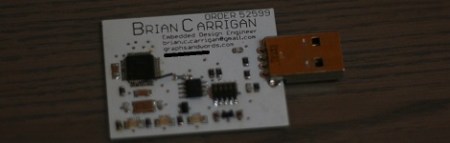
Over on the Hackaday forums, [Brian] introduced himself by showing off his new business card. Given his expertise is creating unique circuit boards, we can’t imagine a better way to show off his skills than an ARM-powered business card.

[Brian] posted a more detailed write-up on his blog that covers his development process. He decided to use a 48-pin LPC1343 ARM Cortex M3 as a USB Mass Storage Class device. All the heavy lifting for instantiating a USB storage device is handled by the microcontroller, so all [Brian] had to do was wire up a Flash memory chip and access it over an SPI interface.

The finished business card functions just like a USB thumb drive with a whopping 1 Megabyte of storage. That’s not a lot of storage, but it has more than enough room for [Brian]’s resume, a link to his website, and the full source code for his card.

IR Remote As PC Input

As a learning experience [GeriBoss] put together an IR remote control receiver board for his PC. His want of volume control from across the room was reason enough to undertake the project, and he got to work with a 38 kHz receiver module and Manchester encoding in the process.

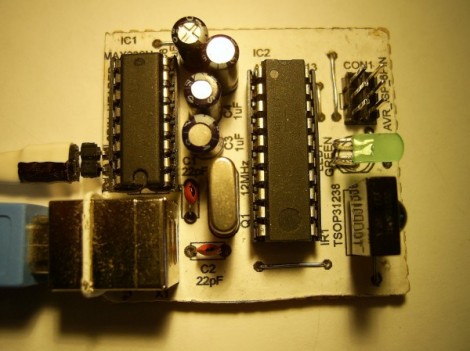
The decoder portion of the project is built around an ATtiny2313 chip. The external interrupt pin (INT0) is connected to a TSOP31238. When it decodes a valid remote code it pushes a character to the RS232 chip connecting to the computer’s serial port.

We think this is a wonderful accomplishment for [GeriBoss], but we encourage him to refine the design further. You’ll notice in the image there’s a USB port on the board which is only used to provide regulated power. We know it’s possible to use V-USB with the ATtiny2313 to add USB functionality and this would be a great way to learn about it. We’d also like to mention the resistor and capacitor suggested for filtering the IR receiver module signal. We’ve included the recommended application schematic for that part after the break.

Continue reading “IR Remote As PC Input”

Raspberry Pi As An AVR Programmer

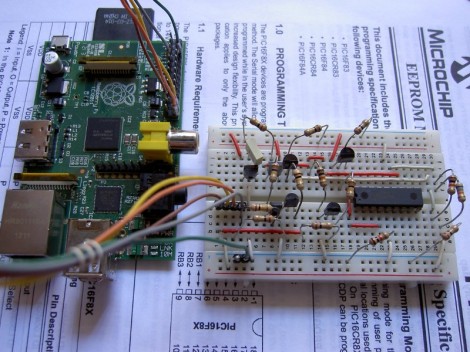
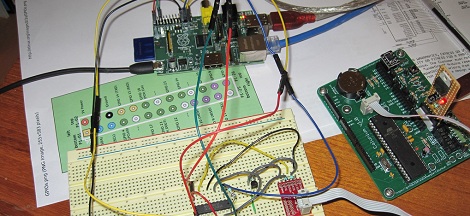
AVR programmers can be bought for just a few dollars on the Internet, but if you’re building an expansion board with an AVR for your Raspi, this is the build for you. It’s a safe way of programming an AVR via the Raspi’s GPIO pins that uses an extremely minimal circuit.

The AVR ISP interface looks a lot like an SPI interface, and the easiest way to program an AVR with a Raspi would be to bitbang all the commands from the GPIO pins. Sometimes, though, the logic of the AVR and Raspi would be at different levels, so while bitbanging may work in a pinch it’s not something anyone should use regularly.

To get the Raspi and AVR talking to each other safely, [Steve] built a small circuit from a 74244 buffer and a FET. With the added support for Linux GPIO avrdude programming, it’s a snap to program an AVR with a Raspi.

A few days ago we ran across a hugely overwrought PIC programmer for the Raspi, so we’re glad to see another round in the PIC/AVR holy war go to the AVR camp.

Thanks [Mateusz] for sending this one in.

Programming The XMEGA With An ISP

Atmel’s XMEGA series of microcontrollers are neat little pieces of hardware; with a very fast clock, a ton of IO, USB, and up to 8 UART ports, these neat little chips serve as a nice bridge between AVRs and PICs and the very powerful ARM chips coming out on the market. Unfortunately, the XMEGAs don’t use the extremely common ISP programming header found on just about every AVR dev board making them a bear to program. [Szu] over in Poland came up with a very easy way to program these chips, all while using the programming hardware you already have on hand.

[Szu]’s build uses a few resistors and diodes to break out a USBASP connection to the XMEGA’s PDI interface. On the software side of things, [Szu] wrote an update to the USBASP firmware to allow it to program PDI devices, and also has a patch for AVRdude to allow uploading firmware from the command line.

A very cool build, and one that allows for very, very powerful devices that build on the AVR code you’ve already written.

PIC 18F4550 Dev Board

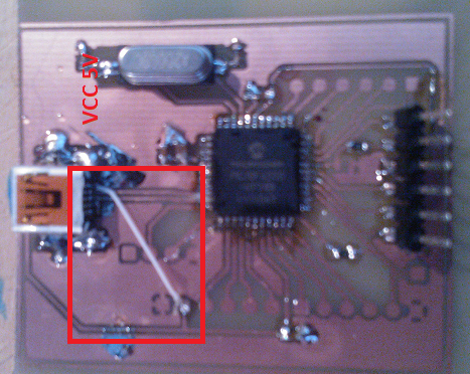
[Natsfr] was looking for a single-sided PCB to host a PIC 18F4550. Not finding one he designed his own in Kicad and is sharing (translated) the spoils of his labor.

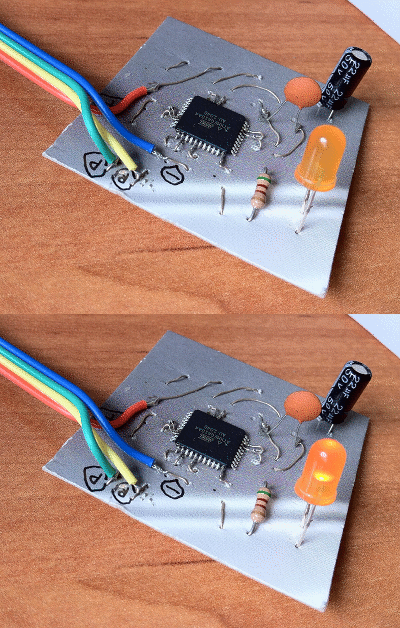
This chip has USB capabilities which is why we see it used in a ton of projects. Almost all of them (including this USB input device post) use a very large DIP package. [Natsfr] went a different route, designing for the TQFP package to keep the drilling ot a minimum. The layout includes a crystal and USB-mini port, but it also breaks out the I/O pins on the chip. The red box above shows the quick fix he used on the VCC line as the board trace was shorting on the USB jack housing.

He didn’t drill out the holes for most of the breakout pins on this prototype. There’s just one header populated for programming the PIC chip. But he does have some plans for the first board. He’s going to use [Texan’s] AVR programming firmware for PIC to turn it into a USB AVR ISP programmer.

Raspberry Pi As A PIC Programmer

[Giorgio Vazzana] turned his Raspberry Pi into a PIC programmer using a rather small collection of common parts. It supports about a dozen different chips from the 16F family. But we’d guess that software is the limiting factor when it comes to supporting more chips.

Generally the problem with PIC programming is the need for a 12V supply. He chose to use an external 12V supply and a 78L05 linear regulator to derive the 5V rails from it. With the power worked out there are some level conversion issues to account for. The RPi provides 3.3V on the GPIO header pins, but 5V logic levels are needed for programming. He built transistor and voltage divider circuits to act as level converters. The programming software bit bangs the pins with a write time of less than eight seconds per 1k words of program data. So far this does not work with ICSP, but he plans to add that feature in a future version.