Single-chip Digital Audio Player

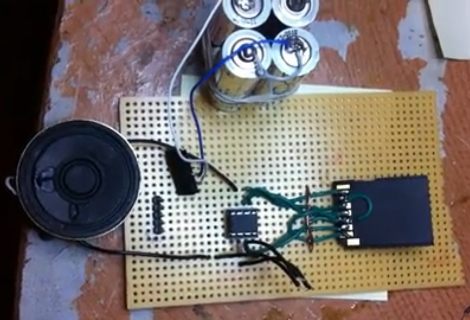
[Dmitry Gr.] built a simple circuit to playback digital audio. At the center you can see an 8-pin PIC 12F1840 microcontroller. It’s pulling audio data from a microSD card which is read through a full-sized SD card adapter to which he soldered jumper wires for all of the necessary connections. There is one additional semiconductor, a FET which is used to drive the speaker seen to the left. Unregulated power is provided by a pair of AA batteries (four are seen in the picture above but only two are actually connected to the circuit). He’s planning to post his code package soon, but for now you’ll have to be satisfied with a couple of demo videos and a schematic. Both videos are embedded after the break, and we’ve also included a screenshot of the schematic which is shown in the second video.

This is very similar to the 1-Bit Symphony CD we saw almost a year ago in a links post. That one used a jewel case instead of the protoboard seen here, and had a headphone jack instead of the speaker.
Continue reading “Single-chip Digital Audio Player”

Simple IR Bounce Tachometer

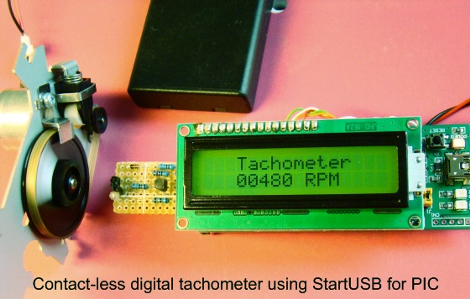
[Rajendra Bhatt] writes in to let us know about a nice simple IR bounce tachometer. The project uses a startUSB for PIC board and a 16×2 character LCD with a very basic Infrared bounce circuit.  Measuring either a reflective or non reflective spot in the rotating object, in this case a bit of white paper, the micro is supposedly capable of measuring up to 99,960 RPM (we think the paper might fly off at this point) with a resolution of 60 RPM. This is the same concept as a beam-break style tachometer but keeps all your electronics on one end of the spinning hazard.

The article also goes into detail about setting the PIC18F2550’s Timer0 register to enable 16-bit resolution.  The PIC is configured to turn on the infrared LED for one second, measure the number of pulses (through timer registers), and multiply that value by 60.  We would be more careful with the TMR0H and TMR0L counters as they have to be read and written in a certain order to preserve their values, but you’d need to be measuring upwards of 15,360 rpm to run into that error.

It is a quality writeup for anyone interested in learning about the start USB for PIC board, tachometers, or a new project. Thanks [Raj]!

Capacitive Touch Sensor Shield For The TI Launchpad

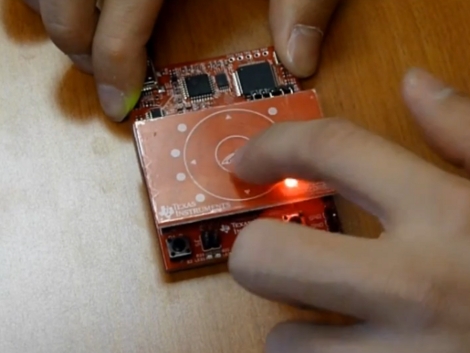
Texas Instruments just released a product they call the Capacitive Touch Boosterpack which is basically a touch-sensitive shield for the Launchpad. The video after the break shows an unboxing and demonstration of the product which TI is launching with a $4.30 limited-time price tag. The red PCB itself has a capacitive touch button in the center, surrounded by a touch-scroll wheel, which is centered in a proximity senor that takes up the rest of the board. There are also nine LEDs which look like they’re soldered on the underside of the board, through routed holes that mount them flush with the top surface. The pack also comes with a new MSP430 microcontroller, the G2452, which has 8 KB of flash memory and takes care of calibrating, reading, and processing signals from the board thanks to the software package that goes along with the add-on kit.

Looks quite nice. There’s a heck of a lot of information in the documentation for this hardware. We do wish it was a bit easier to find board layout information, but we’re sure it’s there somewhere.

Continue reading “Capacitive Touch Sensor Shield For The TI Launchpad”

Chatbox Wireless IM Client

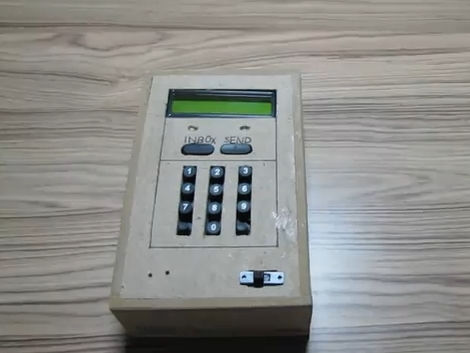
[Utpal Solanki] wanted to do some text chatting from the comfort of the couch. He built this wireless chat client that he calls Chatbox using a microcontroller, a character LCD screen, and a keypad that he built himself.

The device communicates via an Infrared emitter and receiver. It pairs up with an Arduino using an IR shield that [Utpal] built. The handheld unit flashes a pair of white LEDs whenever it receives a message from the Arduino. You can then hit the Inbox button and scroll through to read what was received. To reply  just type on the keypad the same way you would with a cellphone, then hit the send button to shoot that message back to the Arduino.

On the computer side of things the messages are being relayed to and from the Arduino over a USB connection. Early on in the video demonstration (embedded after the break) [Utpal] shows his Chat Box program communicating via the handheld unit in the same way that other messenger programs work.

Looks to us like he’s built his own non-pink version of what the IM-ME was originally intended to do.

Continue reading “Chatbox Wireless IM Client”

HsNet: Node Communications For Feature-limited Microcontrollers

[Diego Spinola] wrote in to tell us about a node communication system he’s been working on called HsNet. The aim is to build a system of nodes that can be made up of small and inexpensive microcontrollers. The problem is that the least expensive controllers often don’t have a hardware UART. HsNet implements the RS485 protocol using a software UART along with a slim and sleek addressing scheme.

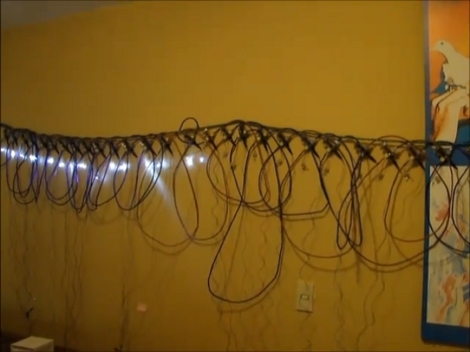
The first module developed, seen in the image above and video after the break, is a single channel pulse-width-modulation node using a PIC 12F683. It can be sent commands in the payload of the HsNet packet format. The PWM modules accept three different commands; one is a desired PWM value, another is a delay between steps for the PWM, and the last toggles a blink function.

He has also developed an analog sensor module and an Arduino-based TCP/IC gateway module. Now that the packet communications have been established, it will be rather simple to add nodes based on that groundwork. [Diego] brought these components together to build an interactive wall which can also be seen after the break.

Continue reading “HsNet: Node Communications For Feature-limited Microcontrollers”

PIC-based Temperature Logger With Onboard Storage

pic_temp_logger

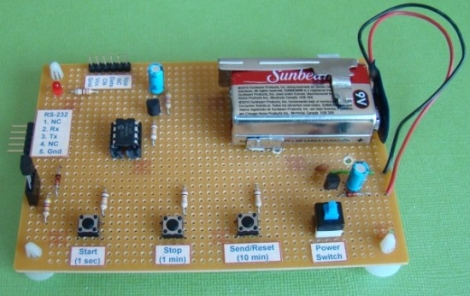
Last summer, [Rajendra Bhatt] built himself a simple PIC-based temperature monitor with data logging abilities and recently got around to sharing it on his site. The sensor is based on a PIC12F683 micro controller and measures the ambient temperature on a set interval, storing the values on the MCU’s internal EEPROM.

He used a Maxim DS18B20 temperature sensor, which communicates with the PIC over a 1-wire bus. The sensor is read based upon the interval chosen by the user, and can be configured to measure the temperature every second, every minute, or every 10 minutes. The data is stored on the aforementioned EEPROM and can be uploaded to a computer via a serial connection. The PIC has the ability to store 254 readings before the data must be cleared from the device.

It’s a great beginner project, and has plenty of room for improvement. As [Rajendra] points out, an external EEPROM could be added to expand the recording capacity, and it would be nice to have a real-time clock on hand for accurate time stamping. If we were to build one ourselves, a means of wireless data transfer would be first on our list of potential enhancements.

Hackaday Reader Throwdown: Electronic Dice

electronic_dice

Hackaday reader [Daid] posted in our forums showing off a set of electronic dice he recently constructed. Back in January, we featured a similar set of electronic dice built with an Arduino that was way overpowered as far as [Daid] was concerned. Not satisfied with simply saying it could be done better, he put his money where his mouth is – something we would love to see more of.

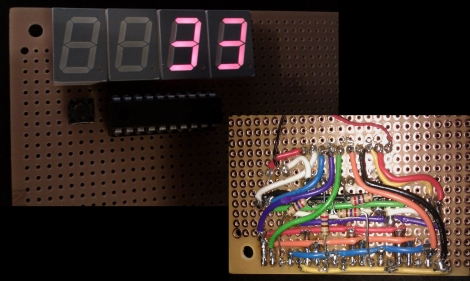
He used an ATTiny2313 to provide the device’s logic, outputting the dice values on a set of four 7 segment displays. The whole setup is controlled by a single push button that serves triple duty rolling the dice, configuring how many sides the dice have, as well as selecting how many dice are being thrown.

He admits that the wiring job is a bit of a mess, but he was going for function over form, and it works just fine. He also says that he would have finished it far sooner if it hadn’t been for those meddling kids some broken 7 segment displays.

We think he did quite a nice job, though we’re all ears if you think you can do it better.