Speak Your Mind And Help RadioShack Suck Less

radio_shack

We can all agree that RadioShack isn’t exactly the DIY mecca it once was.

What used to be a haven for amateur radio operators, tinkerers, and builders alike has devolved into a stripmall mainstay full of cell phones and overpriced junk. RadioShack knows that they have fallen out of your good graces, and since you are the demographic that put them on the map, they are appealing to the DIY community for input.

They want to know what is important to you – what you would like to see at your local RadioShack, and what would bring you back through their doors. Obviously price is a huge concern, especially with online outlets like Digikey and Mouser just a few clicks away. At the end of the day however, if you require a component RIGHT NOW, it would be nice to have the ability to grab some parts locally.

We’re well aware of the fact that this is all part of a marketing scheme, but if it helps stock your local store with a few odds and ends that are actually helpful, it won’t hurt to let your voice be heard.

Stick around to watch the video appeal from RadioShack’s brand manager, [Amy Shineman].

[Thanks komradebob]

[via ARRL.org]

Continue reading “Speak Your Mind And Help RadioShack Suck Less”
Adding Persistent Memory And Ethernet To Vintage Arcade Machines

z80_bus_tapper

If you are a frequent reader, you are undoubtedly familiar with hacker [Sprite_tm]. He has been working with fellow members of the TkkrLab hackerspace to get things ready for their official grand opening on May 28th, and wrote in to share a project he recently completed to kick things off.

As part of their preparations, they have been stocking the joint with all sorts of hacker-friendly goodies including plenty of tools and Club Mate, as well as a vintage ‘1943’ arcade cabinet. The game is a group favorite, though every time the power is turned off, it loses all of the hard-earned high scores. [Sprite_tm] knew he could improve on the current paper-based score register, so he pulled the machine open to see what could be done.

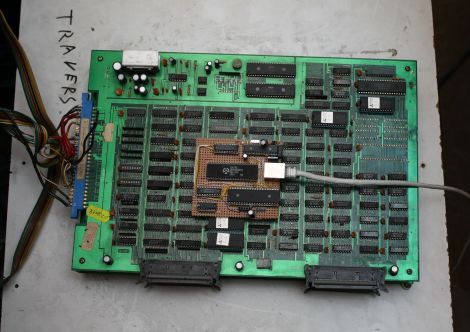
He used an AVR to tap into the machine’s Z80 logic board, allowing him to read and write to the entirety of the game’s RAM whenever he pleased. This enabled him to keep tabs on the high scores, restoring them to memory whenever the machine is powered back on. The addition of the AVR also allowed him to add a TCP/IP interface, which is used to send high scores to Twitter whenever someone beats the previous record.

His modular bus tap can be used in all sorts of Z80-based hardware, so if you have some vintage equipment laying around, be sure to swing by his site for a more detailed look at the build process.

Tracking Eye Movement By Measuring Electrons In The Eye

[Luis Cruz] is a Honduran High School student, and he built an amazing electrooculography system, and the writeup (PDF warning) of the project is one of the best we’ve seen.

[Luis] goes through the theory of the electrooculogram – the human eye is polarized from front to back because of a negative charge in the nerve endings in the retina. Because of this minute difference in charge, a user’s gaze can be tracked by electrodes attached to the skin around the eye. After connecting eye electrodes to opamps and a microcontroller, [Luis] imported the data with a Python script and wrote an “eyeboard” application to enable text input using only eye movement. The original goal of the project was to build an interface for severely disabled people, but [Luis] sees applications for sleep research and gathering marketing data.

We covered [Luis]’ homebrew 8-bit console last year, and he’s now controlling his Pong clone with his eye-tracking device. We’re reminded of a similar system developed by Atari, but [Luis]’ system uses a method that won’t give the user a headache after 15 minutes.

Check out [Luis] going through the capabilities of his interface after the break. Continue reading “Tracking Eye Movement By Measuring Electrons In The Eye”

RF Robot Controlled From A Terminal Window

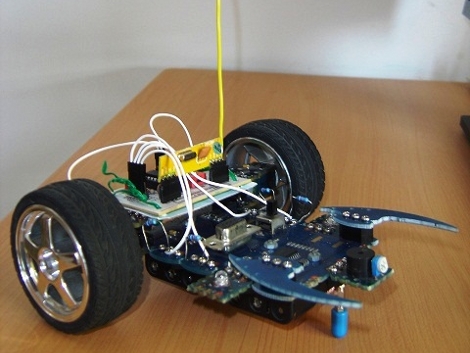
This robot can be controlled from the terminal window of your computer. You can see a manilla-colored board mounted between the wheels. This is the RF receiver which has quite a long antenna that we’ve cropped out to get a better look at the bot itself. [Ashish] picked up an RF transmitter/receiver pair for about $4 and after the break you can watch him walk us through the method he’s using for control.

First off, he had to find a way to interface the transmitter with his computer. He decided to use an Arduino because sending data to it from the computer is as simple as writing to /dev/ttyUSB0. The Arduino sketch just listens for incoming characters on the serial connection and pushes them over the RF transmitter.

We like his development methods. In the video he shows the command syntax used to drive and stop the robot. Once he figured that out he wrote a shell script to send the bot on a preprogrammed square path. From there a bit more coding would give him real-time control which could be extended to something like a web-based interface for smartphone control.

Oh, and if you’re wondering about the bot itself it’s a kit robot which normally uses IR control. [Ashish] upgraded to RF since it doesn’t require line-of-sight to work.

Continue reading “RF Robot Controlled From A Terminal Window”

BAMF2011: Google’s SKPR Bot, Not For Arachnophobes

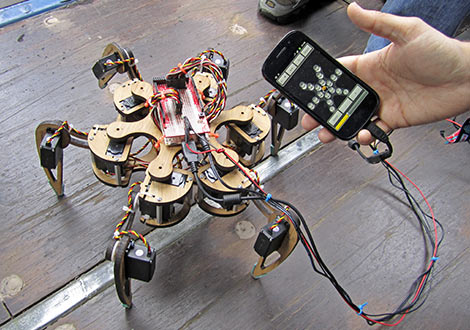
Google’s Maker Faire exhibit space is swarmed with robots…er, androids. Amidst some cool bipeds and Segway-balancers, our inner sci-fi nerd was most smitten with this hexapod design, which they’ve dubbed SKPR Bot. The “Skipper” is on hand to showcase the ease of various Google technologies: SketchUp, Android OS and the Android Open Accessory Development Kit. The whole project came together in less than six weeks.

18 servos are mounted to a framework designed in SketchUp and laser-cut by Ponoko. The low-level servo PWM control is handled by the Dev Kit (essentially a rebadged Arduino Mega, as we’ve seen), while an Android OS phone provides a slick GUI and handles all the inverse kinematics calculations required as the robot takes each step. The coolest bit is that it’s all up for grabs. At this moment you’ll have to scrounge around the ’net a bit to find the plans and code, but some time post-Faire they plan to bring everything together at the SKPR Bot site.

BAMF2011: Bloxes, A Building Kit With A Nifty Pedigree

Not every cool hack needs to involve microcontrollers, LEDs or other bling. We were initially drawn to the Bloxes display simply because we love a good multipurpose construction set, whether it be Lego, 80/20 aluminum, or in this case, a system of interlocking cubes formed from six identical pieces of corrugated cardboard, cut and scored in such a manner as to form a surprisingly sturdy little building block. They can become simple furniture, groovy Logan’s Run-style room decor, or the all-important kids’ forts…then later dismantled and made into something else.

Continue reading “BAMF2011: Bloxes, A Building Kit With A Nifty Pedigree”

Bay Area Maker Faire: Hackaday Has Arrived!

It’s a madhouse already at the 2011 Bay Area Maker Faire. Though the show doesn’t officially start until tomorrow, Friday is “Education Day”, a special preview for local schools. As makers scramble to set up their displays, a thousand impressionable young minds seek the most cacophonous mixture of taiko drumming, ArcAttack’s musical Tesla coils, and the beeping and booping of the R2-D2 Builder’s Club.

Maker Faire is returning for its sixth year at the San Mateo Event Center, and is shaping up to be bigger and zanier than ever. We’ll do our best to provide some live updates through the weekend. As always, check out the official site for pointers on hours, admission, parking and especially public transit options.

(Photo: Colossus, the death-defying centerpiece of the Midway area of the Faire.)