Multi-system Nintendo Emulator Uses Stock Controllers

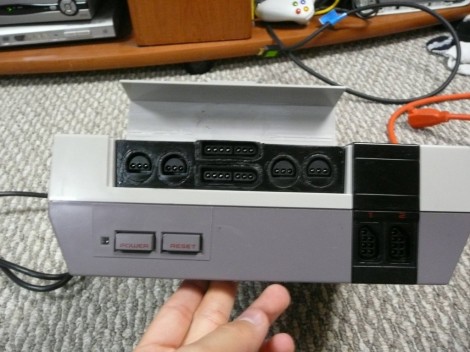
The first month of [WoolyDawg5’s] summer break went into building one Nintendo emulator to rule them all. He thinks there’s nothing like playing the games on the original controllers, and we agree with him 100%. Here you can see that the cartridge door on this NES enclosure hides the extra connectors he needs.

With that door closed this looks like a stock console, but only from the front. If you take a look at the back of it you’ll see how he pulled this off. There’s a Zotac motherboard whose I/O panel has been fitted into the back. It’s responsible for emulating games for the NES, SNES, and GameCube consoles — we’re sure it can do more but that covers the controller ports seen here. Each port is wired to a USB controller module. The cables for these modules exit the back of the case and plug into the motherboard’s I/O panel. There is WiFi for the board, and that’s what [WoolyDawg] uses for configuration, tunneling into the OS instead of connecting a keyboard or mouse.

Of course you could just shoehorn all-original console hardware into one package to accomplish something like this.

[Thanks KoldFuzion]

Drop-in Board For NES ROM Chip Makes Cartridge Reprogrammable

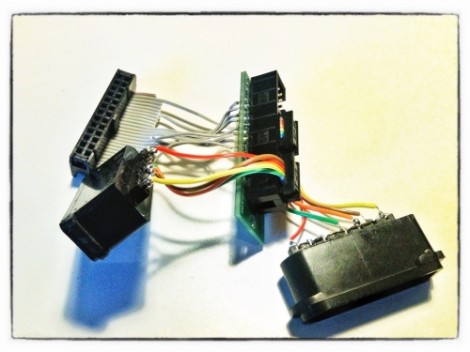
Here’s the guts from [Dext0rb’s] Super Nintendo cartridge. It’s easy to pick out the dark-colored board which lets him reflash SNES ROMs via USB. We’ve seen this done a number of times, but this is a much cleaner option than hacks that just add a dead-bug-style memory chip.

The board he designed has a double-row of pin headers sized to fit the footprint vacated by the original ROM chip. The board has a mini-USB connector which can be accessed through a hole he cut in the side of the cartridge enclosure. This is in the right place so that you cannot plug it in when it’s being used in the SNES (which would cause damage). The ATmega32u4 chip handles USB connectivity and programs the 32 megabit flash chip which stores the ROM. He’s posted a few articles on the blog portion of his site which you’ll find interesting. We suggest starting with this hardware teaser.

Adding A Backlight To The ‘ol Game Boy Brick

For being more than 20 years old, [Max]’s old brick-sized Game boy still has a lot of life left in it. Even though his Game Boy was still in good condition, there were a few vertical lines in the display, making it a perfect candidate for a restoration. While he had his DMG-01 open on his work bench, [Max] also decided to put in a back light.

After researching the blank vertical lines in his Game Boy’s display, [Max] learned the problem was probably a loose solder connection. [Max] whipped out his tri-wing screwdriver, disassembled his classic plastic friend, took a soldering iron to the LCD’s flex connector, and fixed the problem easily.

Since his Game Boy was already taken apart, he decided to add a 3rd party backlight. The installation was a snap – [Max] only removed the reflective LCD backing and shoved an edge-lit backlight panel into the Game Boy.

If you’re wondering why anyone would still be interested in a 20+ year-old Game Boy, the DMG-01 is highly regarded in the chiptune scene when paired with Little Sound DJ, in part because of the noisy amplifiers and unique sound. Anything that keeps these wonderful machines out of the garbage is alright in our book, so we’ve got to hand it to [Max] for putting together this wonderful tutorial.

One Console To Rule Them All

[Bacteria] retro console modder extraordinaire, is back at it with a rather massive project. “Unity”(originally Dubbed Alpha Omega), this will be a single unit that can play games from 20 different console systems. It will run from one power supply, have one video output, and strangely enough, one controller.

[Chris Downing] was nice enough to tip us off to a video of the Unity controller in action.  The controller isn’t quite as bulky as we would have assumed with the extensive list of consoles it has to support, but that could be, in part, due to the fact that you actually swap out the brains for the controller for each system’s compatibility.

Continue reading “One Console To Rule Them All”

NES Controllers For Any Bluetooth Application

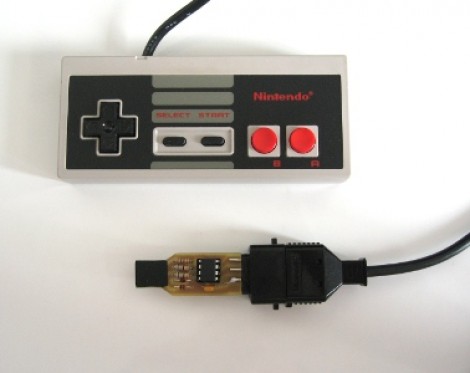
[Dustin Evans] wanted to used his original NES controllers to play emulated games. The problem is he didn’t want to alter the classic hardware. His solution was to use the connectors and enclosure from a dead NES to build a Bluetooth translator that works with any NES controller.

Here he’s showing the gutted half of an original NES. Although the motherboard is missing, the connectors for the controllers are still there. They’ve been rewired to an Arduino board which has a BlueSMiRF modem. The controller commands are harvested by the Arduino and sent to whatever is listening on the other end of the Bluetooth connection. He also has plans to add a couple of SNES ports to the enclosure so that those unaltered controllers may also be used.

In the video after the break [Dustin] walks us through the hardware setup. He then demonstrates pairing the device with an Android phone and playing some emulators with the pictured controllers.

Continue reading “NES Controllers For Any Bluetooth Application”

Grab Your Iron And Add GameCube Back To The Wii

One of the really cool things about the Nintendo Wii when it was first introduced was the ability to play GameCube games on it. This made it a no-brainer for a lot of folks to upgrade. But as the heyday of legacy systems fades into history, Nintendo decided this was no longer a selling point and stopped populating those components. The good new is, if you don’t mind a lot of PCB soldering you can add your GameCube bits to a modern Wii motherboard.

[Deadlyfoez] launched a raffle to raise enough money to buy a new version of the hardware (we guess the raffle prize is the modded console). He then proceeded to solder on four GameCube controller ports and a memory card reader. There are also a number of passive surface mount components that need to be added. But as the video after the break shows, once in place the functionality reappears on the software side.

Continue reading “Grab Your Iron And Add GameCube Back To The Wii”

The Most Portable GameCube Ever

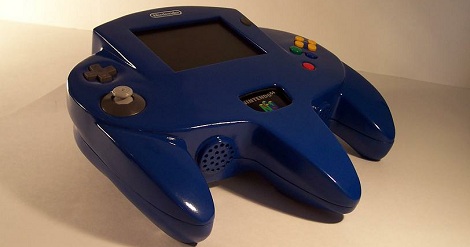
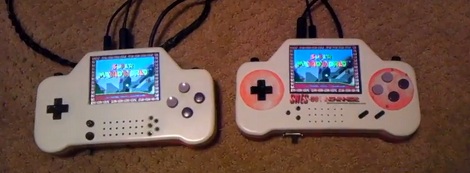
Here’s the smallest GameCube we’ve seen, straight from the fruitful workbench of [lyberty5] over on the ModRetro forums. Even though we’ve seen disc-less GameCubes before, [lyberty5] puts this project together so well it wouldn’t look out-of-place in the Nintendo product lineup.

Unlike most of the other portable GameCubes we’ve seen, [lyberty5]’s build doesn’t have a disk drive. The games are loaded off an SD card with the help of a Wiikey Fusion, a small FPGA’d device that replaces the CD drive in GameCubes and Wiis with an SD card.

The enclosure was constructed out of vacuum formed plastic with the always popular ‘dremeling and bondoing a controller for proper button placement’ method. Inside the enclosure is the hacked up GameCube, a 3.5 inch screen capable of displaying NTSC video at 640×480 resolution and enough battery power to get two or three hours of playtime from a single charge.

After the break you can check out [lyberty5] fast-paced demo video that really sets the bar for portablized console presentation.

Continue reading “The Most Portable GameCube Ever”