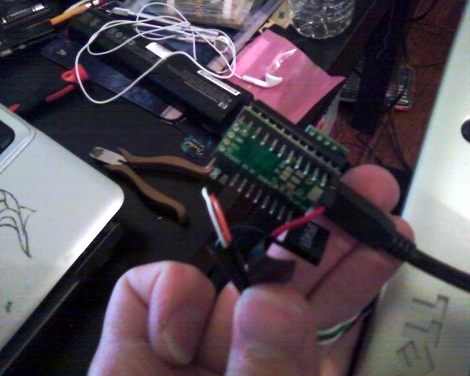
Teensy AVRs Used In Penetration Testing

netragard_penetration_testing_mouse

While some people know that you should be wary of USB drives with unknown origins, the same care is rarely, if ever exercised with USB peripherals. The security firm Netragard recently used this to their advantage when performing a penetration test at a client’s facility. When the client ruled out the use of many common attack vectors including social networks, telephones, social engineering, and unauthorized physical access from the test, the team at Netragard knew they would have to get creative.

They purchased a Logitech USB mouse and disassembled it in order to add their clever payload. A Teensy uC was programmed to emulate keyboard input, entering commands via the mouse’s USB connection once it had been connected to a computer. Using an undocumented exploit in McAfee’s antivirus suite, they were able to evade detection while their system entered commands to install malware from the flash drive they hid along side the Teensy.

Once the mouse was reassembled, they repackaged it along with some marketing materials to make it look like part of a promotional event. They purchased a detailed list of employees and singled out an easy target, sending their malicious mouse on its way. Within three days, their malware was loaded onto the victim’s computer and their test was deemed a success.

[Thanks, Aaron]

Receipt Racer Wastes A Lot Of Paper

[Joshua Nobel] and the team at undef came up with a receipt printer game for the OFFF 2011 festival in Barcelona.

The game is a small openFrameworks app that prints a maze on a thermal printer. A ‘car’ is guided through the maze with input taken from a DualShock 3 controller. The game is limited to a maximum distance of 50 meters, the length of the roll of paper. We wondered about the waste of paper this would be until undef pointed out, “ecologically it’s pretty much a disaster, just like any real car.”

The undef team tried to use the printer for the entire visual representation of the game but that didn’t quite work out until [Joshua Noble] came up with a ‘beamer’ to project the car and score onto the paper. We’re not quite sure what the ‘beamer’ is, but everything syncs up and the resulting game is quite nice.

The game itself reminds us of a certain flash game, but that can’t be where the original idea came from. Check out the Receipt Racer gameplay video after the break.

Continue reading “Receipt Racer Wastes A Lot Of Paper”

Mouse And HDD Combo Show Off Your Data Gluttony

databot_mouse

So we know you’ve got a lot of porn on your computer, but just how much is a lot? This concept mouse and hard drive combo aims to show you just how much digital junk you have acquired through physical feedback.

The DataBot mouse looks like a typical run of the mill scroll mouse that you might get with a new computer. Inside however, the designers have added a small servo which alters the ease with which the ball moves. The more files you have stuffed into the folder you are moving around, the more the mouse resists, giving you a sense of the physical “weight” of your computer’s contents.

The DataBot hard drive gives you a sense of how full your computer is by growing and shrinking based on space usage. During file transmissions the hard drive blinks its LEDs to indicate how fast or slowly your files are moving. When the inevitable file access error occurs, the LEDs switch to a bright red hue and the drive shakes to indicate there is a problem afoot.

With the price of data storage decreasing by the day, it’s easy to get lost in a glut of information without realizing just how much data you have. This is definitely an interesting way to get a different look at your data consumption.

Check out the videos below to see the pair in action.

[via Dvice]

Continue reading “Mouse And HDD Combo Show Off Your Data Gluttony”

We’ve Got A Real Bone To Pick With This Mouse

Finally, there’s a way you can feel like a real bad-ass while you’re formatting those TPS reports. It’s all thanks to this computer mouse built inside the skull of a dog. [Shannon Larratt] dug through his collection of skulls and came up with this one because it fits nicely in the palm of your hand.

Before you get too grossed out, this is not actually part of an animal’s body like another notable mouse hack that comes to mind. [Shannon] started with the skull of a small dog, making a mold for the pieces used in the finished version above. He was quite creative when fitting the electronic parts inside of his reproduction. He pulled the PCB from a $10 Logitech mouse and had no trouble getting it to fit into the base of the skull. But when it came to the buttons he ended up engineering a couple of rockers and used a belt to reposition the scroll-wheel. Not wanting to lose the middle-click feature there’s an additional lever for that functionality. We’d also like to compliment him on the quality of his write-up. Fantastic!

Virtual Reality With A Pico Projector

Although virtual reality was the wave of the future in the early 90’s, it hasn’t really taken off the way we would have liked. Sometimes a great idea just takes time for the technology to catch up to it (Aeolipile anyone?). Now that tiny projectors, realistic FPS games, and eye tracking systems have come down in price, this head-tracking projection system engineered by students at University of Texas at Austin could be the start of something really neat.

Although we’ve seen some cool FPS/pico projector hacks before, most of them use the “gun” as the controller. This approach offers a a different experience as one isn’t required to carry a “gun” around. It simply tracks one’s eye movement and moves the projector automatically. Check out the video after the break to see this device in action. Continue reading “Virtual Reality With A Pico Projector”

Vintage Peripheral Hacks Roundup

A few days ago, we featured an Apple ][ USB keyboard mod, and several readers chimed in sharing their own retro conversions in the comments section. We had no idea that many of you had made similar modifications of your own, so here’s a quick roundup of what your fellow Hackaday readers have put together.


Optical Atari STM1 Mouse

atari_stm1_usb

[JJ] had a 25-year old Atari STM1 mouse sitting around and was wondering how to get it to work with his new computer. Instead of interfacing the old mouse with his computer via a custom circuit board, he gutted the STM1 and replaced the innards with those of a much newer optical mouse. He did a bit of trimming to get the new PCB to fit, aiming the optical sensor through the now-empty “ball hole”. According to [JJ] it works just as good as it looks.


ZX Spectrum USB keyboard conversion

sinclair_zx_spectrum_usb

[Lee] is a sucker for vintage hardware, and with the help of his friend [LanceR], resurrected an old Sinclair ZX Spectrum computer into a working USB keyboard. After replacing the deteriorated membrane, the pair mapped out the keyboard to figure out how the matrix was wired. With that done, they built a prototype USB interface board, which they later replaced with a proper PCB.


BBC Master Compact USB keyboard conversion

bbc_master_compact_usb

A friend of [MoJo’s] had a BBC Master Compact computer from back in the day and wanted to have the keyboard converted to USB in order to use it with certain emulators. [MoJo] gladly took on the project, stripping some of the old motherboard components out to make room for his new circuitry. He built a USB interface board around an ATMega162, and even got the old built-in speaker working properly. From the outside, the keyboard looks like it has never been touched – nice job!

Wireless Mouse Li-Poly Retrofit With USB Charging

wireless_mouse_lipoly_retrofit

It’s no secret that wireless mice can eat through batteries pretty quickly. Rather than keep a fresh supply of AAs on hand at all times, [Phil] decided he would convert his mouse to use a rechargeable lithium polymer battery instead.

This isn’t the first time we’ve seen a cell phone battery crammed into a mouse to increase capacity, but we think this one has been done quite nicely. [Phil] managed to fit a 2.7 – 4.2v Li-Poly battery in the mouse’s palm rest, where there was a little extra empty space. The battery can be charged from any USB port via a custom-built charging module, which he constructed using a MAX1555 charge controller. Another custom-built circuit resides in the space previously occupied by the AA batteries, which uses an MC340063 DC to DC converter to drop the battery’s voltage down to the 1.25v required by the mouse.

The only part of the build that [Phil] is not pleased with is the power switch on the bottom, but since you rarely see that, we could care less. We think it is quite well done, and with a second version already in the works, we anticipate that it will get even better.

Be sure to check out [Phil’s] video tour of the hack, which you can see below.

Continue reading “Wireless Mouse Li-Poly Retrofit With USB Charging”