Repair Stuck IPod Nano Buttons

A system is only as strong as its weakest link and [Roberto Barrios] found that on the sixth generation iPod nano the buttons are the problem. It makes sense that the buttons would be exposed to wear since they’re movable parts. The issue isn’t one of contacts or springs wearing out, but how the buttons are assembled. Each consist of a couple of parts; the tactile piece that you see and press, the electrical switch which converts that force into an electrical signal, and a shim that bridges the gap between the two.

After two months of use the iPod [Roberto] was fixing had stopped responding to presses of the Power button. It turns out that the shims are attached with double-sided tape. Inspection of the internals revealed that the shim had slid to one side and no longer made contact with the electrical system. His solution was to remove the tape and clean off the goo, then reattach the shims using “two-part metal cement”.

With the shim back in place all is well but he made sure to execute this fix on all of the buttons before reassembly.

Switched Mode Power Supply Repair Guide

switched_mode_power_supply_repaiir

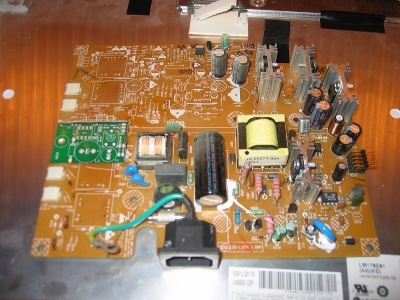
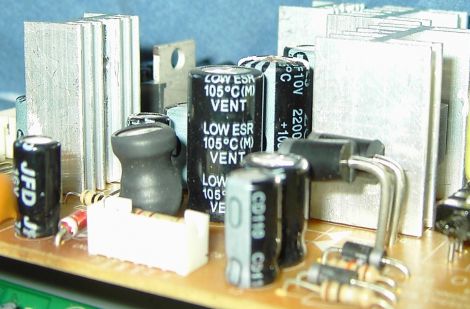
[Erich] spotted a broken DVD recorder at a local amateur radio meeting and decided to see if he could restore it to working order. While he was fortunate enough that someone labeled it as having a bad power supply, things aren’t always that easy. He gives a broad explanation as to how switched mode power supplies work as well as discusses some of the reasons these devices tend to fail. He identifies a few common components and areas that one should check while diagnosing a non-functioning power supply. While obvious bulging capacitors are easily identifiable, he discusses the need for an ESR meter and uses a kit-built model to test capacitors that do not have any visual signs of damage. While some of his walkthrough might be basic knowledge for readers who have experience in recapping circuit boards, it serves as a nice guide for those who are new to the world of electronics troubleshooting and repair.

Revive Your Tired Dremel Battery Pack

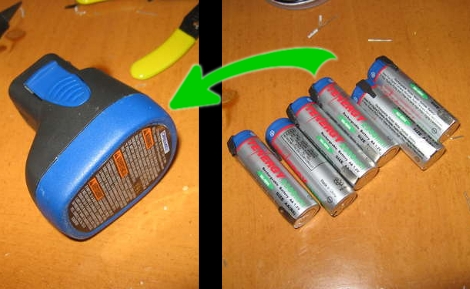
It turns out there’s nothing more than six Nickel Cadmium AA rechargeable batteries inside of that cordless Dremel battery pack. Yep, standard rechargeable AA’s that you can buy most anywhere, and now you can revive that aging battery pack by following [Stuuf’s] guide. Since you’re already at it, a few more bucks will yield a real upgrade by using the superior Nickel Metal Hydride batteries which should yield around three times as much use between charging. We totally understand having a battery pack, since the shape of the case is part of the handheld tool, and it should be easy to interchange the battery as one unit. We just wish that the battery pack had been designed to have the AA cells swapped out by the user once they had reached the end of the line.

Do you have other cordless tools in need of a pick-me-up? Check out this Makita battery pack repair hack for a point in the right direction.

[Thanks Bluewraith]

Reverse Engineering A PCB

Occasionally when a device breaks, the defect is obvious. Whether it is a blown fuse or a defective capacitor, generally the easy to see stuff is easy to fix. When a problem is more subtle, or when doing some more advanced tasks like adding functionality to a device, greater knowledge about a circuit board is required. While there might be details hidden in lower levels of PCB, often just knowing the mounted components and layout of the outside layers can be enough to create a rough schematic of a device. [Throbscottle] has put together an excellent guide for procedurally breaking down a photo of a board and turning it in to something useful. The guide utilizes some open source image processing software such as the GIMP, Inkscape, and Dia, all of which are widely available. Keep in mind this reverse engineering can be a time consuming process, but will almost definitely reward those patient enough to work through it.

[Thanks to everyone who sent this in!]

Fixing The Rovio Battery Charging Circuit

[Chris] was unhappy with the battery performance of his Rovio. It seems that he’s not alone, so he set out to reverse engineer the battery charging circuit to see if there was a fix. Boy is there, what he found is the diode above, apparently installed backwards when compared to the silk screen diode symbol. Now it’s entirely possible that the silk screen is wrong and this was fixed during assembly. We think that’s unlikely because if the closer of the two diodes was supposed to have the same polarity as the one next to it there should have been room to install them both in exactly the same orientation. [Chris] pulled out a soldering iron and changed the diode to match the silk screen. That fixed his problem and he’s now getting better performance than he ever has.

[From our comments section]

Repairing A Broken RC Ceiling Fan

The ceiling fan in [Steve Vigneau’s] bedroom started giving him trouble. It is normally operated using a remote control but that functionality had become pretty spotty. He cleaned the contacts on the remote but still had troubles that could only be fixed by power-cycling the fan itself. When it finally died he set out to repair the unit himself. Above you can see the controller board from the fan. It was a bit too complicated for [Steve] to troubleshoot so he figured why not just stop using the remote control and make it work with a couple of switches? A bit of research led him to some basic fan schematics that he used for a reference. He need to remove a couple of capacitors and wire them up with one switch for the fan and another for the light. Sure, there’s no settings for speed or direction, but [Steve] thinks he doesn’t need to change them and always has the option to add them in the future.

Fixing The Future

[iFixit] (who we’ve posted about many times before) has launched a passionate manifesto promoting the skills and knowledge of repair as a solution to technological consumerism and waste. They use powerful footage of electronic waste dumps in Ghana to make the point that we must collectively change the way we use and relate to our high technology–take a look after the break.

The manifesto rallies against the practice of withholding repair knowledge such as manuals, error codes and schematics–putting responsibility in the hands of manufacturers–but also makes it clear that it is up to every one of us to inform ourselves and to value functionality over novelty.

Considering the many-faceted resource crisis that we are headed towards, any efforts to push our behavior towards a sustainable and considerate way of life should be considered. As hackers we repair, reuse and rethink technology as part of our craft–but we are also privileged by our enthusiasm for technical challenges. The real battle is to disseminate the kind of knowledge and skills we possess into the general population. This is where the heart of [ifixit]’s message comes into play: the creation of an open, editable online repair manual for every electronic device. If you have something to teach, why not pop over and help expand their database?

Continue reading “Fixing The Future”