Canadian Space Robot Will Repair Itself

The video above shows an animation of what the Canadian Space Agency hopes will be the first successful self-repair of the Mobile Servicing System aboard the ISS. The mobile servicing system is basically a group of several complicated robots that can either perform complicated tasks on their own, or be combined into a larger unit to extend the dexterity of the system as a whole.

The most recent addition to the servicing system is the Special Purpose Dexterous Manipulator, otherwise known as Dextre. Dextre is somewhat reminiscent of a human torso with two enormous arms. It is just one of the Canadian Space Agency’s contributions to the station. It was installed on the station in 2008 to perform activities that would normally require space walks. Dextre’s very first official assignment was successfully completed in 2011 when the robot was used to unpack two pieces for the Kounotori 2 transfer vehicle while the human crew on board the ISS was sleeping.

Dextre is constructed in such a way that it can be grabbed by the Canadarm2 robot and moved to various work sites around the Space Station. Dextre can then operate from the maintenance site on its own while the Canadarm2 can be used for other functions. Dextre can also be operated while mounted to the end of Canadarm2, essentially combining the two robots into one bigger and more dexterous robot.

One of the more critical camera’s on the Canadarm2 has started transmitting hazy images. To fix it, the Canadarm2 will grab onto Dextre, forming a sort of “super robot”. Dextre will then be positioned in such a way that it can remove the faulty camera. The hazy camera will then be mounted to the mobile base component of the Mobile Servicing System. This will give the ISS crew a new vantage point of a less critical location. The station’s human crew will then place a new camera module in Japan’s Kibo module’s transfer airlock. Dextre will be able to reach this new camera and then mount it on the Canadarm2 to replace the original faulty unit. If successful, this mission will prove that the Mobile Servicing System has the capability to repair itself under certain conditions, opening the door for further self-repair missions in the future.

Mikey, The Robot That Charges Itself


mikey-the-robot

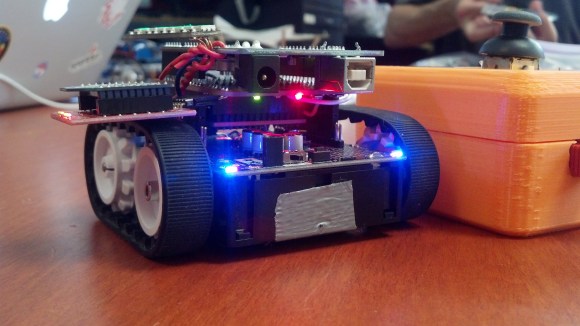
Mikey is [Mike’s] autonomous robot. Like any good father, he’s given the robot his name. Mikey is an Arduino based robot, which uses a Pixy camera for vision.

[Mike] started with a common 4WD robot platform. He added an Arduino Uno, a motor controller, and a Pixy. The Pixy sends directions to the Arduino via a serial link. Mikey’s original task was driving around and finding frogs on the floor. Since then, [Mike] has found a higher calling for Mikey: self charging.

One of the most basic features of life is eating. In the case of autonomous robots, that means self charging. [Mike] gave Mikey the ability to self charge by training the Pixy to detect a green square. The green square identifies Mikey’s charging station. Probes mounted on 3D printed brackets hold the positive leads while springs on the base of the station make contact with conductive tape on Mikey’s belly. Once the circuit is complete, Mike stops moving and starts charging.

Continue reading “Mikey, The Robot That Charges Itself”

Robot Runs On 6 Legs But Never More Than 2 At A Time

Looking at this legged robot gives us the same feeling we had the first time we saw a two-wheeled balancer. At first glance it just shouldn’t work, but after a little thought it makes a lot of sense. The six-legged bot called OutRunner uses two sets of three legs to propel itself. The  footfalls are staggered to mimic how a biped runs, but mechanically it’s just spinning wheels to which the legs attach. If you have a smart enough algorithm it will not only remain upright but be steerable too.

This is a Kickstarter offering to let you can get your hands on an unassembled kit for $200. That version comes with a universal camera mount but no camera. This may not sound like a problem, but look closer and you may notice what we have: The thing is remote-controlled and can run up to 20 MPH, but there’s not footage of it running slowly. We’d wager the need to keep itself balanced equates to the need to run rather than walk. Since it’s going to get away from you very quickly you probably need a camera and a wearable display (or a chase car like in the video) to make the most out of the OutRunner. But hey, who’s complaining about that? Sounds like a ton of fun to us!

Why is it that this thing looks delightful but all of the Boston Dynamics running bots scare the crap out of us?

Continue reading “Robot Runs On 6 Legs But Never More Than 2 At A Time”

MiniBloq IDE, Graphical Programming For Robots Of All Sizes

MiniBloq

The Arduino IDE only brings the ire of actual EEs and People Who Know Better™, but if you’re teaching robotics and programming to kids, you really don’t want something as simple as a text editor with a ‘compile’ button. For that educational feat, a graphical system would be much better suited. [Julián] has been working for months to build such a tool, and now miniBloq, the graphical programming tool for just about every dev board out there, has a new release.

The idea of a graphical programming language for robotics has been done before, most memorably with the Lego Mindstorms programming interface. That was closed source, of course, and only worked with the magical Lego brick that allowed you to attach motors and sensors to a child’s creation. miniBloq takes the same idea and allows the same programming environment to work with dozens of dev boards for robots of every shape and size. Already, the Pi-Bot, SparkFun RedBot, Maple, Multiplo DuinoBot, and anything based on an Arduino Leonardo works with miniBloq, as will any future dev boards that understand C/C++, Python, or JavaScript. It’s not just for powering motors, either: there’s a few Python and OpenCV tutorials that demonstrate how a robot can track a colored object with a camera.

The current version of miniBloq can be downloaded from the gits, with versions available for Windows and *nix. The IDE is written with wxWidgets, so this could also be easily ported to OS X.

TERMES: Termite Inspired Robots

termite inspired robots

Termites, if you think about it, are actually quite amazing. They are capable of building massive complex structures without direct leadership. The Wyss Institute at Harvard is attempting to create robots that can act in a similar way.

Typically if you have a robotic assembly line, if one robot goes down, the whole line shuts down. If it’s an assembly line of people, and one person calls in sick — they still manage, because people are adaptable. What the Wyss Institute is researching is  how to create robots that can work together, or by themselves, with one goal in mind — in this case, building a 3D structure.

In the following demonstration videos they show off their construction-bots assembling a building using basic building blocks. Each robot is completely independent — unaware of the other robots working the same task. It wouldn’t matter if you had one, or even 10 robots — the end result would be the same.

Continue reading “TERMES: Termite Inspired Robots”

Roboartist Draws What It Sees

roboartist-vector-image-machine

The perfect balance of simplicity and complexity have been struck with this automated artist. The Roboartist is a vector drawing robot project which [Niazangels], [Maxarjun], and [Ashwin] have been documenting for the last few days. The killer feature of the build is the ability to process what is seen through a webcam so that it may be sketched as ink on paper by the robotic arm.

The arm itself has four stages, and as you can see in the video below, remarkably little slop. The remaining slight wiggle is just enough to make the images seem as if they were not printed to perfection, and we like that effect!

Above is a still of Roboartist working on a portrait of [Heath Ledger] in his role as Joker from The Dark Knight. The image import feature was used for this. It runs a tweaked version of the Canny Edge Detector to determine where the pen strokes go. This is an alternative to capturing the subject through the webcam. For now MATLAB is part of the software chain, but future work seeks to upgrade to more Open Source tools. The hardware itself uses an Arduino Mega to take input via USB or Bluetooth and drives the quartet of servo motors accordingly.

Continue reading “Roboartist Draws What It Sees”

Opensource RhinoBOT Is Well Suited For Hacking And Sumo-Robotics!

RhinoBOT

The RhinoBOT is an open source and 3D printed robot that is fun to build and easy to expand. It can be used for educational purposes or even as a sumobot!

[Miguel Carro] runs a DIY robotics blog at bq.com (Spanish — Translated) to help teach kids about robotics using a fun cartoon character named Andy. He’s released all the design files for his latest printbot, the RhinoBOT on thingiverse.com. Using an Arduino UNO, an IR sensor, two rotational servos, an LED, batteries and a few pieces of hardware, you can build your very own RhinoBOT! That is — if you have a 3D printer.

The fun doesn’t stop there though, as [Miguel’s] also created a phone app to let you control your RhinoBOT wirelessly!  And since not all the outputs on the UNO are used, y0u can add extra functionality with a bit of creativity — how about being able to move that dozer! To see what it can do, and to start thinking about what you could do with it, stick around after the break to see it in action!

Continue reading “Opensource RhinoBOT Is Well Suited For Hacking And Sumo-Robotics!”