Custom VR Headset Uses Unconventional Displays

Cathode ray tubes (CRTs) are a fascinating display technology that has been largely abandoned outside of retro gaming and a few other niche uses. They use magnets to steer a beam of electrons rapidly across a screen, and while a marvel of engineering for their time, their expense, complexity, and weight all led to them being largely replaced by other displays like LCDs and LEDs. They were also difficult to miniaturize, but there were a few companies who tried. [dooglehead] located a few of the smallest CRT displays he could find and got to work putting them in the most unlikely of situations: a virtual reality headset.

The two displays for his headset come from Sony Watchmans, compact over-the-air black-and-white handheld televisions from the late 1900s. [dooglehead] had to create a method for sending video to these units which originally had no input connections, and then also used an FPGA to split a video signal into two parts, with one for each display. The two displays are placed side by side and attached to a Google Cardboard headset, with an off-the-shelf location tracker attached at the top. An IMU tracks head rotation while this location tracker tracks the motion of the unit through 3D space.

With everything assembled and ready to go, the CRT VR headset only weighs in a few grams heavier than [dooglehead]’s modern HTC headset, although it’s lacking a case (which is sorely needed to cover up the exposed high voltage of the CRTs). He reports surprisingly good performance, with notable interlacing and focus issues. He doesn’t plan to use it to replace any of his modern VR displays anytime soon, but it was an interesting project nonetheless. There are some rumors that CRTs are experiencing a bit of a revival, so we’d advise anyone looking to toss out an old CRT to at least put it on an online market place before sending it to a landfill.

Continue reading “Custom VR Headset Uses Unconventional Displays”

A DIY Headset For SteamVR

The modern era of VR started a long time ago, and a wide range of commercial headsets have proliferated on the market since then. If you don’t want to buy off the shelf, though, you could always follow [Manolo]’s example and build your own.

This DIY headset is known as the Persephone 3 Lite, and is intended for use with SteamVR.  It’s got the requisite motion tracking thanks to a Raspberry Pi Pico, paired with an MPU6500 inertial measurement unit. As for the optics, the headset relies on a pair of 2.9-inch square displays that operate at a resolution of 1440 x 1440 with a refresh rate up to 90 Hz. They’re paired with cheap Fresnel lenses sourced from Aliexpress for a few dollars. Everything is wrapped up in a custom 3D-printed housing that holds all the relevant pieces in the right place so that your eyes can focus on both screens at once. The head strap is perhaps the only off-the-shelf piece, sourced from a Quest 2 device.

If you’re eager to recreate this build at home, files are available over on [Manolo’s] Patreon page for subscribers. We’ve featured some other DIY headset builds before, too. Video after the break.

Continue reading “A DIY Headset For SteamVR”

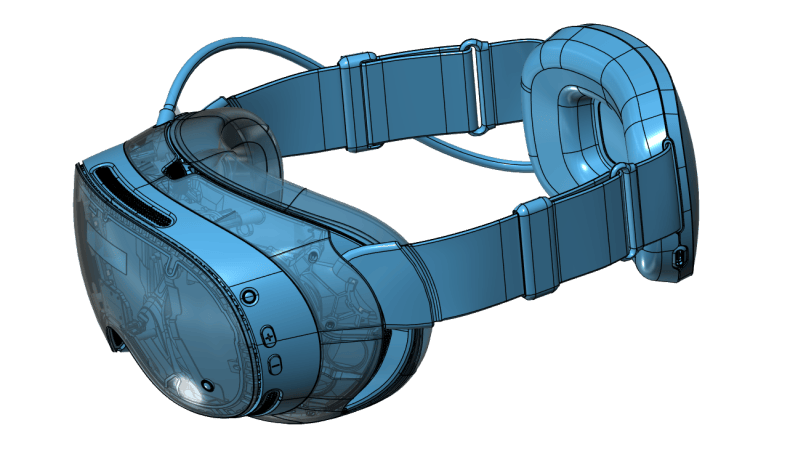
A closeup of a transparent-bodied example of the new Steam Frame VR headset

The Engineering Behind Valve’s New VR Headset

Valve’s new Steam Frame is what all the well-connected YouTubers are talking about, but most of them are talking about what it’s like to game on it. That’s great content if you’re into it, but not exactly fodder for Hackaday — with one exception. [Gamers Nexus] gives us a half hour of relatively-unedited footage of them just chatting with the engineers behind the hardware.

It’s great stuff right from the get-go: they start with how thermal management drove the PCB design, and put the SoC on the “back” of the chip, sandwiched betwixt heat pipes. We don’t usually think of taking heat through the PCB when building a board, so it’s a neat detail to learn about before these things get into the hands of the usual suspects who will doubtless give us teardown videos in a few months.

From there wanders to power delivery — getting the voltage regulators packaged properly was a challenge, since impedance requirements meant a very tight layout. Anyone who has worked on this kind of SBC might be familiar with that issue, but for those looking in from the outside, it’s a fascinating glimpse at electrical sausage being made. That’s just the first half.

The heat-regulation conversation is partially repeated the next conversation (which seems to have happened first) where they get into the cooling requirements of the LCD screens. This requires less than you might think, as they like to run warm for fast refresh. It’s really more about keeping your face cool. They also they discuss acoustic vibration — you don’t want your integrated audio shaking your IMUs apart — and why the prototype was being blasted with freakin’ laser beams to monitor it.

If you haven’t seen or read any other coverage on the Steam Frame, you’re going to miss some context here, but if you’ve not hid under a rock for that announcement, this is amazing detail to have. We’re hugely impressed that Valve let their engineers out of their cubicle-cave to talk to media.

Sure, it’s not an open-source VR headset, but compared to the deafening silence coming from the likes of Meta, this level of information is still awesome to have.

Continue reading “The Engineering Behind Valve’s New VR Headset”

ABCCAD Is Voxels Meets LEGO In AR

We get it, CAD software can be daunting to learn. Somehow [Boaztheostrich] found it so daunting he procrastinated his way into a AR voxel-based CAD app he calls “ABCCAD”, written in Godot for the Meta Quest 3.

The app is simplicity itself: pressing A or X on the controller spawns a cube, which you can place wherever you like in virtual space by moving the controller in real space. The trigger then saves the cube position. Grabbing a cube uses the controller’s grab buttons. You can even change colors (with B or Y), but like in OpenSCAD it appears that’s not actually going to have any effect on the exported STL. Check it out in action in the demo video embedded below.

As far as CAD applications go, this is as simplistic as it gets, but there’s a certain charm to its simplicity. It’s almost like virtual LEGO. Besides, TinkerCAD wasn’t much more complicated when it started out, and look at it now.

Sure, one could say if [Boaz] wanted to do CAD he’d have been better off putting the time into learning good old OpenSCAD or FreeCAD (which can now get you SolidWorks certs, apparently), but this is a fun little app that let him stretch his chops in Godot, another great open-source tool. ABCCAD is, itself, open-source under an MIT license.

We seem to have a paucity of posts under the Godot tag, so if you’ve got a hack that uses the open-source game engine, please send us a tip.

Continue reading “ABCCAD Is Voxels Meets LEGO In AR”

Microsoft Removed WMR Headset Support? No Problem!

In late 2024 Microsoft removed support for WMR (Windows Mixed Reality), and they didn’t just cease development. As of Windows 11 version 24H2, headsets like the HP Reverb and others by Acer, Samsung, Lenovo, and Dell stopped working at all. But the good news is developer [Matthieu Bucchianeri] created the Oasis driver for Windows Mixed Reality which allows WMR headsets (and their controllers) to work again.

Oasis is available as a free download from Steam and involves a few specific setup steps in order to get working, but once the headset and controllers are unlocked and room setup is complete, the hardware will be usable again. Note that while SteamVR is handy, one’s headset and controllers are not actually tied to SteamVR. Any VR application that uses OpenVR or OpenXR should work.

It’s an extremely well-documented project, and anyone willing to read and follow a short list of directions should be off to the races in no time.

Now that there’s a way for folks to dust off their WMR hardware and get back in the game, it’s a good time to mention that if you have ever suffered from VR sickness, we’ve covered ways to help deal with and adapt to it.

Lynx-R1 Headset Makers Release 6DoF SLAM Solution As Open Source

Some readers may recall the Lynx-R1 headset — it was conceived as an Android virtual reality (VR) and mixed reality (MR) headset with built-in hand tracking, designed to be open where others were closed, allowing developers and users access to inner workings in defiance of walled gardens. It looked very promising, with features rivaling (or surpassing) those of its contemporaries.

Founder [Stan Larroque] recently announced that Lynx’s 6DoF SLAM (simultaneous location and mapping) solution has been released as open source. ORB-SLAM3, modified for Android-based hardware (GitHub repository), takes in camera images and outputs a 6DoF pose, and does so effectively in real-time. The repository contains some added details as well as a demo application that can run on the Lynx-R1 headset.

The unusual optics are memorable. (Hands-on Lynx-R1 by Antony Vitillo)

As a headset the Lynx-R1 had a number of intriguing elements. The unusual optics, the flip-up design, and built-in hand tracking were impressive for its time, as was the high-quality mixed reality pass-through. That last feature refers to the headset using its external cameras as inputs to let the user see the real world, but with the ability to have virtual elements displayed and apparently anchored to real-world locations. Doing this depends heavily on the headset being able to track its position in the real world with both high accuracy and low latency, and this is what ORB-SLAM3 provides.

A successful crowdfunding campaign for the Lynx-R1 in 2021 showed that a significant number of people were on board with what Lynx was offering, but developing brand new consumer hardware is a challenging road for many reasons unrelated to developing the actual thing. There was a hands-on at a trade show in 2021 and units were originally intended to ship out in 2022, but sadly that didn’t happen. Units still occasionally trickle out to backers and pre-orders according to the unofficial Discord, but it’s safe to say things didn’t really go as planned for the R1.

It remains a genuinely noteworthy piece of hardware, especially considering it was not a product of one of the tech giants. If we manage to get our hands on one of them, we’ll certainly give you a good look at it.

Weird And Wonderful VR/MR Text Entry Methods, All In One Place

Are you a developer or experimenter pondering options for text entry in virtual or mixed reality? If that’s the case (or you’re merely curious) then here’s the resource you need: TEXT, or the Text Entry for XR Trove. It’s a collection of all the things people have tried when it comes to creating text entry interfaces for virtual and mixed reality (VR/MR) systems, all in a searchable list, complete with animated demonstrations.

There are a lot of different ways to approach this problem, ranging from simple to strange.

VR and MR are new frontiers, and optimal interfaces are still very much a work in progress. If one wishes to avoid reinventing the wheel, it’s a good idea to research prior art. This resource makes it very easy to browse all the stuff people have tried when it comes to text entry.

It’s also fun just to browse and see what kinds of unusual solutions people have come up with that go pretty far beyond “floating over-sized virtual keyboard”. Lenstouch for example involves tapping directly on the touch-sensitive front of the headset, and PalmType reminds us somewhat of the Palm Pilot’s Graffiti system.

It’s a treasure trove of creativity with a nice, searchable interface. Have you come up with your own, or know of a method that isn’t there? Submit it to the collection so others can find it. And if you’re in the process of cooking something up yourself, we have some DIY handwriting recognition resources you might find useful.