Umbrella And Tin Cans Turned Into WiFi Dish Antenna

There’s something iconic about dish antennas. Chances are it’s the antenna that non-antenna people think about when they picture an antenna. And for many applications, the directionality and gain of a dish can really help reach out and touch someone. So if you’re looking to tap into a distant WiFi network, this umbrella-turned-dish antenna might be just the thing to build.

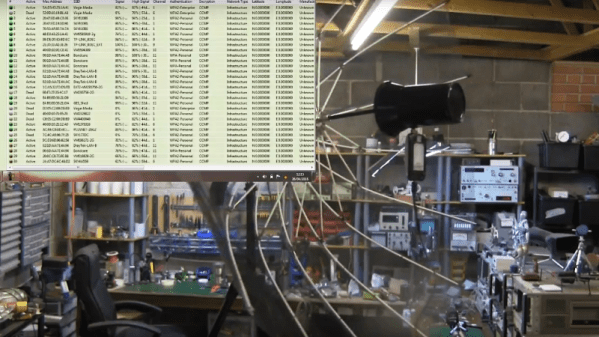
Stretching the limits of WiFi connections seems to be a focus of [andrew mcneil]’s builds, at least to judge by his YouTube channel. This portable, foldable dish is intended to increase the performance of one of his cantennas, a simple home-brew WiFi antenna that uses food cans as directional waveguides. The dish is built from the skeleton of an umbrella-style photographer’s flash reflector; he chose this over a discount-store rain umbrella because the reflector has an actual parabolic shape. The reflective material was stripped off and used as a template to cut new gores of metal window screen material. It’s considerably stiffer than the reflector fabric, but it stretches taut between the ribs and can still fold up, at least sort of. An arm was fashioned from dowels to position the cantenna feed-horn at the focus of the reflector; not much detail is given on the cantenna itself, but we assume it’s similar in design to cantennas we’ve featured before.

[andrew] hasn’t done rigorous testing yet, but a quick 360° scan from inside his shop showed dozens of WiFi signals, most with really good signals. We’ll be interested to see just how much this reflector increases the cantenna’s performance.

Continue reading “Umbrella And Tin Cans Turned Into WiFi Dish Antenna”

Raspberry Pi W Antenna Analysis Reveals Clever Design

The old maxim is that if you pay peanuts, you get a monkey. That’s no longer true, though: devices like the Raspberry Pi W have shown that a $10 device can be remarkably powerful if it is well designed. You might not appreciate how clever this design is sometimes, but this great analysis of the antenna of the Pi W by [Carl Turner, Senior RF Engineer at Laird Technology] might help remind you.

Continue reading “Raspberry Pi W Antenna Analysis Reveals Clever Design”

Reprogramming Cheap WiFi Outlets

If you want to retrofit your home with smart outlets and lightbulbs, bust out your wallet. You can easily spend forty dollars for a smart light bulb at your local home supply store, and strips of smart sockets could cost sixty. When [coogle] found a WiFi-enabled four-outlet power strip on Amazon, he couldn’t resist. Sure, the no-name strip would be locked down behind a stupid iPhone interface and will probably turn your house into a botnet, but never mind that: you can easily reprogram these power strips to be whatever you want.

After receiving these power strips and tearing them open, [coogle] found exactly what you would expect from a no-name white goods manufacturer. There’s a board with an Espressif chip and a WiFi antenna, and a second board with a few relays, with a few wires connecting the two. You only need to browse AliExpress for a few minutes to figure out what’s going on here. The brains of the outfit are in the ESP8266, and if you can control that, you have your own Internet of Power Strips.

The problem, then, was reprogramming the ESP8266. This was a version of the chip [coogle] hadn’t seen before, but a quick query with the Google Mother Brain revealed it was a WT8266-S1 module, with all the pins required for programming easily accessible on a convenient header. After connecting this header up to an ESP programming board, [coogle] had all the relevant information including the capacity of the Flash. There’s still a bit more work to make this a functional WiFi power outlet, namely figuring out which GPIOs and wires connect to which relays, but this is effectively a completely Open IoT device right now. All you have to do is bring your own firmware.

Mc Lighting Takes The Pain Out Of Blinking

If you want to blink a ton of WS2812-alike LED pixels over WiFi, the hardware side of things is easy enough: an LED strip, and ESP8266 unit, and a beefy enough power supply to feed them. But the software side — that’s where it can be a bit of a pain.

Enter Mc Lighting. It makes the software side of things idiot-proof. Flash the firmware onto the ESP8266, and you’ve got your choice of REST, WebSockets, or MQTT to get the data in. This means that it’ll work with Homekit, NodeRed, or an ESP-hosted web interface that you can pull up from any smartphone.

The web interface is particularly swell, and has a bunch of animations built in. (Check out the video below.) This means that you can solder some wires, flash an ESP, and your least computer-savvy relatives can be controlling the system in no time. And speaking of videos, Mc Lighting’s author [Tobias] has compiled a playlist of projects that use the library, also just below. The docs on GitHub are great, and also check out the wiki.

So what are you waiting for? Do you or your loved ones need some blink in your life? And while you’re ordering LED strips, get two. You’re going to want to build TWANG! as well.

Continue reading “Mc Lighting Takes The Pain Out Of Blinking”

Monitor Foot Traffic Using Radio

We talk a lot about information security around here, but in reality it’s not at the forefront of everyone’s minds. Most people are content to walk around with their phones constantly looking for WiFi or Bluetooth connections despite the dangers. But if you’re not a black hat sort of person, you can do something like [Verkehrsrot] did and use all of these phones to do something useful and harmless.

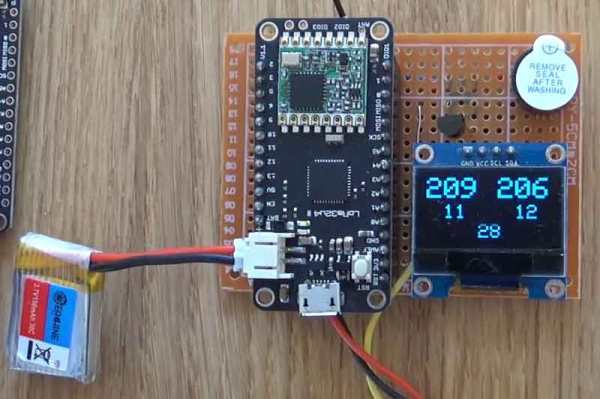
[Verkehrsrot]’s project involves building a radio listening device in order to get an estimate of the amount of traffic in a particular area. The device polls for and detects WiFi and Bluetooth devices nearby and tallies them. For the privacy-minded, it doesn’t persistently store any information about the people or the devices that it detects. The project also runs on a variety of platforms, although you can get the whole thing up and running with little more than an ESP32 and a small lithium-ion battery.

If you’re looking for a useful way to tally the number of people in a given area, this project could be the thing for you. Not everyone keeps their WiFi and Bluetooth turned on, but even so this is still a good way to estimate. But if you need to count everyone going into a room, for example, you’ll need another way to count them.

Build Your Own Antenna For Outdoor Monitoring With LoRa

LoRa and LPWANs (Low Power Wide Area Networks) are all the range (tee-hee!) in wireless these days. LoRa is a sub 1-GHz wireless technology using sophisticated signal processing and modulation techniques to achieve long-range communications.

With that simplified introduction, [Omkar Joglekar] designed his own LoRa node used for outdoor sensor monitoring based on the HopeRF RFM95 LoRa module. It’s housed in an IP68 weatherproof enclosure and features an antenna that was built from scratch using repurposed copper rods. He wrote up the complete build, materials, and description which makes it possible for others to try their hand at putting together their own complete LoRa node for outdoor monitoring applications.

Once it’s built, you can use this simple method to range test your nodes and if you get really good, you might be setting distance records like this.

Speaking The Same Language As A Wireless Thermometer

Temperature is a delicate thing. Our bodies have acclimated to a tight comfort band, so it is no wonder that we want to measure and control it accurately. Plus, heating and cooling are expensive. Measuring a single point in a dwelling may not be enough, especially if there are multiple controlled environments like a terrarium, pet enclosure, food storage, or just the garage in case the car needs to warm up. [Tim Leland] wanted to monitor commercially available sensors in several rooms of his house to track and send alerts.

The sensors of choice in this project are weather resistant and linked in his project page. Instead of connecting them to a black box, they are linked to a Raspberry Pi so your elaborate home automation schemes can commence. [Tim] learned how to speak the thermometer’s language from [Ray] who posted about it a few years ago.

The system worked well, but range from the receiver was only 10 feet. Thanks to some suggestions from his comments section, [Tim] switched the original 433MHz receiver for a superheterodyne version. Now the sensors can be a hundred feet from the hub. The upgraded receiver is also linked on his page.

We’ve delved into thermocouple reading recently, and we’ve featured [Tim Leland] and his 433MHz radios before.