A 6502 All In The Data

Emulating a 6502 shouldn’t be that hard on a modern computer. Maybe that’s why [lasect] decided to make it a bit harder. The PG_6502 emulator uses PostgreSQL. All the CPU resources are database tables, and all opcodes are stored procedures. Huh.

The database is pretty simple. The pg6502.cpu table has a single row that holds the registers. Then there is a pg6502.mem table that has 64K rows, each representing a byte. There’s also a pg6502.opcode_table that stores information about each instruction. For example, the 0xA9 opcode is an immediate LDA and requires two bytes.

The pg6502.op_lda procedure grabs that information and updates the tables appropriately. In particular, it will load the next byte, increment the program counter, set the accumulator, and update the flags.

Honestly, we’ve wondered why more people don’t use databases instead of the file system for structured data but, for us, this may be a bit much. Still, it is undoubtedly unique, and if you read SQL, you have to admit the logic is quite clear.

We can’t throw stones. We’ve been known to do horrible emulators in spreadsheets, which is arguably an even worse idea. We aren’t the only ones.

ESP32 Weather Display Runs Macintosh System 3

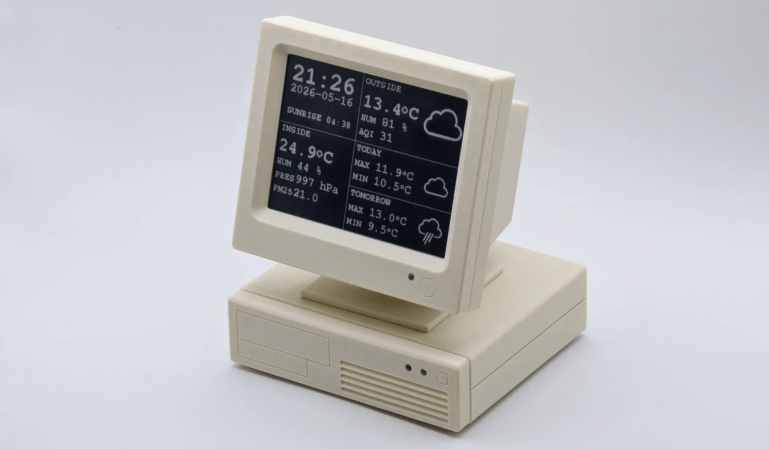
It seems like everybody takes their turn doing an ESP32-based weather display, and why not? They’re cheap, they’re easy, and you need to start somewhere. With the Cheap Yellow Display (CYD) and modules like it, you don’t even need to touch hardware! [likeablob] had the CYD, and he’s showing weather on it, but the Cydintosh is a full Macintosh Plus Emulator running on the ESP32.

Honey, I stretched the Macintosh!

The weather app is his own creation, written with the Retro68k cross-compiler, but it looks like something out of the 80s even if it’s getting its data over WiFi. The WiFi connection is, of course, thanks to the whole thing running on an ESP32-S3. Mac Plus emulation comes from [evansm7]’s Micro Mac emulator, the same one that lives inside the RP2040-based PicoMac that we covered some time ago. Obviously [likeablob] has added his own code to get the Macintosh emulator talking to the ESP32’s wireless hardware, with a native application to control the wifi connection in System 3.3. As far as the Macintosh is concerned, commands are passed to the ESP32 via memory address 0xF00000, and data can be read back from it as well. It’s a straightforward approach to allow intercommunication between the emulator and the real world.

The touchpad on the CYD serves as a mouse for the Macintosh, which might not be the most ergonomic given the Macintosh System interface was never meant for touchscreens, but evidently it’s good enough for [likeablob]. He’s built it into a lovely 3D printed case, whose STLs are available on the GitHub repository along with all the code, including the Home Assistant integration.

Trying To Install Haiku On A 2009 Mac Mini

Although the number of uses for a 2009-era Mac Mini aren’t very long, using them to run new-and-upcoming operating systems like Haiku on would seem to be an interesting use case. This is what [The Phintage Collector] recently took a swing at, using both the 2024 Beta 5 release and a current nightly build. The focus was mostly on the 32-bit build, as this has binary compatibility with BeOS applications, but the 64-bit version of Haiku was of course also installed.

One of the main issues with these Mac systems is that they use EFI for the BIOS, so you’re condemned to either take your chances with the always glitchy CSM ‘classical BIOS’ mode, or to make Haiku and EFI get along. While for the 64-bit version of Haiku this wasn’t too much of a struggle, the 32-bit version ran into the problem that the 64-bit EFI BIOS really doesn’t like 32-bit software. After a while the 32-bit version of Haiku was thus abandoned for a later revisit.

With the 64-bit version a lot of things just work, though audio couldn’t be made to work even with a USB dongle, and there’s no hardware acceleration for graphics, so gaming isn’t really going to happen either. The positive thing here is probably that as a test system for 64-bit Haiku such a Mac Mini isn’t too crazy, it being just an Intel system with an Apple-flavor EFI BIOS.

If you’re into giving it a shot yourself, the video description page contains a lot of resources to consult.

Continue reading “Trying To Install Haiku On A 2009 Mac Mini”

Hackaday Links Column Banner

Hackaday Links: April 12, 2026

At this point, we’ll assume you already know that four humans took a sightseeing trip around the Moon and made their triumphant return to Earth on Friday. Even if you somehow avoided hearing about it through mainstream channels, we kept a running account of the mission’s highlights stuck to the front page of the site for the ten days that the crew was in space.

On the assumption that you might be a bit burned out with space news at this point, we won’t bring up it up in this post… other than to point out that excitement for the lunar flyby has driven the number of simultaneous players of Kerbal Space Program to its highest count ever — nearly 20,000 armchair astronauts spent this weekend trying to cobble together their own rocket in honor of the Artemis II mission.

With so many folks focused on the Moon it would be the perfect time for a company to sneak out some bad news, which is perhaps why Amazon picked this week to announce they would be dropping support for Kindles released before 2012. Presumably there aren’t too many first and second generation Kindles still out there in the wild, but the 2012 cutoff does mean the first iteration of the Paperwhite will be one of the devices being put out to pasture come May 20th.

Continue reading “Hackaday Links: April 12, 2026”

Who Had “New OS For The Z80” On Their 2026 Bingo Card?

Some might say the venerable Z80 doesn’t need another operating system, but [Scott Baker] obviously disagrees. He has come up with a brand new, from scratch OS called NostOS for the Z80-based RC2014 homebrew retrocomputer. [Scott] describes it as CP/M-like, but it’s not CP/M– in fact, it’s totally incompatible with CP/M–and has a few tricks of its own up its sleeve.

As you might expect of an operating system for this vintage of hardware, it is “rommable” — that is, designed to run from read-only-memory, and fit inside 64kB. It of course supports banking memory to go higher than that 16 bit limit, and natively supports common serial devices, along with the good old WD37C65 floppy controller to get some spinning rust into the game. Of course if you don’t have floppies you can plug in a compact flash card– try that with CP/M– or, interestingly Intel Bubble Memory. [Scott] has a soft-spot for bubble memory, which at one point seemed poised to replace both hard drives and RAM at the same time. We also appreciate that he included drivers for vacuum fluorescent displays, another forgotten but very cool technology. Back in the day, this operating system would have enabled a very cool little computer, especially when you take his implementation of text-to-speech with the SP0256A-AL2 chip. Fancy a game of talking Zork? Yes, he ported Zork, and yes, it talks.

The whole thing is, of course, open-source, and available on [Scott]’s GitHub. Unlike too many open-source projects, the documentation is top-notch, to the point that we could picture getting it in a three-ring binder with a 5 1/4 floppy on the inside cover. If you like video, we’ve embedded [Scott]’s walkthrough but his blog and the docs on GitHub have everything there and more if you’re not into rapidly-flickering-pixels as an information exchange medium.

[Scott] isn’t wedded to Zilog, for the record; this OS should run on an Intel 8080, perhaps like the one in the Prompt 80 he restored last year. 

Thanks to [Scott Baker] for the tip!

Continue reading “Who Had “New OS For The Z80” On Their 2026 Bingo Card?”

2026 Green Powered Challenge: Solar Powered Pi Hosts Websites In RAM

If you started with computers early enough, you’ll remember the importance of the RAMdisk concept: without a hard drive and with floppies slow and swapping constantly, everything had to live in RAM. That’s not done much these days, but [Quackieduckie]’s solar powered Pi Zero W web server has gone back to it to save its SD card.

Sustainability and low power is the name of the game. Starting with a Pi Zero W means low power is the default; a an SLS-printed aluminum case that doubles as the heat sink– while looking quite snazzy–saves power that would otherwise be used for cooling. The STLs are available through the project page if you like the look and have a hankering for passively cooled Pi. Even under load [Quackieduckie] reports temperatures of just 29.9°C,  less than a degree over idle.

The software stack is of course key to a server, and here he’s using Alpine Linux running in “diskless mode”– that’s the equivalent of what us oldsters would think of as the RAMdisk. That’s not that unusual for servers, but we don’t see it much on these pages. It’s a minimal setup to save processing, and thus electrical power, with only a handful of services kept running: lighttpd, a lightweight webserver, and duckiebox, a python-based file server, along with SSHD and dchron; together they consume 27 MB of RAM, leaving the rest of the 512 MB DDR2 the Pi comes with to quickly serve up websites without the overhead of SD card access.

As a webserver, [Quackieduckie] tested it with 50 simultaneous connections, which would be rather a lot for most small, personal web sites, and while it did slow down to an average 1.3s per response that’s perfectly usable and faster than we’d have expected from this hardware. While the actual power consumption figures aren’t given, we know from experience it’s not going to be drawing more than a watt or so. With a reasonably sized battery and solar cell– [Quackieduckie] suggests 20W–it should run until the cows come home.

This isn’t the first solar-powered web server we’ve seen, but this one was submitted for the 2026 Green Powered Challenge, which runs until April 24th.

Making The Forgotten 1982 Game Adventure Canoe Run On MAME

A Taito Egret II mini arcade cabinet.

A while back [Jack] came across a Taito arcade game that neither he nor any of his mates recognized. The game was Adventure Canoe and part of the collection of forty preinstalled games on a Taito Egret II mini arcade cabinet. Yet despite [Jack] and his buddies being avid 1980s arcade enthusiasts, this 1982 title for the Z80-based Taito SJ system was completely unfamiliar to them.

When even a web search turned up extremely few details, [Jack] did the only reasonable thing and borrowed the rather expensive mini arcade for hopefully some extracting of the game ROM.

As expensive as this mini arcade is, it features the typical ARM-based SoC and Linux-based firmware. Although you can totally dump the Flash, [Jack] found that the firmware update ZIP file was a much easier target to poke at and hopefully extract the ROMs from.

Of course, Taito used password-protected ZIP files within the firmware, leading to some reverse-engineering to find the passwords. The first was ‘hidden’ as plain text in the egret2 binary. For the remainder of the ZIP files the password wasn’t as readily found, but required some sleuthing. This took the form of dynamic runtime analysis with gdb, using information previously gleaned from a Ghidra analysis. Eventually this yielded the final passwords.

Extracting the game’s ROM files this way allowed for them to be adapted to the format that MAME expects, after which the game just had to be added to the emulator’s source files. With this done the game fired right up, and [Jack] was able to play the game without any trouble.