Linux Fu: Globs Vs Regexp

I once asked a software developer at work how many times we called fork() in our code. I’ll admit, it was a very large project, but I expected the answer to be — at most — two digits. The developer came back and read off some number from a piece of paper that was in the millions. I told them there was no way we had millions of calls to fork() and, of course, we didn’t. The problem was the developer wasn’t clear on the difference between a regular expression and a glob.

Tools like grep use regular expressions to create search patterns. I might write [Hh]ack ?a ?[Dd]ay as a regular expression to match things like “HackaDay” and “Hack a day” and, even, “Hackaday” using a tool like grep, awk, or many programming languages.

Continue reading “Linux Fu: Globs Vs Regexp”

Linux Fu: User Space File Systems — Now For Windows, Too!

One of the nice things about the Unix philosophy that Linux inherited is that the filesystem is very modular. That’s good, too, because a typical system might want a choice of filesystems like ext4, reiserfs, btrfs, and even network systems like nfs. Besides that, there are fake file systems like /sys and /dev that help Linux make everything look like a file. The downside is that building a filesystem required changing the kernel or, at least, writing a loadable module. That’s not as hard as it sounds, but it is a little more difficult than writing a normal program. Then came FUSE — file system in user space. This is a single file system module that allows you to create new file systems by writing ordinary code.

Continue reading “Linux Fu: User Space File Systems — Now For Windows, Too!”

Linux Fu: Walk, Chew Gum

If you ever think about it, computers are exceedingly stupid. Even the most powerful CPU can’t do very much. However, it can do what it does very rapidly and repeatably. Computers are so fast, they can appear to do a lot of things at once, too and modern computers have multiple CPUs to further enhance their multitasking abilities. However, we often don’t write programs or shell scripts to take advantage of this. However, there’s no reason for this, as you’ll see.

Bash Support

It is surprisingly easy to get multiple processes running under Bash. For one thing, processes on either side of a pipe run together, and that’s probably the most common way shell scripts using multiprogramming. In other words, think about what happens if you write ls | more.

Under the old MSDOS system, the first program would run to completion, spooling its output to a temporary file. Then the second program will run, reading input from the same file. With Linux and most other modern operating systems, both programs will run together with the input of the second program connected to the first program’s output. Continue reading “Linux Fu: Walk, Chew Gum”

Linux Fu: Superpowers For Mere Mortals

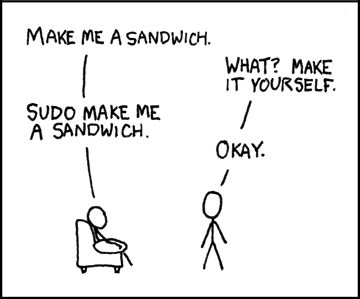
You can hardly mention the sudo command without recalling the hilarious XKCD strip about making sandwiches. It does seem like sudo is the magic power to make a Linux system do what you want. The only problem is that those superpowers are not something to be taken lightly.

CC-BY-NC-2.5 by [XKCD]
If you are surfing the web, for example, you really don’t want to be root, because if someone naughty takes over your computer they could do a lot more harm with your root password. But still, there are times when you want to run certain commands that are normally root-only and don’t want to bother with a password. Luckily, sudo can handle that use case very easily.

Why?

As a simple example, suppose you like to shut your computer down at the end of the day. You run the shutdown command from the terminal but it doesn’t work because you aren’t root. You then have to do it again with sudo and if you haven’t logged in lately, provide your password. Ugh.

Continue reading “Linux Fu: Superpowers For Mere Mortals”

Linux Fu: PDF For Penguins

PostScript started out as a programming language for printers. While PostScript printers are still a thing, there are many other ways to send data to a printer. But PostScript also spawned the Portable Document Format or PDF and that has been crazy successful. Hardly a day goes by that you don’t see some kind of PDF document come across your computer screen. Sure, there are other competing formats but they hold a sliver of market share compared to PDF. Viewing PDFs under Linux is no problem. But what about editing them? Turns out, that’s easy, too, if you know how.

GUI Tools

You can use lots of tools to edit PDF files, but the trick is how good the results will look. Anything will work for this: LibreOffice Draw, Inkscape, or even GIMP. If all you want to do is remove something with a white box or make an annotation, these tools are usually great, but for more complicated changes, or pixel-perfect output, they may not be the right tool.

The biggest problem is that most of these tools deal with the PDF as an image or, at least, a collection of objects. For example, columns of text will probably turn into a collection of discrete lines. Changing something that causes a line to wrap will require you to change all the other lines to match. Sometimes text isn’t even text at all, but images. It largely depends on how the creator made the PDF to begin with. Continue reading “Linux Fu: PDF For Penguins”

Linux Fu: Databases Are Next-Level File Systems

It is funny how exotic computer technology eventually either fails or becomes commonplace. At one time, having more than one user on a computer at once was high tech, for example. Then there are things that didn’t catch on widely like vector display or content-addressable memory. The use of mass storage — especially disk drives — in computers, though has become very widespread. But at one time it was an exotic technique and wasn’t nearly as simple as it is today.

However, I’m surprised that the filesystem as we know it hasn’t changed much over the years. Sure, compared to, say, the 1960s we have a lot better functionality. And we have lots of improvements surrounding speed, encoding, encryption, compression, and so on. But the fundamental nature of how we store and access files in computer programs is stagnant. But it doesn’t have to be. We know of better ways to organize data, but for some reason, most of us don’t use them in our programs. Turns out, though, it is reasonably simple and I’m going to show you how with a toy application that might be the start of a database for the electronic components in my lab.

You could store a database like this in a comma-delimited file or using something like JSON. But I’m going to use a full-featured SQLite database to avoid having a heavy-weight database server and all the pain that entails. Is it going to replace the database behind the airline reservation system? No. But will it work for most of what you are likely to do? You bet. Continue reading “Linux Fu: Databases Are Next-Level File Systems”

Linux Fu: Mixing Bash And Python

Although bash scripts are regularly maligned, they do have a certain simplicity and ease of creation that makes them hard to resist. But sometimes you really need to do some heavy lifting in another language. I’ll talk about Python, but actually, you can use many different languages with this technique, although you might need a little adaptation, depending on your language of choice.

Of course, you don’t have to do anything special to call another program from a bash script. After all, that’s what it’s mainly used for: calling other programs. However, it isn’t very handy to have your script spread out over multiple files. They can get out of sync and if you want to send it to someone or another machine, you have to remember what to get. It is nicer to have everything in one file.

Continue reading “Linux Fu: Mixing Bash And Python”