A business card-sized, solar-powered weather station.

2024 Business Card Challenge: Weather Or Not You Get The Job

What’s the easiest way to break the ice with someone you’ve just met? If you’re not immediately talking shop, than it’s probably the time-tested subject of the weather. So what better way to get the conversation started than with a lovely solar-powered circuit sculpture of a business card that displays the weather?

We love that the frame has a built-in stand; that’s a great touch that really turns this card into something that someone might keep on their desk long-term. The brains of this operation is an ESP32 TTGO E-paper board, which checks the battery voltage first before connecting to Wi-Fi and getting data from the OpenWeatherMap API. It displays the information and then goes to sleep for 15 minutes.

For power, [BLANCHARD Jordan] is using a 5 V solar panel and a small battery from an old vape pen. We love to see projects that keep those things out of the landfills, so don’t sleep on using them.

You have just a few weeks left to enter the 2024 Business Card Challenge, so fire up those soldering irons and get hackin’!

Close-up of the mod installed into the HDMI switch, tapping the IR receiver

Interfacing A Cheap HDMI Switch With Home Assistant

You know the feeling of having just created a perfect setup for your hacker lab? Sometimes, there’s just this missing piece in the puzzle that requires you to do a small hack, and those are the most tempting. [maxime borges] has such a perfect setup that involves a HDMI 4:2 switch, and he brings us a write-up on integrating that HDMI switch into Home Assistant through emulating an infrared receiver’s signals.

overview picture of the HDMI switch, with the mod installed

The HDMI switch is equipped with an infrared sensor as the only means of controlling it, so naturally, that was the path chosen for interfacing the ESP32 put inside the switch. Fortunately, Home Assistant provides the means to both receive and output IR signals, so after capturing all the codes produced by the IR remote, parsing their meaning, then turning them into a Home Assistant configuration, [maxime] got HDMI input switching to happen from the comfort of his phone.

We get the Home Assistant config snippets right there in the blog post — if you’ve been looking for a HDMI switch for your hacker lair, now you have one model to look out for in particular. Of course, you could roll your own HDMI switch, and if you’re looking for references, we’ve covered a good few hacks doing that as part of building a KVM.

Hands On: Inkplate 6 MOTION

Over the last several years, DIY projects utilizing e-paper displays have become more common. While saying the technology is now cheap might be overstating the situation a bit, the prices on at least small e-paper panels have certainly become far more reasonable for the hobbyist. Pair one of them with a modern microcontroller such as the RP2040 or ESP32, sprinkle in a few open source libraries, and you’re well on the way to creating an energy-efficient smart display for your home or office.

But therein lies the problem. There’s still a decent amount of leg work involved in getting the hardware wired up and talking to each other. Putting the e-paper display and MCU together is often only half the battle — depending on your plans, you’ll probably want to add a few sensors to the mix, or perhaps some RGB status LEDs. An onboard battery charger and real-time clock would be nice as well. Pretty soon, your homebrew e-paper gadget is starting to look remarkably like the bottom of your junk bin.

For those after a more integrated solution, the folks at Soldered Electronics have offered up a line of premium open source hardware development boards that combine various styles of e-paper panels (touch, color, lighted, etc) with a microcontroller, an array of sensors, and pretty much every other feature they could think of. To top it off, they put in the effort to produce fantastic documentation, easy to use libraries, and free support software such as an online GUI builder and image converter.

We’ve reviewed a number of previous Inkplate boards, and always came away very impressed by the attention to detail from Soldered Electronics. When they asked if we’d be interested in taking a look at a prototype for their new 6 MOTION board, we were eager to see what this new variant brings to the table. Since both the software and hardware are still pre-production, we won’t call this a review, but it should give you a good idea of what to expect when the final units start shipping out in October.

Continue reading “Hands On: Inkplate 6 MOTION”

A small internet radio in 3D-printed case with a knob and an OLED screen.

GlobeTune Will Widen Your Musical Horizons

Are you tired of the same old music, but can’t afford any new tunes, even if they’re on dead formats? Boy, do we know that feeling. Here’s what you do: build yourself a GlobeTune music player, and you’ll never want for new music again.

The idea is simple, really. Just turn what we assume is a nice, clicky knob, and after a bit of static (which is a great touch!), you get a new, random radio station from somewhere around the globe. [Alexis D.] originally built this as a way to listen to and discover new music while disconnecting from the digital world, and we think it’s a great idea.

[Alexis D.] has production in mind, so after a Raspberry Pi Zero W prototype, they set about redesigning it around the ESP32. The current status seems to be hardware complete, software forthcoming. [Alexis D.] says that a crowdfunding campaign is in the works, but that the project will be open-sourced once in an acceptable state. So stay tuned!

Speaking of dead-ish formats, here’s an Internet radio in a cassette form factor.

The Long Road Towards Reverse Engineering The ESP32 Wi-Fi Driver

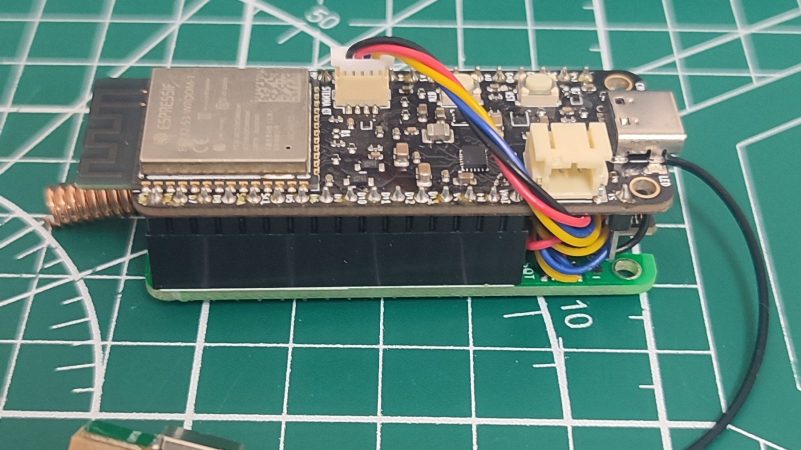
Although much of the software that runs on the ESP32 microcontroller is open source, the Wi-Fi driver is not. Instead, it uses a proprietary binary blob. This was no problem for [Jasper Devreker]’s reverse-engineering of the ESP32’s Wi-Fi stack so far until he came face to face with reverse-engineering the initialization of the Wi-Fi peripheral. As it turns out, there is a lot of work involved after you call esp_phy_enable in the Espressif binary blob, with the team logging 53,286 peripheral accesses during the initialization phase. In comparison, sending a Wi-Fi packet takes about ten calls.

Currently, the way that the initialization step is handled is by having the initialization routine in the binary blob do its thing by configuring the radio and other elements before killing the FreeRTOS task and replacing it with their own version. The team is actively looking for a clean approach for moving forward that will avoid simply writing everything from scratch. For the Wi-Fi MAC, existing code (e.g., FreeBSD’s stack) could be used, but the radio code is much more of a headache. Clearly, there’s still a lot more work to be done in order to get a fully open-source Wi-Fi MAC and stack for the ESP32, but having the community (that’s you) pitch in might speed things up if there’s demand for an open-source driver.

[Jasper’s] been working on this for a while. He’s even built a Faraday cage to make the task easier.

This WiFi Filament Sensor Is Unnecessary, But Awesome

As desktop 3D printers have inched towards something resembling the mainstream, manufacturers have upped their game across the board. Even the quality of filament that you can get today is far better than what was on the market in the olden days, back when a printer made out of laser-cut birch wasn’t an uncommon sight at the local makerspace. Now, even the cheap rolls are wound fairly well and are of a consistent diameter. For most folks, you just need to pick a well-reviewed brand, buy a roll, and get printing.

But as with everything else, there are exceptions. Some people are producing their own filaments, or want to make sure their extrusion rate is perfectly calibrated. For those that need the capability, the WInFiDEL from [Sasa Karanovic] can detect filament diameter in real-time while keeping the cost and complexity as low as possible. Even better, with both the hardware and software released as open source, it makes an excellent starting point for further development and customization.

Continue reading “This WiFi Filament Sensor Is Unnecessary, But Awesome”

A capacitive touch MIDI instrument that doubles as a bookmark.

MIDI Bookmark Marks The Spot Where Work And Play Intersect

Have you ever wanted to take a break from reading or studying to just rock out for a few blissful minutes? If you’re anything like us, you like to rock out most of the time and take the occasional break to do your reading. Either way, you really can’t go wrong with this MIDI bookmark from [Misfit Maker].

The guts of a MIDI bookmark.This slick little bookmark may look 3D printed, but it’s all carefully-cut foam board in two thicknesses. Even the keys are made foam board — they’re just wrapped in carbon fiber so they look extra cool.

Underneath that carbon fiber is a layer of aluminium tape to make them capacitive. [Misfit Maker] recommends using copper tape instead because it allows for wires to be soldered directly to the keys.

The brains of this beauty is in the form of an ESP32 which is controlling an MPR-121 capacitive touch sensor. If you’d like to make one of these for yourself, there are plenty of helpful GIFs embedded in the thorough write-up. Be sure to check out the brief demo after the break.

If you want to easily MIDI-fy something and use touch inputs, you can’t really go wrong with the Raspberry Pi Pico, which does capacitive touch natively. Check out this MIDI kalmiba to learn more.

Continue reading “MIDI Bookmark Marks The Spot Where Work And Play Intersect”