The Process Behind Manufacturing That Mac Pro Grille

Apple released a monitor stand not so long ago with an eye-watering price tag, and in the resulting fuss you might almost be forgiven for missing the news that they also released a new computer. The distinctive grille on the new Mac Pro caused some interest among Hackaday editors, with speculation rife as to how it had been machined. It seems we’re not alone in this, because [J. Peterson] sent us a link to his own detailed analysis.

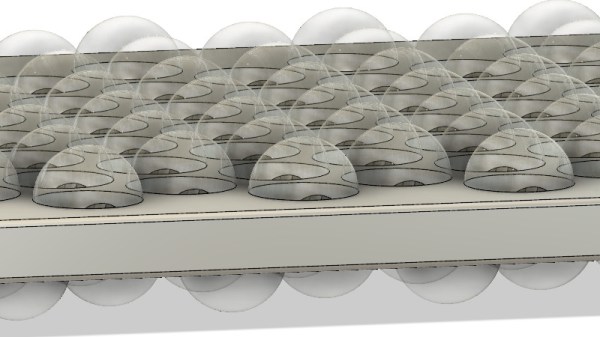
The key to the pattern lies in hemispherical holes milled part-way-through a piece of metal on a triangular tessellation, and intersecting with an identical set of holes milled at an offset from the other side. The analysis was done purely from online information as he doesn’t have a real Mac Pro, but using some clever trigonometry he is able to calculate the required offset as well as the hole depth. There are some STL files on Thingiverse, for the curious.

Should you wish to make your own copy of a Mac Pro grille you should therefore be able to use this information in programming a CNC mill to carve it from a piece of alloy plate. The interesting side of it from a manufacturing perspective though is that this is a complex shape that would be difficult to produce in numbers without either CNC or a very specialist one-off machine tool for this single purpose, and neither is a normal expenditure for a mere grille. Perhaps you might come close by rolling alloy plate between rollers whose profile matched the hole pattern, but in that event you would not equal the finish that they have achieved. Apple’s choice to use a relatively time-intensive CNC process in mass-production of a cosmetic part is probably in a large part a quality statement for their particular brand of consumer, but also sets a high bar to any would-be imitators. We applaud it for its engineering, even if we won’t be shelling out for that monitor stand.

Apple Just Killed The VESA Mount And We Couldn’t Be Happier

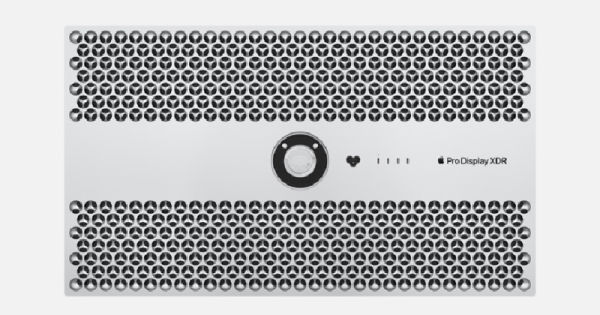
After the immense failure of the 2013-era Apple Pro trash can Mac, Apple has been hard at work at the next generation of workstation desktops. This week, the new Mac Pro has been announced, and the specs are amazing: We finally can buy a professional, desktop Mac with half the storage of an iPhone. The big story isn’t the next generation of cheese-grater Macs, though: the new display, the Pro Display XDR, has killed the venerable VESA mount and we couldn’t be happier.

The VESA mount, or more correctly, the VESA Mounting Interface Standard, was created in 1997 as a mounting standard for flat panel monitors and televisions. Look on the back of your monitor, and you’ll probably find a pattern of M4 threaded inserts laid out on a 75mm or 100mm square. Larger sizes, with respectively larger thread sizes, are used for gigantic wall-mounted televisions. For the last two decades, this has been the standard for mounting monitors to stands. Now this standard faces a challenger thanks to the brave designers at Apple. Continue reading “Apple Just Killed The VESA Mount And We Couldn’t Be Happier”

Hackaday Links Column Banner

Hackaday Links: June 2, 2019

The works of Shakespeare, Goethe, and Cervantes combined do not equal the genius of Rick And Morty. Actually, the word ‘genius’ is thrown around a bit too much these days. Rick and Morty has surpassed genius. This cartoon is sublime. It is beyond any art that could be created. Now, you might not have a high enough IQ to follow this, but Rick and Morty is, objectively, the best art that can be produced. It just draws upon so much; Rick’s drunken stammering is a cleverly hidden allusion to Dostoevsky’s Netochka Nezvanova, absolutely brilliantly providing the back-story to Rick’s character while never actually revealing anything. Now, you’re probably not smart enough to understand this, but Teenage Engineering is releasing a Rick and Morty Pocket Operator. Only the top percentages of IQs are going to understand this, but this is game-changing. Nothing like this has ever been done before.

The Microsoft IntelliMouse Explorer 3.0 is the high water mark of computer peripheral design. Originally released in 2003, the IntelliMouse Explorer 3.0 was an instant classic. The design is nearly two decades old, but it hasn’t aged a day. That said, mouse sensors have gotten better in the years since, and I believe the original tooling has long worn out. Production of the original IntelliMouse Explorer 3.0 stopped a long time ago. Microsoft tried to revive the IntelliMouse a few years ago using a ‘BlueTrack’ sensor that was ridiculed by the gaming community. Now Microsoft is reviving the IntelliMouse with a good sensor. The Pro IntelliMouse is on sale now for $60 USD.

It has come to my attention that wooden RFID cards exist. This shouldn’t come as a surprise to anyone because wood veneer exists, thin coils of wire exist, and glue exists. That said, if you’re looking for an RFID card you can throw in the laser cutter for engraving, or you just want that special, home-made touch, you can get a wooden RFID card.

Lego has just released an Apollo Lunar Lander set, number 10266. It’s 1087 pieces and costs $99. This is a full-scale (or minifig-scale, whatever) Apollo LEM, with an ascent module detachable from the descent module. Two minifigs fit comfortably inside. Previously, the only full-scale (or, again, minifig-scale) Apollo LEM set was 10029, a Lego Discovery kit from 2003 (original retail price $39.99). Set 10029 saw a limited release and has since become a collectible: the current value for a new kit is $336. The annualized ROI of Lego set 10029-1 is 13.69%, making this new Apollo LEM set a very attractive investment vehicle. I’m going to say this one more time: Lego sets, and especially minifigs, are one of the best long-term investments you can make.

A Weinermobile is for sale on Craigslist. Actually, it’s not, because this was just a prank posted by someone’s friends. Oh, I wish I had an Oscar Mayer Weinermobile.

Rumors are swirling that Apple will release a new Mac Pro at WWDC this week. Say what you will about Apple, but people who do audio and video really, really like Apple, and they need machines with fast processors and good graphics cards. Apple, unfortunately, doesn’t build that anymore. The last good expandable mac was the cheese grater tower, retired in 2013 for the trash can pro. Will Apple manage to build a machine that can hold a video card?  We’ll find out this week.

Hackaday Links Column Banner

Hackaday Links: March 24, 2019

It has come to my attention that a few of you don’t know about Crystalfontz, an online store where you can find displays of all types, from USB LCD displays to I2C OLEDs, to ePaper displays. Thanks to [arthurptj] for that tip. Yes, Crystalfontz is cool, but have you ever heard of Panelook? Oh boy are there some displays at Panelook. Here’s a 1024 by 768 resolution display that’s less than half an inch across.

The comments section of Hackaday has been pretty tame as of late, so here’s why Apple is the king of design. It’s a question of fillets. There are a few ways to add a fillet to the corner of an icon or a MacBook. The first is to draw two perpendicular lines, then add a fixed radius corner. The Apple way is to make everything a squircle. The ‘squircle’ way of design is that there are no sudden jumps in curvature, and yes, you can do this in Fusion360 or any other design tool. This is also one of those things you can’t unsee once you know about it, like the arrow in the FedEx logo.

The ESP8266 simply appeared one day, and it changed everything. The ESP32, likewise, also just arrived on the Internet one day, and right now it’s the best solution for a microcontroller, with WiFi, that also does things really fast. Someone over at Espressif is dropping hints of a new microcontroller, with a possible release on April 1st (the same date that Apple released their competitor to the Raspberry Pi). Is it RISC-V? Is it 5V tolerant? Who knows! (Editor’s note: it’s not RISC-V. Though they’re saying that’s in the pipeline.)

The Verge got their hands on an original iPhone engineering validation unit. It’s a breakout board for an iPhone.

San Dimas High School Football Rules

There’s a screwdriver in your toolbox that has a cast clear handle, a blue ferrule surrounding the shaft, and red and white lettering on the side. Go check, it’s there. It’s a Craftsman screwdriver. It’s an iconic piece of design that’s so ubiquitous that it’s unnoticeable. It’s just what a screwdriver is. It’s a prototypical screwdriver. Thanks to the rise of resin and turning craftsmanship, there’s now a gigantic version of this screwdriver.

[The 8-Bit Guy] posted the following message on his Facebook on March 19th: “Just FYI – somebody hacked and totally erased my website. So, it’s going to be down for a while.” At the time of this writing, everything looks okay, which brings up the larger question of why Facebook is still a thing. We’re on a gradient of coolness here, and the sooner you delete your Facebook, the cooler you are. I, for example, deleted my Facebook during the Bush administration, and we all know how cool I am. I’ll never get to the singularity of coolness of kids who never had a Facebook in the first place, but the point remains: delete your Facebook old man.

[SirEdmar] wants to bring Fusion 360 to Linux users. Autodesk wants the same, and they tried a web-based version of Fusion 360, but… it’s a web version of Fusion 360. Right now the best solution is Wine, and thanks to [SirEdamr] 360 works in Wine.

Bing translate does Klingon! How well does it work? Not bad, it could use some work, mostly with non-standard vocabulary:

What Happens When A Regular Person Finds A Huge Security Flaw?

The biggest news in the infosec world, besides the fact that balaclavas are becoming increasingly popular due to record-low temperatures across the United States, is that leet haxors can listen to you from your iPhone using FaceTime without you even answering the call. There are obvious security implications of this bug: phones should only turn on the microphone after you pick up a call. This effectively turns any iPhone running iOS 12.1 or later into a party line. In response Apple has taken group FaceTime offline in preparation of a software update later this week.

So, how does this FaceTime bug work? It’s actually surprisingly simple. First, start a FaceTime call with an iPhone contact. While the call is dialing, swipe up, and tap Add Person. Add your own phone number in the Add Person screen. This creates a group call with two instances of your iPhone, and the person you’re calling. You may now listen in to the audio of the person you originally called even though they haven’t chosen to pick up the call. Dumb? Yes. Insecure? Horribly. If your iPhone is ringing, the person on the other end could be listening in.

But this isn’t a story about how Apple failed yet again. This is a story about how this security flaw was found, and what a normal person can do if they ever find something like this.

Continue reading “What Happens When A Regular Person Finds A Huge Security Flaw?”

Apple II Megademo Is Countin’ Cycles And Takin’ Names

The demoscene is an active place to this day, with enthusiasts around the world continuing to push the envelope as far as the capabilities of machines are concerned. [Deater], along with a skilled team, produced this Apple II Megademo which won first place at Demosplash 2018.

The demo starts with an intentional tease, with an emulated C64 BASIC startup screen which splits to reveal the title card. White-on-blue text isn’t the easiest on the Apple II, due to palette limitations, but it’s necessary for the joke to work. The following scenes make heavy use of mode-switching techniques in the middle of drawing the screen. Single screens are made up of various sections in LORES, HIRES, and even text modes. The term “cycle-counting” refers to the fact that the demo is written to operate in a cycle-exact fashion. This is necessary to achieve the mode-switching effects and to make the most of the limited resources of the Apple II.

It’s a demo that, like many others, does the right things in the wrong way to achieve its impressive results, and is a worthy competition winner. [Deater] has kindly provided an FAQ and source code for those who wish to study it further.

If you’ve written a mindblowing demo yourself, be sure to notify the tips line. Video after the break.

Continue reading “Apple II Megademo Is Countin’ Cycles And Takin’ Names”

Mac Mini Teardown Late 2018

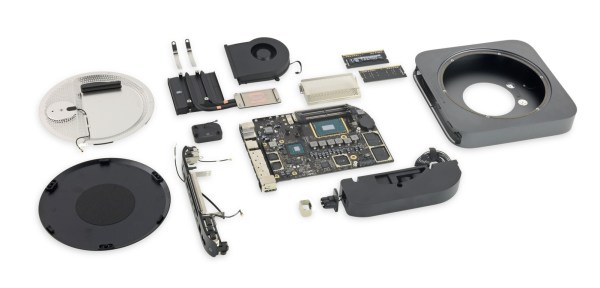
What’s Inside That New Mac Mini Anyway?

It’s been four long years since Apple has refreshed their entry-level desktop line. Those that have been waiting for a redesign of the Mac Mini can now collectively exhale as the Late 2018 edition has officially been released. Thanks to [iFixit] we have a clearer view of what’s changed in the new model as they posted a complete teardown of the Mac Mini over on their website.

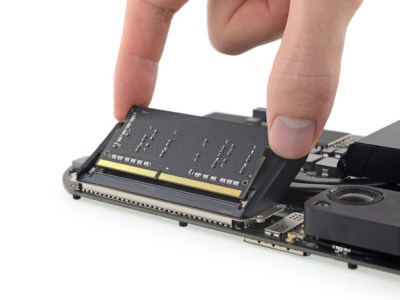
Mac Mini Teardown Late 2018 RAM Slots

One of the most welcomed changes is that the DDR4 RAM is actually user upgradeable this time around. Previously RAM was soldered directly to the motherboard, and there were no SO-DIMM slots to speak of. The 2018 Mac Mini’s RAM has also been doubled to 8GB compared to the 4GB in the 2014 model. Storage capacity may have taken a hit in the redesign, but the inclusion of a 128GB PCIe SSD in the base model fairs better than the 500GB HDD of old. The number of ports were flip-flopped between the two model generations with the 2018 Mini featuring four Thunderbolt ports along with two USB 3.0 ports. Though the biggest upgrade lies with the CPU. The base 2018 Mac Mini comes with a 3.6GHz quad-core Intel Core i3 as compared to the 2014’s 1.4GHz dual-core Intel Core i5.

Although Apple lacked “the courage” to drop the 3.5mm headphone jack this time around, they did retain the same footprint for Mac Mini redesign. It still provides HDMI as the default display out port, although the additional Thunderbolt ports provide additional options via an adapter. A quick overview of the spec differences between the 2018 and 2014 base Mac Mini models have been summarized below.

Model 2018 Mac Mini 2014 Mac Mini
CPU 3.6GHz quad-core Intel Core i3 1.4GHz dual-core Intel Core i5
Storage 128GB PCIe SSD 500GB HDD
RAM 8GB DDR4 @ 2666MHz 4GB DDR3 @ 1600MHz
Graphics Intel UHD 630 Intel HD 5000
Ports Thunderbolt 3 (x4), USB 3.0 (x2) Thunderbolt 2 (x2), USB 3.0 (x4)
Card Slot N/A SDXC
WiFi 802.11a/b/g/n/ac 802.11a/b/g/n/ac
Audio 3.5mm Headphone Jack 3.5mm Headphone Jack
Video HDMI HDMI
Price from $799 from $499

Source [MacWorld]