Autonomous Metal Detector Lets You Sit Back, Get Rich

thunderbird7-autonomous-metal-detector

As a kid, metal detectors seemed like great fun. Every commercial I saw beckoned with tales of buried treasure “right in my own back yard” – a bounty hard for any kid to pass up. In reality, the process was both time consuming and tedious, with little reward to be had. [Gareth] liked the idea of scouring the Earth with a metal detector, but he liked sitting and relaxing even more. He decided he could easily partake in both activities if he built himself an autonomous metal detecting robot.

He stripped down a hand held metal detector, and installed the important bits on to the front of an R/C chassis. An Arduino controls the entire rig via a motor shield, allowing it to drive and steer the vehicle while simultaneously sweeping the metal detector over the ground. He fitted the top of the rover with a camera for remotely watching the action from the comfort of his patio, along with a laser which lets him pinpoint the location of his new found goods.

Continue reading to see a short video of the robot in action, and be sure to check out his site for more build details.

Continue reading “Autonomous Metal Detector Lets You Sit Back, Get Rich”

Electronic Bag Pipes Need No Bag And Use Only 1 Pipe

A lot of people might turn their noses up at an electronic version of bagpipes. But we see a definite need for them. After all, it’s pretty hard to take your bagpipes on a road trip, but this eChanter will have no trouble entertaining your fellow travelers.

The musical instrument is Arduino-based and the builder can decide between a headphone jack (use it with that FM transmitter when in the car!) or a speaker. The version seen above uses headphones with a piece of PVC pipe as the body, screw heads as touch sensors, and a project box to hold the electronics. But there are a lot of alternatives suggested, such as using automatic sprinkler parts. It sounds like a riser, connector, and pop-up sprinkler head body will do just as well hosting all of the components.

Want to hear what it sounds like? There’s an mp3 clip under the final steps section.

[audio http://www.echanter.com/marine-corps-hymn.mp3]

Android 3.1 Devices Have USB Host Mode. Here’s How To Use It.

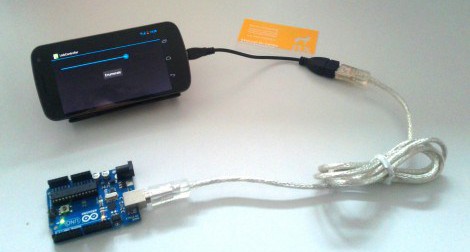
With the coming of Android 3.1 you finally have the option of using the device as a USB host. This may be through a USB OTG (On-the-Go) adaptor, but nonetheless it’s a feature which was sorely missed until now. [Manuel] put together a guide on using Android as a USB host. As you can see, his example hardware is an Arduino board but this is applicable with just about any device.

The tutorial implements a test app for the Android device where a slider will set the brightness of the Arduino’s on-board LED. The Arduino sketch is nothing special, it just reads data received on the UART. This means that it doesn’t care if it’s connected to an Android, PC, OSX, or Linux system, it goes about its business until the RX interrupt updates the data variable.

This will greatly simplify a lot of projects we’ve seen, such as this message scrolling belt buckle. That used extra hardware to make the Arduino the host, a step that is now necessary.

Retro Hardware Mash-up Spouts Archaic Geekery

This delightful little box is something only a hacker could love. It uses some second-hand hardware to display random sayings attributed to [Buckminster Fuller]. The image above doesn’t do the display justice. There are other photos which show very crisp lettering which is easier to read.

[Autuin] always keeps his eyes open for cool gear at the end of its consumer life. The screen for this project is a CRT from a Coleman TV lantern (you know, for camping… bah!). It finds a home in the chassis of an old non-functional radio he had picked up a few years earlier. With those parts in hand the real adventure started: getting an Arduino to read in quotes and generate a TV out signal to display them.

We love the SD card holder which he fashioned from a card-edge connector he grabbed at the local electronics store. From there he scoured the Internet for help on where to patch into the TV signal. Once the right trace was discovered the Arduino TV out library does the heavy lifting.

Hacking Together A Color Changing Water Wall

[BadWolf’s] girlfriend wanted him to build her a lamp for Christmas and he didn’t disappoint. What he came up with is a water-filled color changing lamp with bubbles for added interest. See for yourself in the clip after the jump.

The color changing properties are easily taken care of by some waterproof RGB LED strips. [BadWolf] went the Arduino route for this project but any microcontroller will be able to fill the role of color cycling. The enclosure is all hand-made from acrylic sheets. He grabbed some chemical welding liquid from the hardware store and applied it to the acrylic with a syringe. That’s easy enough when attaching the edges to one side of the enclosure. But it gets much tougher when it’s time to seal up the other side. He recorded a video of this which shows the syringe taped to a rod so he can get it down in there, pushing the plunger with a second extension device.

Bubbles are supplied by a small aquarium pump. We’re wondering if this will need frequent cleaning or if you can get some pool chemicals to keeps it nice and clear (or just a teaspoon of bleach)? Continue reading “Hacking Together A Color Changing Water Wall”

Flash An Arduino From An SD Card

[Kevin] has been working on reverse engineering the protocol used by the Arduino IDE and porting it to the Arduino platform. Now that his BootDrive project is nearing completion, he’s ready to give every Arduino the ability to program another Arduino over an SD card.

BootDrive isn’t terribly different from using an Arduino as an ISP, only now AVRdude runs on the Arduino itself and no computer is required to put new firmware into the target Arduino.  [Kevin] attached a MicroSD breakout board to an Arduino-compatible clone. When the clone starts up, it searches the SD card for a file called ‘program.hex.’ This file is sent over to the target Arduino and the new firmware is installed.

While it may not be extremely practical if you’ve only got a few Arduinos that never leave your workbench, we’re thinking this would be an invaluable tool if you need to update the software on a board already ‘in the field,’ serving as a weather station or homemade game camera. [Kevin] put up a demo of his BootDrive project; you can check that out after the break.

Continue reading “Flash An Arduino From An SD Card”

Wire Loop Game Penalizes For Touches By Shrinking Your Wand

We really like this take on a conductive wire maze game. It’s the result of a 48-hour hackathon in Belgium which required that all projects stemming from the event use an Arduino. We think [Jan] and [Kristof] made perfect use of the prototyping device in the time allotted. The event organizers thought so too because this took top prize.

As you can see, the gaming area is two-sided, and consists of some copper wire bent into a maze. There’s a wand made out of a PVC pipe with a loop of braided cable running through it. The loop surrounds the copper track and each player needs to get from the beginning to the end, touching checkpoints along the way without coming in contact with the track.

Pretty standard, right? Well there’s a twist. At each checkpoint the Arduino signals a servo motor in the wand to make the loop smaller. Add to that a penalty/reward system: if you touch the track, your loop gets smaller and your opponent’s loop grows larger. Don’t miss the head-to-head action after the break.

This reminds us of that wire-based cave racer from a few years back. Continue reading “Wire Loop Game Penalizes For Touches By Shrinking Your Wand”