Haptic GPS Sneakers For The Visually Impaired

gps_haptic_shoe

The world can be a pretty difficult place to navigate when you lack the ability to see it. There are many visually impaired people across the globe, with some figures claiming up to 40 million individuals affected. While walking canes and seeing-eye dogs can be a huge help, [Anirudh] of Multimodal Interactions Group, HP Labs India, and some students at the College of Engineering in Pune, India (COEP) have been hard at work constructing a haptic navigation system for the blind.

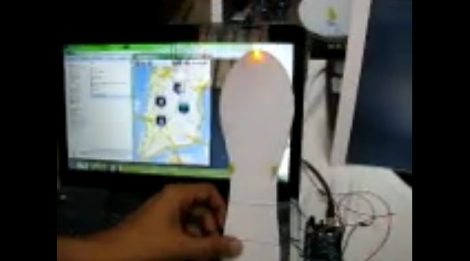
[Anirudh Sharma and Dushyant Mehta] debuted their haptic feedback shoe design during an MIT Media Lab Workshop hosted at COEP. In its current form, Google Maps and GPS data is sourced from an Android device, which is fed to an Arduino via Bluetooth. The Arduino then activates one of four LEDs mounted on a shoe insert that are used to indicate which direction the individual should travel in order to safely reach their destination. While the current iteration uses LEDs, they will be swapped out for small vibrating motors in the final build.

We’re always fans of assistive technology hacks, and we think this one is great. The concept works well, as we have seen before, so it’s just a matter of getting this project refined and in the hands shoes of those who need it.

Stick around for a quick video about the project filmed at the MIT/COEP event.

Continue reading “Haptic GPS Sneakers For The Visually Impaired”

CNC Mill Built From Junk And Hardware Store Parts

[Csshop] is setting a new bar for building an inexpensive CNC mill. Not only did he complete his build at a very low cost, but it seems to work quite well too. Check out the video after the break to see the device cut out thin wood parts for a toy plane.

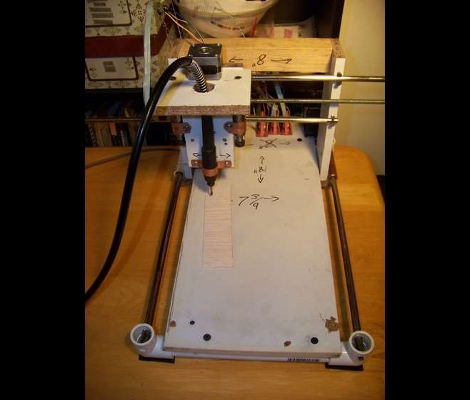
The majority of the build uses scrap wood for the body of the mill. The business end of the device is a flexible rotary attachment for a Dremel tool which takes a lot of the weight and bulk out of the gantry assembly. Old flat bed scanners were gutted for the precision ground rod and bearings, as well as the three stepper motors used to drive the axes. An Arduino board controls the device, commanding the stepper motors via EasyDriver boards.

Once the hardware is assembled there’s still a fair amount of work to do. [Csshop] builds his designs in Google Sketchup, but some conversion is necessary to arrive at code that the Arduino will understand. He’s got a second project write-up that covers the software side of things.

Continue reading “CNC Mill Built From Junk And Hardware Store Parts”

Dynamic DNS Updating – No PC Required

arduino_ddns

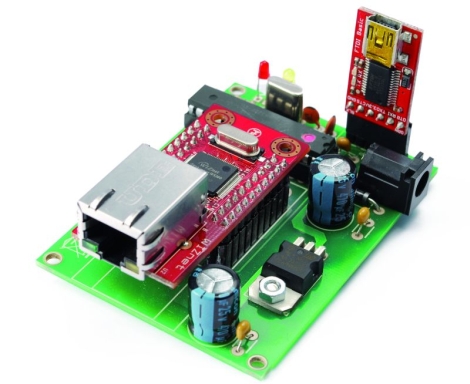
[Boris] from Open Electronics recently wrote us to share their latest creation. Like many of us, he uses DynDNS to keep his home network a FQDN’s reach away. While DynDNS is quite a convenient service, many people don’t like the idea of leaving their computer on all the time to keep the IP updated. That’s where the Arduino DDNS module comes into play.

Built using a standard ATMega328 with the Arduino bootloader installed, the module periodically checks to see if the user’s IP has changed, updating the DynDNS entry as needed. The Arduino talks to the network via a WIZnet Ethernet breakout board, contacting DynDNS’ servers to check and update the user’s IP over a series of standard HTTP requests.

We are aware that several router firmware packages such as DD-WRT have this functionality built-in, but this project makes for a nice alternative when those resources are not available.

As always, a bill of materials, PCB layouts, and Arduino Sketch code are all available for download over at the Open Electronics site.

Ball Bot Constructed From Power Tools And Pet Toys

ballbot

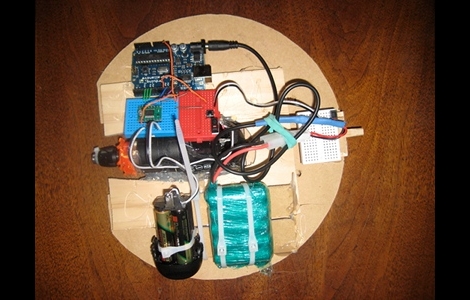
Hackaday forum member [machinelou] says he’s been fascinated with remote controlled hamster balls for quite some time. Inspired by a ball bot he saw on a BBC show, he finally picked up a 12″ plastic ball and got to work.

He used a small drill to provide the power required to roll the ball, and an Arduino is used as the brains of the device. This is his first major project outside of simple I/O and servo control, so he’s taking things slowly. While all this is a bit new to him, he already has things up and running to a degree as you can see in the video below. In its current state, the ball is programmed to roll forward and backwards for a few seconds before going back to sleep.

His future plans include adding a servo-controlled weight to allow him to steer the ball as well as using a pair of Zigbee modules in order to control the ball remotely.

It’s a neat little project, and definitely one that would be a fan favorite among kids. Stick around to see a quick video of his bot’s progress thus far.

Continue reading “Ball Bot Constructed From Power Tools And Pet Toys”

Sticky Sweet Animatronic Peep Show

peeps_peep_show

With Easter quickly approaching, [Kyle] decided to finally build a project that is as tasty as it is wrong.

Behold, the Animatronic “Peep” show! Using nearly a dozen marshmallow Peeps, he constructed a stage for his “performers” and a seating area for their “clients”. The structure was built mostly from balsa wood and foamboard, featuring a retractable curtain, stage lighting, and music.

Once triggered, the embedded Arduino gets to work animating the stage lights and blaring “Cherry Pie” while the sugar-coated onlookers await their entertainment. The curtain is drawn back and a trio of winged dancers emerge one by one, ready to entertain the crowd.  The onlookers even offer up dollar bills to the dancers via a servo-mounted arm.

The project uses a total of 10 servos driven by the Arduino, along with an audio decoder chip to provide the proper ambiance for the marshmallow debauchery. [Kyle] says that he put together about 650 lines of code to get the whole thing running, but there doesn’t seem to be any way to download it at the moment – hopefully we’ll see something posted soon.

It might not be high-brow, but it sure beats blowing up old, stale Peeps in the microwave!

Stick around for a trio of videos demonstrating the Peep show as well as revealing some of the stage’s inner workings.

Continue reading “Sticky Sweet Animatronic Peep Show”

Simulating VHDL Of An AVR8 Soft Processor

Okay, now we’re beginning to feel a bit like [Alice]. This tutorial shows you how to simulate VHDL code. This code is intended to run on an FPGA and includes a software-only version of the AVR 8-bit microcontroller core. Essentially, you’ll simulate VHDL code that simulates AVR hardware. Wrap your mind around that!

The code is intended to run on a Papilio Field Programmable Gate Array development board. We saw an early version of this board running the AVR8 core about a year ago. However, you don’t need to have any hardware to follow along and recreate this simulation yourself. It might be a great way to get your feet wet with FPGA programming before making that first hardware buy. Five different screencasts take you through the process of getting the AVR8 code, using an altered Arduino IDE for it, setting up a free version of Xilinx ISE to run the simulation, then setting it free and interpreting the data that the simulator spits out the other end.

RFID Drink System Eliminates The Need For Change

popcard_vending_machine

[Avatar-X] snagged a drink vending machine online a few years back, and has been selling drinks to his neighbors ever since. People are always asking him for change, and just the other day he was thirsty and out of change himself.  He considered adding an override key so that he could snag free drinks whenever he pleased, but decided to go all out and built a cash card system instead.

He didn’t know how to interface with the machine’s logic board, so after poring over the service manual he consulted with a support rep from the company that manufactured it. Luckily, he was able to get enough information from them to start making some headway. With his friend’s assistance, he was able to figure out which pins on the Bill Validator Interface needed to be shorted in order to simulate the addition of funds.

Using an Arduino with an Ethernet shield, LCD display, and an RFID reader, he had his PopCARD system up and running in no time. Now all his neighbors have to do when they want a drink is swipe their card in front of the machine and hit a button to add funds from their account.

As you can see in the video below it works great, and we’re sure his neighbors are pleased with the improvements he has made.

Continue reading “RFID Drink System Eliminates The Need For Change”